
The Car File
السياره / Customer Car — سيارات > ملفات السيارات > السياره — is one physical vehicle. It is a master file like a customer or an item, with a code, a group and a name, but almost everything on it describes one particular car: this chassis, this engine, this key, this slot in the yard, this pile of customs paper.
Most of the time you will not create one by hand. A car record is normally born the moment a Car Purchases document is saved, from the data typed on the line — see The Car Purchase Invoice. But the record is where everything ends up, and it is the first screen a support engineer should open when somebody asks "why did that document not do what I expected".
Required licence
srvcenter-subitems.
The one field that is genuinely required
الصنف / Item — the supply-chain item the car is a unit of. Everything else on the screen can be left empty. Because the car record is a dimension of that item, stock and cost are tracked per car: on-hand quantity and inventory cost both live against the pairing of item plus car record, which is what makes "what did chassis NWA7R24C26K000318 actually cost us" a question with an answer.
Five tabs
The Basic Information block and the Dimensions block are repeated at the top of every tab. That is a layout quirk, not five different copies of the data — it is the same fields shown again.
Tab 1 — المعلومات الأساسية / Basic Information
The identity of the vehicle:
| Field | English | Typed or written |
|---|---|---|
| الكود / المجموعة | Code / Group | Written by the coding rule of the group named on the status configuration |
| الموديل | Model — free text, not the workshop's model file | Typed, or copied from the document line |
| رقم الهيكل | Chassis Number | Typed on the document line, or here |
| رقم المحرك | Engine Number | Typed on the document line, or here |
| ناقل الحركة / نوع الهيكل / عدد الركاب | Gearbox / Body Type / Number of Passengers | Typed |
| حمولة السيارة / السعة اللترية | Pay Load / Liter Capacity | Typed |
| قسم الصنف، تصنيفات الصنف، الفئات | Section, item classes, categories | Copied from the item or the line |
| الحالة الرئيسية / الحالة | Main Status / Status | Read-only. Written only by the status engine |
| نسب الضرائب ١–٤ | Tax percentages 1–4 | Read-only. Synchronised with the line by term options |
| تاريخ التسليم | Delivery Date | Read-only. Stamped by a document when its term says so |
| منع البيع | Prevent Sales | Typed |
Tab 1 on a new car screen — the whole identity of the vehicle in one block:
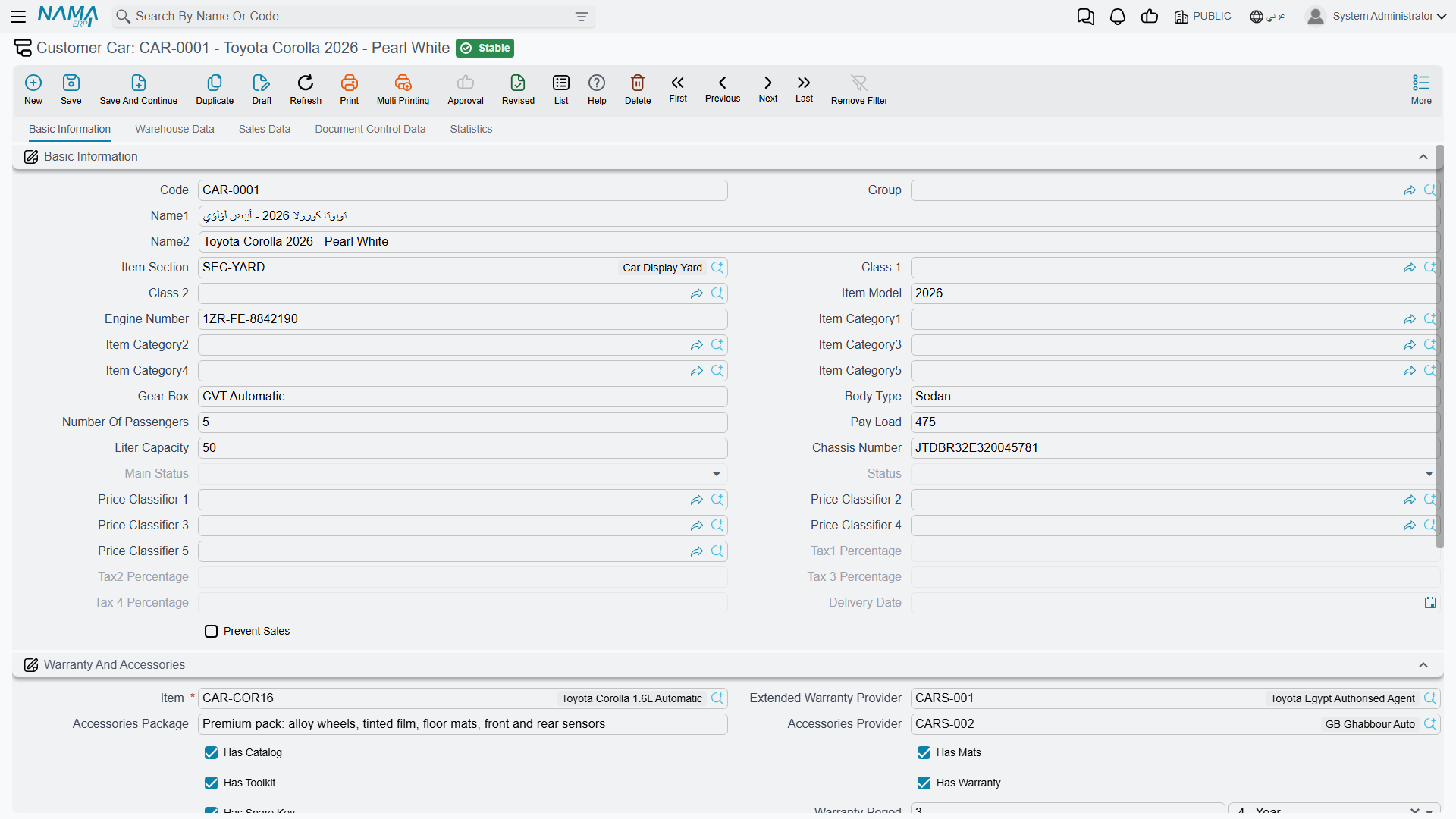
Below it sits الضمان والاكسسوارات / Warranty And Accessories: the item reference, the extended warranty provider, a free-text accessories package and its supplier, the five tick boxes — has catalogue, has mats, has toolkit, has warranty, has spare key — and the warranty and extended warranty periods with their units. And an attachment grid for scans of anything that arrives with the car.
Prevent Sales blocks more than sales
The منع البيع (Prevent Sales) tick is the one field on this screen with real teeth: a sales document refuses any line whose car is flagged, with "The subItem … at line … is prevented from sale."
What is easy to miss is that the car picker on every document filters flagged cars out completely — including purchase documents, the Car Receipt and the Car Purchase Return. So a car you flagged to stop it being sold also disappears from the searcher on the documents you use to correct its stock. Untick it before you try to fix anything.
Tab 2 — بيانات المخزن / Warehouse Data
Where the car physically is, and what condition it is in: warehouse, locator, key number, slot number, PDI performed / date / by, condition (New or Used), mileage, plate number, registered customer, scratches flag and remarks, general remarks, delivery status, delivered to customer, deliver to related, and two attachment slots.
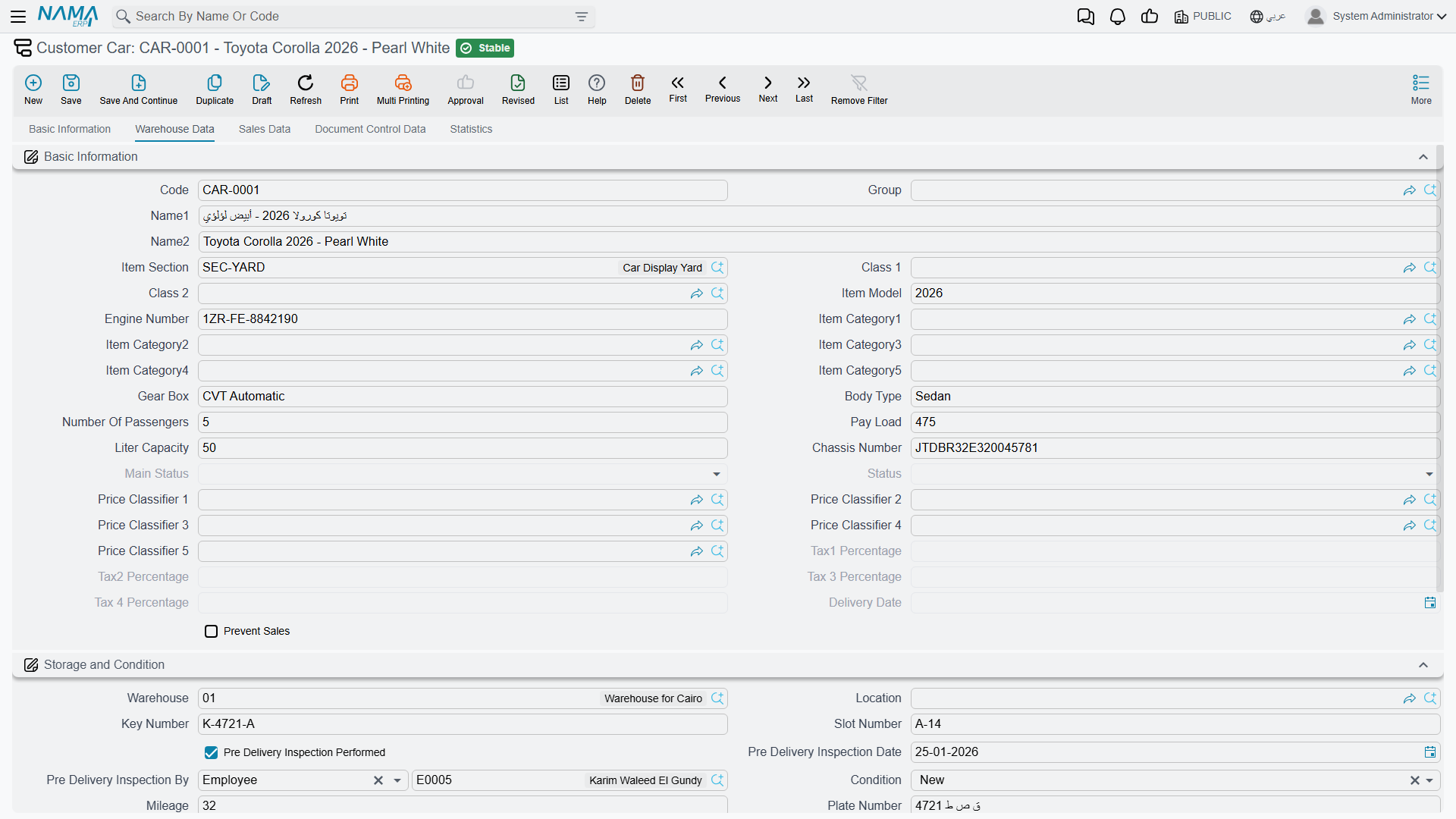
Most of this tab is typed by hand
Delivery status, delivered to customer, deliver to related, condition, mileage, PDI performed / date / by, plate number, customs paid, customs paid date, customs release number and date, and traffic letter stamping are typed here by a person, after the event.
That includes the hand-over: a Car Final Delivery moves the car's status to Final Delivered, and the delivery status and the customer it was delivered to are typed on this tab. The plate number, once the Traffic Letter has produced it, is typed here too.
Warehouse and locator are the exceptions: document terms can copy them onto the car through the Copy Warehouse To Sub Item and Copy Locator To Sub Item options.
Tab 3 — بيانات البيع / Sales Data
Five fields, all read-only: allocated to customer, to branch, to department, to salesperson and to warehouse. They are written by the Car Allocation document and cleared by the Car Allocation Cancel, and by nothing else.
Read them as an informational stamp: they show who the car is promised to, and they do not hold the car for that customer.
Tab 4 — بيانات متابعة المستندات / Document Control Data
Three groups of paperwork, every field typed by hand:
- الجمارك / Customs — customs list number, customs paid, customs paid date, customs release number, customs release date, vessel name, carrier, and two attachment slots.
- مستندات الشركة المصنعة للمعدات الأصلية / OEM Documents — the original-equipment supplier, the purchase invoice date, the OEM traffic letter number, its location and its receiving details.
- مستندات التسجيل / Registration Documents — traffic letter stamping, certificate of data number, certificate issuing date, certificate governorate.
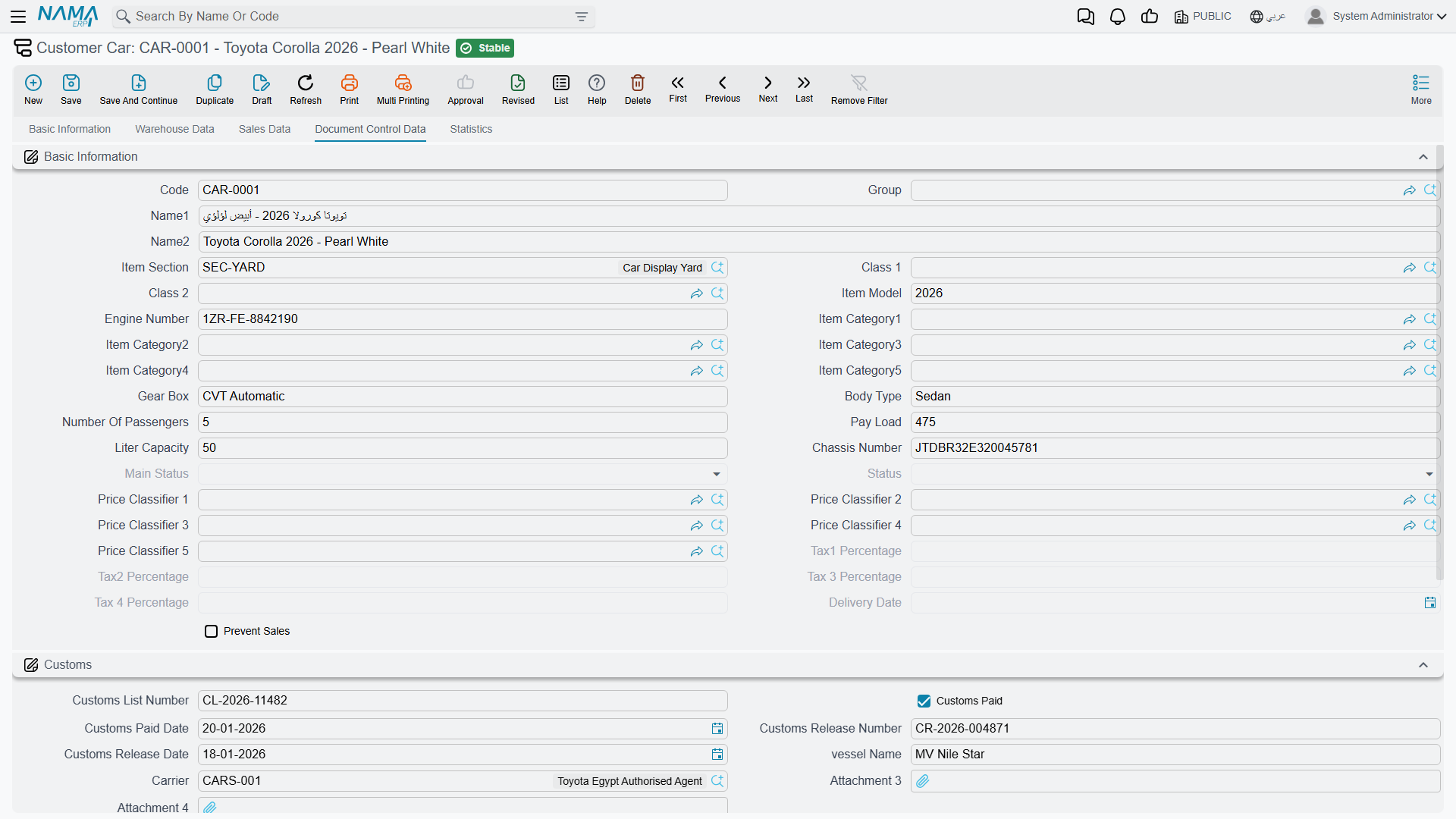
The customs fields record the paperwork
The customs list number and the customs paid tick are labels you record for your own reference and for your own reports.
Import charges reach the car's cost through service lines on the purchase invoice. See Freight, Customs and Landed Cost.
Tab 5 — الإحصائيات / Statistics
Open this one first when something has gone wrong. Everything on it is read-only.
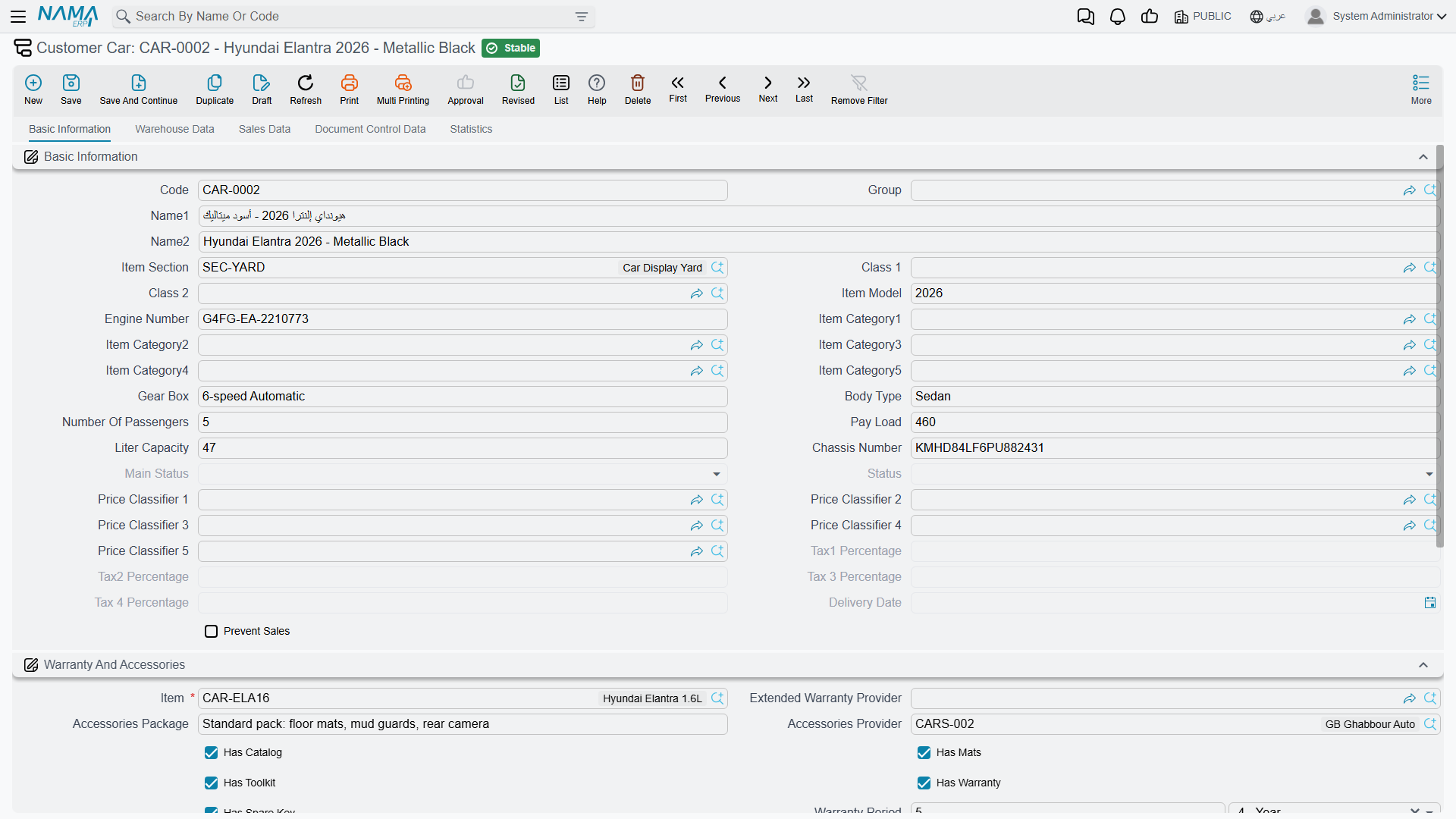
At the top, the documents that have touched the car: purchase invoice, sales invoice, purchase order, sales order, traffic letter, salesperson, cancelled-by document, stock receipt, traffic letter request, sales quotation and sales quotation request. Each of these is stamped only if the relevant document's term has the matching Update … In Sub Item option switched on — an empty field usually means the option was never ticked, not that the document never happened.
Underneath is the grid that answers most questions: حركات تغير حالة الصنف الفرعي / Sub Item Status Entries. One row per status change, showing the creation date, the value date, the document that caused it, the line index, the item, and the from and to values of both the status and the main status. This is the complete audit trail of the car's lifecycle, replayed in value-date order — read it top to bottom and you can see exactly why the car is where it is. Its behaviour, including what happens when you back-date a document, is explained in Car Status Configurations.
What documents write onto the car
Beyond the status, three mechanisms write to a car record, and it is worth knowing which is which when a field is not filling in:
- The allocation fields — written by the Car Allocation, cleared by its cancel. Nothing else.
- Whatever the line carries — chassis, engine, gearbox, body type, passengers, warranty period, key and slot numbers, item classes and categories are copied from the document line's car properties when the record is created, and re-copied every time the document is re-processed. Only non-empty values overwrite: blanking a field on the line does not blank it on the car.
- Reference stamps and dimension copies — the document term options named Update Purchase Invoice / Sales Invoice / Stock Receipt / Purchase Order / Sales Order / Traffic Letter / Traffic Letter Request / Sales Quotation / Sales Quotation Request / Salesman In Sub Item, plus Update Delivery Date In Sub Item and Update Cancelled By Doc. Each writes its reference when the document commits and clears it when the document is cancelled.
There is a fourth, quieter one: when the item is saved, every car record hanging off it is refreshed using the field map named on the item's status configuration. That is how a change to a model-wide attribute reaches the individual cars.
Creating one by hand
You can. Give it an item, type the chassis and engine numbers, and save. It is the right move for opening balances — the cars already in the yard on the day you go live — and for correcting a record that a document created badly.
Two cautions. First, a hand-made car has no status entries, so its status is whatever the item's configuration names as the initial status. Second, remember there is no chassis-number uniqueness check anywhere: search the file before you create, because a duplicate will be accepted silently and will then carry its own separate stock and cost.
The worked example
CAR-000318 is the first of the six NAWA Rimal 2.4s Al-Sahra bought from SUP-77 NAWA Motors Import Co. in February 2026:
| Field | Value |
|---|---|
| Code | CAR-000318 |
| Item | MDL-RIMAL24 NAWA Rimal 2.4 |
| Chassis number | NWA7R24C26K000318 |
| Engine number | R24-360318 |
| Key number / slot number | K-318 / A-14 |
| Warehouse | WH-SHOW |
| Landed cost | 76,500 — 74,000 to the importer plus 2,500 of freight and customs |
| Plate number | ر ط ص 8318, typed on this screen on 5 March, after the plates came back |
Its Statistics tab shows the purchase invoice SIPI-2026-021, the stock receipt STR-2026-0552, and a status entry for every document from the purchase invoice through to the final delivery.