
Traffic Letters
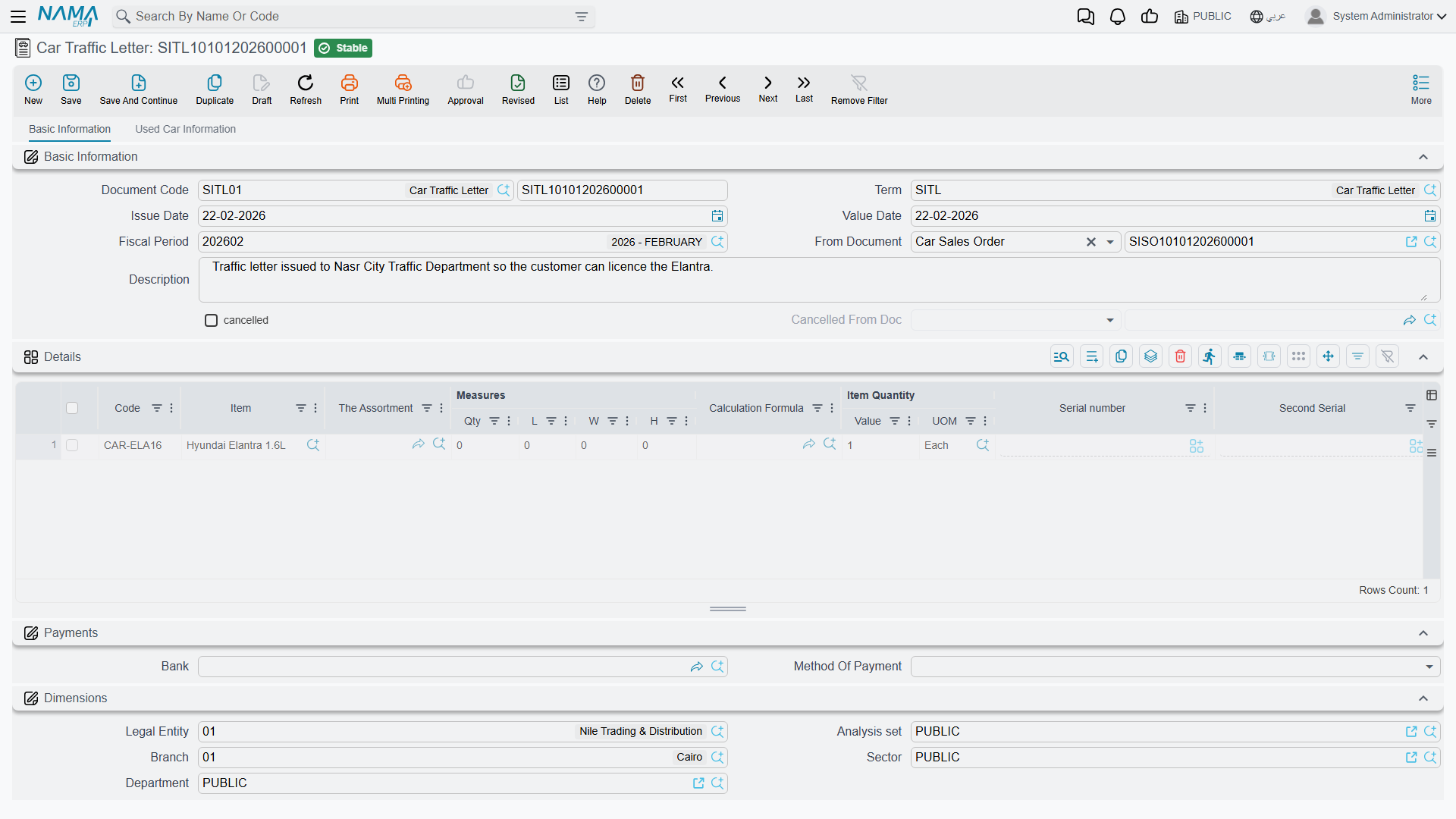
A car that has been sold still cannot be driven. Before the customer can put it on the road, the dealer has to produce a letter to the traffic department (خطاب مرور) so the vehicle can be registered and plated in the buyer's name. It is a real, dated, numbered piece of paperwork, and Nama gives it two documents: an internal request for the letter, and the letter itself.
- Car Traffic Letter Request —
سيارات > مبيعات السيارات > طلب خطاب مرور سيارة - Car Traffic Letter —
سيارات > مبيعات السيارات > خطاب مرور سيارة
Each has a matching cancellation document, and both cancellations sit in the same folder rather than with the other cancellations:
- Car Traffic Letter Request Cancel —
سيارات > مبيعات السيارات > إلغاء طلب خطاب مرور سيارة - Car Traffic Letter Cancel —
سيارات > مبيعات السيارات > إلغاء خطاب مرور سيارة
Required licence
srvcenter-subitems.
What the two documents are for
The request is the internal step: the sales desk asks the department that handles registration to produce a letter for this chassis, for this customer. The letter records that the letter was produced and issued. Both use the same screen as the rest of the car sales family — a header with book, term, value date, بناءا على (From Document), customer and warehouse, and a lines grid where each line names one car in the السياره (Customer Car) column.
Build the request on the sales order or the sales invoice, and the letter on the request, and the car picker on each keeps you to the cars that were on the source document.
What they push onto the car record
This is the useful part, and the reason the letters carry a technical block on their lines at all. On commit, each line's properties are copied onto the car master record — only non-empty values overwrite, and the copy is one-way, from the document to the car:
| Pushed onto the car | |
|---|---|
| رقم الهيكل (Chassis Number) | رقم المحرك (Engine Number) |
| ناقل الحركة (Gear Box) | نوع الهيكل (Body Type) |
| عدد الركاب (Number Of Passengers) | مدة الضمان (Warranty Period) |
| رقم المفتاح (Key Number) | رقم الموقع الفرعي (Slot Number) |
| The accessory flags — catalogue, mats, toolkit, spare key, warranty |
So the traffic letter is genuinely useful as a data-capture point: it is often the moment somebody finally checks the engine number against the metal, and whatever is typed here lands on the car record for good.
Each document also writes a status line on the car — typically مطلوب له خطاب مرور (Traffic Letter Requested) for the request and مُصدر له خطاب مرور (Traffic Letter Issued) for the letter — if the car status configuration has a status updater line targeting that document. And, if the document term switches the option on, the letter's reference is stamped onto the car's Statistics tab so you can see from the car which letter was issued for it.
The plate is typed on the car record
The plate lives on the car record, on its Warehouse Data tab, and it is typed there by hand. Make it an explicit step in your process: when the plates arrive, open the car and type the number.
What they do not do
None of the four traffic-letter documents creates a journal entry, and they move no stock. A traffic letter is paperwork and a status move.
Nothing requires a traffic letter before delivery
No rule in the product refuses to invoice or deliver a car that has no traffic letter. You can invoice, hand over the keys and close the file without either document ever existing.
If your dealership needs that gate — and most do — you build it yourself, in the car status configuration: model the legal moves so that the status a final delivery requires can only be reached through the traffic letter's status. That is configuration, and it is the only way this gate exists. There is also the منع البيع (Prevent Sales) flag on the car record as a blunt manual block.
The worked example
CAR-000318 is invoiced to Layla Al-Harbi on 1 March 2026. The registration paperwork runs alongside the hand-over:
| Date | Document | What it contributes |
|---|---|---|
| 1 March | SITLR-2026-0288 — traffic letter request | Asks for the letter; pushes the chassis, engine and key data onto CAR-000318; status → Traffic Letter Requested |
| 2 March | SITL-2026-0296 — traffic letter | Records the issued letter; refreshes the same technical data; status → Traffic Letter Issued |
Neither creates any journal entry. The plate, ر ط ص 8318, is typed onto the car record on 5 March when the plates come back — by a person, on the car's own screen.
Actions on these screens
The Car Traffic Letter Request, the Car Traffic Letter and the Car Traffic Letter Cancel each carry one action, in the More menu:
- Create Sub Item From Line Information (إنشاء صنف فرعي من السطر) — builds car records from the line data: for every line whose item has sub items it creates the car record (or refreshes the one already on the line) and writes it back onto the line. The car record is saved straight away. It runs only when the term's Create Sub Item From Line Info option is on.
Switch Create Sub Item From Line Info on for exactly one document type in a chain. Two documents with the option on will either rewrite an existing car record or, if the later document's lines were typed fresh rather than copied, create a duplicate car — nothing checks that a chassis number is unique.
Cancelling a letter
Link the cancellation to the letter or the request through From Document and commit. It stamps the source as cancelled and writes its own status line — and, like every cancellation document in this module, it reverses no money and no stock, because these documents never produced any. A second cancellation of the same letter is refused.
Fill From Document. A cancellation saved without it commits cleanly, marks nothing, and still moves the car's status. The whole pattern is on Cancellation Documents.