
Handing the Car Over
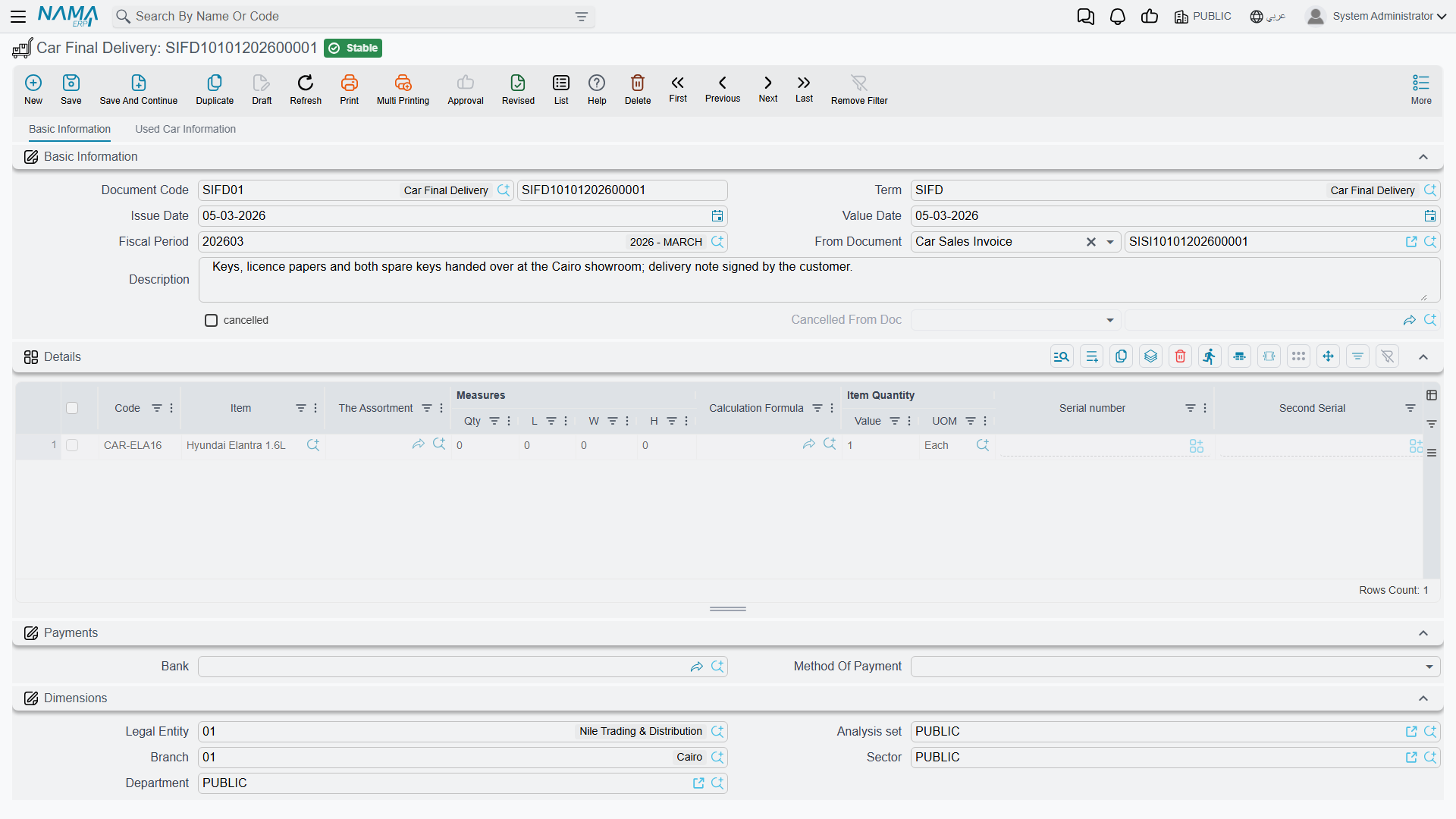
The invoice is the sale; the Car Final Delivery is the moment the keys change hands. It is the document a showroom raises when the customer actually drives away — the record that says this chassis left the premises, on this date, to this customer.
Because it sits at the end of the chain and has the word "delivery" in its name, it is also the document about which readers hold the most wrong expectations. Two of them matter enough to state before anything else: it does not fill in the delivery fields on the car record, and it can issue the car from stock a second time if you configure it carelessly.
You will find it under the inventory folder, not the sales one: cars > Car Inventory > Car Final Delivery (سيارات > مخازن السيارات > تسليم سيارة نهائي).
Required licence
srvcenter-subitems.
What the document actually does
Four things, and only four:
- Generates a stock issue — if, and only if, its document term names a generation book and a generation term. With both filled, a stock issue is created from the delivery, carrying the delivery's warehouse and locator and one line per delivery line. The inventory movement and the inventory accounting belong to that generated stock issue, under its own book and term — not to the delivery.
- Moves the car's status, typically to توصيل نهائي (Final Delivered), if a status updater line targets the final delivery.
- Copies the technical properties from its lines onto the car record — chassis number, engine number, gearbox, body type, number of passengers, warranty period, key number and slot number. Only non-empty values overwrite; the copy is one-way, from the document to the car.
- Stamps the delivery date onto the car, when the term's update delivery date option is on — along with any of the other reference stamps the term switches on.
The final delivery creates no journal entry of its own.
The stock rule — read this before configuring anything
The car can be issued from stock twice
Both the Car Sales Invoice and this document can generate a stock issue, and neither can see the other's. Each looks only for a stock issue raised from itself. Neither checks whether the car has already left stock, and neither looks at remaining quantities.
Follow the natural path — invoice the car, then deliver it — with both terms configured to generate, and the same chassis is issued twice: the landed cost is relieved to cost of sales twice and the car sits at −1 on hand. Where negative stock is permitted for that item, both documents commit silently and nothing in the module warns. Where it is blocked, the second document you save fails with a generic inventory-shortage error naming an auto-generated stock document — which reads like an unrelated inventory problem rather than a configuration mistake.
The rule: fill Generation Book and Generation Term on exactly one of the two document terms for any given flow. For an ordinary sale — invoice first — leave the final-delivery term's generation book and term empty, and let the invoice move the stock. Use the final delivery as the stock-moving document only on a flow where there is no invoice to do it: a consignment, or a deliver-now-invoice-later arrangement.
To stop the final delivery generating a stock issue, clear the generation book or the generation term on its term.
Treat the invoice and the final delivery as alternatives for moving stock, never as a sequence.
At Al-Sahra Motors the sales invoice generates the issue, so the final-delivery term's generation book and term are left empty and SIFD-2026-0357 moves no stock at all. That is the configuration every example in this documentation assumes.
What it does not write
The delivery fields on the car are typed by hand — all of them
After a final delivery commits, open the car record and you will find these fields still empty. No document in Nama writes any of them:
- حالة التسليم (Delivery Status) — Sold And Not Delivered / Consignment / Final / Inspection …
- العميل المُستلم (Delivered To Customer) and Deliver To Related
- رقم اللوحه (Plate Number)
- The whole PDI block — PDI performed, PDI date, PDI by
- Condition and Mileage
- Every customs and registration field, including the traffic-letter stamping fields
The only field on the car that the delivery touches is the delivery date, and only when the term's update delivery date option is switched on.
So the operating instruction is simple and must be given to the showroom staff explicitly: after the hand-over, open the car's own screen and fill the delivery block by hand. If those fields matter to your reporting, this is a manual step in your process, not something the document does for you.
The same goes for the plate number, even though the traffic letters exist to obtain plates — see Traffic Letters. The plate lives on the car record and is typed there, afterwards, by a person.
The worked example
Layla collects CAR-000318 on 3 March 2026. Final delivery SIFD-2026-0357 is built on the sales invoice, so its line already carries the right chassis.
| Customer | CUS-1105 Layla Al-Harbi |
| Car | CAR-000318, chassis NWA7R24C26K000318 |
| Generation book / term on the delivery's توجيه | empty — no stock issue |
| Car status after commit | توصيل نهائي (Final Delivered) |
| Written on the car | delivery date only |
Two days later the plates come back from the traffic department and ر ط ص 8318 is typed onto CAR-000318 by hand, together with the delivery status and the delivered-to-customer flag.
Undoing a delivery
The Car Final Delivery Cancel sits beside it at cars > Car Inventory > Car Final Delivery Cancel (سيارات > مخازن السيارات > إلغاء تسليم سيارة نهائي). Link it to the delivery through From Document and commit. It stamps the delivery as cancelled and writes its own status line, so the car can be moved back — if the configuration has a movement line for that transition.
The cancel does not take the car back into stock
If the final delivery generated a stock issue, the cancel document does not delete it. The car stays out of stock and the cost stays relieved.
To unwind the stock movement you must cancel or delete the final delivery itself — cancelling or deleting the original is what removes its generated stock issue. The cancel document is a paperwork marker plus a status move, nothing more.
And as with every cancellation document here: a final delivery cancel saved with From Document empty commits cleanly, marks nothing, and still moves the car's status.
The full pattern, including what each cancellation document can and cannot mark, is on Cancellation Documents.
Actions on these screens
The Car Final Delivery and its cancellation carry one action each, in the More menu:
- Create Sub Item From Line Information (إنشاء صنف فرعي من السطر) — for every line whose item has sub items, creates the car record (or refreshes the one already on the line) from the line's data and writes it back onto the line. The car record is saved straight away, even before you save the document. It runs only when the term's Create Sub Item From Line Info option is on.