
Car, Insurance and Rental Document Terms
Nothing about a car's behaviour in Nama is built in. A chassis becomes a tracked record, moves through a lifecycle, picks up a sales invoice reference and finally leaves the stock — and every one of those steps happens because somebody switched it on in a document term. This page is the map of those switches, for the showroom, the insurance desk, the rental counter and the courier round.
Required licence
srvcenter-subitems for the car documents, srvcenter-insurance-and-installments for the policy documents, srvcenter-rental-assets for the rental documents and srvcenter-mobile-delivery for the courier documents.
"Sub Item" means the car
The option labels on these term screens all say Sub Item / الصنف الفرعي, while the menu calls the same object Customer Car / السيارة. They are one thing: the individually tracked vehicle record. This block of options is also shared with document terms outside Service Center, so you will meet the identical labels on other modules' screens.
The Sub Item block — where car records come from
This block appears on the Sub Item tab of every car sales and car purchase term. It is the biggest single block of configuration in the module, and it does two distinct jobs: it creates car records, and it stamps them.
Creating the car record
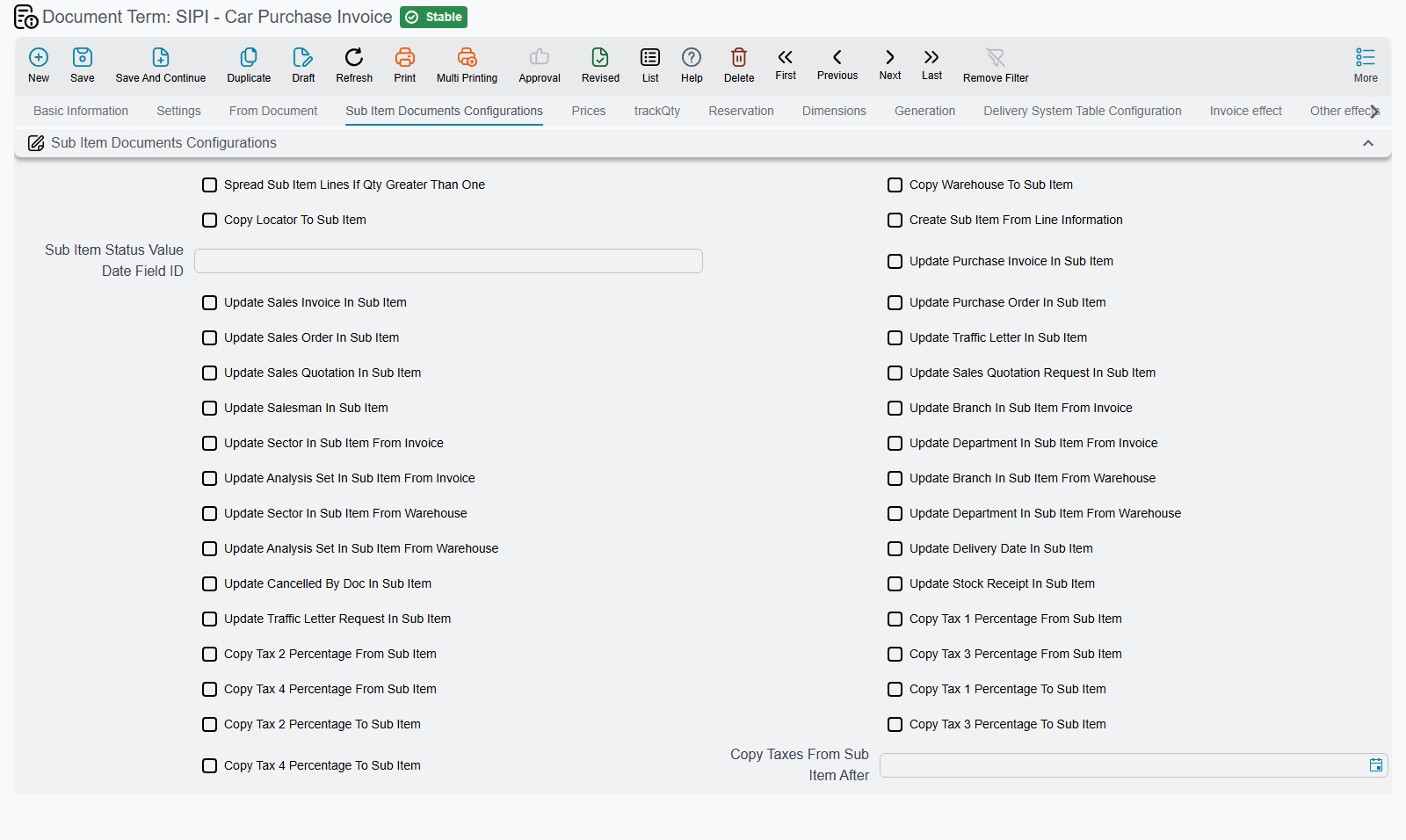
Create Sub Item From Line Information / إنشاء صنف فرعي من السطر (termConfig.createSubItemFromLineInfo) is the master switch. With it on, saving the document creates a car record from each line's data — chassis, engine, colour, key number, price. It also enables the matching Create Sub Item From Line Information button in the document's More menu.
A car record is created automatically when you save any Car Purchases document — order, receipt, pro-forma, purchase invoice or purchase return — whose term has Create Sub Item From Line Information switched on. Switch it on for exactly one document type in your chain.
Al-Sahra Motors switched it on for the Car Purchase Invoice term only, so SIPI-2026-021 on 10 February 2026 is where six CAR-… records were born, each starting at status Pre Initial.
Two documents with the switch on will not warn you
If the flag is on for two documents in the same chain, what happens depends on how the second document was built.
- Built from the first — the line carries the car reference forward, so the existing record is found and re-edited. No duplicate, but its group, default status and warehouse are silently rewritten, even on a car already in use.
- Lines typed fresh — a second, duplicate car record is created with a new code. Nothing checks the chassis number; there is no uniqueness rule on it anywhere.
Never switch it on for a return term. A purchase return or a sales return with the flag on will mint brand-new car records for cars that are going away.
Splitting a quantity works only on copied documents
Spread Sub Item Lines If Qty Greater Than One (termConfig.spreadSubItemLinesIfQtyGreaterThanOne) splits a line for six cars into six lines of one, so each gets its own record — but only when the document was built from another document. Type a line with quantity 6 by hand on a Car Purchase Invoice and it stays one line, producing one car record for six cars. When entering a purchase by hand, type one line per chassis, as Al-Sahra's six-line invoice does.
Sub Item Status Value Date Field Id (termConfig.subItemStatusValueDateFieldId) decides which of the document's dates orders the car's status history. Because the status is replayed in date order rather than simply overwritten, this choice matters for back-dated documents.
Stamping the car record
A long family of Update … In Sub Item switches, each of which writes one back-reference onto the car's Statistics tab when the document commits: the purchase order, the purchase invoice, the stock receipt, the sales quotation and quotation request, the sales order, the sales invoice, the traffic letter and letter request, the salesperson, the cancelling document and the delivery date (termConfig.updatePurchaseOrderInSubItem, termConfig.updatePurchaseInvoiceInSubItem, termConfig.updateStockReceiptInSubItem, termConfig.updateSalesQuotationInSubItem, termConfig.updateSalesQuotationReqInSubItem, termConfig.updateSalesOrderInSubItem, termConfig.updateSalesInvoiceInSubItem, termConfig.updateTrafficLetterInSubItem, termConfig.updateTrafficLetterReqInSubItem, termConfig.updateSalesmanInSubItem, termConfig.updateCancelledByDoc, termConfig.updateDeliveryDateInSubItem). Cancelling the document clears its own stamp again, provided the car still points at it.
Alongside them:
- Copy Warehouse To Sub Item / Copy Locator To Sub Item (
termConfig.copyWarehouseToSubItem,termConfig.copyLocatorToSubItem) — writes the line's warehouse and locator onto the car, which is how a car "knows" it is inWH-SHOW. - Update Branch / Sector / Department / Analysis Set In Sub Item From Invoice (or From Warehouse) — copies dimensions onto the car record (
termConfig.updateBranchInSubItemFromInvoice…termConfig.updateAnalysisSetInSubItemFromInvoice,termConfig.updateBranchInSubItemFromWarehouse…termConfig.updateAnalysisSetInSubItemFromWarehouse). - Copy Tax 1–4 Percentage From / To Sub Item and Copy Taxes From Sub Item After — keeps per-car tax rates and the line's tax rates in step (
termConfig.copyTax1PercentageFromSubItem…termConfig.copyTax4PercentageFromSubItem,termConfig.copyTax1PercentageToSubItem…termConfig.copyTax4PercentageToSubItem,termConfig.copyTaxesFromSubItemAfter).
What the Final Delivery does not stamp
Even with the whole stamping block switched on, a committed Final Delivery leaves the car's Delivery Status, Delivered To Customer, Plate Number and every registration and customs field empty. Only Delivery Date is written, and only when Update Delivery Date In Sub Item is on. Al-Sahra types plate ر ط ص 8318 onto CAR-000318 by hand on 5 March, after the plates come back. There is no term option that changes this.
The From Doc tab
Two options, and the first is the one that keeps a document chain honest:
Do Not Filter Sub Items By From Document Sub Items (termConfig.doNotFilterSubItemsByFromDocSubItems) — normally, a document built from another can only name cars that were on the source. Switch this on and that restriction disappears. Leaving it off is what stops a delivery naming a chassis that was never invoiced.
Do Not Spread Line Data When Sub Item Of From Document Added (termConfig.doNotSpreadLineDataWhenSubItemOfFromDocAdded) — suppresses the automatic copying of line data when a car is pulled from the source document.
The Reservation tab
Reserve (حجز, termConfig.reserve), optionally guarded by Reserve Only When Criteria Is Matched (termConfig.reserveOnlyWhenCriteriaIsMatched), is the only switch that makes an order-class car document touch quantities at all — and only as a reservation, never as a stock movement. Al-Sahra's sales order SISO-2026-0233 reserves chassis NWA7R24C26K000318; it moves nothing.
The tab also carries Check Available Quantities (termConfig.checkAvailableQties), the warehouse and locator sources for the reservation (termConfig.reservationWarehouseSource, termConfig.reservationLocatorSource), Cancel Reservation Of Related Docs (termConfig.cancelReservationOfRelatedDocs) and Prevent Cancel Reservation (termConfig.preventCancelReservation).
The Generation tab — the two settings that decide everything
Generation Book and Generation Term (termConfig.generationConfigurations.generationBook, termConfig.generationConfigurations.generationTerm) name the book and term of the stock document this document creates. On the Car Receipt and the Car Final Delivery, these two fields decide whether stock moves: to stop either document generating, clear the generation book or the generation term.
Stock in — configure generation on exactly one term
The Car Receipt and the Car Purchase Invoice can each generate a Stock Receipt for the same chassis, and neither can see the other's stock document. Configure both and the car is received twice, at double cost, silently.
Fill the generation Book and Term on exactly one of the two terms. Al-Sahra generates on the purchase invoice — SIPI-2026-021 produced stock receipt STR-2026-0552 into WH-SHOW — and leaves the car receipt's generation book and term empty, so SIR-2026-0088 records the physical arrival, the accessory checklist and the parking slots and moves nothing.
If instead you generate on the receipt, leave Generate Document (termConfig.generationConfigurations.generateDoc) off on the purchase invoice term and use its تجميع / Collect and تطبيق / Apply buttons to link the receipts that already exist. On whichever term does generate, switch Do Not Generate Documents If Manual Documents Found (termConfig.generationConfigurations.doNotGenDocsIfManualDocsFound) on as a second line of defence.
Treat the receipt and the purchase invoice as alternatives, never as a sequence.
Stock out — configure generation on exactly one term
The mirror image: the Car Sales Invoice and the Car Final Delivery can each generate a Stock Issue for the same chassis, and neither sees the other's document. Configure both and the car leaves stock twice, its cost is relieved to cost of sales twice and on-hand goes negative — either silently or with a shortage error naming a stock document nobody created by hand.
Fill the generation Book and Term on exactly one of the two terms. Al-Sahra issues from the sales invoice — SISI-2026-0498 produced stock issue STI-2026-1201 — and leaves the final delivery's generation book and term empty, so SIFD-2026-0357 is purely the hand-over record.
The invoice and the final delivery are alternatives for stock purposes, not a sequence.
Which car documents actually create journal entries
The car sales term screen carries the full accounting block — debit and credit, cash, invoice and line discount, seven further discount accounts, approximation discount, the tax accounts, service-fee pairs, and for the sales order a pair of reservation-value accounts (termConfig.reservationValueDebit, termConfig.reservationValueCredit).
Three of the fourteen documents in the family create a journal entry from it:
| Document | Creates an entry? |
|---|---|
| Sales Order | Yes — this is where Al-Sahra's 5,000 booking deposit lands, against the reservation-value accounts |
| Sales Approval | Yes |
| Pro-forma Sales Invoice | Yes |
| Everything else in the family | No |
Allocation, Allocation Cancel, Sales Order Cancel, Final Delivery, Final Delivery Cancel, Sales Quotation, Sales Quotation Request, Car Receipt, Car Receipt Cancel and the four traffic-letter documents create no journal entry. On the purchasing side, neither does the Car Pro-forma Purchase Invoice.
The genuinely financial car documents are the Car Purchase Invoice, the Car Purchase Return, the Car Sales Invoice and the Car Sales Return — those create an entry from their term's accounts every time, unconditionally.
Purchase-side extras
The Car Purchase Invoice term carries the landed-cost machinery, which is what turns Al-Sahra's 74,000 list price into a 76,500 cost per car:
| Option | Field id | Effect |
|---|---|---|
| Create Receipt Additional Cost With Service Items | termConfig.createReceiptAdditionalCostWithServiceItems | Builds a receipt-additional-cost document from the invoice's service lines — the 9,000 freight, 4,200 clearance and 1,800 transport on SIPI-2026-021 |
| Additional Cost Doc Book / Term | termConfig.additionalCostDocBook / termConfig.additionalCostDocTerm | The book and term of that document — RAC-2026-009 |
| Distribute Cost Based On Receipt Qty | termConfig.distributeCostBasedOnReceiptQty | Spreads the 15,000 by received quantity: 2,500 per car across six cars |
| Quantity Of Invoice Should Match Stock Document | termConfig.quantityOfInvoiceShouldMatchStockDocument | Refuses an invoice whose quantities disagree with the receipts it collected |
The Sub Item Assembly Document, reached from Cars > Car Purchases, has the smallest term in the whole car family: the standard Sub Item block described above, plus exactly two options — an Assembly Document Book and an Assembly Document Term. Fill both and committing the document creates the vehicle records and a matching supply-chain assembly document that consumes the chassis item and the engine item named on the assembly bill of materials. Leave either empty and it stops after creating the vehicle records (termConfig.assemblyDocumentBook, termConfig.assemblyDocumentTerm). Note that this is the one document in the module gated by a supply-chain licence code, supplychain-assembly, on top of srvcenter-subitems.
The Car Purchase Return term mirrors it with its own generation settings for the Stock Issue, plus Source Invoice Calculation (termConfig.sourceInvoiceCalculation), Recreate Inventory Stock Document With Return Invoice (termConfig.recreateInvStockDocWithReturnInv) and Add Return To Invoice Payment (termConfig.addReturnToInvoicePayment). The Car Purchase Order term is the plainest of the four: taxable, tax plan, modifiable tax (termConfig.taxable, termConfig.taxPlan, termConfig.modifiableTax), Disable After Use (termConfig.disableAfterUse) and approximation discount (termConfig.approximationDiscount).
Insurance terms
The insurance sub-module's terms are small. What each document books is explained on the policy cycle page.
Car Insurance Policy Order and Car Insurance Policy Renewal share one term, whose whole content is one pair of accounting sides under Total Insurance Price: Total Insurance Price Debit / Total Insurance Price Credit (مدين/دائن قيمة التأمين, termConfig.totalInsurancePriceDebit, termConfig.totalInsurancePriceCredit). Al-Sahra's policy order SIIPO-2026-0212 books the typed 3,150 against that pair.
Car Insurance Policy Receipt gets the same pair, plus a Cost group (Debit Cost / Credit Cost, مدين التكلفة / دائن التكلفة, termConfig.costDebit, termConfig.costCredit) for the policy's cost. Its Prevent Saving If Policy Is Unpaid switch (termConfig.preventSaveIfPolicyUnpaid) refuses to save a receipt while any policy on its lines is still marked Unpaid by the customer. The Receipt Cancellation has a term of the same shape; give it the receipt's accounts swapped so it reverses the receipt.
Car Insurance Policy Delivery has three groups: Taxes Info with the Taxable switch (termConfig.taxable; taxes are calculated on the delivery only when it is ticked), Cost (Debit Cost / Credit Cost) and Net Value (Net Value Debit / Net Value Credit, صافي القيمة - مدين / دائن, termConfig.netValueDebit, termConfig.netValueCredit) for what the customer is charged. The Delivery Cancellation has a term of the same shape, set up the other way round.
Car Insurance Policy Purchase Invoice — the dealer's settlement with the insurer — has a full invoice term. Its Effect page carries three pairs, one per money column on the document: Insurance Expense (Insurance Value Debit / Credit, مدين/دائن تحمل التأمين, termConfig.insuranceValueDebit / termConfig.insuranceValueCredit), Commission (Insurance Commission Debit / Credit, عمولة التأمين, termConfig.insuranceCommissionDebit / termConfig.insuranceCommissionCredit) and Insurance Purchase (Purchase Value Debit / Credit, قيمة الشراء, termConfig.purchaseValueDebit / termConfig.purchaseValueCredit), plus the Taxable switch. The Invoice Effect page holds the main debit and credit sides (termConfig.config.debit, termConfig.config.credit) and an Approximation Discount side (termConfig.approximationDiscount) that books the rounding discount. The remaining pages hold the tax, discount and cash sides, as on any purchase invoice, and the External Effects grid (termConfig.externalEffectLines), which works exactly as on the External Repair term: each row adds a debit/credit pair for the payment documents recorded against the invoice. The three amounts are booked separately and are not required to add up to anything: Al-Sahra's SIIPI-2026-0074 books 2,835, 315 and 3,150 against three different pairs. The Purchase Return has a term of the same shape.
And the documents with no term at all — Customer Insurance Policy, Policy Cancellation, Policy Period Adjustment, Policy Value Adjustment — have nothing to configure and book nothing. Their book's توجيه tab is empty by design.
Rental terms
Rental Request and Rental Invoice — the rental documents — share a single term, carrying the full sales-invoice account block: debit and credit sides (termConfig.config.debit, termConfig.config.credit), cash, invoice and line discount, the seven extra discount accounts, approximation discount (termConfig.approximationDiscount), the tax accounts and the service-fee pairs.
The rule to remember is that both documents create their entries through the same engine, and only when the debit or the credit side is filled. Leave the pair empty and neither the request nor the invoice produces an entry. Al-Sahra bills the 520 for Fahad's twelve-hour courtesy car on RARI-2026-0061 through these accounts.
Because the two share one term record, a change made for the invoice applies to the request as well. If you want the request to hold a booking without creating any entry, give the request its own term with the accounts left empty.
Reservation Cancel has its own small term with one pair: Cancel Discount Value Debit / Cancel Discount Value Credit (termConfig.cancelDiscValueDebit, termConfig.cancelDiscValueCredit). The cancellation charge — a figure typed by hand on the document, say 100 — is recorded as one debit and one credit on that pair. If either side is unset, nothing is recorded at all, and no receivable is raised against the customer in any case.
Courier terms
The Delivery Document term names the packaging side of a courier round: From Warehouse and From Locator (termConfig.fromWarehouse, termConfig.fromLocator), up to seven Transfer Item slots for the packaging items being tracked (termConfig.transferItem1 … termConfig.transferItem7), and the Stock Transfer Book and Stock Transfer Term (termConfig.stockTransferBook, termConfig.stockTransferTerm) of the transfer that moves them onto the courier.
The Batch Delivery Document term names what the batch generator produces: the Delivery Document Book and Delivery Document Term (termConfig.mobDeliveryDocBook, termConfig.mobDeliveryDocTerm) for the sheets it creates, a Collected Invoice Term (termConfig.collectedInvoiceTerm) that restricts which sales invoices are collected, and a row of Consider … When Collect Lines switches — branch, sector, department, analysis set, courier, region, deliver-to and salesperson (termConfig.considerBranchWhenCollectLines … termConfig.considerSalesManWhenCollectLines) — that decide how the collected invoices are grouped into rounds.
The Invoice Receipt Document term names two generated documents and one classification rule: Sales Return Book and Sales Return Term (termConfig.salesReturnBook, termConfig.salesReturnTerm) for the credit raised against a short delivery (empty means the shortfall is recorded but never credited), Stock Transfer Book and Stock Transfer Term (termConfig.stockTransferBook, termConfig.stockTransferTerm) for the returned packaging, and an Item Class / Package Type pair (termConfig.packageItemsClassifications.itemClass, termConfig.packageItemsClassifications.packageType) that says which item classification marks an item as packaging and which of the seven header counters it totals into.
For the module-wide rules behind these screens, see Document Terms in Service Center. For the workshop side, see Workshop Document Terms.