
Moving a Policy Through Its Cycle
Required licence
srvcenter-insurance-and-installments and srvcenter-subitems. The overview page explains why both are needed.
Layla's policy POL-2026-7741 exists as a record on 5 March 2026, but nothing has happened to it yet. Over the following week three documents move it through its life:
| Date | Document | What it records |
|---|---|---|
| 5 March | SIIPO-2026-0212 Insurance Policy Issuance Order | Al-Sahra orders the policy from Wafa Insurance |
| 10 March | SIIPRP-2026-0198 Car Insurance Policy Receipt | The paper policy arrives |
| 12 March | SIIPD-2026-0187 Car Insurance Policy Delivery | It is handed to Layla with the keys |
Later, if the cover changes, three more documents are available — renewal, value adjustment and period adjustment — and at any point after the first document the policy can be cancelled. A receipt or a delivery recorded by mistake is undone with its own cancellation document: the receipt cancellation and the delivery cancellation.
All nine share a common shape. The header carries the sales order, the programme, the category, the policy number and the car details; the grid carries one row per policy, so a single document can move a whole batch of policies at once. The same policy may not appear twice in one document.
The order is enforced
Every time you commit one of these documents other than the renewal, the system gathers all committed documents of the cycle that touch each policy in your grid, sorts them by date, and checks that the resulting sequence is legal. If it is not, the commit is refused. The date used is the row's received date on a receipt, the row's delivered date on a delivery, and the value date on the other documents.
The legal sequence is:
Order  →  Receipt  →  Delivery  →  { Renewal | Value adjustment | Period adjustment }*
                                     (repeatable, in any order)

Receipt   →  Receipt cancellation   →  a new Receipt
Delivery  →  Delivery cancellation  →  a new Delivery, or a Receipt cancellation

Cancellation — allowed after any document
In words:
- Only the Insurance Policy Order may be first. A receipt against a policy that was never ordered is refused, and so is a delivery against a policy that was never received.
- The receipt may only follow an order or a receipt cancellation, and the delivery may only follow a receipt or a delivery cancellation.
- The delivery cancellation may only follow a delivery. It puts the policy back to received, so the next step is a new delivery or a receipt cancellation.
- The receipt cancellation may only follow a receipt or a delivery cancellation. It puts the policy back to requested from the supplier, so the next step is a new receipt.
- Value and period adjustments may follow the delivery, a renewal, or another adjustment — never an order or a receipt. A policy must have reached the customer before its terms are adjusted.
- Cancellation may follow anything.
A refused commit names the documents and the policy:
- Document {0} can not be the first document in the cycle of insurance policy {1} — «المستند {0} لا يمكن أن يكون أول مستند في دورة وثيقة التأمين {1}»
- Document {0} can not come after document {1} in the cycle of insurance policy {2} — «المستند {0} لا يمكن أن يأتي بعد المستند {1} في دورة وثيقة التأمين {2}»
A policy may also appear on only one line of the same document; a second line naming it is refused with The same insurance policy is used in more than one line — «تم استخدام نفس وثيقة التأمين في أكثر من سطر».
Because the check is re-run on every commit against the whole history, back-dating matters: a document you insert with an earlier value date is placed at that point in the sequence, and if that makes the sequence illegal the commit fails even though nothing about the document itself is wrong.
What each document does
Insurance Policy Issuance Order — أمر إصدار وثيقة تأمين
The first document in the chain. The header carries the currency, the insurance company (required) and a calculated total; the grid carries the policies.
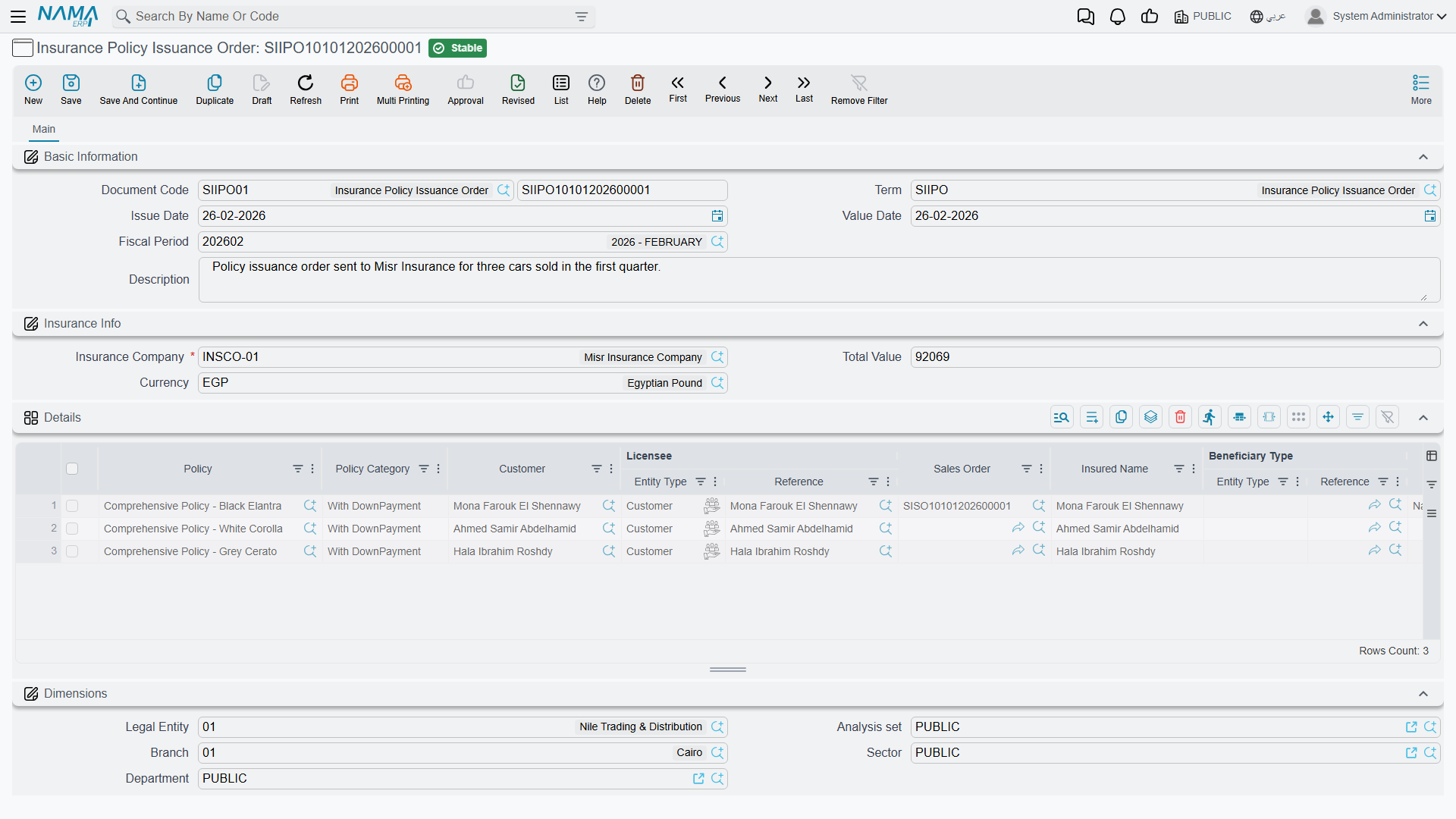
On commit it stamps each policy with Processed By pointing at itself and — only if the policy has not already been received — sets Physical Status to Requested From Supplier, Payment Status to Fully or Partially Paid and Policy Status to First Time. Cancelling or deleting the document clears all four, dropping the physical status back to Initial and the payment status to Unpaid.
Its policy picker offers only policies with no Processed By — that is, policies not yet ordered.
Accounting: yes. One journal line pair per grid row, using the Total Insurance Price Debit / Credit (مدين / دائن قيمة التأمين) accounts on its term, for the amount in the row's Insurance Price column. See the danger box below.
Selecting an insurance company in the header fills the grid with one row for every policy of that insurer that has not been ordered yet. To order only some of them, pick the policies through the grid's own picker instead.
Car Insurance Policy Receipt — استلام وثيقة تأمين سيارة
Records the paper arriving from the insurer. The header carries the insurance company, the Supplier (مورد), a Received Date (تاريخ الاستلام) that is copied down onto every grid row on save, the Net Value (the total of the rows' policy values) and the Total Cost. A second grid holds the external payment documents — the payment instruments Al-Sahra handed the insurer, each with a value and a date.
If the supplier is left empty, it is copied from the first policy in the grid that has one. Each row's Cost column is filled from its policy: the policy's Initial Cost until the policy is bought from the insurer, its Actual Cost afterwards (see the policy record page).
On commit it sets each policy's Physical Status to Received From Supplier, ticks its Received flag and writes the received date onto the policy. Cancelling or deleting the document clears the received date and puts the status back to Requested From Supplier.
Its picker offers only policies with no received date, narrowed to the header's insurance company when one is set.
To stop the paper being received for a policy the customer has not paid for, tick Prevent Saving If Policy Is Unpaid on the receipt's term. A row whose policy still has the Payment Status Unpaid is then refused with Cannot save receipt {0}. Insurance policy {1} is not paid by the customer — «لا يمكن حفظ مستند الاستلام {0}. وثيقة التأمين {1} غير مسددة من العميل».
Accounting: yes — three things:
- the Insurance Price column against the Total Insurance Price Debit / Credit pair (مدين / دائن قيمة التأمين), as on the order;
- the Cost column against the Debit Cost / Credit Cost pair (مدين التكلفة / دائن التكلفة);
- debt lines built from the external payment grid.
When the policy's cost changes later — because a purchase invoice for it is saved, changed or cancelled — the receipt's cost entry is rebuilt with the new figure. You do not need to touch the receipt.
Car Insurance Policy Receipt Cancellation — إلغاء استلام وثيقة تأمين سيارة
Undoes a receipt. It must be created from a committed receipt, and every policy on it must be one of that receipt's policies; otherwise the commit is refused with:
- Document {0} must be created from a committed document of type {1} — «يجب إنشاء المستند {0} بناءً على مستند محفوظ من النوع {1}»
- Insurance policy {0} is not included in document {1} — «وثيقة التأمين {0} غير موجودة في المستند {1}»
It has the same screen as the receipt plus a From Document field: pick the receipt there and the screen copies its header and its rows; delete the rows of any policy you are keeping. On commit it puts each policy back to Requested From Supplier and clears its received date, so a new receipt can be recorded. It books the same three amounts as a receipt, against the accounts on its own term, and the debt lines from its payment grid go to the opposite side — set up its term with the receipt's accounts swapped so the entry reverses the receipt.
Car Insurance Policy Delivery — تسليم وثيقة تأمين سيارة
The hand-over — and the document that charges the customer for the policy. The header carries a Delivered Date (تاريخ التسليم), copied down to every row, the Supplier (copied from the policies when left empty) and the Total Cost, plus five attachment slots for a signed receipt.
The delivery is built like an invoice. Each row's unit price is the policy's Policy Value, and the row carries the usual discount columns; the totals and the payment methods sit below the grid, and a Payment Documents page holds the payment lines and the external payment documents. Taxes are calculated only when the delivery's term has Taxable (خاضع للضريبة) ticked; otherwise the rows carry no tax. Each row also carries a Cost column, filled from the policy's Initial Cost or, once the policy is bought, its Actual Cost. The delivery cannot be saved with a negative remaining amount.
The one date check is that the delivery date is not earlier than the policy's received date. On commit it sets Physical Status to Delivered To Customer, ticks the policy's Delivered flag and writes the delivered date onto the policy; cancelling or deleting the document clears them.
Accounting: yes — two pairs from the delivery's term:
- the Cost column against the Debit Cost / Credit Cost pair (مدين التكلفة / دائن التكلفة);
- each row's net value (after discounts and taxes) against the Net Value Debit / Credit pair (صافي القيمة - مدين / دائن).
As on the receipt, the cost entry is rebuilt by itself whenever a purchase invoice changes the policy's cost.
Car Insurance Policy Delivery Cancellation — إلغاء تسليم وثيقة تأمين سيارة
Undoes a delivery — the customer handed the policy back, or it was delivered against the wrong sale. Like the receipt cancellation, it must be created from a committed delivery (pick it in From Document, and the screen copies the delivery's header, rows, prices and payment lines), and every policy on it must be one of that delivery's; the same two messages refuse it otherwise.
On commit it puts each policy back to Received From Supplier and clears its delivered date, so the policy can be delivered again or its receipt cancelled. It books the same cost and net value amounts as a delivery, against the accounts on its own term — set up that term with the delivery's accounts swapped so the entry reverses the delivery.
Car Insurance Policy Renewal — تجديد وثيقة تأمين سيارة
Extends the cover into a new period. The header carries a New Insurance Date (تاريخ التأمين الجديد) and a New Expiry Date (تاريخ الانتهاء الجديد), both copied down to the rows, and either can be overridden per row.
On commit it writes the new dates onto each policy — its effective date and its expiry date — and sets Policy Status to Renewal.
Accounting: yes, using the same account pair and the same term family as the order, for the Insurance Price column on its rows. Note that it books in the company's own currency rather than a currency chosen on the document.
Car Insurance Policy Cancellation — إلغاء وثيقة تأمين سيارة
Records that cover has ended. The header carries a Cancellation Date (تاريخ الإلغاء) and a free-text Cancellation Reason (سبب الإلغاء), plus an attachment slot.
On commit it writes the cancellation date onto each policy, sets Policy Status to Cancelled and records itself as the cancelling document. Cancelling or deleting the cancellation document clears all three — but only for policies this particular document cancelled, so a second cancellation cannot undo the first one's work. Committing a cancellation against a policy another document has already cancelled is refused with a message naming that document.
Accounting: none. A cancellation books nothing and refunds nothing. If money comes back from the insurer, that is a separate accounting document.
The two adjustments
Car Insurance Policy Value Adjustment (تعديل قيمة وثيقة تأمين سيارة) changes what the policy is worth. Type a New Value on the header; on commit each policy's value is overwritten with it and the Policy Status becomes Value Adjustment. The header value is used for every row, so the per-row New Value column is decorative — filling it differently per row achieves nothing. The one check is that the new value must not be zero.
Car Insurance Policy Period Adjustment (تعديل فترة وثيقة تأمين سيارة) changes when the policy ends. Type a New Expiry Date on the header; on commit each policy's expiry date is overwritten with it and the Policy Status becomes Period Adjustment.
Neither adjustment recalculates anything — no premium, no pro-rata figure — and neither books anything. Extending a policy or changing its value produces no journal entry and no change to what the insurer is owed; record the money side as a separate accounting document. Cancelling or deleting a value adjustment restores the policy value stored on its rows.
What actually reaches the ledger
Each document books one debit/credit pair per grid row for every amount below, against the accounts configured on the document's term:
| Document | Amounts booked |
|---|---|
| Order, Renewal | The Insurance Price (سعر التأمين) column, against Total Insurance Price Debit / Credit |
| Receipt, Receipt Cancellation | The Insurance Price column, as above; the Cost column, against Debit Cost / Credit Cost; and debt lines from the payment grid |
| Delivery, Delivery Cancellation | The Cost column, against Debit Cost / Credit Cost; and the row's net value, against Net Value Debit / Credit |
| Cancellation, Value Adjustment, Period Adjustment | Nothing |
The Insurance Price column is never filled for you
Nothing ever writes the Insurance Price column. Choosing an insurance programme does not fill it. Choosing a policy does not fill it. The car price does not derive it. It is a blank column waiting for somebody to type in it.
Commit an order with that column left empty — which is exactly what happens if you assume the programme priced the policy — and the document produces a journal entry of zero, cleanly, with no warning, and the business request completes successfully.
Type the insurance price into every grid row of every order, receipt and renewal, take the figure from the insurer's own quotation, and check the processed entry before you close the period. On Layla's order the figure typed is the 3,150 Wafa Insurance quoted — not a number the system worked out.