
Settling with the Insurer
Required licence
srvcenter-insurance-and-installments and srvcenter-subitems. The overview page explains why both are needed.
Al-Sahra has arranged Layla's policy, taken her money and handed her the paperwork. What remains is the other side of the arrangement: Al-Sahra bought that policy from Wafa Insurance, usually at a discount off its face value, and it earns something for placing the business. The Car Insurance Policy Purchase Invoice (فاتورة شراء وثيقة تامين سيارة) is where that is booked. You reach it from cars → Car Insurance.
Al-Sahra raises SIIPI-2026-0074 with one line: policy POL-2026-7741, car sale price 87,500, policy purchase percentage 3.6 %.
The screen
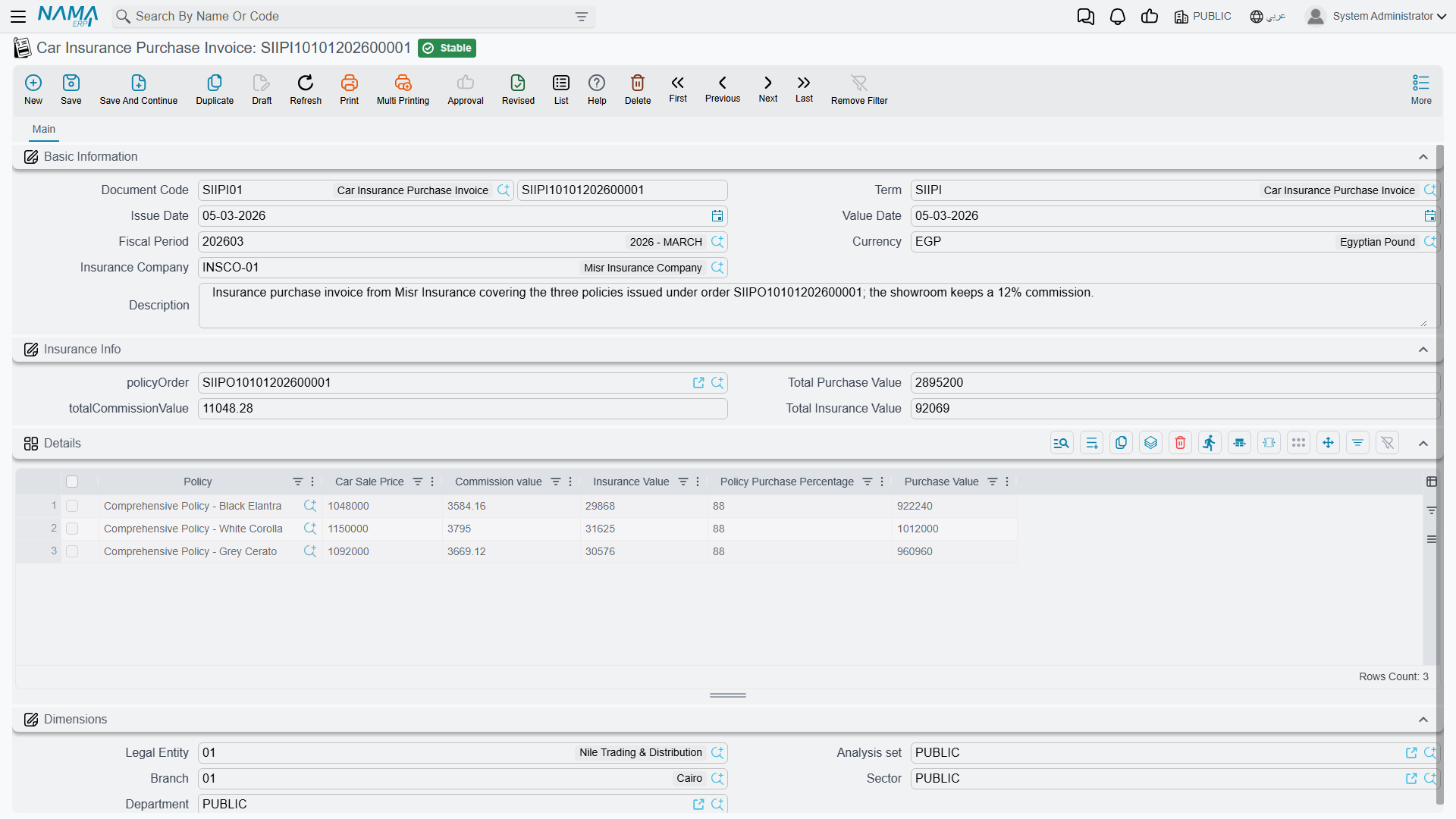
Basic information carries the code, the value date, the currency, the insurance company and the Supplier (مورد) — the party the invoice is owed to. Leave the supplier empty and it is copied from the first policy in the grid that has one.
Insurance information carries a reference to the policy order the invoice settles, plus three totals — total purchase value, total commission value and total insurance value, all calculated from the grid. Picking a policy order fills the grid with that order's policies.
The details grid is where the money is, one row per policy:
| Column | Arabic | Typed or calculated |
|---|---|---|
| Insurance Policy | وثيقة تأمين سيارة | Picked — the picker offers only policies not yet bought |
| Car Sale Price | سعر بيع السيارة | Filled from the policy's car price |
| Policy Purchase Percentage | نسبة شراء الوثيقة | Filled from the programme band that matches the car |
| Purchase Value | قيمة الشراء | Calculated — car sale price × the percentage. It becomes the row's unit price |
| Insurance Value | — | Typed |
| Commission Value | — | Typed |
After those columns come the usual invoice price columns — unit price, discounts and taxes — and below the grid the invoice totals and payment methods. A Payment Documents page holds the payment lines and the external payment documents. Taxes are calculated only when the invoice's term has Taxable (خاضع للضريبة) ticked. The invoice cannot be saved with a negative remaining amount.
The insurance value and the commission are numbers you type; nothing derives them from the programme, from the policy or from each other.
Al-Sahra's line reads: purchase value 3,150 (87,500 × 3.6 %), and insurance value 2,835 and commission value 315, both typed.
What it books
The invoice books the purchase value like any purchase invoice: the rows' net value (after discounts and taxes) against the Insurance Purchase pair on its term (Purchase Value Debit / Credit, قيمة الشراء - مدين / دائن), with the taxes, discounts and payments booked from the term's tax, discount and cash settings.
On top of that, it books two amounts per row against two more pairs:
| Amount | Term group | Debit / credit fields |
|---|---|---|
| Insurance Value | Insurance Expense (تحمل التأمين) | Insurance Value Debit / Credit (مدين / دائن تحمل التأمين) |
| Commission Value | Commission (العمولة) | Insurance Commission Debit / Credit (عمولة التأمين - مدين / دائن) |
A pair left empty on the term books nothing. Nothing reconciles the three amounts: the insurance value is not the purchase value plus the commission, and the system never checks that it is. In Layla's case 2,835 + 315 happens to equal 3,150, because that is how Al-Sahra chose to break the figure down — not because anything enforced it.
What it does to the policy
Beyond the ledger, the invoice touches every policy it names. On commit it stamps each one with a reference back to itself, ticks its Purchased flag, sets its Payment Status to Paid To Supplier (مدفوعة للمورد), and writes the row's net value into the policy's Actual Cost.
That actual cost then replaces the policy's Initial Cost as the cost the receipt and the delivery book. Any receipt or delivery already committed for the policy has its cost entry rebuilt on the spot, so the cost in the ledger always follows the latest purchase.
Cancelling or deleting the invoice reverses all of this: the reference is cleared, Purchased is unticked, the actual cost goes back to zero (so the initial cost applies again) and the payment status goes back to Fully or Partially Paid.
It moves no stock — there is nothing physical about a policy — and it does not touch the policy's physical status, its value or its dates.
One purchase at a time
A policy is bought once. A second purchase invoice for a policy that is still bought is refused, and so is a purchase return that was not made from the invoice that bought it:
- Document {0} can not be the first document in the purchase cycle of insurance policy {1} — «المستند {0} لا يمكن أن يكون أول مستند في دورة شراء وثيقة التأمين {1}»
- Document {0} can not come after document {1} in the purchase cycle of insurance policy {2} — «المستند {0} لا يمكن أن يأتي بعد المستند {1} في دورة شراء وثيقة التأمين {2}»
Returning a policy to the insurer
The Car Insurance Policy Purchase Return (مرتجع شراء وثيقة تامين سيارة), on the same menu, undoes a purchase — the insurer took the policy back, or it was bought against the wrong band. It must be created from a committed purchase invoice: pick the invoice in From Document and the screen copies its header, rows, prices and payment lines. A return made any other way is refused with:
Document {0} must be created from a committed document of type {1} — «يجب إنشاء المستند {0} بناءً على مستند محفوظ من النوع {1}»
On commit the return clears the policy's purchase exactly as cancelling the invoice would: Purchased is unticked, the actual cost goes back to zero and the payment status returns to Fully or Partially Paid, and the receipt's and delivery's cost entries are rebuilt with the initial cost. The policy can then be bought again with a new purchase invoice. The return has its own term, with the same groups as the invoice's.