
The Insurance Policy Record
Required licence
srvcenter-insurance-and-installments and srvcenter-subitems. The overview page explains why both are needed.
Layla's policy has a number, a start date, an expiry date, a value and a car. It also has a life: it is ordered, it arrives, it is handed over, and later it may be renewed or cancelled. Nama keeps those two halves in two different places. The facts about the policy live on a master record — Car Insurance Policy / وثيقة تأمين سيارة, reached from cars → Car Insurance — and the events live on documents that point at it.
Al-Sahra creates one such record for Layla's car: policy POL-2026-7741 against INS-02 Wafa Insurance, programme INSP-WAFA-COMP, covering the car record CAR-000318 (chassis NWA7R24C26K000318).
This page is about that record. The documents are on the next page.
Start from the sales order and let the screen fill itself
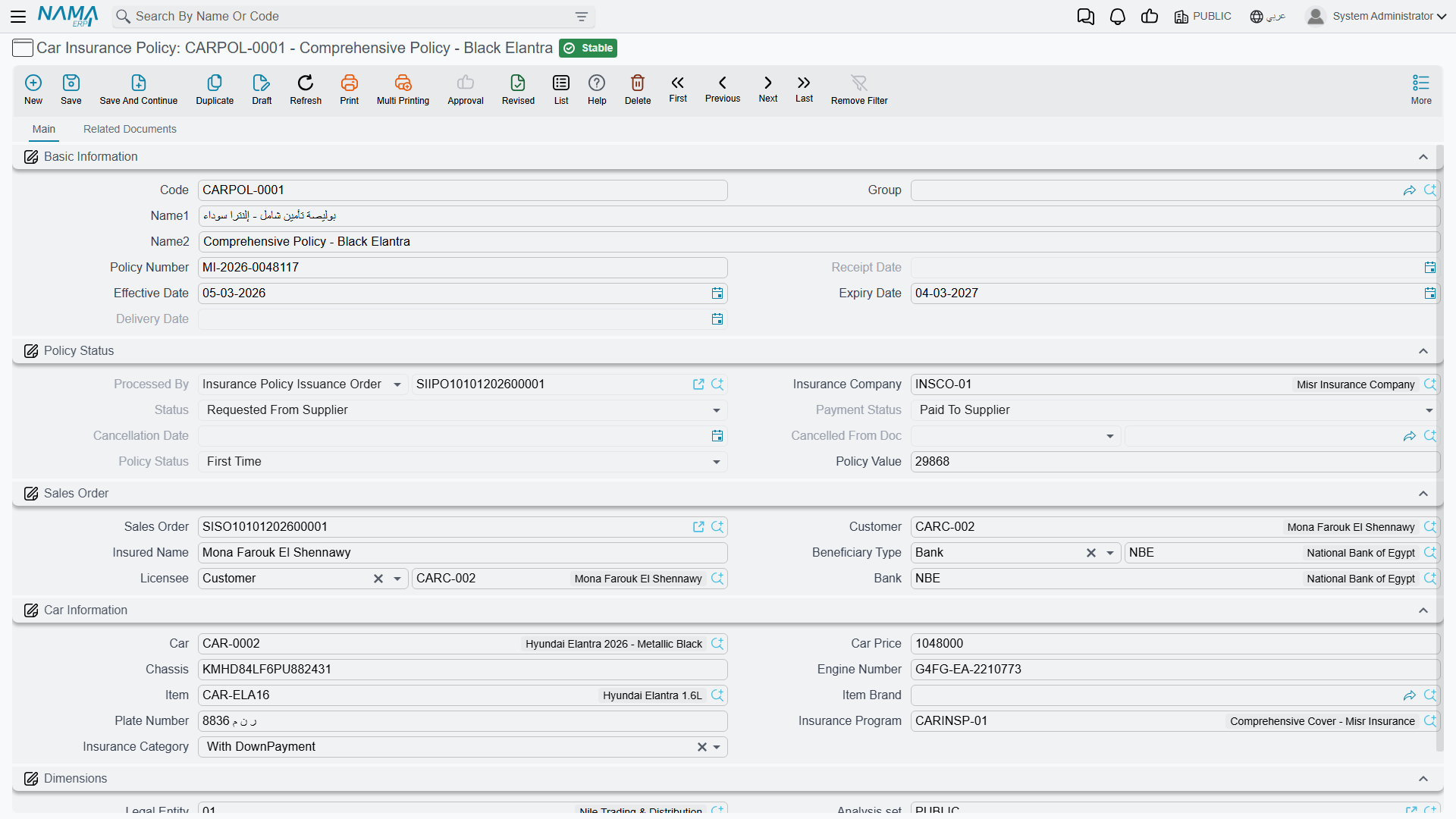
The most efficient way to create a policy is not to type it. Open a new policy and pick the sales order first — SISO-2026-0233 in Layla's case — and the screen pours the sale into itself.
From that one choice the policy takes the customer, the insured name, the licensee, the bank, the insurance company, the insurance programme from the order's first line, the policy category from that programme's first band, the car price, and the car, chassis, engine number and item from the order line. The insurance for field is filled from the sale's nature: on a cash sale it is the customer, on a financed sale it is the financing bank named in the order's financing block.
Two things worth knowing about that fill:
- It only fills fields that are still empty. Anything you typed first is left alone — which is convenient, and also means a stale value you typed by mistake will not be corrected.
- The sales-order picker hides orders that already carry a policy, so you cannot accidentally insure the same sale twice. On an installation with a very large policy history this picker is slow to open, because it has to work out the full exclusion list before it can show you anything.
What you still type yourself is the part the sale cannot know: the policy number the insurer issued, the policy value, and the effective start date.
What is yours to type, and what belongs to the documents
The policy screen mixes two kinds of field, and telling them apart is the whole skill of using this record.
Written by documents, read-only on the screen — you will see them fill in as the cycle progresses, and you cannot edit them:
| Field | Arabic | Written by |
|---|---|---|
| Processed By | — | The policy order (cleared when the order is cancelled or deleted) |
| Physical Status | — | Order, receipt, delivery and the two cancellations of those |
| Payment Status | — | The order, the purchase invoice and the purchase return |
| Policy Status | — | Order, renewal, the two adjustments, cancellation |
| Received Date and Received | تاريخ الاستلام / تم الاستلام | The policy receipt (cleared by the receipt cancellation) |
| Delivered Date and Delivered | تاريخ التسليم / تم التسليم | The policy delivery (cleared by the delivery cancellation) |
| Purchased | تم الشراء | The purchase invoice (cleared by the purchase return) |
| Actual Cost | التكلفة الفعلية | The purchase invoice: the net value of the policy's row. Back to zero when the purchase is returned or cancelled |
| Cancellation Date and Cancelled From Document | تاريخ الإلغاء | The cancellation document |
Typed by you, freely, at any time — the policy number, the policy value, the effective date (تاريخ فعلي), the expiry date, the car price, the insurance company, the Supplier (مورد), the insurance programme and the policy category.
The two costs. The Initial Cost (التكلفة المبدئية) is what you expect the policy to cost before the insurer bills you: type a percentage in the small box beside it and it is worked out as that percentage of the car price, or type the amount directly. The Actual Cost is what the purchase invoice says it cost. The receipt and the delivery book the policy's cost from the Actual Cost once there is one, and from the Initial Cost until then. The supplier you type here is copied onto the receipt, the delivery and the purchase invoice when their own supplier field is empty.
The record can quietly disagree with its own documents
Look at that second list again. Policy Value, Expiry Date, Effective Date and Policy Number are all typed fields with no lock on them — and they are also written by committed documents.
A value adjustment writes the policy value. A renewal writes the effective date and the expiry date. A period adjustment writes the expiry date. Once any of those has been committed, nothing stops a user opening the policy screen afterwards and typing straight over the result. There is no warning, no confirmation and no audit note on the screen; the field simply takes the new number and the committed document is left describing something that is no longer true.
The practical rules:
- Once a policy has been through a renewal or an adjustment, treat its value and dates as document-owned and change them only by raising another adjustment.
- If a figure on a policy looks wrong, do not fix it on the master screen. Open the Related Documents page (below), find what the documents actually say, and correct it there.
- Never load policy values or dates through an import or an integration after the cycle has started — the import will overwrite whatever the documents wrote, silently.
The three status fields
The policy carries three independent status axes, all system-written, and it helps to read them as three different questions.
Physical Status — where is the piece of paper?
| Value | Arabic | Set by |
|---|---|---|
| Initial | — | The starting state; restored when the order is cancelled or deleted |
| Requested From Supplier | مطلوبة من المورد | The policy order, and the receipt cancellation |
| Received From Supplier | تم استلامها من المورد | The policy receipt, and the delivery cancellation |
| Delivered To Customer | تم تسليمها للعميل | The policy delivery |
Payment Status — has it been paid for? Values are Unpaid, Fully or Partially Paid (مسددة كلياً أو جزئياً), set by the policy order, and Paid To Supplier (مدفوعة للمورد), set by the purchase invoice. Cancelling the invoice or returning the purchase puts it back to Fully or Partially Paid.
Policy Status — what phase of its life is it in? Values are First Time (أول مرة), Renewal, Period Adjustment (تعديل فترة), Value Adjustment (تعديل قيمة) and Cancelled. Each of the corresponding documents stamps its own value here, so this field always tells you what happened to the policy most recently.
The expiry date
Type the effective date and the expiry date on the policy.
Al-Sahra types Layla's dates directly: effective 12 March 2026, expiry 11 March 2027. The record checks that the expiry date is not earlier than the effective date, and refuses one that is with Effective start date must be before expiry date — «تاريخ بداية السريان يجب أن يكون قبل تاريخ الانتهاء».
The Related Documents page
The second page of the policy screen is the most useful screen in the whole area, and it is easy to miss.
It shows a timeline of every committed document whose grid contains this policy — orders, receipts and their cancellations, deliveries and their cancellations, purchase invoices and returns, renewals, adjustments and cancellations — in the order the cycle sees them. Each entry gives the document, its type, when it was created, the event date (the received or delivered date on a receipt or delivery, the value date otherwise) and the physical status the policy had after it. That is the complete history of the record in one place — and, because of the overwrite problem described above, it is the authoritative history. When the policy's value or dates look wrong, this page tells you what the documents actually recorded.