
Selling Insurance with a Car
Required licence
srvcenter-insurance-and-installments — and srvcenter-subitems as well. See the warning immediately below; the second code is not optional.
Layla Al-Harbi signs for her NAWA Rimal 2.4 at Al-Sahra Motors on 24 February 2026, at the end of the usual car sales cycle. She cannot drive it off the forecourt uninsured, and she does not want to spend a morning at an insurer's office, so Al-Sahra does what most dealerships do: it arranges the policy on her behalf with Wafa Insurance (INS-02), hands her the paperwork with the keys, and settles up with the insurer separately.
The Car Insurance area exists to keep a record of that arrangement. It is reached from cars → Car Insurance and is built around one master record — the Car Insurance Policy (وثيقة تأمين سيارة) — plus a chain of documents that move that policy through its life: ordering it from the insurer, receiving the paper, handing it to the customer, then later renewing it, adjusting it or cancelling it. A separate purchase invoice books what Al-Sahra owes Wafa Insurance, and a purchase return undoes it.
Before you read any further, there are two things about this area you must know, because everything else on these four pages depends on them.
The insurance licence is not self-contained
A customer who has licensed srvcenter-insurance-and-installments and nothing else cannot use this area at all.
The Insurance Company master file (شركة تأمين) — and the External Agency file beside it — do not belong to the insurance licence. They sit in cars → Car Files, which belongs to the vehicles sub-module, srvcenter-subitems. Without that code the Insurance Company screen is not merely hidden from the menu; the record type does not exist in the installation, so no insurance company can be created.
And an insurance company is required everywhere. The Insurance Policy Order demands one before it can be committed, and so does the Car Insurance Program — which is what carries the price bands and the rate. Every policy in the system is reached through a company-scoped programme, and every policy document is filtered by company.
The whole cars menu root is gated the same way, so both the Car Insurance and the Car Installment folders disappear from the menu without srvcenter-subitems even though the documents inside them are licensed separately.
In practice: order both codes together. If a customer asks for "just insurance and instalments", the answer is that the feature cannot be delivered on that licence alone.
Know where each money figure comes from
The Car Insurance Program looks like a rate card, and it is natural to assume that choosing a programme prices the whole policy. Only one document uses it that way. Each figure the cycle books has its own source:
| Figure | Where it comes from | Booked by |
|---|---|---|
| Insurance Price (سعر التأمين) on the grid of the order, receipt and renewal | Typed on each row. Nothing fills it. | Order, receipt, renewal |
| Policy Value on the policy | Typed on the policy | The delivery, as the price the customer is charged |
| Initial Cost on the policy | Car price × the percentage typed beside it, or typed directly when no percentage is given | Receipt and delivery, as the cost — until the policy is bought |
| Actual Cost on the policy | The net value of the policy's line on the purchase invoice | Receipt and delivery, as the cost — once the policy is bought |
| Purchase Value on the purchase invoice | Car sale price × the programme band's percentage, filled when you pick the policy | The purchase invoice |
Type the insurance price on every grid row of the order, receipt and renewal, and the policy value on the policy. Left empty, those documents book zero.
What the area is made of
| Record | Arabic | What it is |
|---|---|---|
| Insurance Company | شركة تأمين | The insurer. A master file with a subsidiary account, contact, tax and bank details. Lives under cars → Car Files. |
| Car Insurance Program | برنامج تأمين سيارة | The rate card: one row per car-price band, each carrying the negotiated percentages and the policy category. |
| Car Insurance Policy | وثيقة تأمين سيارة | The policy itself, one record per insured car. Covered on the policy record page. |
| Nine policy documents | — | Order, receipt, receipt cancellation, delivery, delivery cancellation, renewal, value adjustment, period adjustment, cancellation. Covered on the policy cycle page. |
| Car Insurance Policy Purchase Invoice | فاتورة شراء وثيقة تامين سيارة | What the dealer owes the insurer. Its counterpart, the Car Insurance Policy Purchase Return (مرتجع شراء وثيقة تامين سيارة), undoes it. Both are covered on their own page. |
The insurance company file
Three master files in this module share one screen and one field list: Insurance Company, Finance Company and External Agency. They are identical records with different names.
The Main page carries the code and names, the subsidiary accounts block, and the dimensions. The Contact Info page carries contact details, the tax block and a bank block (bank name, branch, account title, country, SWIFT, IBAN and an intermediary bank).
The subsidiary account (الذمة) makes the insurer addressable in accounting, so the purchase invoice's term can book the amount owed against it. The contact, tax and bank details are kept for reference.
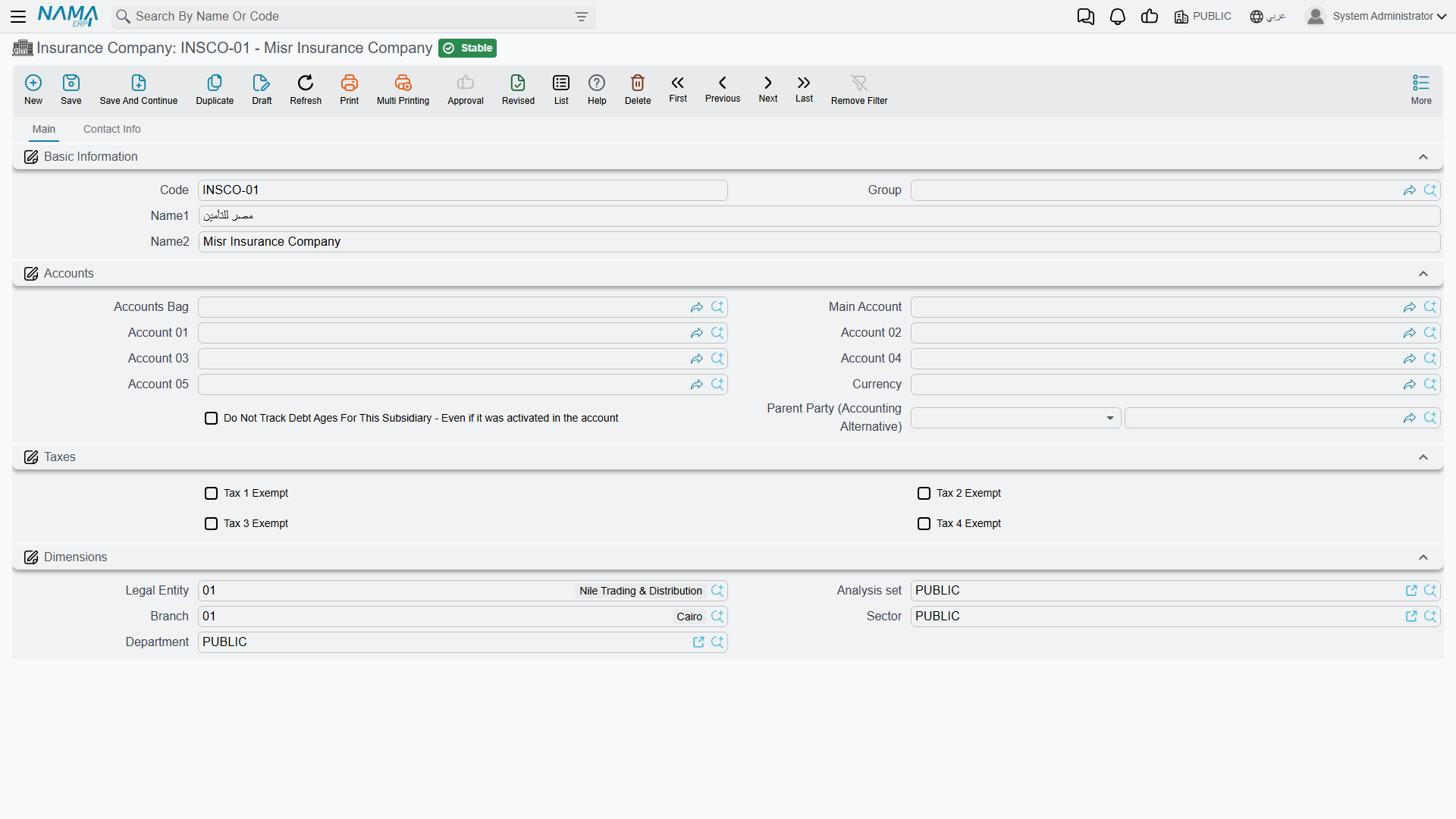
Al-Sahra creates one record: INS-02 Wafa Insurance / وفاء للتأمين, with a supplier-style subsidiary account.
External Agency (معرض خارجي) sits next to the insurance company in the same menu folder and uses the same screen. It is a master file with a subsidiary account and tax data that you can use as an accounting party.
The insurance programme — a rate card you read
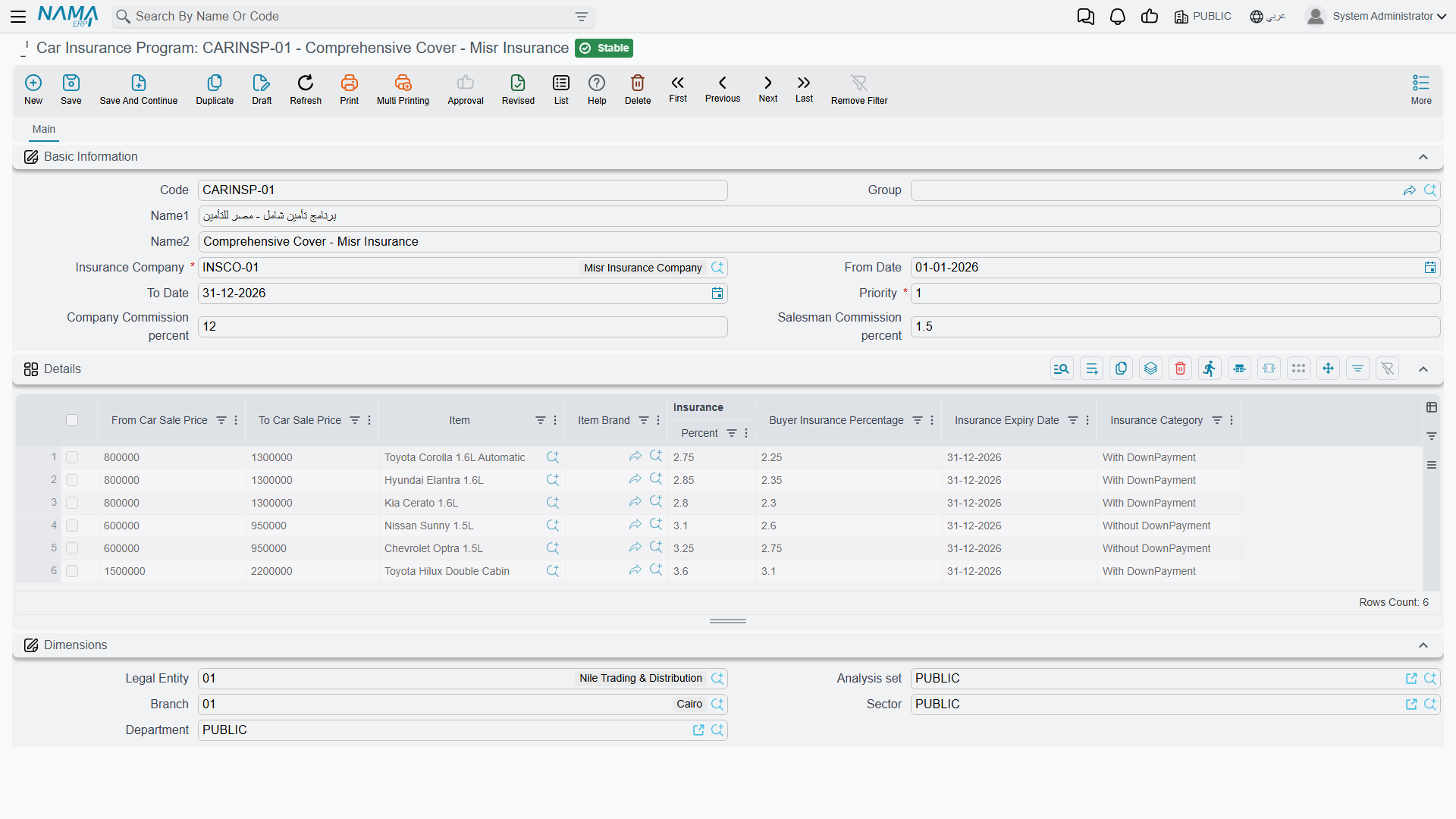
An insurance programme records a deal Al-Sahra has struck with one insurer: for cars in this price band, of this brand or this model, the policy costs this percentage and the buyer's share is that percentage. Al-Sahra sets up INSP-WAFA-COMP Wafa Comprehensive / وفاء الشامل against INS-02.
The header is short — the insurance company (required) and five attachment slots for the signed agreement.
The value is in the grid: one row per price band.
| Column | Arabic | What it holds |
|---|---|---|
| From Car Sale Price | من سعر بيع السيارة | Lower bound of the band. Required. |
| To Car Sale Price | إلى سعر بيع السيارة | Upper bound. Required. A row whose From is above its To is refused with From car price {0} must be less than to car price {1} — «سعر السيارة من {0} يجب أن يكون أقل من سعر السيارة إلى {1}». |
| Item | الصنف | Optional. Narrows the row to one model. |
| Brand | الماركة | Optional. Narrows the row to one brand. |
| Insurance Percentage | نسبة التأمين | The negotiated rate for the band. Required. |
| Buyer Insurance Percentage | نسبة تأمين المشتري | The buyer's rate. Feeds the Policy Purchase Percentage field on the insurance purchase invoice. |
| Policy Category | فئة الوثيقة | With DownPayment (بتحمل) or Without DownPayment (بدون تحمل). Required. Copied onto the policy. |
Al-Sahra's Rimal 2.4 sells at 87,000, so the row that covers it is the 50,000 → 150,000 band, with an insurance rate of 3.75 % and a buyer rate of 3.6 %.
Those two numbers are what the service advisor quotes to the customer and what the accounts clerk checks the insurer's statement against. The system uses the band in one place only: the purchase invoice, where it fills the policy purchase percentage that prices the policy bought from the insurer. The order, receipt and renewal book the insurance price typed on their rows — see the table in the box above.
The programme's only validation is that a band's lower bound may not exceed its upper bound. Overlapping bands, gaps between bands and a band that covers every car ever sold are all accepted.
How a programme is chosen
When you pick a programme on a policy, the picker offers the programmes that match on three things: the insurance company, the car price falling inside a band, and the brand and item matching or being left empty. When more than one band of the chosen programme covers the price, the more specific one wins — a band naming both the brand and the item beats one naming only the brand, which beats one naming neither. Ties are broken arbitrarily.
To take an old rate card out of circulation, remove its bands or delete the record.
The commission that reaches accounting is the Commission Value column on the insurance purchase invoice, typed line by line.
Where to read next
- The Insurance Policy Record — the policy file itself, what is typed on it and what its documents stamp.
- Moving a Policy Through Its Cycle — the nine documents, the order they must be committed in, and which of them can be undone.
- Settling with the Insurer — the purchase invoice, the purchase return and what they book.