
Renting Out Assets
Required licence
srvcenter-rental-assets. Nothing on these pages is available on a base installation.
Al-Sahra Motors has a problem every service centre knows. A customer's car goes in for an air-conditioning compressor, the part has to be bench-tested outside, and the two-day job becomes a four-day job. The customer still has to get to work. So Al-Sahra keeps a handful of small cars at the back of the workshop and lends them out — for a fee, by the hour.
That is what the Rental Assets sub-module is for: taking a bookable thing, publishing the hours it is available, holding a slot for a customer, and billing the period at a tiered rate. You reach it from Service Center → Rental Assets.
A rental asset is a register of its own
This is the first thing to understand and the thing readers get wrong most often.
A rental asset is not the showroom's car record, and it is not an inventory item. It is a separate master file — a bookable resource — with no plate number, no chassis number, no engine number, no odometer and no status field. Nothing links it to the car file the dealership sells from, nothing links it to the vehicle file the workshop services, and nothing links it to a fixed asset.
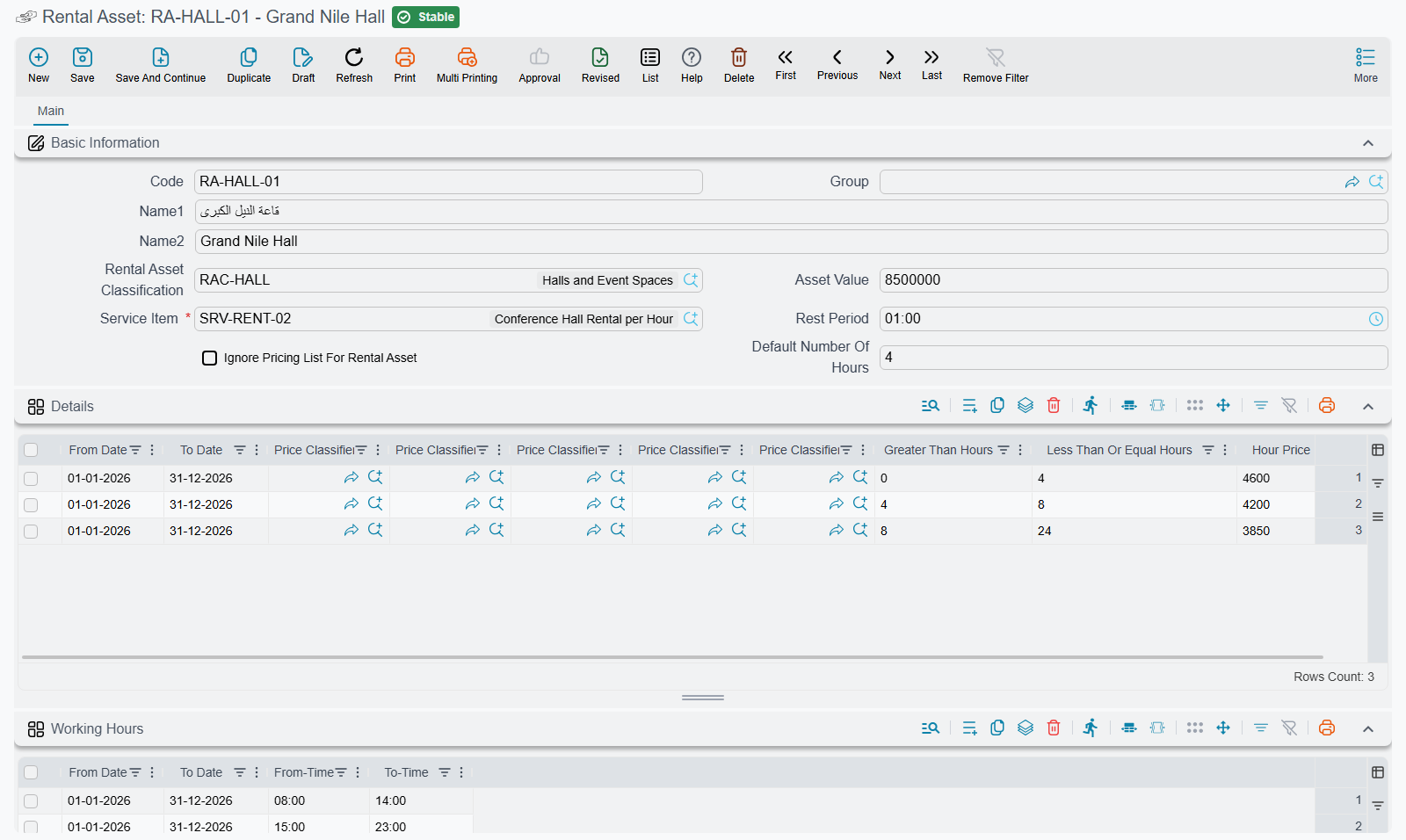
Its only outward connection to the rest of the system is one required field: the service item that appears as the revenue line on the invoice it generates. So the model is deliberately thin. A rental asset says "this is a bookable thing, here are the hours you may book it, here is what an hour of it costs, and here is the item to bill it against" — and stops there.
The practical consequence: if the same physical Saif 1.6 is also a customer vehicle in the workshop's register, you will have two unrelated records for it, and no screen in the system will tell you they are the same car. Al-Sahra accepts that, because its courtesy cars are never serviced as customer vehicles.
The rented vehicle is not recorded on the invoice line
The invoice line the system builds carries the service item and nothing else — the Customer Car column on the details grid is always left blank on a system-generated rental line. If you need the specific vehicle recorded for a customer, put it in the line's remarks or in the document description.
The three documents
The sub-module is small enough to describe in one breath.
| Document | Arabic | What it is for |
|---|---|---|
| Rental Asset Request | طلب حجز تأجيرى | The reservation. Holds the slot. |
| Rental Asset Invoice | فاتورة حجز تأجيرى | The bill for the booked period. |
| Rental Asset Reservation Cancel | إلغاء حجز أصل تأجيري | Frees the slot and records a typed cancellation charge. |
Both the request and the invoice are full sales documents underneath — they carry taxes, discounts, payment lines, an instalment schedule, sales terms and dimensions, exactly like an ordinary sales invoice. Neither moves stock: the line they generate is a service item, so there is nothing to issue.
The chain is request → invoice, and the invoice takes over the reservation from the request it was built on. It is not mandatory: you can raise a rental invoice on its own and skip the request entirely. Doing so costs you the double-booking check, for reasons the booking page explains.
One switch decides how the whole area behaves
There is a single option in the Service Center settings — Pricing Method / طريقة التسعير — with two values, By Hour / بالساعة and By Day / باليوم. It ships set to By Hour.
It is installation-wide. There is no per-asset override and no per-document override. Flipping it changes:
- which columns appear on the price-tier grids of the asset and its classification (hour thresholds and an hour price, or day thresholds and a day price);
- which header fields appear on the request and the invoice (Number of Hours + Hour Price, or Number of Days + Day Price);
- which threshold pair the tier matcher compares against;
- which quantity and price are pushed onto the generated invoice line;
- which of the two counts is mandatory before the document may be committed.
Al-Sahra rents by the hour, and every example in this documentation is By Hour.
What this sub-module does not do
This is the most important section on these pages. The word "rental" sets an expectation that this feature does not meet, and a reader who assumes otherwise will design a process around something that is not there.
The final invoice bills the planned period — the from date/time and to date/time typed on the header. Nothing else feeds into the money except taxes and discounts.
None of the following exists anywhere in the rental flow:
- No actual return date. There is no field for when the vehicle actually came back. If it comes back late, somebody must edit the to date and to time on the invoice by hand before committing, which re-runs the pricing.
- No late fee, no overtime rate, no grace period. Late return produces no charge of its own.
- No mileage capture and no mileage charge. The odometer readings the workshop records belong to the serviced-vehicle file and have no connection to a rental asset.
- No fuel charge.
- No deposit or security-deposit handling. You can take money up front through the document's ordinary payment lines, but nothing tracks it as a refundable deposit.
- No insurance, collision-damage or excess line.
- No damage charge.
- No handover event and no return event. Nothing is recorded when the customer collects the vehicle, and nothing is recorded when it comes back. The only trace of the vehicle having been out is the reservation period on the document.
- No condition report, checklist, photo capture or inspection of any kind. The module's inspection sheets are bound to the workshop's serviced-vehicle file; they cannot be raised against a rental asset.
Everything on that list has to be handled the same way: as extra hand-typed lines in the details grid of the rental invoice, or as a separate sales invoice raised afterwards. If your business needs a signed condition report at handover and at return, that is a paper process alongside the system, not a feature of it.
Where to read next
- The Rental Asset File — the bookable resource itself, its working hours, its rest time and its price tiers.
- Booking, Invoicing and Cancelling — the three documents in order, with the double-booking qualifier stated in full.
A note on the Arabic menu
The Rental Assets folder reads أصول تأجيرىة in the Arabic menu, spelled with ى where ي is intended, and the Rental Asset entity title is أصل تأجيرى for the same reason. Both are reproduced here as they appear on screen so you can find them; the correct spellings are أصول تأجيرية and أصل تأجيري. In an English session some of these entity titles also fall back to Arabic — take the English names from the menu, not from the screen title.