
Taking a Car Back
The sales invoice is the point of no return, which means there is exactly one way back: the Car Sales Return. Not a cancellation document, not deleting the invoice — a return, raised against the invoice, that reverses the money and brings the car back into stock.
It is at cars > Car Sales > Car Sales Return (سيارات > مبيعات السيارات > مردود مبيعات سيارة).
Required licence
srvcenter-subitems.
What it reverses
The return is a proper financial document with its own book and document term (التوجيه), and on commit it does three real things:
- Reverses the sale in the ledger — contra-revenue, the customer credit and the tax reversal, through the accounts on the return's own term. This is why the return term matters: it is not the invoice's term run backwards, it is a separate configuration, and if you point it at the wrong accounts the reversal lands in the wrong place.
- Brings the car back into stock through a generated stock receipt, which is also what puts the cost back where it came from.
- Writes a status line on the car, so the chassis can be pushed back to a saleable status — provided the car status configuration has a movement line for that transition. It also copies the line's technical properties onto the car in the ordinary way.
Each line carries a source invoice reference, so every returned car is tied back to the sales invoice it came from. Fill it: it is what makes the return traceable, and what stops somebody returning the same car twice against different invoices.
What it does not do
This is where returns catch people out. The return reverses the sale; it does not tidy up everything the sale left behind.
Four things a return leaves untouched
- The allocation fields on the car. Allocated To Customer, Branch, Department, Sales Man and Warehouse still name the customer who returned the car. Only a Car Allocation Cancel clears them.
- The reference stamps on the car's Statistics tab. The returned car still shows the old sales invoice, the old sales order and the old delivery date. Those stamps are cleared only when the original document is cancelled or deleted, never by a return.
- The final delivery's stock issue, if the delivery generated one. The return books its own stock receipt instead, which balances the quantity but leaves two unrelated documents in the car's history.
- Anything on the delivery block of the car record — delivery status, delivered to customer, plate number. Those were typed by hand and they stay typed until somebody edits them by hand.
So the practical instruction after a return is: open the car record, clear or correct the sales data, and raise an allocation cancel if the car was allocated.
There is also no cancellation document for a sales return. If a return itself is wrong, delete or cancel it — that is what removes its generated stock receipt and its ledger entry.
Two things about the screen
The return has its own layout rather than sharing the one used by the rest of the car sales family. It carries the customer, the warehouse and locator, the invoice classification, a details grid with the source invoice per line, the stock receipt documents it generated, payment lines, the instalment block and the generated-documents grid.
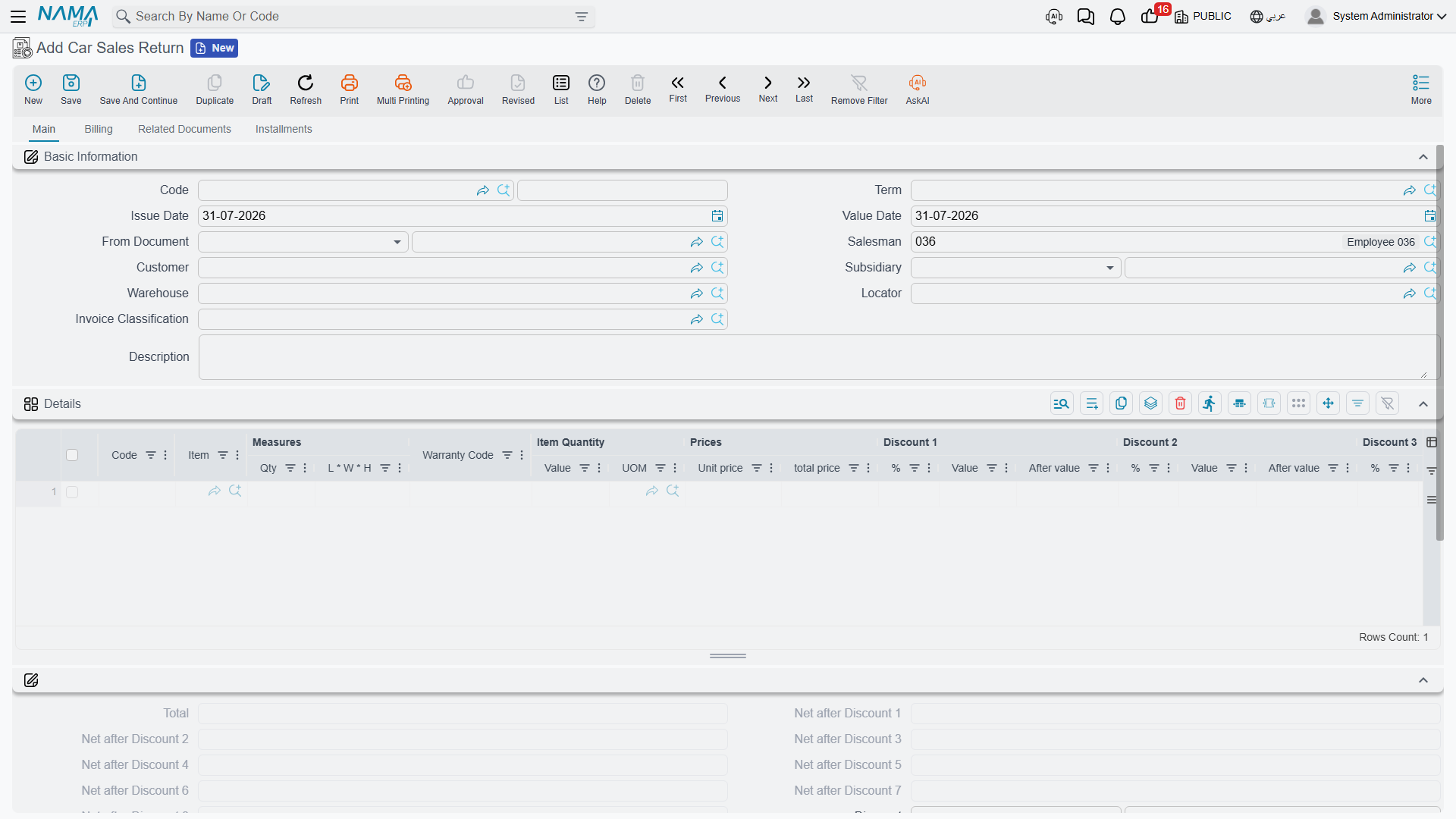
Never switch Create Sub Item From Line Information on for a return term
The option that creates car records from document lines works on returns too. Switch it on for a sales return term and the return will mint brand-new car records from its lines instead of matching the cars that came back — and nothing anywhere checks that a chassis number is unique. Leave it off on every return term.
The worked example
Suppose Layla Al-Harbi's purchase of CAR-000318 falls through after the invoice. The showroom raises a car sales return against SISI-2026-0498, one line, source invoice named, car CAR-000318.
| Amount | |
|---|---|
| Net reversed | 87,000 |
| VAT at 15 % reversed | 13,050 |
| Credited to the customer | 100,050 |
| Cost returned to inventory | 76,500 |
The car comes back into WH-SHOW on the generated stock receipt, and its status moves back to a saleable one. Then somebody has to raise the allocation cancel, and somebody has to open CAR-000318 and clear the delivery block by hand — because, as above, the return does neither.
As with every effect in the module, the reversal is created as a business request processed in the background. If it fails, retry it from the Business Requests list view with More → Reprocess / Recommit.
Actions on this screen
More menu:
- Reverse Document (عكس المستند) — the return must be saved; opens a new, unsaved Car Sales Invoice with this return's lines copied in.
- Add Invoice (إضافة فاتورة) — asks for a car sales invoice and appends its lines to the return. It is refused on a full return.
- Remove Taxes (حذف الضرائب) and Restore Taxes (احتساب الضرائب) — the first asks which taxes to clear and empties them on every line; the second recalculates them. Both are refused when the return is not taxable.
- Calculate Discounts From Offers (حساب خصم الفاتوره من العروض) — recalculates the line discounts from the sales offers in force. It is refused unless invoice discount calculation from offers is activated in the supply chain configuration.
- Copy To First Cash Line (نسخ لأول سطر طريقة دفع نقدية) — puts whatever value is not yet covered by the other payment lines and the external payments onto the first cash payment line.
- Add Current Line To Shortage Document (إضافة السطر الحالي الي مستند النواقص) — appends the line you are standing on to a shortage document, using the shortage book and term named on the return's term.
- Installment Payments (سندات سداد الدفعات) — opens a list of the vouchers that paid this document's instalments.
Related documents page:
- Collect (تجميع) — asks for a from date and a to date and fills the stock documents grid with the stock receipts already taken back from this customer into the same warehouse that have not been used yet.
- Apply Receipts (تطبيق) — turns the receipts in that grid into priced return lines.
Installments page:
- collect Installments By From Doc (تجميع الدفعات من بناءاً علي) — rebuilds the return's instalment grid from the unpaid instalments of the invoice in From Document, consuming the return value from the earliest instalment onward until it runs out.
- Distribute Return Value On All Unpaid installments (توزيع قيمة العائد على جميع الأقساط الغير المسددة) — fills the same grid, but spreads the return value evenly across the unpaid instalments. Both need a From Document.
On the list screen, Update Prices (تحديث الأسعار, More menu) recalculates the unit prices of every selected return and saves it.