
Cancellation Documents
Most systems cancel a document by flipping a status on it. Nama's cars area does something else: for each cancellable document there is a separate document type whose whole job is to point at the original and mark it. An allocation is cancelled by a Car Allocation Cancel; a sales order by a Car Sales Order Cancel; a final delivery by a Car Final Delivery Cancel.
Understanding what that marker does, and where stock and money are undone instead, saves a great deal of confusion later.
Required licence
srvcenter-subitems.
The one sentence to remember
A cancellation document is a bookkeeping marker plus a status move. Money and stock are unwound on the original document.
Everything below is an elaboration of that sentence.
How the pattern works
- You open the cancellation document that matches the original — there is one type per cancellable document, and they are not interchangeable.
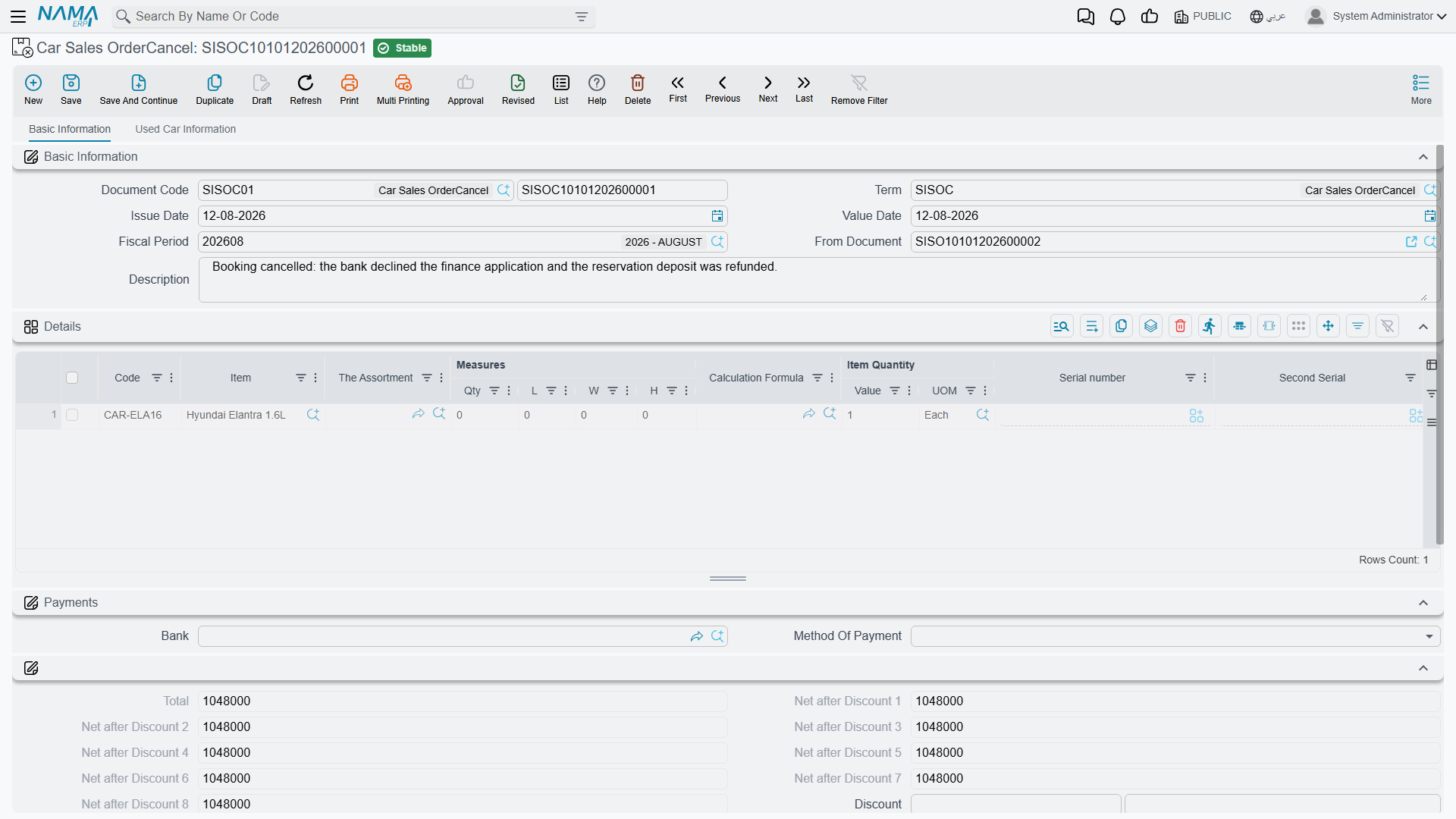
- You link it to the original through the ordinary بناءا على (From Document) field. This is the only link there is; there is no "cancel" button on the original.
- You put the car on a line and commit.
- On commit the original document is stamped cancelled, and ملغي من سند (Cancelled From Doc) on it now points at the cancellation document. Both fields are read-only on the original and are never typed by anyone.
- The cancellation document writes its own status line on the car, exactly like any other car document.
Cancelling or deleting the cancellation document clears the two fields again, and re-pointing its From Document at a different original un-cancels the previous one. Committing a second cancellation against an already-cancelled document is refused, with a message naming the document that cancelled it first.
All six cancellation documents look almost identical; this is the Car Sales Order Cancel:
Where they live in the menu
They are scattered across three folders, which is the first practical problem readers hit:
| Cancellation document | Menu path |
|---|---|
| Car Sales Order Cancel | سيارات > الغاء مبيعات سيارات > إلغاء أمر بيع سيارة |
| Car Allocation Cancel | سيارات > الغاء مبيعات سيارات > إلغاء تخصيص سيارة |
| Car Receipt Cancel | سيارات > مخازن السيارات > إلغاء توريد سيارة |
| Car Final Delivery Cancel | سيارات > مخازن السيارات > إلغاء تسليم سيارة نهائي |
| Car Traffic Letter Request Cancel | سيارات > مبيعات السيارات > إلغاء طلب خطاب مرور سيارة |
| Car Traffic Letter Cancel | سيارات > مبيعات السيارات > إلغاء خطاب مرور سيارة |
In English the folders read Cars Sales Cancellation, Car Inventory and Car Sales respectively. The two traffic-letter cancellations sit with the sales documents rather than with the other cancellations — that is not a mistake in this page.
What each one actually reverses
| Cancellation document | Marks the source cancelled | Reverses accounting | Reverses inventory | Anything else |
|---|---|---|---|---|
| Car Sales Order Cancel | Yes | No — the order's journal entry, including the booking deposit, stays exactly where it is | No | Its own status line |
| Car Allocation Cancel | Yes | No — neither document creates an entry | No | Clears the five allocation fields on the car |
| Car Final Delivery Cancel | Yes | No | No — the delivery's stock issue is left in place | Its own status line |
| Car Receipt Cancel | — | No | No — the receipt's stock receipt is left in place | Its own status line |
| Car Traffic Letter Cancel / Request Cancel | Yes | No | No | Its own status line |
Two things to know before you cancel
1. The ledger and the warehouse stay as they were. A cancelled sales order keeps its booking-deposit journal entry. A cancelled final delivery keeps its stock issue, so the car stays out of stock. A cancelled car receipt keeps its stock receipt, so the car stays in stock. The next section shows how to undo each of them.
2. Always fill From Document. Nothing requires the link. A cancellation saved with the field empty still commits: the original is not marked, yet the document still writes its status line, and a Car Allocation Cancel still clears the allocation fields of whatever car is on its lines.
So how do you actually undo something?
| To undo | Do this |
|---|---|
| A stock movement made by a Car Receipt or a Car Final Delivery | Cancel or delete the original document. That is what removes its generated stock document — the cancellation document will not. |
| A committed sales invoice | Raise a Car Sales Return. There is no cancellation document for an invoice, and money that reached the ledger should come back through a return. |
| An allocation | A Car Allocation Cancel, which does genuinely clear the five allocation fields. |
| A sales order's booking-deposit entry | The ordinary accounting route. The cancellation does not touch it. |
| A sales approval | Delete it. No cancellation document targets the sales approval. |
The real reversal is the status move
If cancellation reverses so little, why bother? Because in this module the car's status is the thing everybody looks at, and the status move is exactly what the cancellation document is for.
The moves are yours to design. A site typically configures:
- Allocated → Received for the allocation cancel, putting the car back on the market;
- Final Delivered → Invoiced for the final delivery cancel;
- Traffic Letter Issued → Allocated for the traffic letter cancel.
Without those movement lines in the car status configuration, a cancellation document commits and the car's status stays where it was — so when a site reports that a cancellation left the car's status unchanged, check those movement lines first.
None of the cancellation documents creates a journal entry.
One more thing the cancelled marker does
There is a single behaviour tied to the flag itself, and it is easy to miss: a cancelled sales document stops maintaining the car's reference and dimension stamps. Once an order or a delivery is marked cancelled, re-saving it no longer refreshes the references it had stamped onto the car's Statistics tab, nor the branch, sector, department or tax values it had been copying across. The stamps already written stay written; they simply stop being updated.
Actions on these screens
The Car Sales Order Cancel, Car Allocation Cancel, Car Final Delivery Cancel, Car Receipt Cancel and Car Traffic Letter Cancel each carry one action, in the More menu:
- Create Sub Item From Line Information (إنشاء صنف فرعي من السطر) — for every line whose item has sub items, creates the car record (or refreshes the one already on the line) from the line's data and writes it back onto the line. The car record is saved straight away, even before you save the document. It runs only when the term's Create Sub Item From Line Info option is on.