
Freight, Customs and Landed Cost
A car leaving the importer's yard at 74,000 does not arrive in Riyadh costing 74,000. There is sea freight, there is customs clearance, there is a truck from the port. Al-Sahra paid 15,000 on the February shipment, and if that 15,000 does not reach the six cars then every margin the showroom reports afterwards is wrong by 2,500 a car.
This page is about how it gets there. The short answer is that it uses the ordinary supply-chain landed-cost mechanism, that it works only on the Car Purchase Invoice, and that there is nothing car-specific about it at all.
Required licence
srvcenter-subitems for the car documents; the additional-cost mechanism itself is standard supply chain.
There are no customs or freight fields in the buying chain
Start with the disappointment, because it saves a lot of hunting.
No document in the Car Purchases chain has a customs field, a freight field or a clearance field. Not the order, not the pro-forma, not the invoice, not the return. There is no "duty" column and no "landed cost" tab where you type an amount.
The customs fields on the car file record the paperwork
The car record's Document Control Data tab carries customs list number, customs paid, customs paid date, customs release number, customs release date, vessel name and carrier. Every one of them is typed by hand, so the paperwork is filed against the right chassis.
The amounts that reach the car's cost come from the mechanism described below.
How the charges actually reach the cars
Import charges are entered as service-item lines on the same purchase invoice as the cars, and the invoice spins them off into a Receipt Additional Cost document that spreads them over the received vehicles.
The chain, step by step:
- Create the expense items. Each charge you want to capitalise needs an item of type Service, with its expense item field filled in — that field is what marks a service line as a capitalisable cost rather than an ordinary expense. Al-Sahra has three: sea freight, customs clearance, inland transport.
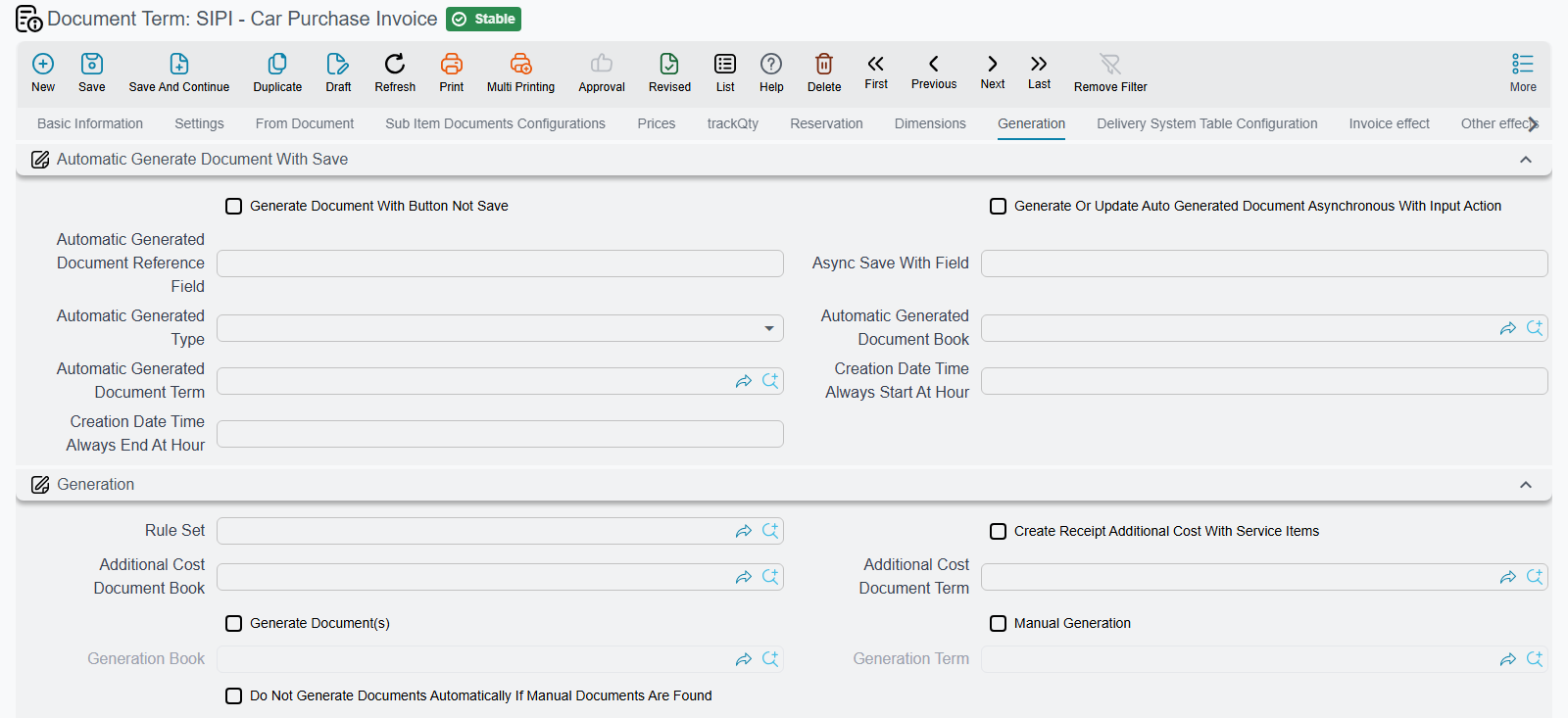
- Configure the invoice's document term. Three settings do the work:
- إنشاء سند تكاليف إستلام إضافية مع بنود الخدمات (Create Receipt Additional Cost With Service Items) — the master switch. Nothing happens without it.
- دفتر سند التكاليف الإضافية and توجيه سند التكاليف الإضافية (additional cost document book and term) — where the generated document is filed.
- توزيع التكلفة على أساس كمية الاستلام (Distribute Cost Based On Receipt Quantity) — the distribution basis.
- Put the charges on the invoice. Alongside the six car lines, add one line per charge using the service items. They carry an amount and no quantity of cars.
- Commit. The invoice collects the service lines whose item is a service item with an expense item, and generates a Receipt Additional Cost document in the book and term you named, cloning those lines. The reference appears in the read-only سند التكاليف الإضافية field on the invoice header, and the generated document is listed on the بنود مصروفات (Expense items) tab.
- The cost lands per car. Because the car record is an item dimension, inventory cost is held against the pairing of item and car. The spread charge therefore reaches each individual chassis, not just the model — which is what makes a per-car margin meaningful.
If the condition later stops holding — you remove the service lines, or untick the term option — the generated document is deleted again on re-processing.
The worked example
SIPI-2026-021, 10 February 2026. Six cars at 74,000, and three service lines:
| Expense | Amount |
|---|---|
| Sea freight | 9,000 |
| Customs clearance | 4,200 |
| Inland transport | 1,800 |
| Total additional cost | 15,000 |
The invoice generates RAC-2026-009, which distributes the 15,000 across the six cars by receipt quantity — 15,000 ÷ 6 = 2,500 each.
Landed cost per car = 74,000 + 2,500 = 76,500.
That is the figure the invoice's read-only unit cost column shows on each line once the additional-cost document has been processed, the figure held on CAR-000318's cost row, and the figure that is relieved to cost of sales when the car is eventually sold for 87,000 — giving a gross margin of 10,500.
Quote 76,500 wherever a car's cost is mentioned. It is the number, not 74,000.
Where the accounting goes
Moving the 15,000 into the cars takes an entry from the generated additional-cost document and an entry from the stock receipt, and the two only cancel out if their accounts are set up to match. The car purchase invoice's term has no accounting setting for this: on that term, the additional-cost options only create the document and pick its book and term.
1. The Receipt Additional Cost document records the charge. Each line is copied from a service line on the invoice, and its accounts come from that line's expense item. The line debits the expense item's debit side, or the additional-cost document term's debit side if the expense item has none. It credits the expense item's credit side, which can be a specific account, the supplier, or a customs, shipping or insurance company. If the expense item has no credit side, the term's credit side is used. Al-Sahra's three expense items all debit an Import Charges Clearing account.
2. The stock receipt capitalises it. The purchase invoice brings the cars into stock through a generated stock receipt, filed under the توجيه الأصناف المستلمة (Received Items Term) named on the invoice term. Once the 15,000 has been spread over the cars, that stock receipt's entry gains two more lines, taken from the التكاليف الإضافية (Additional Cost) group on the stock receipt's term:
- مدين التكاليف الإضافية (Additional Cost Debit) — if left empty, the stock receipt's own main debit side is used, which is the inventory account.
- دائن التكاليف الإضافية (Additional Cost Credit) — if left empty, the stock receipt's own main credit side is used.
With Additional Cost Credit set to the same clearing account, the entry is:
| Account | Debit | Credit |
|---|---|---|
| Inventory (6 cars × 2,500) | 15,000 | |
| Import Charges Clearing | 15,000 |
The clearing account is back to zero, and the inventory account now carries each car at 76,500.
3. The sale relieves it. When a car is sold, its stock issue moves 76,500 from inventory to cost of sales, the additional cost included. Nothing extra needs setting up for this step.
Leaving Additional Cost Credit empty
If the stock receipt term's Additional Cost Credit is empty, step 2 credits the receipt's main credit side instead. Inventory still receives its 15,000. But unless that main credit side is the same account the additional-cost document debited in step 1, the two entries never meet: the account from step 1 keeps a 15,000 debit and the receipt's credit side keeps an extra 15,000 credit. Either point Additional Cost Credit at the account the additional-cost document debits, or make that document debit the receipt's credit account.
The other three documents add nothing
Only the purchase invoice can carry landed cost
The Car Purchase Order, the Car Proforma Purchase Invoice and the Car Purchase Return have no additional-cost reference and generate no additional-cost document. Nothing on them capitalises anything, and the pro-forma in particular is not a distribution base — its value is spread over nothing.
If a charge arrives after the purchase invoice has been raised, put it on a separate Receipt Additional Cost document directly, against the same stock receipt. Do not expect a later document in the car chain to pick it up.
Two practical notes
Check the unit cost column after the invoice has processed. The additional cost reaches the line through a generated document processed in the background, so the invoice's cost columns are not meaningful the instant you press save. If they still read 74,000 some minutes later, the usual cause is the term option not being switched on, or the service item missing its expense item.
Keep one shipment to one invoice. The distribution is over the receipt quantity of the invoice that carries the charges. Splitting six cars across two invoices and putting all the freight on one of them gives you three cars at 79,000 and three at 74,000 — arithmetically what you asked for, and almost never what you meant.
Messages you may see
These come from the generated Receipt Additional Cost document, so they appear when the invoice is processed rather than while you are typing on it.
| Message | Why | What to do |
|---|---|---|
| No items found to distribute the additional cost on — «لا توجد أصناف لتوزيع التكاليف الإضافية عليها» | The additional-cost document found no stock lines to spread the charge over — usually because the source document has only service lines, or its lines carry no receipt quantity. | Make sure the invoice carries the car lines as well as the charge lines. A document term option, Allow Empty Sys Distribution Lines (السماح بترك سطور التوزيع النظامية فارغة), lets the document save with nothing to distribute onto — but then nothing is capitalised either. |
| Line {0} has a different costed document {1} than expected {2} — «السطر رقم {0} مرتبط بمستند تكلفة مختلف {1} عن المستند المتوقع {2}» | A distribution line names a costed document other than the document's own From Document. | Clear the costed document on that line so it follows the header, or correct the From Document. |
| You Can Not have more than One Document Type in Receipt Additional Cost documents — «لا يمكنك استعمال أكثر من نوع مستند فى سند تكاليف إستلام إضافية» | The documents being costed are of different types. Purchase orders and purchase invoices count as one type; anything else is separate. | Raise one additional-cost document per document type. |
| You can only use One Assembly Document per Receipt Additional Cost Document — «يمكنك استعمال سند تجميع واحد فقط فى سند تكاليف إستلام إضافية» | An assembly document is among the costed documents together with something else. An assembly may only be costed on its own. | Put the assembly document on an additional-cost document of its own. |
| You can not use the order {0} as from doc for invoice {1} because it was used before with the invoice {2} and the order was found in the receipt additional cost {3} — «لا يمكن إستخدام المستند {0} كبناءا علي للفاتورة {1} لانه استخدم من قبل الفاتورة {2} ووجد في مستند تكاليف الإستلام الإضافية {3}» | A purchase order is being used as the From Document of a second invoice, while an additional-cost document already spread charges over the first invoice raised from that order. | Charge the second invoice on its own additional-cost document, or reverse the first one before re-invoicing the order. |