
Assembling a Vehicle from a Chassis and an Engine
Not every dealer buys finished cars. Some buy a chassis from one supplier and an engine from another and put them together — a body-builder fitting cabs onto truck chassis, an assembler working under a manufacturer's licence, a specialist converting panel vans. For that, the last entry in the Car Purchases folder is a document of a different kind.
مستند تجميع الصنف الفرعي / Sub Item Assembly Document — سيارات > مشتريات السيارات, the last item in the group, after the purchase return.
It does two things at once. It creates the individual car records for the vehicles it assembles, and it produces a real supply-chain assembly document that consumes the chassis and the engine and produces the finished vehicles as co-products. One save, both effects.
Required licences — you need two
supplychain-assembly and srvcenter-subitems.
This is the only document in the cars half that is licensed outside Service Center. It sits with the supply-chain assembly entities, which is consistent with what it actually does, but it catches people out: with srvcenter-subitems alone the Car Purchases menu group appears and this entry is missing from it, and with supplychain-assembly alone the document exists but the cars menu that contains it is never built. You need both codes before anybody can open it.
The screen
One page, المعلومات الأساسية / Basic Information.
The header names what is being built and what it is built from:
| Field | English | Notes |
|---|---|---|
| صنف التجميع | Assembly Item | The finished vehicle item |
| قائمة مكونات التجميع | Assembly BOM | Required. Supplies the chassis item and the engine item |
| كمية التجميع | Assembly Quantity | How many vehicles this document builds |
| المخزن | Source warehouse | Where the chassis and engines are drawn from |
| مخزن الاستلام | Receipt Warehouse | Where the finished vehicles land |
Then the details grid — one row per vehicle — carrying chassis number, chassis number 2, engine number and engine number 2, alongside the usual line columns and the السياره (Customer Car) picker.
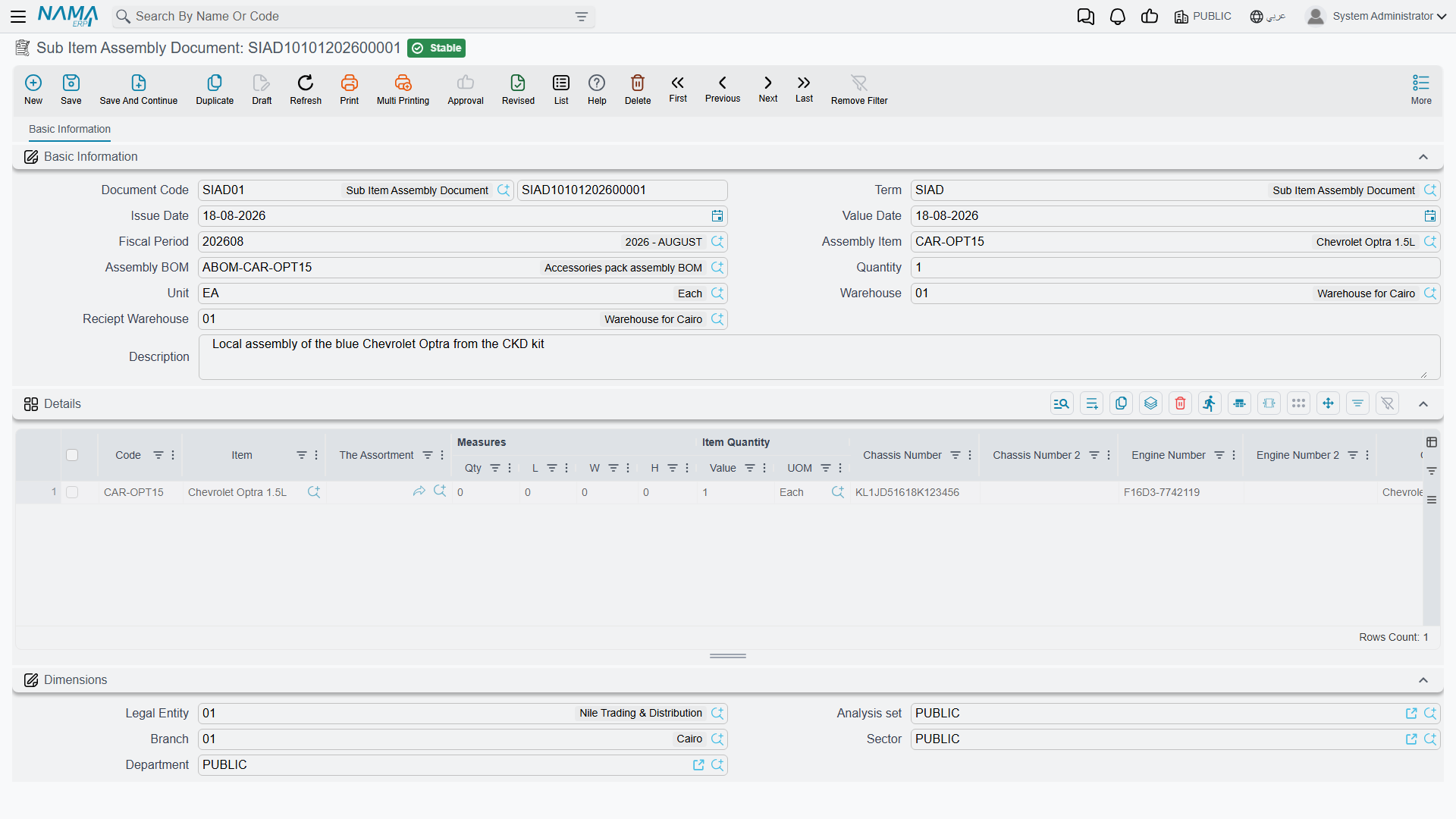
Those four columns are worth pausing on. As noted throughout this folder, no Car Purchases screen shows chassis or engine columns out of the box — except this one. It is the only shipped screen in the module where you can type a chassis number without first commissioning a screen modification.
What the four numbers become
The document threads its identifiers into the supply chain's own tracking dimensions on every save:
| You type | It becomes |
|---|---|
| Chassis number | The line's second serial |
| Engine number | The line's serial number |
| Engine number 2 | The line's lot id |
| Chassis number 2 | The line's box |
That is deliberate, and it is what makes the next section possible: the assembly can then check that the chassis and the engine you claim to be using are real, tracked units that actually exist.
What it checks before it will commit
Two validations, both strict, both per line:
- The quantity must be exactly one. A line stands for one vehicle. Anything else is refused with "Prime quantity must be one". Unlike everywhere else in the cars half, this rule is unconditional here — it does not depend on the item's status configuration.
- The chassis and the engine must genuinely exist. Each line's chassis serial is checked against the named lot of the BOM's chassis item, and its engine serial against the named lot of the BOM's engine item. A number that was never received, or received into a different lot, stops the commit.
Together these mean you cannot assemble a vehicle out of parts you do not have, and you cannot quietly build two vehicles on one line.
What it does on commit
- It creates the car records — one per line, through the same routine as every other document in this folder, and subject to the same prerequisites: the item flagged as having sub items, a Car Status Configurations attached to it, and a Created SubItem Master Group filled in. As everywhere else, the document term'sإنشاء صنف فرعي من السطر (Create Sub Item From Line Information) governs whether creation happens at all.
- It generates a supply-chain Assembly Document — but only if the document term names both an assembly document book and an assembly document term. Those two options are the entire content of this document's own term configuration, added on top of the shared sub-item block. If either is empty, the document stops after step 1: the car records exist, and no assembly is produced.
The generated assembly document is the one that does the inventory and costing work. Its co-products are the assembled vehicles, and its components are the BOM's chassis item and engine item. It is committed automatically and its reference is stored on the assembly document, so you can open it from here.
Cancelling this document permanently deletes the car records it created
This is the one behaviour in the module that destroys master data rather than reversing an effect.
Cancelling a Sub Item Assembly Document does not detach its vehicles, does not mark them cancelled, and does not move their status. It hard-deletes each line's car record, and with it the stock quantity and cost rows held against that car. It also deletes the generated assembly document.
There is no undo, and no message warning you what is about to go. If any of those vehicles has since been received, allocated, invoiced or delivered, the documents that referenced it are left pointing at a record that no longer exists.
Before cancelling, check whether any of the assembled vehicles has been used downstream. If one has, correct the situation with a return or an adjustment rather than by cancelling the assembly.
How it fits the rest of the chain
An assembler's chain looks like the buying chain with this document in place of the purchase invoice for the finished vehicle:
- The chassis and the engine are bought and received as ordinary items, serial-tracked and lot-tracked, through the normal supply-chain purchase documents. They are not car records.
- The Sub Item Assembly Document builds the vehicle: the car records are born here, and the generated assembly document consumes the components and produces the finished units into the receipt warehouse.
- From that point everything is identical to a bought-in car — allocation, traffic letter, sales invoice, final delivery — all driven by the same Car Status Configurations.
Because the car records are created here, this is the document whose term should carry Create Sub Item From Line Information — and, as with every chain, exactly one document should carry it. If you also switch it on for a later document that is not built from this one, you get duplicate car records for the vehicles you just assembled, and nothing validates the chassis number to catch it.
Landed cost
The additional-cost mechanism described in Freight, Customs and Landed Cost belongs to the Car Purchase Invoice, not to this document. The assembled vehicle's cost is the cost of its components, rolled up by the generated assembly document in the ordinary supply-chain way. Charges that need to reach an assembled vehicle should be capitalised onto the component purchases before the assembly runs.