
Ordering Cars
Two documents open the buying chain, and neither of them is a financial event in the ordinary sense. The Car Purchase Order is what Al-Sahra sends to the importer. The Car Proforma Purchase Invoice is what the importer sends back. Both live in سيارات > مشتريات السيارات (cars > Car Purchases), and both are, in practice, paperwork with a payment schedule attached.
Required licence
srvcenter-subitems.
The Car Purchase Order
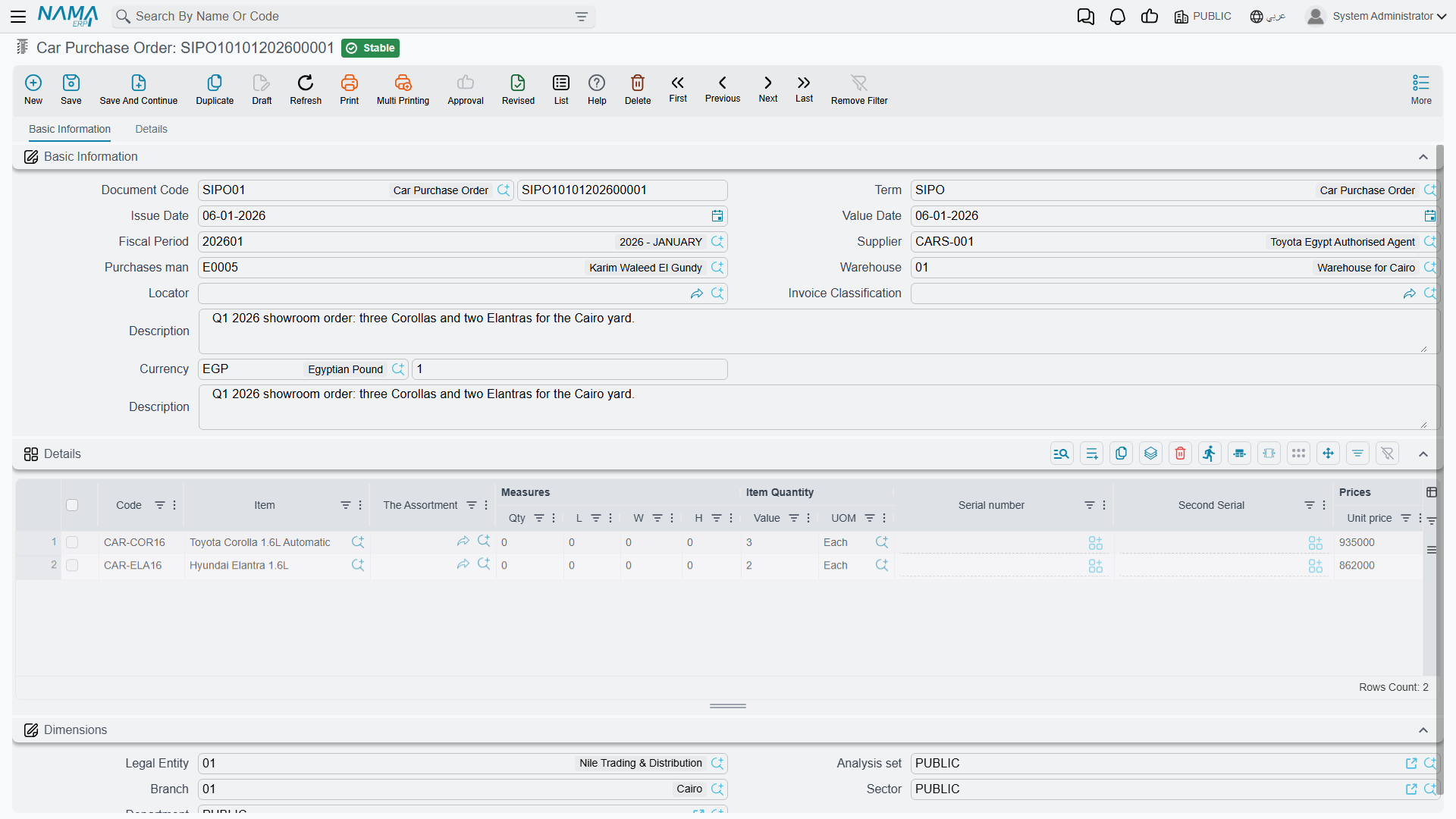
أمر شراء سيارة / Car Purchase Order — سيارات > مشتريات السيارات > أمر شراء سيارة.
On 1 February 2026 Al-Sahra orders six NAWA Rimal 2.4 at 74,000 each — 444,000 from SUP-77 NAWA Motors Import Co., as SIPO-2026-014.
The main page
The basic group holds the supplier, the purchasing agent, the destination warehouse and locator, the invoice classification, an invoice-money block, the five price classifiers and remarks. Then the line grid: item, measures and quantities, unit and total price, the eight discount blocks, the tax blocks, net value, box / revision / size / colour / lot, the السياره (Customer Car) column, production and expiry dates, department, warehouse and locator, an attachment, remarks and the line type.
The details page
This is where the commercial terms of the order live:
- the payment schedule — a payment template plus a الدفعات (payments) grid of instalment code, percentage, value, payment date and paid flag, filled either by hand or by the Generate Payments button;
- external payment lines — payment vouchers already raised against the order;
- شروط الشراء القياسية (standard purchase terms) — a grid of the standard terms you attach to supplier orders, each with its own remarks;
- the shipping address and the dimensions block.
What it does on commit
- Stock: nothing. No receipt, no issue. The one exception is a reservation — if the term's حجز (Reserve) flag is on, the order raises an expected-in reservation, which is a claim on incoming quantity, not a movement.
- Accounting: normally nothing. Unlike an ordinary purchase order, this document can have an accounting effect: it builds a journal entry if — and only if — the term's debit or credit side is filled in. Most sites leave them empty and get no entry, which is the sensible default. Clearing the sides on a term later removes the entry from documents that are re-processed.
- Quantity tracking, so the pro-forma or the purchase invoice can be built بناءا على (From Document) this order and know what is still outstanding.
- Car records, if the term says so — see below.
The Car Proforma Purchase Invoice
فاتورة مشتريات سيارة مبدئية / Car Proforma Purchase Invoice — سيارات > مشتريات السيارات > فاتورة مشتريات سيارة مبدئية.
The importer's pro-forma: the price it will actually invoice, the payment plan, the advance it wants before shipping. Raise it بناءا على the order and everything copies down.
The screen is the purchase invoice's screen with the related documents / receipts page removed — main, shipping and billing, and expense items, plus the instalment schedule and the external payment lines. That missing page is the whole story: the pro-forma has no stock documents grid at all, so it cannot bring anything into stock, ever.
What it is genuinely for:
- recording the supplier's pro-forma and its payment plan, including advance payments and payment vouchers;
- optionally, being the document where the car records are born;
- being a From Document source for the real Car Purchase Invoice;
- tracking the quantity so the invoice knows what is left.
The Car Proforma Purchase Invoice creates no journal entry.
It is also worth stating what the pro-forma is not, because the name invites both guesses: it is not a capitalisation document and it is not a distribution base. Its value is not spread over anything, and no landed-cost mechanism reads it. Import charges reach a car's cost only through the real purchase invoice — see Freight, Customs and Landed Cost.
Where car records are born
This is the decision that shapes your whole chain, and it belongs here because the purchase order is the first place it can be made.
Any of the four Car Purchases documents can create car records — switch it on for exactly one
The option is إنشاء صنف فرعي من السطر / Create Sub Item From Line Information, on the document term. When it is on, saving the document creates one car record per qualifying line, from the data typed on that line.
It is available, and behaves identically, on all four documents: the Car Purchase Order, the Car Proforma Purchase Invoice, the Car Purchase Invoice and the Car Purchase Return. The purchase invoice is not privileged in any way — it is simply where most dealerships choose to put it. Switch the option on for exactly one document type in your chain.
What happens if two documents in the same chain both have it on:
- If the later document was built بناءا على the earlier one, the line carries the car reference forward, so the later document finds the existing car and re-edits it. No duplicate — but it re-runs the whole creation routine, which re-derives the master group, re-applies the coding rule, resets the status default and overwrites the warehouse, locator, item classes and price classifiers from the new line. A car already in use can be silently rewritten.
- If the later document's lines were typed fresh — no From Document, or the car column left empty — a second, duplicate car record is created, with its own code, its own stock and its own cost. Nothing checks the chassis number: there is no uniqueness constraint on it anywhere.
A hand-typed line with quantity 5 creates ONE car record, not five
There is a term option called Spread Sub Item Lines If Qty Greater Than One, and it does exactly what it says — but only when the document is built from another document. It is part of the copy-from-document routine and nowhere else.
Type a line by hand with a quantity of 6 and press save, and you get one car record standing for six physical cars, with one chassis number. Nothing warns you.
Two defences, and use both: enter one line per chassis, and tick الكمية الرئيسية يجب ان تساوي الواحد الصحيح (Prime Quantity Must Be One) on the item's Car Status Configurations so the mistake is refused instead of accepted.
Both screens also carry a More → إنشاء صنف فرعي من السطر (Create Sub Item From Line Information) action, which runs the same routine on demand against the grid you are looking at. It is gated by the same term option: with the option off, pressing it creates nothing and shows no message, so if nothing appears to happen, check the term first.
And remember the prerequisite from The Car Dealership in Nama: neither of these screens shows a chassis-number column out of the box. The order and the pro-forma display only the السياره (Customer Car) picker, so there is nowhere to type the chassis number the creation routine is meant to read. Add the car-property columns through a screen modification first.
Actions on these screens
Car Purchase Order:
- Create Sub Item From Line Information (إنشاء صنف فرعي من السطر, More menu) — runs the car-creation routine against the lines, as described above: for every line whose item has sub items it creates the car record (or refreshes the one already on the line) and writes it back onto the line. The car record is saved straight away, even before you save the order.
- GeneratePayments (إنشاء الدفعات, details page) — splits the order value into an instalment schedule. It asks for the number of payments, the period between them and its unit, the start date, a grace period, down / first / second / last payment values and a rounding mode. The English label ships as the raw name shown here.
Car Proforma Purchase Invoice:
- Create Sub Item From Line Information (إنشاء صنف فرعي من السطر, More menu) — the same routine as on the order.
- Generate Doc (إنشاء مستند بناءا على, More menu) — asks which kind of document to create (stock issue, stock receipt, stock transfer, purchase invoice, purchase return, car purchase return, sales invoice or car sales invoice) and opens a new, unsaved one built from this pro-forma.
- Remove Taxes (حذف الضرائب) and Restore Taxes (احتساب الضرائب), More menu — the first asks which taxes to clear and empties them on every line; the second recalculates them. Both are refused when the document is not taxable.
- Reset discounts (حذف الخصومات, More menu) — clears all eight discounts on every line.
- Installment Payments (سندات سداد الدفعات, More menu) — opens a list of the vouchers that paid this document's instalments.
- On the shipping and billing page: GeneratePayments (إنشاء الدفعات), the same scheduling dialog; Generate payment voucher (إنشاء سند صرف) — the pro-forma must be saved; it creates a payment voucher for the whole remaining value against the supplier; Generate Payment Voucher For Selected Payments (إنشاء سند صرف للسطور المختارة) — the same for only the instalment lines you ticked; and Collect Payment Vouchers (تجميع سندات الصرف) — brings existing vouchers onto the pro-forma.
On the list screen of both, Reset documents discounts with saving (حذف الخصومات من السجلات المختارة مع الحفظ, More menu) clears the line discounts of every selected record and saves it.
What moves the car's status
Nothing, until you configure it. If your updater rows target the purchase order, the six Rimals move to بالطريق (In Transit) when SIPO-2026-014 commits; if they target the pro-forma, they move when that commits. Al-Sahra starts its chain at the purchase invoice, so in the worked example the order and the pro-forma move nothing at all.
Next in the chain
- The Car Purchase Invoice — the document that books the purchase.
- Receiving Cars into the Showroom — the physical-arrival record, and the alternative place to move stock.