
Subcontractor Extracts
Everything else on the subcontractor side is preparation. The subcontract records what you agreed, the execution records what was built, the advance records what you lent him and the fine records what he owes you back — and none of those four reaches the general ledger. The subcontractor extract (مستخلص مقاول باطن) is the one document that does. It is his payment application: the certificate that says this much work was done this period, this much is being held back, this much of your advance is coming off, and this is what you will actually be paid.
You will find it under Contracting > Contractor Contracting > Contractor Contract Extract.
What is the same as the project extract
The document is built from the same machinery as the owner-side Project Extract: the same details grid and Collect Terms buttons, the same incremental billing quantity, the same conditions grid, the same strict time ordering between extracts on one contract, and the same three extract types. Read that page for the shape of the document; this page is about the ways the cost side differs, and there are more of them here than anywhere else in the module.
The headline differences:
| Project extract | Subcontractor extract | |
|---|---|---|
| Direction of money | a receivable — the client owes you | a payable — you owe the subcontractor |
| Settled by | receipt vouchers | payment vouchers |
| Deductions collected from | contract conditions, project advances, project fines | contract conditions, subcontractor advances, other payments, fines — and material you sold him |
| Taxes | a tax-term mechanism derives the tax lines automatically | tax percentages typed on the document |
| Actual-cost accounting entries | yes | no — the amounts are always zero on this side |
| Closing the contract | — | a Final extract marks the subcontract finished |
The example this page follows
Subcontract CC-0042, blockwork, with the blockwork subcontractor:
| Term 3.01 blockwork 200 mm | 2,000 m² contracted at 40 → 80,000 |
| Retention condition on the contract | 10% deduction, «استقطاع ضمان» |
| Mobilisation advance already paid | 16,000, recovered at 20% of each extract's value |
| VAT | 15% |
| Cement sold to him during month one | 80 bags at 30 → 2,400 |
Three extracts will bill the 2,000 m²: 800, then 700, then a Final 500.
Anatomy: three grids, three different ways of filling them
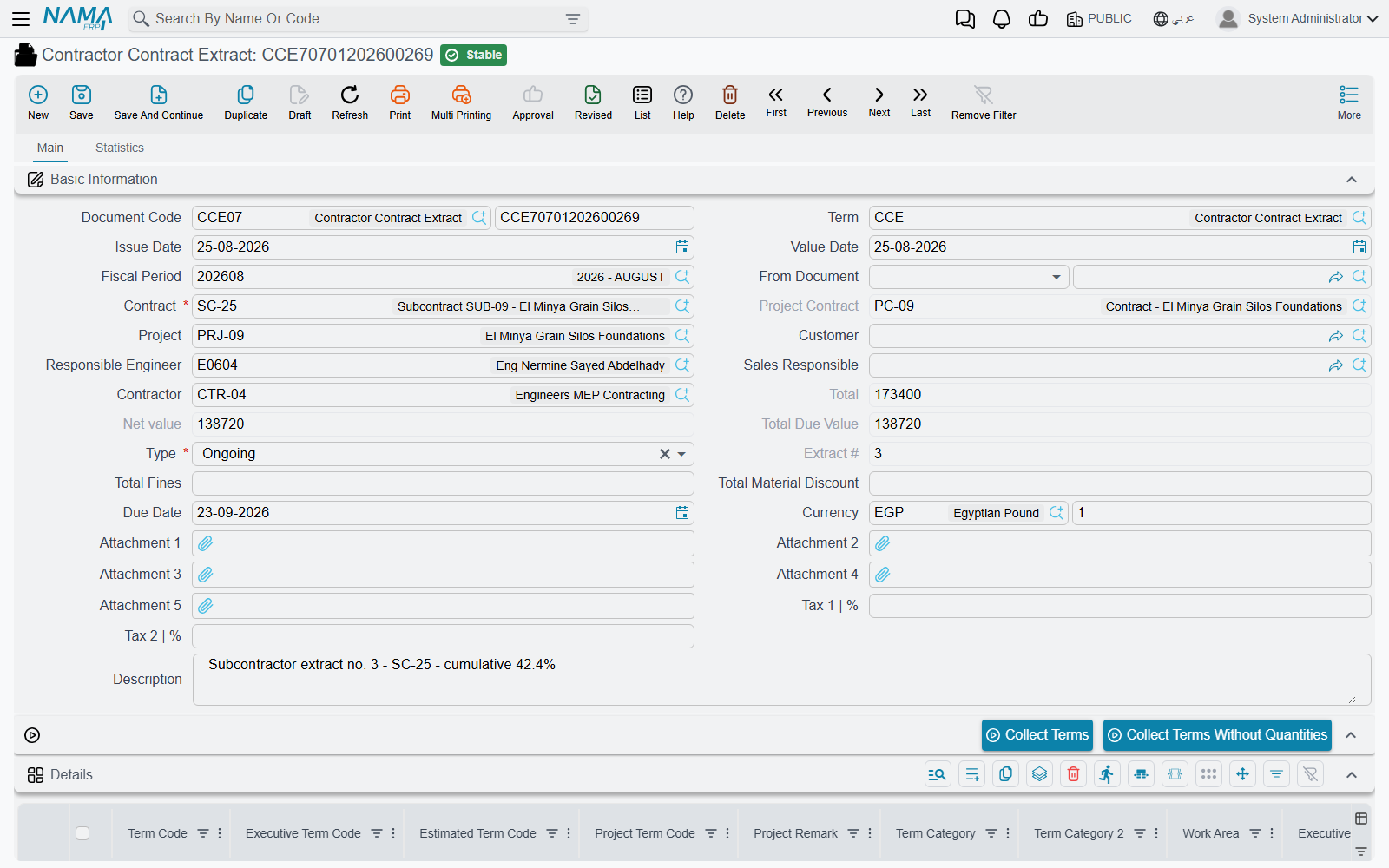
The header identifies the document and the money. Contract is the subcontract, and picking it fills the contractor, the project, the responsible engineer and sales owner, the client — and the project contract, which is then locked, because a subcontract can only ever sit inside one client contract. The due date is worked out from the payment period agreed on the subcontract. Type is Initial, Ongoing or Final, and Extract Number is filled on commit: a sequence per subcontract, so the third extract on CC-0042 is number 3 no matter how many extracts exist elsewhere.
Below that sit the two grids that matter.
The details grid — the work
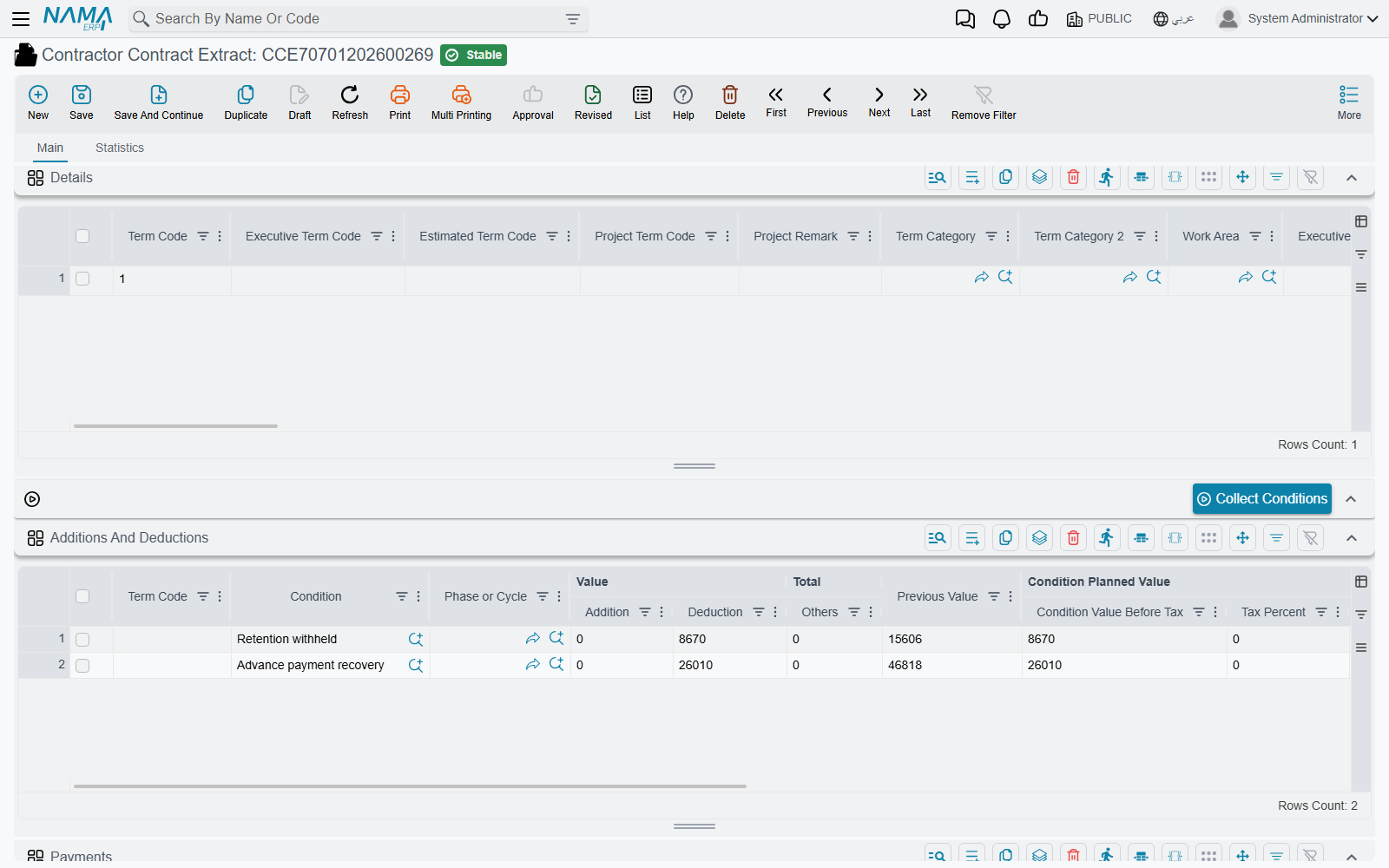
One line per term, or per phase of a term. It is a wide grid — sixty-odd columns — but the money comes from a handful of them:
| Column | What it is |
|---|---|
| Term Code | which line of the subcontract is being billed |
| Contracted Qty | the subcontract's quantity for that term, for reference |
| Previous quantity | everything billed on earlier extracts of this subcontract |
| Quantity | Paid Amount | the quantity being billed on this extract. This is the field you fill and the number every value on the line is derived from |
| Total quantity | previous plus current |
| Unit Price / Price | the price from the subcontract, and the extended value |
| Unit Cost / Total Cost | the cost view of the same work |
| Discounts, Tax 1, Tax 2, Net Value | the money block |
| Additions From Conditions / Deductions From Conditions | what the conditions grid contributed to this line |
| Project Term Code, Executive/Estimated Budget Term Code | the cross-references that tie the subcontract item back to the client contract and to the budgets |
Those last three are worth pausing on, because they exist only on this side. A subcontract term is a slice of a client-contract term: your term 3.01 sold to the client may be delivered by three different subcontractors' term 3.01s. Filling the project term code — which Collect Terms does for you from the subcontract — is what lets the system add up how much of the client's blockwork has been subcontracted, and it is what makes the write-back described further down possible.
The extract also fills the analysis term code and the analysis card on each line from the matching subcontract term, when you leave them empty. That is how the money on this document later finds its way into cost analysis.
The conditions grid — everything that moves the net payable
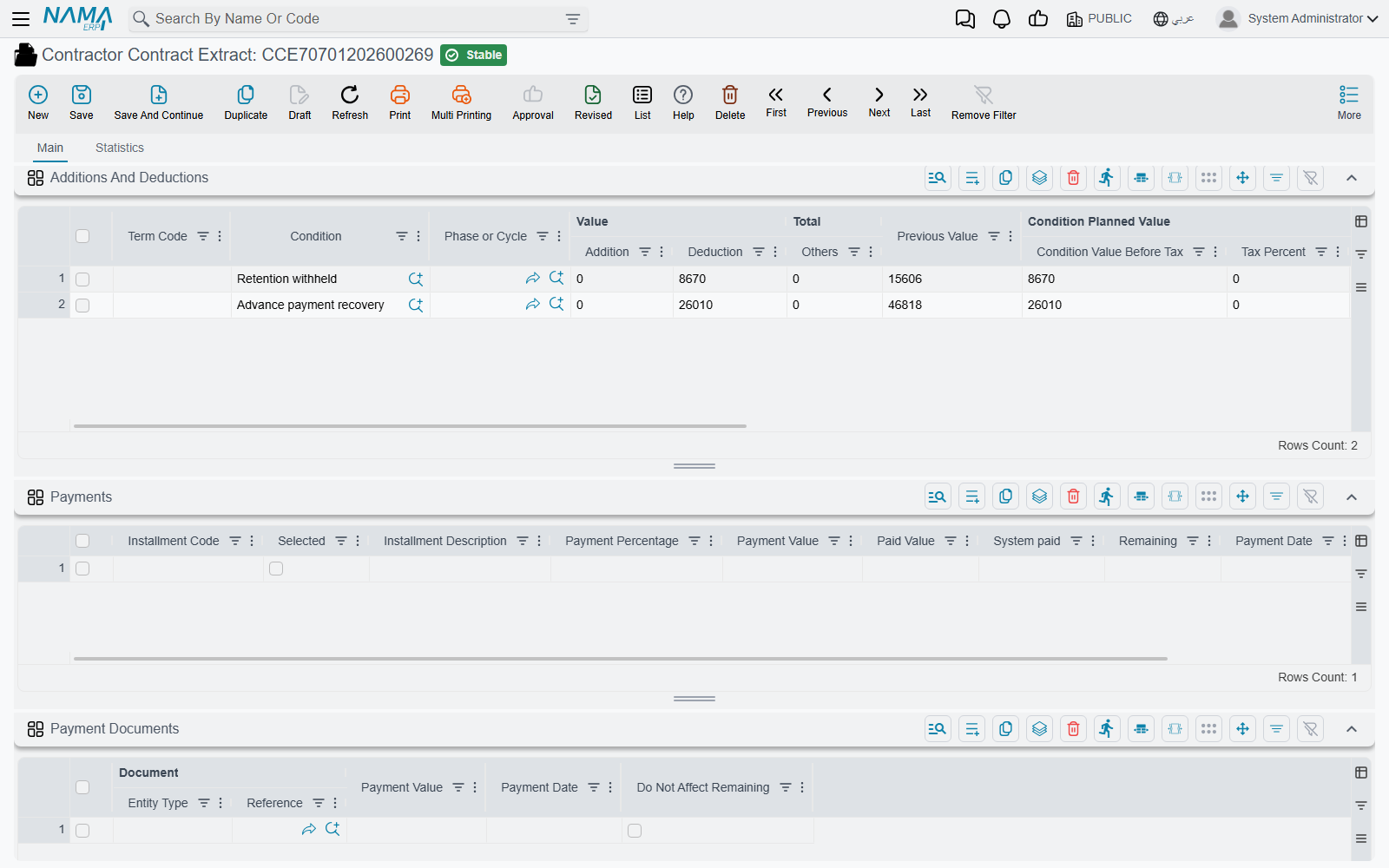
Additions And Deductions is the single most important grid on the subcontractor side, because every reduction of what he gets paid arrives here. Retention, advance recovery, other payments being clawed back, fines, and the material you sold him are not separate mechanisms — they are all condition lines on this grid. Each carries a condition (شرط), the term code it applies to, an addition value, a deduction value, an other value, a tax percentage and, where the line came from a document, the condition document it came from.
Filling the details grid
There are two routes and they exclude each other.
From an execution. Put a subcontractor execution in the Based On field. The measured lines come across, and unless the document term allows otherwise the billed quantities must stay exactly as measured.
From the subcontract. Leave Based On empty and press Collect Terms. The extract asks the server what has been measured but not yet billed on this subcontract, builds a line for each, and then adds a line for every remaining contract term. Each line arrives with its contracted quantity, its previous quantity, the unit price and unit cost from the subcontract, the term's discount and tax percentages, and a suggested billing quantity — normally measured so far minus already billed. Parent lines are then re-totalled from their children.
The button refuses to run while Based On is filled, and it needs the contract first. There is a second button, Collect Terms Without Quantities, which does everything except suggest the quantities — the choice for a surveyor who wants the bill of quantities laid out but insists on typing every figure himself. Two options on the document term change the suggestion as well: one makes every collected quantity zero, and the other fills it with the quantity remaining after the previous extract.
Terms with nothing left to bill are hidden
Collect Terms deliberately skips any term whose remaining quantity has reached zero. When you do need those lines — a corrective extract, a re-measurement — the variants that pull every contract term regardless (Collect All Terms and Collect All Terms Without Quantities) are not above the details grid; they appear only on the Term Phase Lines page, which exists when the module option Show Term Phase Lines is on.
For the first extract on CC-0042, the line is:
| Contracted Qty | 2,000 |
| Previous quantity | 0 |
| Quantity | Paid Amount | 800 |
| Unit Price | 40 |
| Price | 32,000 |
| Tax 1 at 15% | 4,800 |
| Net Value | 36,800 |
Previous extracts, and the three ways a line can be priced
By default the extract is incremental: the quantity you fill is this period's quantity, and every value on the line is that quantity times the price. The previous figures are carried for context and for printing — each line records the cumulative net value and due value of the earlier extracts for the same term and phase, so a certificate can show "previously certified / this period / to date" without any of it affecting what is being paid.
"Previous" means committed extracts on the same subcontract with an earlier value date. Two term options on the extract's document term change the arithmetic, and they cannot both be switched on:
- Calculate Prices Based On Total Qty prices the line on the cumulative quantity instead. Be precise about what this gives you: the line's pricing does change in every case, but the part that then subtracts the previous extract's price and previous discounts only runs when the phase term lines feature is enabled in the module configuration. Switch it on without that, and you get cumulative pricing without cumulative netting — which is almost never what you want.
- Calculate Prices Diff From Previous Extract Only works everywhere. It finds the last previous extract line for the term and fills a parallel set of difference columns — price difference, net value difference, discount differences — and the amount claimed for the line becomes this net value minus the previous one. Those difference columns have their own accounts on the document term, so a difference-only extract books the movement rather than the gross.
Separately, a header-level option makes the total due value cumulative-minus-previous regardless of how the lines are priced, for organisations whose certificate format expects that.
Actions on this screen
Above the details grid:
- Collect Terms — builds the lines from the subcontract: what has been measured but not billed, plus every remaining contract term, each with a suggested billing quantity. Refuses to run while Based On is filled.
- Collect Terms Without Quantities — the same lines with the quantities left for you to type.
Above the conditions grid:
- Collect Conditions — assembles the retention, advance-recovery and fine lines described below.
When the module option Show Term Phase Lines is on, the extract gains a Term Phase Lines page with its own four buttons: Collect Terms, Collect Terms Without Quantities, Collect All Terms and Collect All Terms Without Quantities. The two All variants are the only way to pull in terms that have nothing left to bill.
Retention, advance recovery and fines: the conditions grid at work
Press Collect Conditions above the grid and the extract assembles the deductions from two places.
From the subcontract's own conditions. Every clause on the subcontract that is not driven by a separate document and is not flagged to stay out of extracts is evaluated against this extract's value. This is how retention works. There is no retention field anywhere on the extract; there is a condition on the contract, and it produces a deduction line here. Its value comes from the clause's value type — a percentage of the extract, a fixed amount, a percentage of a term's net value, a custom equation — and clauses can be told to calculate after the clauses above them, so a "retention on the net of discount" rule can be expressed honestly. See Contract Conditions for how a clause is written.
From outstanding documents. The extract scans the subcontract for anything still owed back and turns each into a condition line carrying the document it came from. On this side that means subcontractor advance payments, other payments, fines and material issued to him. It looks for documents on the same subcontract, committed, with a remaining balance, dated no later than the extract. How much each one gives up is decided by the recovery method on that document:
| Recovery method | Taken on each extract |
|---|---|
| First Next Extract | the whole remaining balance, on the next extract raised |
| Fixed Value With Every Extract | the fixed amount on the document, or the remaining if less |
| Percentage With Every Extract | that percentage of the document's own value |
| Percentage From Due Value With Every Extract | that percentage of this extract's value |
| Final Extract | nothing until the Final extract, then the whole remaining |
An owner-side fine is deliberately excluded from this scan, so a penalty you levied on your client's contract can never appear as a deduction against a subcontractor.
For the first extract on CC-0042, Collect Conditions produces three lines:
| Condition | From | Deduction |
|---|---|---|
| Retention 10% | the subcontract's retention clause | 3,200 |
| Advance recovery, 20% of the extract's value | advance payment of 16,000 | 6,400 |
| Material charge-back | the cement issue | 2,400 |
You can have the extract do this on save
The extract's document term carries a collect-type setting with three positions: never collect automatically, collect on every extract, or collect on the Final extract only. Set it to collect on every extract and the grid is rebuilt server-side each time you save, which is the safer default for a busy site office — the Collect Conditions button then becomes a way of previewing the deductions before committing.
Two guards protect the conditions grid. A condition can never recover more in total than the subcontract planned for it, unless the clause is explicitly allowed to exceed its planned value — this is what stops you withholding 12% of retention on a 10% clause, counting all the extracts together. And no advance, other payment or fine may be driven negative; the save fails and names the document and the term.
Each condition line also records, per term and per source document, what earlier extracts already took, so the grid shows the recovery to date beside this period's amount.
Material sold to a subcontractor comes back as a deduction
This is the mechanism with no owner-side equivalent, and the one that surprises people most.
When you issue material from your own store to a subcontractor, that is not a project cost — it is a sale. The Contractor Material Issue is a priced invoice: he is charged for the cement, VAT and all, and a receivable is created. Nobody expects him to write you a cheque for it, though. The money comes back the only way money moves between you: off his next extract.
The path is worth understanding because it explains what you see:
- Committing the material issue records a charge against the subcontract, one entry per issued line, carrying the term code and the net value.
- Because the issue carries a condition and a recovery method just like an advance does, the next extract's Collect Conditions finds it and writes a deduction line for it.
- Committing the extract stamps each charge with the extract that absorbed it, so it is never collected twice, and the issue's remaining balance falls to zero.
- From that moment the issue is frozen: change or delete a line whose charge an extract has already taken, and the save is refused, naming the extract that consumed it. Correct the extract first, or issue a material return.
- A material return is the mirror image. It reverses the sale, brings the stock back, and on the next extract it appears as an addition rather than a deduction — you are giving him his money back.
On CC-0042 the 80 bags of cement at 30 became a 2,400 deduction on the first extract. Had he handed 20 bags back, the following extract would have carried a 600 addition. The material issue's own Statistics page answers the question the site office actually asks — has this material been deducted yet, and on which extract?
Taxes
Tax percentages are set on the document header and flow into the lines' tax columns, which then feed the tax accounts on the document term. There is no automatic tax-term derivation on this side; that mechanism belongs to the owner extract alone, along with its tax detail grid.
Tax on a condition is handled separately: the accounts for it come from the condition record itself rather than from the document term, so if a retention clause is meant to carry tax, that is where you set it up. A term option additionally rolls condition taxes into the document's main Tax 1 amount.
The condition record also decides the condition line's tax percentage. On every save, a line whose condition does not have Taxable ticked gets a tax percentage of 0, and an empty percentage on a taxable condition is filled from the condition's Tax Percentage. If a retention line's tax keeps going back to 0, tick Taxable on the condition — see Contracting Conditions.
What the extract books
The extract does not write ledger rows itself. On commit it builds an accounting business request (طلب أعمال) and hands it to the queue, which is processed in the background — so the save is instant and a failure is visible and retryable. If the entry does not appear, go to the Business Requests view, filter for failures and use More > Reprocess / Recommit. Re-saving the extract updates the same request rather than creating a second one, and the Regenerate Accounting Effects action re-issues it.
What the request contains, in business terms:
- The work. Each detail line's claimed value on the document term's main debit and credit pair — labelled Debit 2 and Credit 2, and there is no "Debit 1"; that pair is the primary one for every contracting document. Typically debit work in progress or project cost, credit the subcontractor's payable. Heading (parent) term lines never contribute; the money is on the detail lines.
- The cost view. The line's total cost on a separate cost debit/credit pair, if you configure one.
- The taxes, on the tax pairs.
- Every condition line, which is where retention, advance recovery, fines and the material charge-back land.
- Difference amounts, when the document term is in difference-only mode.
Accounts can be overridden twice over
The main pair on the document term is only the default. A standard term can carry its own debit and credit, and when it does those win for the lines that use it — so concrete can go to a concrete work-in-progress account and steel to a steel one, driven from the standard-term catalogue rather than from the document. Independently, each condition can carry its own account pair, and when it does, its value is booked there as a positive amount; a condition with no accounts of its own is booked on the main pair, negated when it is a deduction. That is the difference between "retention appears as a credit on a retention-payable account" and "retention appears as a negative line against the payable".
The subcontractor's side of the entry is expressed as an accounting side whose subsidiary is the supplier: it lands on the contractor record's own accounts, or on the accounts of the supplier record linked to him when the contractor has none. A term option shortens the entry, collapsing the per-line rows into one row per account so the journal is not a copy of the bill of quantities.
Read as a journal, with a conventional set-up — main pair debiting work in progress and crediting the subcontractor's payable, and each condition carrying its own pair — the first extract on CC-0042 is:
the work        Dr Work in progress — blockwork      32,000
                   Cr Subcontractor payable                      32,000
the tax         Dr Input VAT                          4,800
                   Cr Subcontractor payable                       4,800
retention       Dr Subcontractor payable              3,200
                   Cr Retention payable                           3,200
advance         Dr Subcontractor payable              6,400
                   Cr Advance to subcontractor                    6,400
material        Dr Subcontractor payable              2,400
                   Cr Material sold to subcontractor              2,400
The payable is left holding 32,000 + 4,800 − 3,200 − 6,400 − 2,400 = 24,800, which is what the payment voucher will pay him. A parallel cost entry is added on top if the cost pair is configured.
The three extracts, end to end
| Extract 1 | Extract 2 | Extract 3 (Final) | |
|---|---|---|---|
| Quantity billed | 800 | 700 | 500 |
| Work value | 32,000 | 28,000 | 20,000 |
| VAT 15% | 4,800 | 4,200 | 3,000 |
| Retention 10% | −3,200 | −2,800 | −2,000 |
| Advance recovered | −6,400 | −5,600 | −4,000 |
| Material charge-back | −2,400 | — | — |
| Fine | — | −1,500 | — |
| Net payable | 24,800 | 22,300 | 17,000 |
Retention withheld comes to 8,000 — 10% of the 80,000 subcontract, exactly as the clause promised. The advance clears at 6,400 + 5,600 + 4,000 = 16,000, landing on zero as the last extract closes. The fine on extract 2 is a 1,500 rework charge. The retention itself is released later, by a separate agreement — the extract only withholds it.
Extract types, and the rules of order
Initial, Ongoing and Final. Only one Initial extract is allowed per subcontract, and once a Final extract is committed no further extract can be raised on that contract at all. A Final extract does three extra things:
- It recovers the whole remaining balance of every advance, other payment and fine, regardless of each document's own recovery method.
- It refuses to save while anything is still outstanding — "the payment … for the contract … still has a remaining …". You cannot close a subcontract with an unrecovered advance.
- It marks the subcontract finished, which is why closed subcontracts stop appearing in the contract picker of new documents. Cancelling the Final extract reopens it.
Extracts on one subcontract are strictly ordered in time and only the last one is editable. Change a quantity, a condition or the value date while a later extract exists and the save is refused, naming the later document; two committed extracts may not share a value date, either. Deletion follows the same logic — a later extract blocks it, and so does a line already consumed by a cost execution.
Other checks worth knowing: you may not bill a parent term code on a detail line; every term code used must exist on the subcontract (or on the execution, when the extract came from one); the cumulative billed quantity is held to the term's permitted percentage unless the document term allows it to exceed the contract; a payment percentage may not exceed 100; and a term option can force line prices to match the contract exactly, refusing any line that has been re-priced.
Duplicating an extract gives you an empty bill of quantities
Use Duplicate and every billing quantity comes across as zero. That is the intended behaviour and it is genuinely useful: you get the same lines, the same prices and the same structure, ready for this month's measurements.
What else commit changes
Beyond the ledger and the condition documents, committing an extract updates:
- The subcontract's term lines — the quantity billed to date, per term and per phase, and the last achieved phase.
- The subcontract's condition totals, so the contract itself shows how much retention has accumulated.
- The execution it came from, marked as extracted with the billed quantity recorded per line.
- The contracting cost pool, which is what Cost Execution and the budgets later read.
- The client contract and the budgets — but only when the module configuration turns on the option to update term quantities from subcontractors' extracts. When it is on, the system gathers every subcontract on the same client contract, sums their extracted quantities by project term code, estimated budget term code and executive budget term code, and writes those totals onto the project contract and both budgets. This is the only place a subcontractor document reaches up into the owner side, and it is why the cross-reference columns on the detail lines matter.
Paying it
The extract creates the obligation; a payment voucher discharges it. Vouchers attached to the extract appear in its payment documents grid, and the vouchers total and remaining amount sit in their own block beside the totals — so the document itself answers "how much of this certificate has actually been paid?". A term option redirects that settlement to the subcontract's instalment schedule instead of the extract, for organisations that track payment against the contract.
Finally, the extract's Statistics page is the audit trail. It lists the fine documents this extract consumed and, row by row, which advance or other payment gave up how much on it. When somebody asks why the subcontractor was paid 24,800 instead of 36,800, that page and the conditions grid are the answer.