
Selling Material to a Subcontractor
Contractors supply their subcontractors constantly. You buy cement by the lorry and he buys it by the bag, so you give him yours — but not for free. The bags come off your stock, they go on his account, and when his payment application comes round the value is taken off what you owe him.
That is exactly what the module does, and it is the reason the Contractor material documents look so different from the Contracting ones they sit beside in the menu. Contractor Material Issue is a sale. It is a sales document with a full invoice effect: a price on every line, discounts, taxes, a receivable raised against the subcontractor, and a charge-back record that his next extract will turn into a deduction. Nothing about it touches project cost — the material stopped being your cost the moment you sold it.
The three documents, all under Contracting > Costs, all needing the contracting licence:
| Document | Arabic name | What it does |
|---|---|---|
| Contractor Material Issue Request | طلب صرف خامات مقاول باطن | a priced authorisation; records nothing |
| Contractor Material Issue | صرف خامات مقاول باطن | stock out, invoice booked, charge-back created |
| Contractor Material Return | مردود خامات مقاول باطن | stock back, credit note, and the charge-back reversed |
If what you actually want is material consumed on your own project rather than sold on, that is Issuing Material to a Project.
The header carries the settlement terms
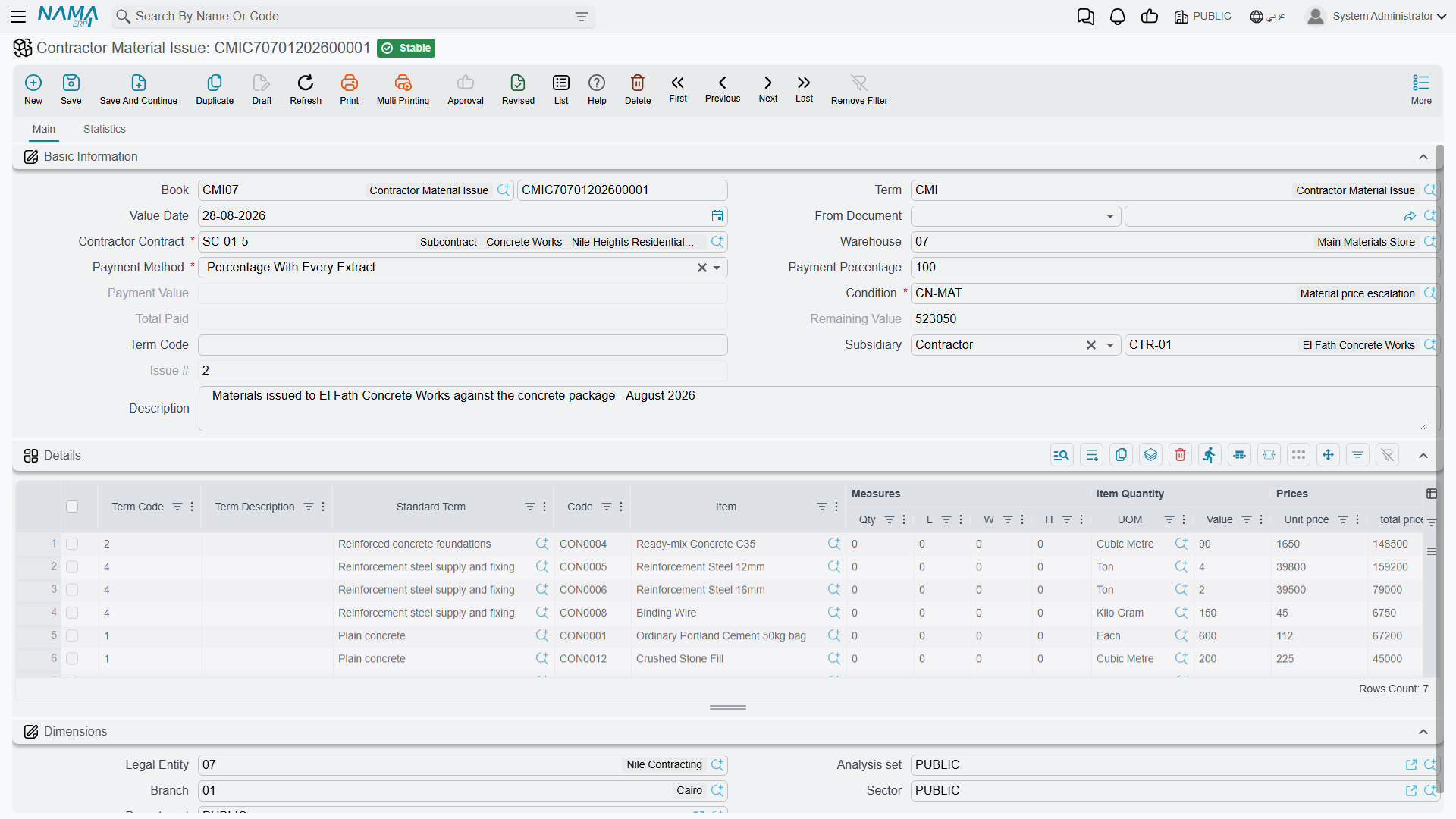
The header looks like an inventory document until you reach the middle of it, at which point it starts looking like a sale on credit.
| Field | |
|---|---|
| Contract | required, and it accepts a subcontract only — never a project contract |
| Warehouse | the source of the material; the header value is pushed onto every line |
| Payment Method | required — how the charge is to be settled, which in practice means deduction from his extract |
| Payment Percent, Payment Value | how much of the charge is settled by that method |
| Condition | required — the contract condition the deduction will ride on when it reaches the extract |
| Term Code | a header default, pushed down onto every line |
| Total Paid Amount, Remaining Value | system — how much of the charge has been settled, and how much is still outstanding |
| Issue Number | system — this document's ordinal among the issues on this subcontract, so the first issue is 1, the second 2 |
| Subsidiary, dates, From Document, remarks | the ordinary document header |
The Condition field is the one people skip past, and it matters more than its position suggests. The deduction does not arrive on the extract out of nowhere: it arrives as a condition line, and this field names which condition. Pick a condition that exists for the purpose — a "material deduction" condition — and make it the default on the document term so nobody has to remember.
The lines are ordinary sales lines: term code, standard term, item and code, measures and quantity, then the full price block — unit price, price, the discount levels, the taxes, and Net Value. Net Value is the number that becomes the deduction, so it is the figure to check before committing.
Unless the term makes it optional, the line's term code is required and must exist in the subcontract's term list. That is what ties the deduction to a term of his work, and it is how the extract knows which of its lines the deduction belongs beside.
What committing an issue does
Four things happen, and they are worth separating because each is visible in a different place.
- The invoice is booked. The document generates an ordinary ledger effect as a background business request, using the accounts configured on its document term: the subcontractor's receivable side against inventory going out, plus tax. This is a real sale in the general ledger.
- The stock moves. A Stock Issue is generated and committed automatically, carrying the lines, the warehouse and the locator. As with every generated document in this family, the book and term of the generated stock issue come from this document's own document term — leave either empty and no stock document is created at all, so the invoice is booked and the material never leaves the warehouse. It also works in reverse: empty the details and the generated stock document is deleted.
- A charge-back record is written, one per line, holding the subcontract, the term code, the item and the line's net value, with no extract against it yet.
- The outstanding balance is set. The header's Remaining Value becomes the net value of the document, and each line's remaining value becomes the net value of its term group. That non-zero remaining value is the flag that makes the charge visible to the next extract.
How the charge reaches his extract
When a subcontractor extract is prepared for the same subcontract, it collects the committed material issues that still have a remaining value and dated on or before it, and turns each one into a condition line carrying a deduction value — the named condition, the term code, and the money. The deduction then flows into the extract's net payable alongside retention, advance recovery and fines, and is reversed if the extract is cancelled.
On committing the extract, two things settle:
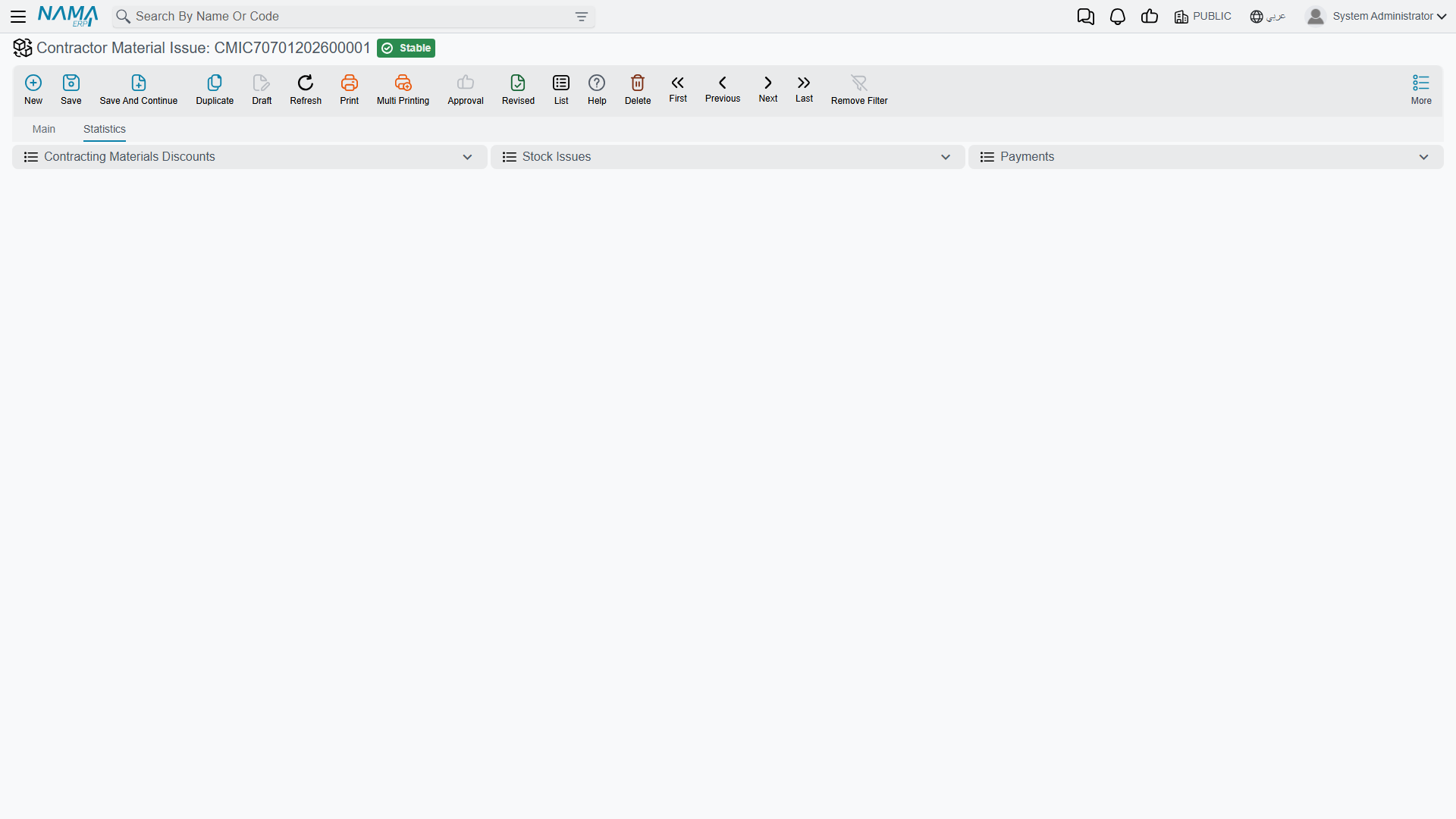
- each charge-back record is stamped with the extract that absorbed it, which is what you see on the issue's Statistics page — the row's extract column answers "has this material already been deducted?" without opening anything else;
- the issue's Total Paid Amount rises to the deducted value and its Remaining Value drops to zero, so the same material is never collected onto a second extract.
Once an extract has consumed a line, the issue is frozen
From that point on the line cannot be edited or deleted. The attempt fails with You removed or modified line number {0} in document {1} which is linked with contractor extract {2}. This is deliberate: the deduction has already been paid out of his money. To correct it, the extract has to be reversed first.
The return flips the sign
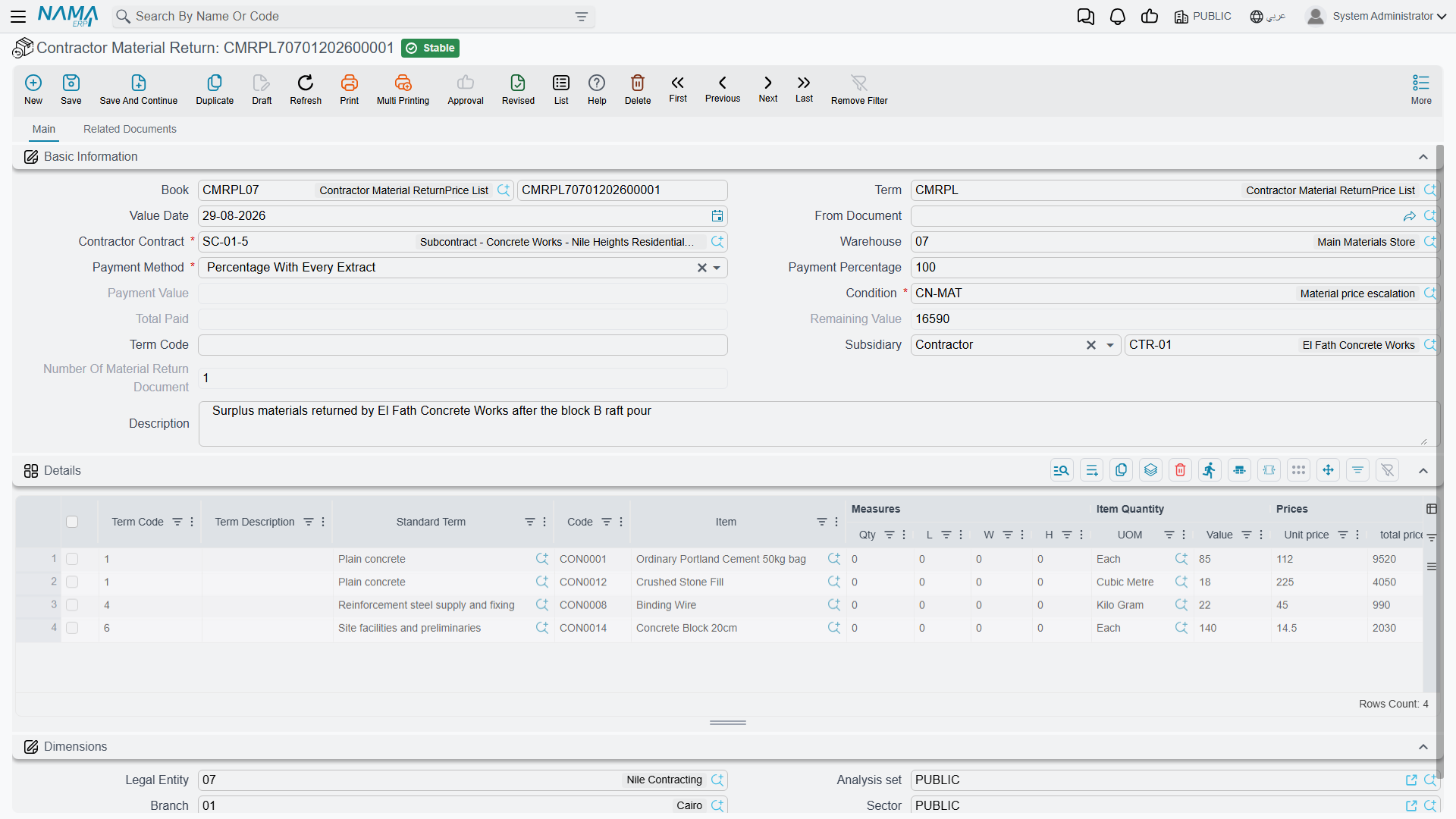
A Contractor Material Return is the same document run backwards. Material comes off his account and back into your warehouse, so:
- a Stock Receipt is generated instead of a stock issue;
- the money side is booked in the credit-note direction, reversing the sale;
- and on the extract the value appears as an addition rather than a deduction — the system does not merely stop deducting, it gives him the money back.
Its header carries the same payment block and a Return Number counting the returns on the subcontract, and building it from the issue copies the subcontract, the condition, the payment block and the term code across.
The request
The Contractor Material Issue Request is the paperwork stage: a priced list of what the subcontractor has asked for, against which contract terms, at what price, on what settlement terms. It is a record of the agreement: the ledger entry, the stock document and the charge-back come from the issue.
Its value is what it saves you when it becomes an issue. Select it in From Document on the issue and the subcontract, the condition, the payment method, the payment percent, the payment value and the term code all come across, so the priced request only has to be agreed once. As on the project side, the issue does not require a request — you can sell material directly.
Setting it up once
Four things on the Contractor Material Issue document term make the difference between a document that works and one that half-works:
| On the term | Why |
|---|---|
| the generated document's book and term | without both, no stock issue is created and the material never leaves the warehouse |
| the debit and credit accounts, and the tax accounts | this is a sale; without them there is no ledger entry |
| default condition, payment method, payment percent and payment value | so the settlement terms are right without being retyped, on every issue |
| whether the project term code is optional | leave it required unless you have a reason; the term code is what places the deduction against a line of his work |
The return has the same set, pointed at a stock receipt and the credit-note accounts.
Worked example: cement for the blockwork subcontractor
On Tower A, the blockwork on term 3.01 is subcontracted to Modern Construction Est. for 80,000 — 2,000 m² at 40 — on subcontract CC-0042, with 10% retention. He lays and supplies the blocks, but the mortar cement is bought from us.
A condition exists for the purpose. MATDED — material deduction — set up once as a contracting condition, deducting whatever value is put on it.
He asks.
CIQ-000012, a Contractor Material Issue Request: subcontractCC-0042, conditionMATDED, payment method deduct from extract, term3.01, one line — 80 bags ofCEM-42.5at 30.00, net 2,400. Nothing happens yet.We issue.
CTI-000031, a Contractor Material Issue with From Document =CIQ-000012, so the subcontract, condition and payment block copy themselves in. Commit, and:- stock issue
SI-001231is generated — 80 bags leaveWH-SITE-A; - the ledger entry raises 2,400 receivable on Modern Construction Est. against inventory out, plus tax per the term;
- a charge-back record is written for subcontract
CC-0042, term3.01, itemCEM-42.5, net value 2,400, with no extract against it; - Remaining Value on the header is 2,400.
- stock issue
His first extract collects it. The blockwork extract certifies 800 m² at 40 and the deduction arrives on its own:
On the subcontractor's first extract Work certified this period, 800 m² at 40 32,000 Retention withheld, 10% −3,200 Material deduction, condition MATDED, term3.01−2,400 Net before advance recovery and tax 26,400 It settles. On commit,
CTI-000031's charge-back row is stamped with that extract — visible on the issue's Statistics page — its Total Paid Amount becomes 2,400 and its Remaining Value zero. The next extract will not see it again. And from now on its line cannot be touched.Twenty bags come back.
CTR-000004, a Contractor Material Return: 20 bags at 30.00 = 600. Stock receiptSR-000488brings them into the warehouse, the money side is booked as a credit note, and on his next extract the 600 appears as an addition, not a deduction.
Two things this example does not do, both of them the point of the page. It never touches the tower's cost — the 2,400 is revenue, and the blocks we issued to our own term 3.01 are a completely separate document. And it never reduces the 80,000 subcontract value: the subcontract is still 80,000 of work, and the cement is money he owes us that happens to be collected by netting.