
Contracting Purchase Requests and Orders
Nama already has a perfectly serviceable purchase request and purchase order in the supply chain module. So why does contracting ship its own pair?
Because a contractor never simply buys rebar. He buys rebar for the concrete term of the Tower A contract, out of the executive budget line approved for that term, against an analysis card that said the term needs so much steel per cubic metre. The purchase has to be traceable to a line of a bill of quantities from the moment the site asks for it — otherwise nobody can answer the two questions a project manager asks every week: has what we ordered for this term arrived, and are we buying more of it than we sold?
So the contracting purchase request and the contracting purchase order are the ordinary purchase documents — same supplier, same price block with its eight discount levels and four taxes, same instalment schedules, same shipping information — plus a contracting spine on every line. That spine is the whole point of their existence.
Where they live and what they are called
| Document | Arabic name | Where you click |
|---|---|---|
| Contracting Purchase Request | طلب شراء مقاولات | Contracting > Contractor Contracting |
| Contracting Purchase Order | أمر شراء مقاولات | Contracting > Contractor Contracting |
Both need the contracting licence. The menu placement is misleading: these are owner-side documents about your project, filed under the subcontractor menu group. In the English menu the order appears as Contractor Purchase Order, but its Contract field accepts a project contract only — you can never point either document at a subcontract.
The spine that makes them contracting documents
Every line of both documents carries, on top of the ordinary purchase columns, the same set of contracting columns you see on a material issue:
| Column | What it is for |
|---|---|
| Term Code | the load-bearing field — the project contract term this purchase belongs to |
| Executive Term Code, Estimated Term Code | the matching lines on the two budgets |
| Analysis Term Code, Term Analysis Card | the analysis axis, so the buy can be compared with the analysed cost |
| Standard Term, Term Category, Term Category 2, and the three remark columns | descriptive, carried from the contract |
| Contract | the project contract of this individual line |
And a block of availability figures that answers "do we even need to buy this?" without leaving the screen: Requested, In Stock, In Transit, Remaining and Ordered.
Whatever term code you type is checked against the chosen contract's term list, and a code that is not there is refused. The executive budget term code is checked too, against the budget's own parent/leaf hierarchy — so you cannot order against a roll-up budget line that exists only to total its children.
Picking the contract fills the screen. When you choose the project contract on either document, its project is copied to the header and every term line of the contract is added to the grid, with its term code, standard term, term category, remarks and item. Two switches turn this off. Tick Do Not Copy Contract Terms When Selected on the document term and only the project is copied. Turn on the module option Do Not Copy Data In Contractor Purchase Order And Request When Selecting Contract in Contracting Configuration and nothing is copied at all — the lines are entered by hand.
The request — the site asking, and nothing more
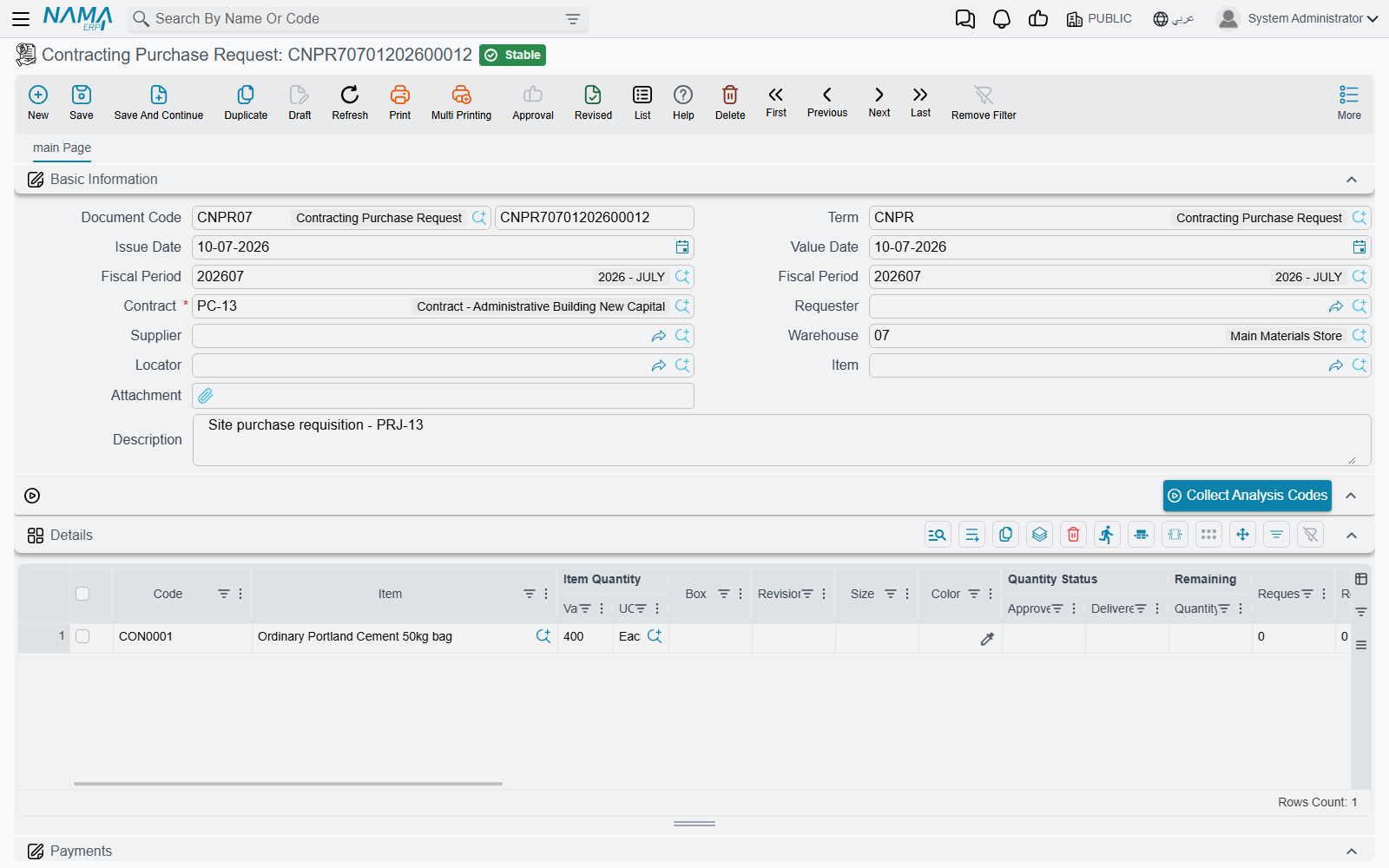
The request is what a site engineer raises when the store cannot supply something. Three things on it are specific to that job.
The requester fills itself in. Opening a new request stamps the Requester field with the employee record of the logged-in user, so the trail back to whoever asked survives without anyone typing a name.
Each line tracks its own fulfilment. Alongside the requested quantity sit an Approved Quantity, a Delivered Quantity and a Remaining Quantity, plus a Recommended Supplier the site can nominate for the buyer to consider. A request is therefore useful long after it was raised: it is the running record of what was asked for and how much of it has actually turned up.
The analysis card fills the grid for you. Name an item in the header and press Collect Analysis Codes and the grid fills with every analysis-card term on this contract where that item appears — useful when one delivery has to be split across several terms. The reverse works too: pick a term analysis card and the grid is populated from its lines. An implementation can also restrict the item picker to the items named on the analysis card, through the module setting described in Contracting Configuration.
The request books nothing. No journal entry, no stock movement. Whether it touches the project at all is a setup decision on its document term (توجيه): tick تطبيق تأثير تكاليف وكميات المقاولات / Apply Contacting Cost And Quantity Effects and the request starts contributing the ordered quantity to the term lines it names. Left alone, it contributes nothing — it is paperwork, and that is usually what you want from a request.
Actions on these screens
On the request:
- Collect Analysis Codes — fills the grid with every analysis-card term on the contract where the header item appears.
- Select all installment lines — ticks every line of the scheduled payments grid.
- GeneratePayments — the label really reads like that on English screens. Splits the request's value into an instalment schedule from the payment template, asking for the number of payments, the period, the start date, a grace period, the down / first / last payment values and a rounding mode.
- In the More menu, Reset discounts clears all eight discount columns on every line.
On the order:
- GeneratePayments — the same, on the second page, above the scheduled payments grid.
- In the More menu, Reset discounts as above, and Installment Payments, which opens in a pop-up list the payment documents that have settled the order's instalments.
The order — the commitment to a supplier
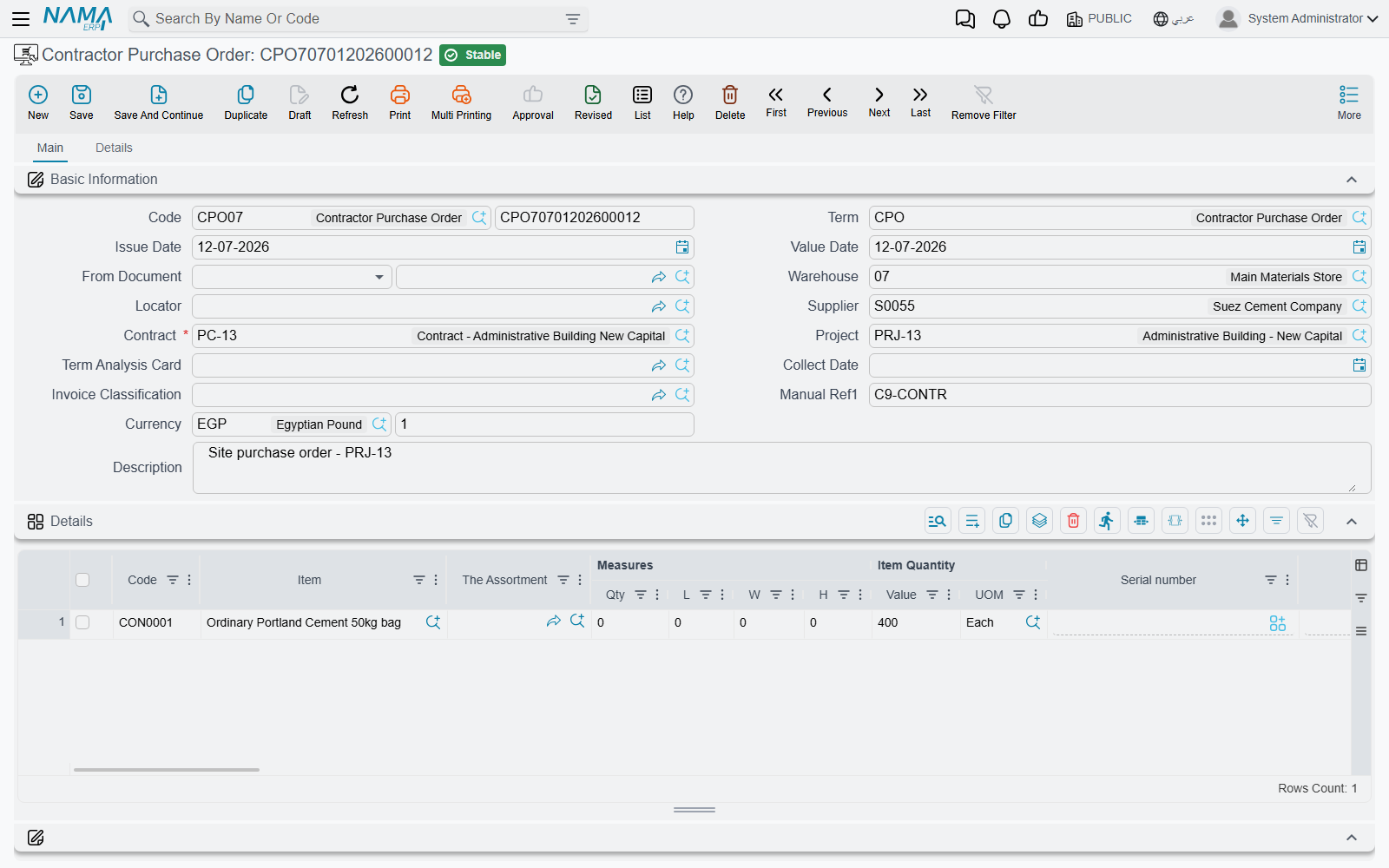
The order is where the money appears. Its header carries the supplier, the required project contract, the project, a term analysis card, the delivery period and delivery date, a collect date, the payment template and the full invoice-money composite; its lines carry the whole purchase price block on top of the contracting spine. A second page holds three grids that matter on a construction buy:
- Purchase clauses — a grid of standard terms with a planned end date, an extended end date, a fulfilment date and accumulated extension fines. This is where "delivered to site by the 20th or 1% a week" is written down.
- Scheduled payments — the instalment plan, built from the payment template, with an Installment Payments action in the More menu for what has actually been paid.
- External payments — payment vouchers that settled this order from outside it.
What the order actually does when it is processed
Two effects, and both are configurable in a way that surprises people the first time.
It creates a journal entry only if you tell it to. The order looks at the debit and credit sides on its document term. If neither is configured, the order books nothing at all — which is the normal setting, because a purchase order is a commitment, not an expense. If they are configured it produces a full invoice-style entry, taxes and discounts included. Change your mind and clear the sides, and re-processing the order cancels the entry it made earlier.
It contributes the ordered quantity to the project. Here the polarity is the opposite of the request: the order applies its contracting quantity effects unless you tick عدم تطبيق تأثير تكاليف وكميات المقاولات / Do Not Apply Contacting Cost And Quantity Effects. What lands on the contract's term line is the Ordered Quantity column — not money. The money side of a purchased material reaches the project later, when the material is issued to it. A further option makes those entries appear at save, before the order is approved, for implementations that want the commitment visible during the approval cycle rather than after it; abandoning the draft removes them again.
What it refuses to save
A supplier is required. The instalment schedule has to reconcile with the remaining amount and the voucher payments against it. Every term code must exist in the contract, the executive budget code must respect the budget's hierarchy, and the contract must not be marked finished. Two more options cap the quantities themselves: منع تجاوز الكمية / Do Not Exceed Quantity and منع تجاوز كمية كارت التحليل / Do Not Exceed Analysis Card Quantity, which measure the order against the planned and the analysed quantity of the term respectively.
The one hard link between the order and the site's consumption
The contracting purchase order is also the ceiling for what the site is allowed to consume. Tick منع الحفظ إذا تعدت كمية الأصناف التي يتم صرفها كمية الأصناف الموجودة في أمر الشراء on the material issue's document term and, per item and per term code, the system totals everything ever issued on this contract and compares it with everything ever ordered on it. Issue more than was bought for that term and the commit is refused.
The check runs in both directions. Reducing or deleting an order that has already been over-consumed is refused for the same reason, with the same comparison. It is the only enforced relationship between the two documents, and it is off by default.
There is no contracting purchase invoice
This is the fact that catches everyone. The module has a purchase request and a purchase order, and then the chain stops: the order is invoiced on the ordinary supply chain purchase invoice. There is no contracting purchase invoice, and looking for one in the Contracting menu is a waste of an afternoon.
In practice you create the purchase invoice from the order the ordinary way — through From Document, or through the generate-document machinery that every purchase order participates in — and from that point on you are in supply chain territory: goods receipt, supplier balance, payments, all of it standard.
What the ordinary purchase invoice does not carry is the contracting spine. It has no term code column, so it cannot say which BOQ line the money belongs to. That is not an omission you need to work around, because of how project cost is designed to arrive:
- Stocked material becomes project cost when it is issued to the project, valued at inventory cost — see Issuing Material to a Project. Buying it only moves it into the store.
- Non-stock spend — a service, a hire charge, a fee — never goes through this pair at all. It goes through the misc contracting trio, whose invoice does carry term codes and does book project cost.
So the rule of thumb when someone asks which purchase document to use: if it will sit in a warehouse, use this pair and let the issue carry the cost. If it will never be stocked, use the misc contracting documents instead.
Worked example: four tonnes of rebar for the concrete term
Tower A, the residential tower we are building for Al-Fanar Development, project contract PC-2026-001. Term 2.01 Reinforced concrete, 60 m³.
- The site asks.
CPR-000067, a Contracting Purchase Request: contractPC-2026-001, requester filled in automatically as the site engineer, one line — term2.01, executive termEX-2.01, itemRBR-16deformed bar 16 mm, 4 tonnes, recommended supplier Gulf Steel. The availability columns show 0.4 t in stock and nothing in transit, which is the justification for buying. The request books nothing and reserves nothing. - Buying converts it.
CPO-000058, a Contracting Purchase Order created from the request, so the contract and the lines come across. Supplier Gulf Steel, 4 t at 2,600 = 10,400, VAT 15% = 1,560, total 11,960. A purchase clause line records "to site by 18 April, 1% a week thereafter". The instalment plan is 50% on delivery, 50% at 30 days. - The contract notices. The order's term has the cost-and-quantity effects left on, so term
2.01ofPC-2026-001now shows 4 in its Ordered Quantity column. Its Actual Cost has not moved — no money has reached the project yet. - The supplier is invoiced. The buyer raises an ordinary Purchase Invoice from
CPO-000058. Gulf Steel's balance and the input VAT are dealt with there. The project still shows no cost. - The steel reaches the project. When the bar is drawn from the site store for the pour,
CMI-000119, a Contracting Material Issue against term2.01, is what finally puts the cost on the contract — at the inventory cost of what left the store. - And the ceiling bites. The material issue's term has the issued-versus-ordered check on. Four tonnes were ordered for term
2.01; a second issue that would take the total past four tonnes is refused until someone raises another order.
That sequence is the whole model in miniature: the order commits the quantity, the ordinary invoice settles the supplier, and the issue carries the cost.