
Cancelling a Course Contract
A contract is signed for a full training programme, the trainee attends three months and then withdraws. The fees for the months that will never be taught should stop being owed, the ledger entry that put them on the payer's account has to be undone, and whatever was collected in advance may have to go back out. Education handles all of that with one document: Course Contract Cancel (إلغاء عقد دورة تدريبية), which sits on Education → Master Files, right next to the contract itself.
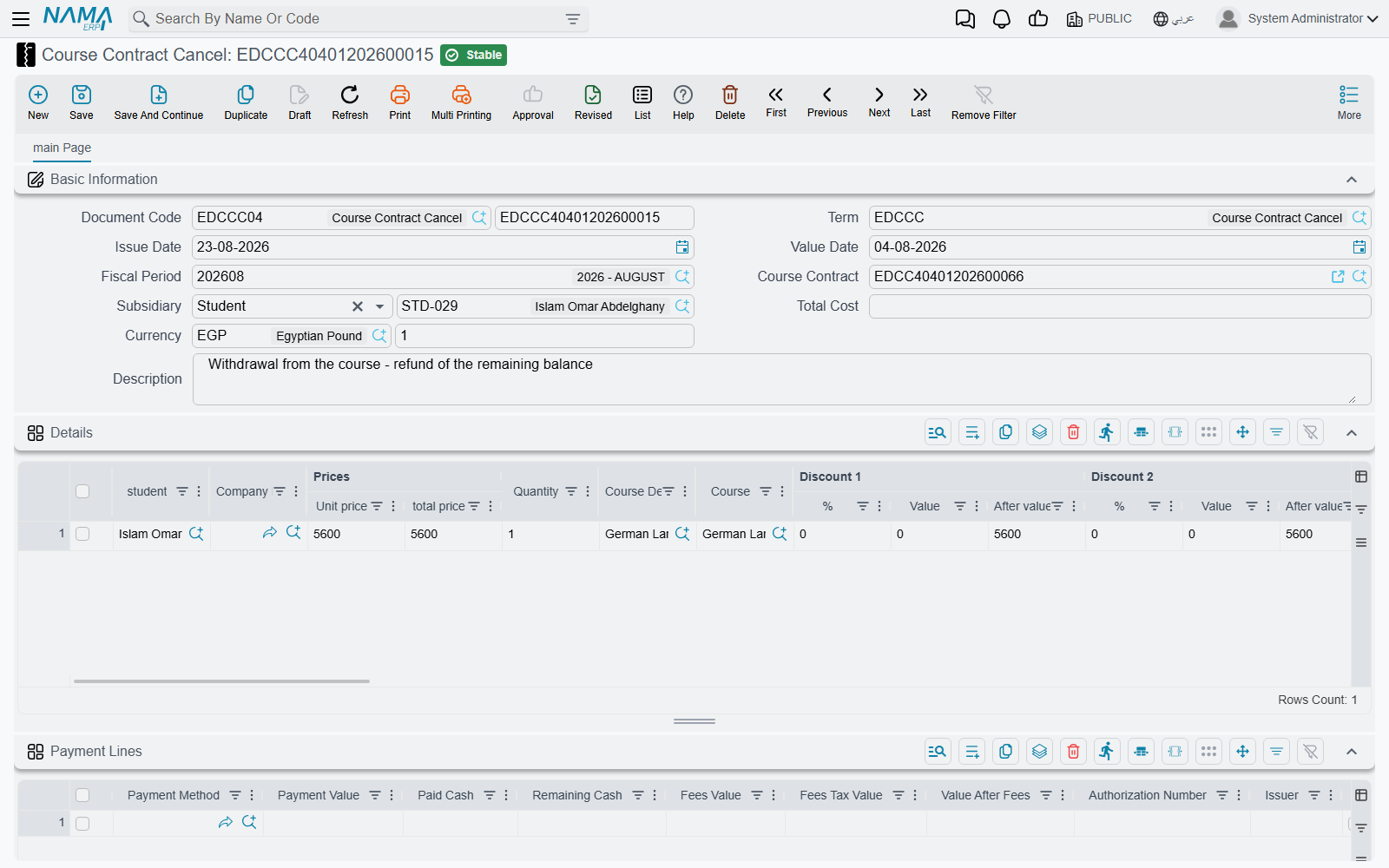
It is a document in its own right, not a button on the contract. It has its own book and code, its own issue date, value date and fiscal period, its own currency and rate, and — the detail that decides everything it does to the ledger — its own document term.
It starts life as a copy of the contract
The only field you really have to fill is Course Contract in the header. Choosing it pulls the contract down into this document: the Subsidiary (the party who pays), the description, every Details line with its student, quantity, unit price, discounts and taxes, every payment-method row, and every instalment from the contract's payment schedule. Each copied line arrives as a fresh line on the cancellation.
Which means that the document in front of you, if you touch nothing else, describes the cancellation of the entire contract. That is the default, and it is deliberate — a full cancellation is the common case, so it costs one field.
Partial cancellation is subtraction, not a percentage
There is no "cancel 40%" field anywhere on the screen. You cancel part of a contract by editing the copy down to the part you are actually cancelling: delete the detail lines for trainees who are staying, reduce a quantity or a unit price on a line that is only partly cancelled, and delete the instalment rows you are not releasing. Whatever is left on the screen when you commit is what gets cancelled.
The two grids you edit
Details (التفاصيل) carries one line per trainee, with the same columns as the contract — Student, Course Definition, Course, Unit Price, Quantity, the discount and tax columns, the analysis dimensions and the line Subsidiary. It also shows one column the contract's grid does not: Prices | Total price, the gross line total. Keep an eye on it, because that is the figure the document is validated against.
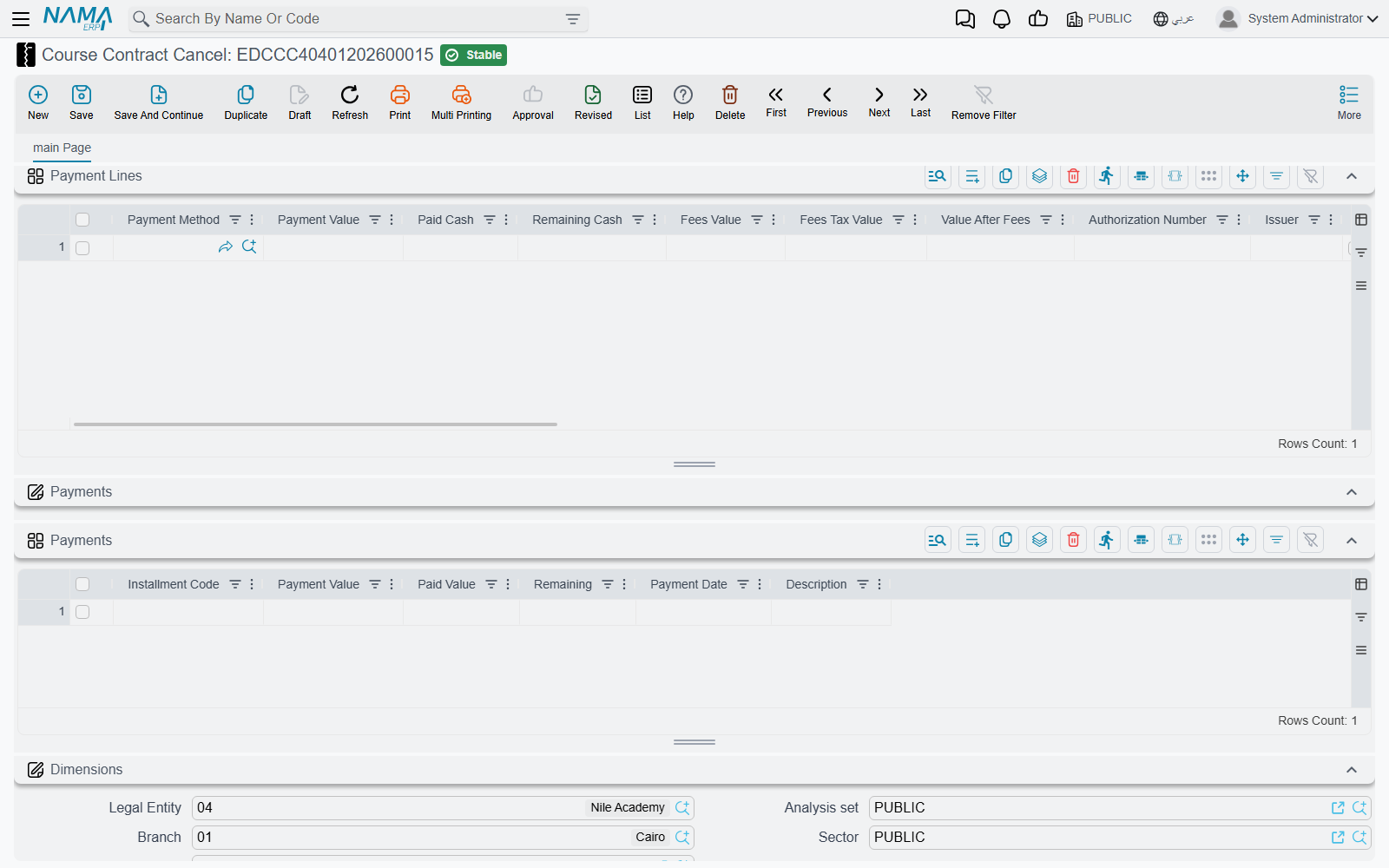
Payments (الدفعات) carries the instalments being released. On this document most of the grid is read-only: Payment Value and Payment Date arrive disabled and are taken from the contract, so you cannot quietly rewrite the original plan from here. The two columns you fill are:
- Installment Code — which instalment on the contract this row settles. The field offers the contract's own instalment codes as a suggestion list, so you pick rather than type.
- Paid Value — how much of that instalment this cancellation releases.
The two totals have to agree before it will commit
The sum of Prices | Total price across the detail lines must equal the sum of Paid Value across the instalment rows, otherwise the document is refused with Details total {0} must be equal to schedule lines total {1}. Three more checks guard the instalment side: a code that does not exist on the referenced contract is rejected, two cancellations cannot settle the same instalment, and the amounts settled against an instalment cannot exceed its value.
A worked example
A contract for one trainee runs at 24,000 over eight monthly instalments of 3,000. Three instalments have already been collected and the trainee withdraws, so 15,000 across the remaining five instalments has to go.
- Create a Course Contract Cancel, pick the contract. Everything copies down: a 24,000 detail line and eight instalment rows.
- On the detail line, reduce the unit price to 15,000 — that is the part being cancelled.
- Delete the three instalment rows that were already collected. On each of the five that remain, enter Paid Value 3,000.
- Details total 15,000, instalment total 15,000. The document commits.
What processing does
Saving the document creates its effects in the background as a business request, so the save itself is instant. Two separate things then happen, and the second one is the one people are usually looking for.
It books the mirror image of the contract's entry
The cancellation produces its own general-ledger entry through its own term — not the contract's. The two terms are configured on the same screen, but the sides are reversed: what the contract's term holds on the debit side, the cancellation's term holds on the credit side and the other way round. A contract that debited the trainee's receivable and credited fees revenue is undone by a cancellation that debits fees revenue and credits the trainee. The mechanics of setting both terms up, and the mirroring rule in full, are on the Document Terms page.
It settles the contract's instalments
This is the part that surprises people, so it is worth stating plainly. A cancellation does not delete instalments from the original contract and it does not mark them void. It registers itself as a payer of them.
Every instalment row you filled writes a settlement entry against the matching instalment on the contract. On the contract's payment schedule, that instalment's System paid rises by the amount you entered and its Remaining falls by the same amount — exactly as if a receipt voucher had come in and paid it. Take the example above: the contract's five open instalments of 3,000 each go from 3,000 remaining to zero, and the contract as a whole now reads as fully collected, because the cancelled portion has been settled rather than left hanging.
So after a cancellation, the contract's paid figure is higher and its remaining figure is lower. That is the intended reading: the contract has nothing outstanding any more, because the part that was never going to be collected has been closed out by the cancellation. You can see exactly which entries did it from the contract itself — the Installment Payments (سندات سداد الدفعات) toolbar button lists every settlement entry standing against that contract's instalments, and the cancellation shows up there among them. More on how the schedule is built and read on the Payment Schedules and Collection page.
No refund document is produced
Nothing is generated by a cancellation — no payment voucher, no receipt voucher, no credit note, no return document of any kind. If money has to physically go back to the payer, you record it on the Payment Lines grid of the cancellation itself, exactly the way an incoming collection is recorded on the contract. Each row names a payment method and an amount, and books to that method's account — on the opposite side of the ledger from the contract, because this document runs in the opposite direction. Money out is a line on this document, not a separate document.
If the background processing fails — a closed fiscal period, an account the term cannot resolve — the document is still saved and its processing status says so. Power users retry from the Business Requests list view: filter the failed rows, select them, and use the More menu to reprocess.
Undoing a cancellation
A cancellation is reversible in the ordinary way. Cancelling or deleting it removes its ledger entry and removes every settlement entry it wrote, which restores the original contract's instalments to the state they were in before — the System paid figures drop back and the Remaining figures return. Nothing has to be repaired by hand on the contract.
For the document being cancelled, and how its fees, students and collections are recorded in the first place, see Course Contracts.