
Recording Marks
At the end of the term somebody has to write down what each student scored in each subject. In Nama that record is the Marks Balance, and one of them covers one student, on one course, in one semester.
You reach it from Education → Master Files → Marks Balance (in Arabic التعليم ← الملفات ← رصيد درجات).
What one Marks Balance covers
Think of it as a single student's marks sheet for a single term. If a stage has thirty students, the end of the term produces thirty Marks Balances — one per student. If that student also sat a second course in the same semester, that is a further document.
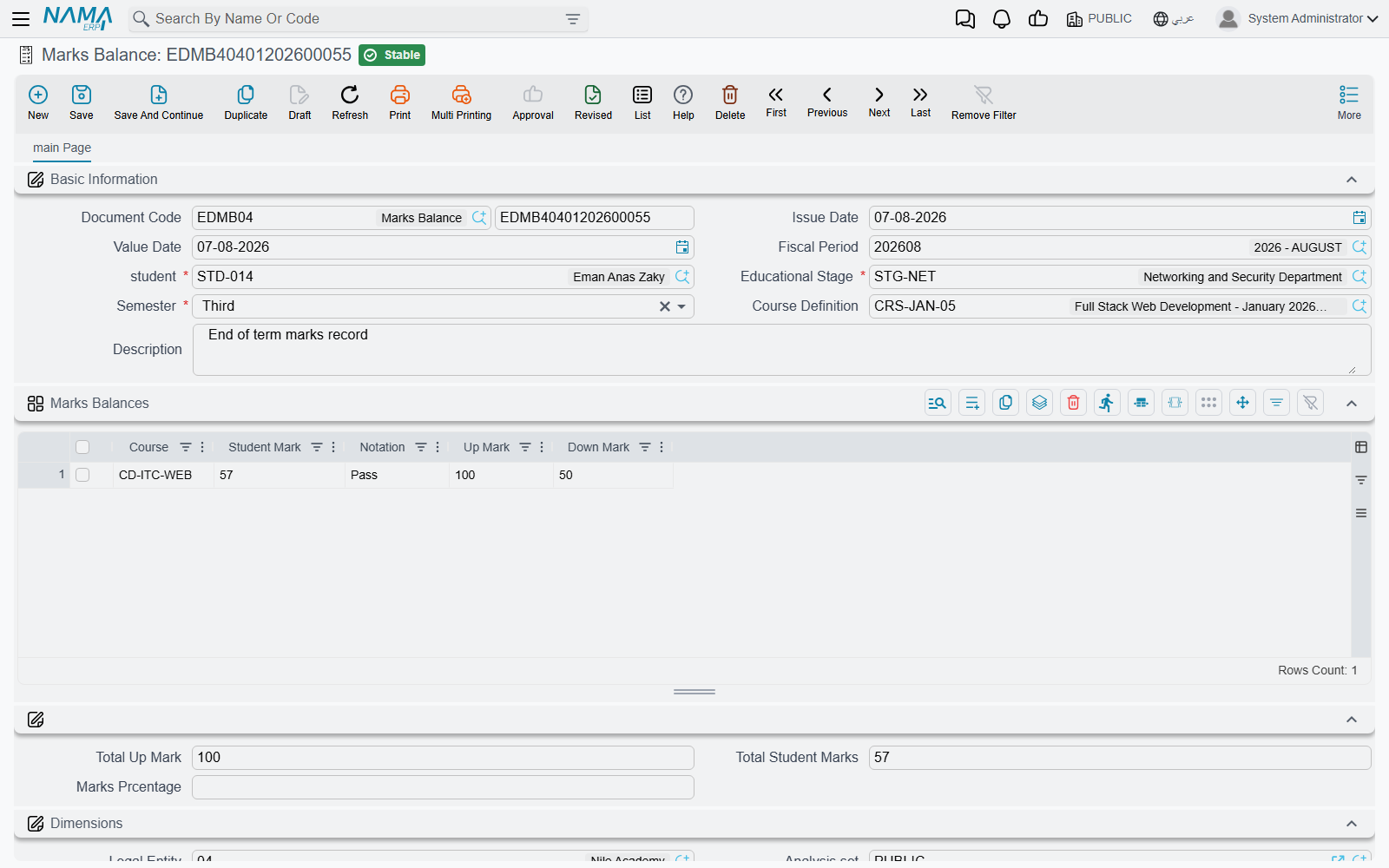
It is an ordinary Nama document, so it takes a book and code, an Issue Date (تاريخ التحرير), a Value Date (التاريخ الفعلي) and a Fiscal Period (الفترة). Unlike most documents in the system it needs no document term — there is no term field on the screen, and none is asked for when you save.
Four things identify the sheet, and the first three are required:
- the Student (الطالب) whose marks these are;
- the Educational Stage (المرحلة التعليمية) they sat it in;
- the Semester (ترم دراسى) — First (الاول), Second (الثاني), Third (الثالث), Fourth (الرابع) or Annual (سنوى);
- and the course, chosen in the Course Definition (تعريف المواد الدراسية) field — this is where you pick the offering the student actually attended, described in Course Definitions and Courses.
A Description (ملاحظات) field at the end takes anything the sheet needs to say as a whole.
The subject lines come from the course
Picking the course is the step that does the work. The moment you choose it, Nama reads that course's subjects grid and builds one line here for every subject on it, carrying across the subject name and both of its marks:
| Column | Where it comes from |
|---|---|
| Course (مادة دراسية) | The subject name, copied from the course. It is free text there and free text here |
| Up Mark (الدرجة العظمى) | The maximum the subject is out of, copied from the course |
| Down Mark (الدرجة الصغرى) | The pass mark, copied from the course |
| Student Mark (درجة الطالب) | The one column you type — what this student actually scored |
| Notation (ملاحظات) | Free text per subject: "absent from the retake", "project submitted late" |
So the sheet arrives ready to fill in. Taking the Excel intake from the courses page — Formulas and Functions out of 40 with a pass at 20, Pivot Tables and Dashboards out of 30 with a pass at 15, Financial Modelling out of 30 with a pass at 15 — you choose the course, three lines appear with those six figures already in place, and all you type is 34, 22 and 19.
Having the pass mark sitting on the line next to the mark you are typing is the point of carrying it across: whoever enters the marks, and whoever reads the sheet afterwards, can see at a glance where each subject stands against the bar the course set.
Choosing the course rebuilds the grid
The lines are pulled fresh from the course each time you pick one, and they replace whatever is in the grid. If you have already typed marks and then change the course on the document, those marks go with the old lines. Settle the student and the course first, then enter the marks.
Because the subject names are plain text copied from the course, they read exactly as they were typed there — and they stay as they were on the day the sheet was made. Renaming a subject on the course later does not rewrite marks sheets already entered, which is what you want: last term's sheets should keep last term's wording.
A Marks Balance records marks, and nothing else
This is worth saying plainly, because the document sits in a module that also handles money.
A Marks Balance is a record. Saving and committing it creates no accounting entry and no stock movement, and it feeds no other document — not a course contract, not a fee, not an instalment, not attendance. Nothing in the module reads it back. Marks and money never meet: the money side of Education runs entirely through the Course Contract and its payment schedule.
That independence is convenient in practice. Marks can be entered, corrected and re-entered by academic staff at the end of a term without any risk of disturbing a contract, a balance or a receivable — and a student's marks sheet exists whether or not anybody has finished collecting the fees.