
Fixed Asset Purchase Request
The purchase request is the internal ask: the paint shop needs a compressor, production needs a CNC cutting machine. It is written by the people who need the equipment, not by the people who will buy it, and it deliberately holds almost nothing — a name and a quantity. No supplier is committed to, no price is quoted, no account is touched.
That poverty of detail is the point. A request that demanded prices would force the requester to go shopping, and shopping is purchasing's job.
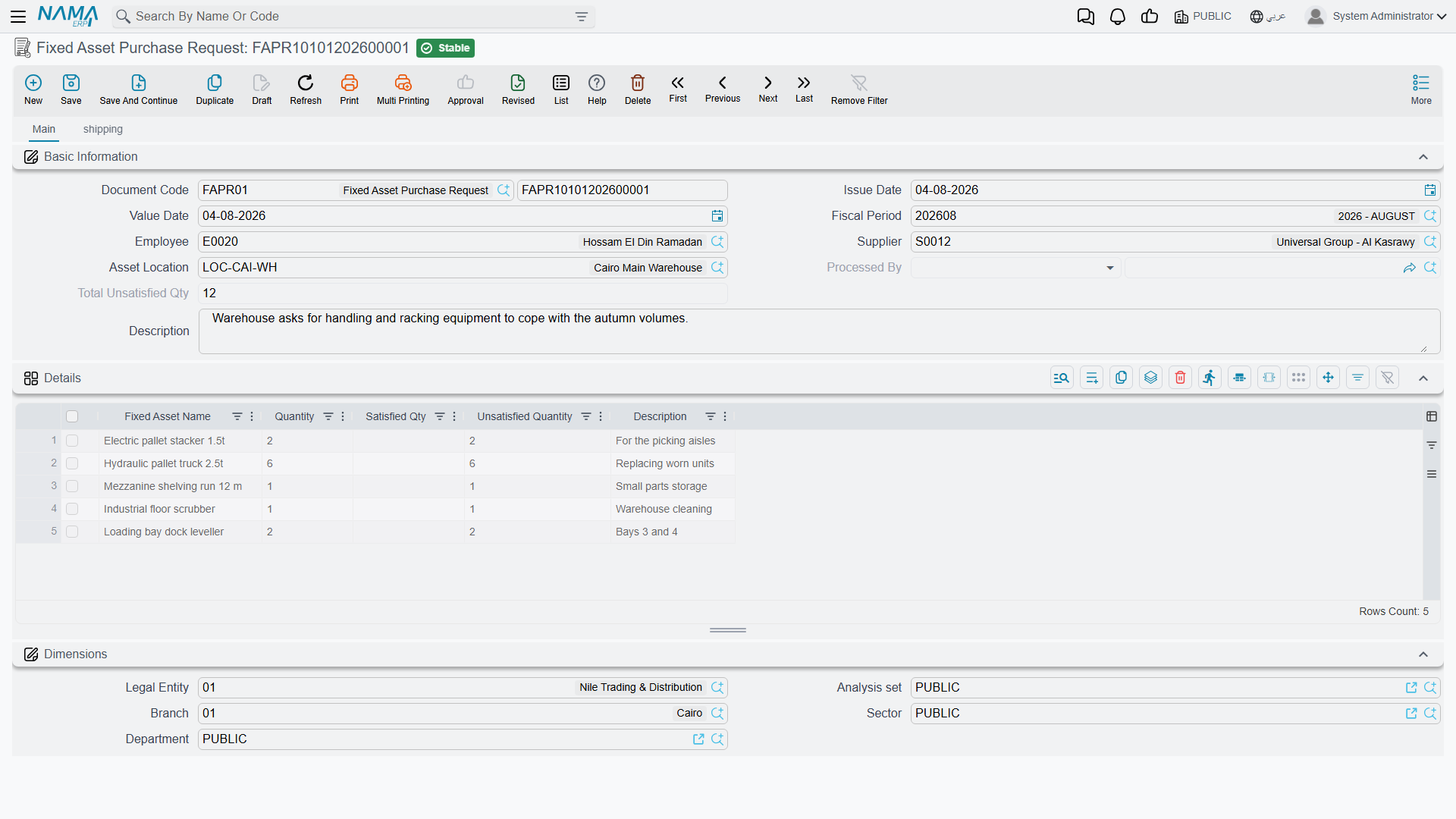
You will find it under Assets > Documents > Fixed Asset Purchase Request (الأصول > المستندات > طلب شراء أصل). It needs only the base fixedassets licence.
Filling one in
The header is the usual document header, plus the people and place involved:
| Field | Arabic label | What it is for |
|---|---|---|
| Document Code (Book, Code) | رقم المستند (الدفتر، الكود) | The document book and its serial number |
| Issue Date | تاريخ التحرير | When the request was written |
| Value Date | التاريخ الفعلي | The date the request counts from |
| Fiscal Period | الفترة | The period the request falls in |
| Employee | الموظف | Who is asking |
| Supplier | مورد | A preferred supplier, if there is one — a suggestion, not a commitment |
| Asset Location | موقع الأصل | Where the equipment is wanted |
| Processed By | تمت معالجتة بواسطة | Filled in by the system: the document that consumed this request |
| Total Unsatisfied Qty | إجمالي الغير مسلم | Filled in by the system: how much of the request is still outstanding |
| Description | ملاحظات | Free text — the place to justify the ask |
Then the Details grid (التفاصيل), which is where the request lives:
| Column | Arabic label | Notes |
|---|---|---|
| Fixed Asset Name | أسم الأصل | Free text. You are naming a thing you want, not picking an asset record — the record does not exist yet |
| Quantity | الكمية | How many |
| Satisfied Qty | نفذت | System-maintained: how many have been ordered or received against this line |
| Unsatisfied Quantity | الكمية الغير مستلمة | System-maintained: quantity minus satisfied |
| Description | ملاحظات | Per-line note — specification, model, urgency |
Below the grid sit the five dimensions — legal entity, analysis set, branch, sector and department — so the request can be reported by whoever is asking for the spend.
The second page, Shipping (الشحن), carries the logistics wish-list: expected shipping and delivery dates, shipping method, shipping and arrival ports, the insurance, shipping and customs parties, an expected delivery period with its unit of measure, contract terms and a shipping address. All of it is descriptive; it exists so that the information travels down the chain when purchasing builds an offer or an order from the request.
No term, no accounting
The purchase request has no Term field on its screen and produces no journal entry of any kind. Nothing about it reaches the ledger, and nothing about it touches the asset register. It is a piece of internal correspondence that the system happens to keep tidily.
Nothing blocks a purchase request from being committed — there are no validations of its own. Save it, commit it, and it is an open ask.
Actions on this screen
The Fixed Asset Purchase Request has no buttons of its own. You type the ask, save it and commit it, and that is the whole of your side of the work. The request is consumed from the other end: when somebody raises an offer or a purchase order and points its From Document at this request, the lines come across and the satisfied quantities here start moving. Nothing on the request screen pushes it forward.
How the request knows it has been answered
The two quantity columns are the only moving parts, and they are worth understanding because they are the module's only "open orders" report.
Every time an offer, an order or an initial receipt is raised with From Document (بناءا على) pointing at this request, the lines that came from the request carry a hidden link back to the request line they were copied from. When that downstream document is committed:
- the matching request line's Satisfied Qty goes up by the quantity ordered,
- its Unsatisfied Quantity is recomputed as quantity minus satisfied,
- the header's Total Unsatisfied Qty is refreshed as the sum of the line figures,
- and Processed By on the request is stamped with the document that consumed it.
Cancel or delete that downstream document and every one of those figures is put back. Because the counters are driven by the link between lines, they only work when the downstream document was genuinely built from the request — typing the same asset name onto an unrelated order proves nothing and counts for nothing.
Reading the list screen
Because Total Unsatisfied Qty lives in the header, the purchase request list view answers the question "what has been asked for and not yet ordered" at a glance: sort or filter on that column and anything above zero is still open.
Al-Waha asks for the CNC machine
Production at Al-Waha Industries writes request FAPR-0004 on 5 January 2026:
| Line | Fixed Asset Name | Quantity | Satisfied | Unsatisfied |
|---|---|---|---|---|
| 1 | CNC Cutting Machine | 1 | 0 | 1 |
| 2 | Pallet trolley | 2 | 0 | 2 |
Header Total Unsatisfied Qty = 3. The description line explains that the CNC machine replaces a manual saw and that the trolleys serve the same hall.
Purchasing collects quotations, and Gulf Machinery Trading is chosen for the machine at 240,000. An order is raised from the request covering the machine only. On commit, line 1 shows Satisfied 1 and Unsatisfied 0; line 2 is untouched; the header total drops to 2. The request stays open, correctly, because the trolleys have not been ordered.
When the machine's supplier invoice arrives it becomes a purchase document, the asset record MCH-0007 receives its 240,000 of cost, and the acquisition is complete — while the request still politely reminds purchasing about two pallet trolleys.