
Opening Balances for Assets You Already Own
Almost nobody starts using Fixed Assets on the day they buy their first machine. They start with four hundred assets already in the yard, half of them bought years ago and half depreciated, and a legacy spreadsheet that has to be transplanted into Nama without losing a single figure.
That transplant is the Fixed Asset Opening Document (افتتاح أصل ثابت). For each asset you state what it originally cost, how much depreciation has already been taken, how long it was meant to last, what it will be worth as scrap and when its depreciation clock started. The system works out where in its life the asset currently stands, records the balancing side on a suspense account, and from the next period onwards depreciates it as if it had always been here.
It is the single most common go-live task in this module, so it is worth doing slowly and once.
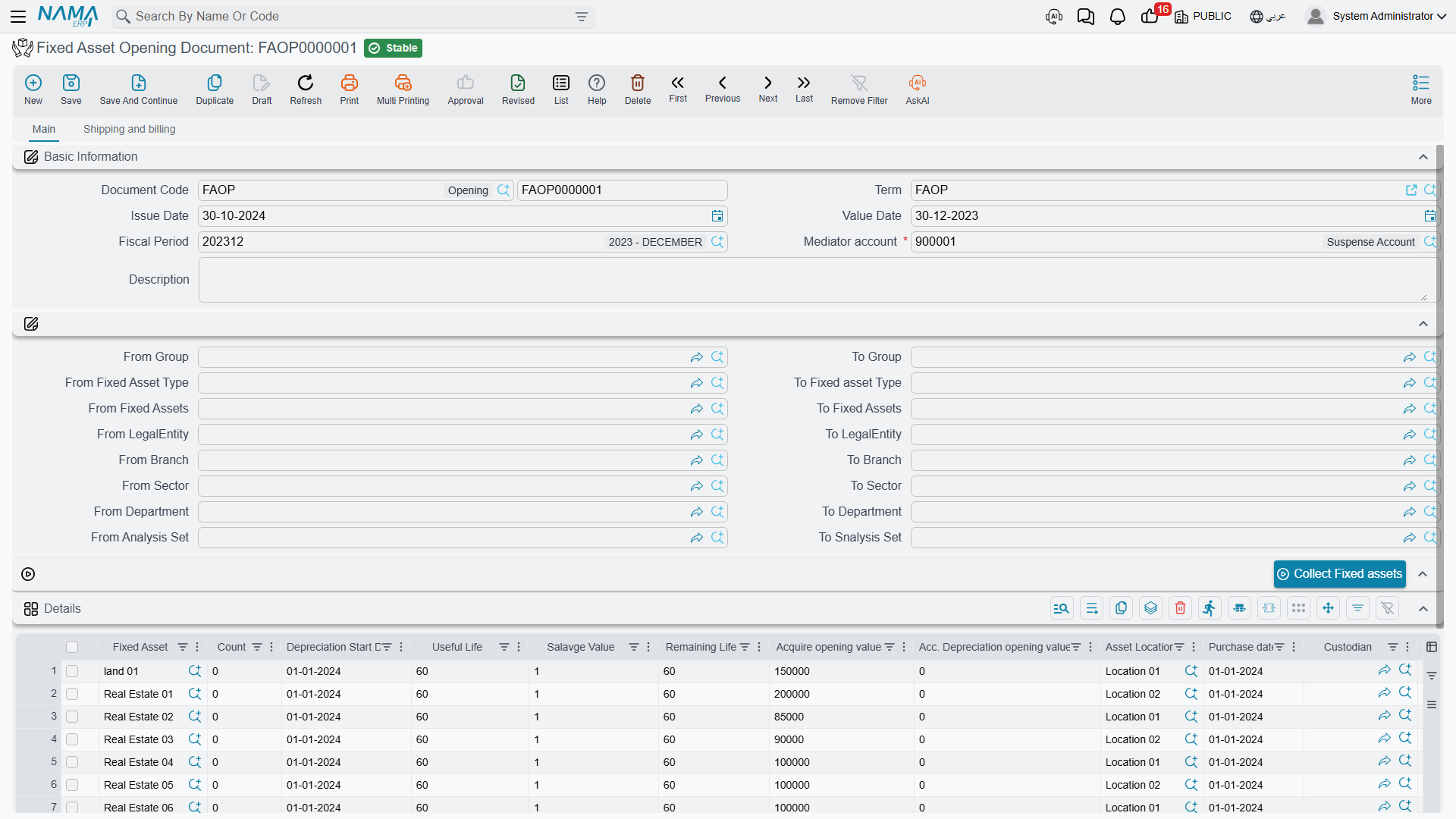
Menu: Assets > Documents > Fixed Asset Opening Document (الأصول > المستندات > أفتتاح أصل ثابت), licence fixedassets.
Before you type anything
Four things have to be in place, and three of them are easy to forget.
1. The asset records must exist, in Initial status. The opening document values assets; it does not invent them. Create them first on the Fixed Asset screen — or, for assets capitalised out of a finished contracting project, with the creation document — each with its code, name, type, classifications and location. The asset picker on the opening document shows only assets in Initial (إبتدائى) status.
(If you prefer, the opening document can create the records itself: switch on the module setting Add Fixed Assets Creation Columns To Fixed Assets Opening And Purchase and the grid gains the name, serial number, type, classification and group columns, exactly as on the purchase document. For a go-live of any size, creating the master files first is usually cleaner.)
2. You need an opening fiscal period. By default the opening document may only be issued in a fiscal period of type opening — the zero-length period that sits before your first real trading period. If your chart of periods does not work that way, the module setting Allow Normal Periods In Fixed Assets Opening (السماح بالفترات العادية في افتتاحي الاصول) in the Fixed Assets configuration lifts the restriction.
3. You need a mediator account. The Mediator account (الحساب الوسيط) field in the header is mandatory, and it must be a detail account. This is the suspense account that absorbs the net book value of everything you bring in — normally the same opening-balances account the rest of your go-live uses, so that the fixed asset opening balances net off against the trial balance opening entry.
4. Decide your period rhythm first. Life and remaining life in this module are counted in months, and the module depreciates once per fiscal period. Set up monthly fiscal periods before you open assets, not after.
The screen
The header is short: document book and code, issue date, value date, fiscal period, the Mediator account, an optional term, and a description.
Below it sits a block of from / to range fields — group, fixed asset type, fixed asset, legal entity, branch, sector, department and analysis set — which are not filters on the document but the criteria for the Collect Fixed assets (تجميع الأصول الثابته) button that sits with them.
Collect Fixed assets
Set the ranges — say, from asset type FAT-VEH to FAT-VEH — and press the button. Every asset in Initial status inside those ranges is appended to the grid as a line, with its useful life brought in from the asset's type. Assets already on the grid are skipped, so you can press it repeatedly with different ranges and build the document type by type. Type in each line's salvage value yourself.
Then the Details grid, which is where the real work happens:
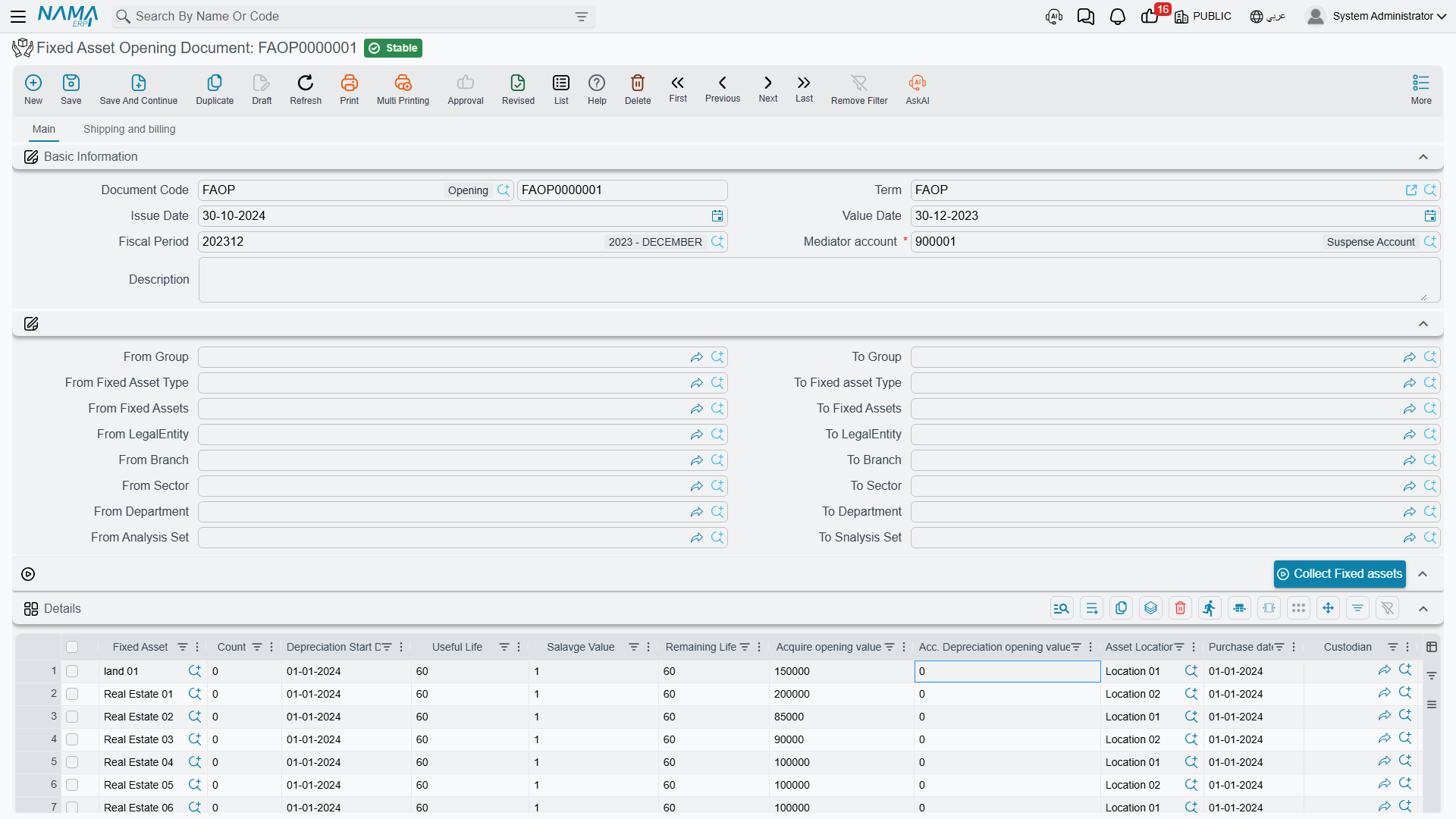
| Column | Arabic label | What to put in it |
|---|---|---|
| Fixed Asset | الأصل الثابت | The record being opened |
| Count | العدد | For countable assets, how many units the record represents |
| Depreciation Start Date | تاريخ بداية الاهلاك | The date the asset originally started depreciating, in the old system |
| Useful Life | العمر الأفتراضي الأفتتاحي | The original total life in months |
| Salvage Value | قيمة الأصل كخردة الأفتتاحية | The residual value |
| Remaining Life | العمر المتبقي | Usually left to the system to compute |
| Acquire opening value | قيمة الأقتناء الأفتتاحية | The original cost, not the book value |
| Acc. Depreciation opening value | قيمة الأهلاك التراكمي الأفتتاحية | The depreciation already taken before go-live |
| Purchase date | تاريخ الشراء | When it was bought |
| Asset Location | موقع أصول | Where it stands |
| Custodian | مسئول العهدة | Who holds it |
| Legal Entity, Branch, Analysis set, Department, Sector | المحددات | The asset's dimensions |
The Totals group under the grid adds up the acquisition and accumulated-depreciation columns for you, and the second page carries addresses and a payment schedule for the rare case where the opening is also a purchase being settled.
The two columns that matter most are the two value columns, so say it once more plainly: Acquire opening value is the original cost of the asset, and Acc. Depreciation opening value is everything depreciated on it so far. Do not enter the net book value in the first column. The system needs both figures separately because it records them on two different accounts and depreciates from their difference.
Worked example: a truck bought in 2023, entered in 2026
Al-Waha Industries goes live on 1 January 2026, with monthly fiscal periods and an opening period 2026-OPEN. Among the assets to bring in is a pickup:
| Asset | VEH-0002 — Toyota Hilux |
| Bought | 1 July 2023 for 250,000 |
| Useful life | 60 months |
| Salvage value | 10,000 |
| Depreciated in the legacy system | to 31 December 2025 — 30 months at 4,000 = 120,000 |
The mediator account is 299900 — Opening suspense.
The line
Fixed Asset = VEH-0002, Depreciation Start Date 1 July 2023, Purchase date 1 July 2023, Useful Life 60, Salvage Value 10,000, Acquire opening value 250,000, Acc. Depreciation opening value 120,000.
What the system computes on save
Remaining life. From the depreciation start date, the asset's life would end on 1 July 2028. The opening takes effect on 1 January 2026. The gap between them is 30 months — which is exactly right, since 30 of the 60 months were used up before go-live. The Remaining Life column fills itself in.
Header totals. Acquire opening value 250,000, Acc. Depreciation opening value 120,000.
What the system checks on commit
The one check people trip over is this: accumulated depreciation may not exceed cost minus salvage value. Here 120,000 ≤ 250,000 − 10,000 = 240,000, so it passes. An asset whose legacy accumulated depreciation was recorded down to zero rather than down to its scrap value will fail this check, and the fix is to correct the salvage value, not the depreciation.
It also insists that every depreciable line has a depreciation start date, a useful life and an acquisition value; that no asset appears twice; that the salvage value is at least the Minimum Salvage Value from the module configuration and is not equal to the acquisition value; that every asset is still in Initial status; and that the fiscal period is an opening one unless the configuration says otherwise.
What the asset looks like afterwards
Field on VEH-0002 | Value |
|---|---|
| Acquisition value | 250,000 |
| Accumulated depreciation | 120,000 |
| Book value | 130,000 |
| Depreciation start date | 1 July 2023 |
| Remaining life | 30 periods |
| Salvage value | 10,000 |
| Current instalment | (250,000 − 120,000 − 10,000) ÷ 30 = 4,000 |
| Status | Running Depreciation |
Notice that the instalment comes out at exactly the 4,000 the legacy system was charging. That is not a coincidence — it is the module's standard formula, (current value − salvage) ÷ remaining life, applied to an asset that is 30 months into a 60-month life. If your recomputed instalment does not match the figure the old system was charging, one of the five numbers you typed is wrong, and this is the quickest place to catch it. See depreciation concepts for the formula in full.
The entry
| Debit | Credit | |
|---|---|---|
Vehicles cost account (from VEH-0002) | 250,000 | |
Accumulated depreciation account (from VEH-0002) | 120,000 | |
299900 — Opening suspense | 130,000 | |
| Total | 250,000 | 250,000 |
The two asset-side accounts come from the asset record itself — its main account for the cost and its second account for accumulated depreciation — which is why the opening document's term carries no account fields at all. Only the mediator account is chosen, and it is chosen on the document. The entry is created as a business request processed in the background.
Where depreciation picks up
The asset is now treated as depreciated up to the last day of the period before the opening period — here, 31 December 2025. The first depreciation run that will collect this truck is therefore January 2026, for 4,000, and the schedule runs on to June 2028.
That default can be shifted. The opening document's term offers four options that change how the dates and the remaining life are derived:
| Term option | Arabic label | What it changes |
|---|---|---|
| Make Last Depreciation Date Period End Date | جعل تاريخ آخر إهلاك في الأصول المدرجة هو تاريخ نهاية الفترة المختارة في السند | Treats the assets as depreciated up to the end of the document's own month, instead of the end of the previous period |
| Calculate Depreciation Start Date For Depreciated Assets | احتساب تاريخ بداية الإهلاك آليا للأصول المهلكة | For a line that is fully depreciated (cost = salvage + accumulated depreciation), forces the remaining life to zero and back-computes the depreciation start date from the useful life |
| Calculate Depreciation Start Date Based On Difference Between Default Useful Life And Remaining Life | احتساب تاريخ بداية الإهلاك بناءا على الفرق بين العمر الافتراضي والعمر المتبقي | Derives the depreciation start date from the two life figures, for legacy data that has lives but no reliable dates |
| Do Not Calc Remaining Life From Dates | عدم حساب العمر المتبقي من التواريخ | Keeps the remaining life you typed instead of recomputing it from the dates |
The last two are the ones to reach for when your legacy data is thin. If the old system recorded "60 months total, 30 remaining" but no start date, switch on Calculate Depreciation Start Date Based On Difference… and let the system derive the date; if it recorded reliable remaining lives that do not match the dates, switch on Do Not Calc Remaining Life From Dates and your figure wins.
Fully depreciated assets
An asset that has reached the end of its life still belongs in the register — it is still in the yard, and it will still be disposed of one day. Enter it with its cost and an accumulated depreciation equal to cost minus salvage, and switch on Calculate Depreciation Start Date For Depreciated Assets on the term so the remaining life is set to zero and no depreciation run picks it up.
The date the opening carries in the asset's own history
The asset's internal history records the opening as of the line's depreciation start date, not the document date — the 2023 date, not 1 January 2026. That is deliberate: it puts the asset's starting cost at the point in time it really began. The ledger entry, of course, carries the document's value date like every other entry.
Cancelling an opening document
Cancelling or deleting the document reverses everything: the acquisition value, the accumulated depreciation, the depreciation start date, the instalment, the purchase date and the link to the document are cleared, each asset goes back to Initial, and the journal entry is reversed. It is the clean way out of a badly typed go-live batch — as long as nothing has depreciated yet.
Once depreciation has run, you no longer cancel. You correct.
Correcting an opening: the Opening Document Update
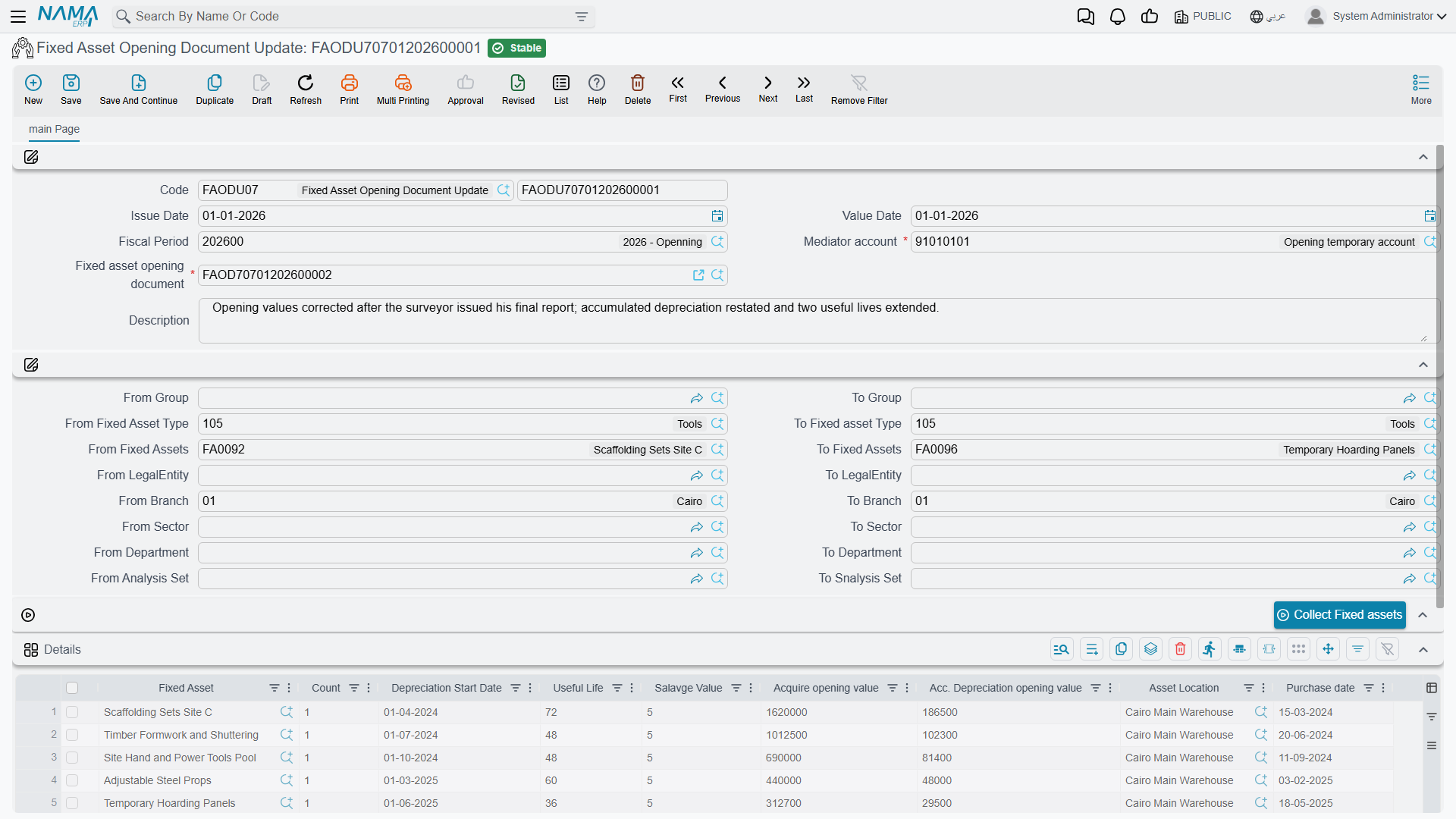
Assets > Documents > Fixed Asset Opening Document Update (الأصول > المستندات > تعديل أفتتاح أصل ثابت).
Despite its position in the menu this is not a second opening document. It is an editor for a committed opening document — the supported way to say "the truck's useful life was 72 months, not 60" after the opening has already been processed into the accounts and depreciated against.
It has no accounting effect of its own. What it does instead is rewrite the original opening document and replay the asset's figures from it, so the original entry is regenerated rather than supplemented.
How you use it:
- Open a new update document and pick the committed opening document in the Fixed Asset Opening Document field. The header — dates, fiscal period, mediator account, the collect ranges, dimensions and totals — and the detail lines copy across. If the update's term has Do Not Copy Details Of From Doc switched on, only the header copies and you enter the lines to correct yourself — see the opening terms.
- Change the lines that need changing. As you save, the system quietly photographs the previous values of every line it has not seen before: supplier, depreciation start date, purchase date, useful life, remaining life, salvage value, disposal date, acquisition opening value, accumulated depreciation opening value and location. That photograph is what makes the update reversible.
- Commit. The header and every matching line are written back into the original opening document, its calculations are re-run, and the assets' figures are rebuilt from scratch.
- If you cancel the update, the photographed values are copied back into the opening document and the assets are rebuilt again — back to where they were.
The rules that keep this honest:
- once committed, you may not re-point the update at a different opening document;
- you may not change its value date;
- it must be the latest update document for that opening document — you cannot commit or delete an older one out of order;
- every line's asset must already exist on the source opening document;
- a line carrying a depreciation value whose depreciation start date falls on or after the start of the fiscal period is rejected.
By default an update will not touch an asset whose status has moved on. The module setting Ignore Asset Status With Fixed Asset Opening Document Update (تجاهل حالة الأصل مع تعديل افتتاح أصل ثابت) lifts that guard for the installations that need it.
Correcting the truck
A few days after go-live, and before the January depreciation run, the fleet manager produces the registration papers: the Hilux's useful life should have been 72 months, not 60.
Raise an update document on the same value date as the original opening, pick opening document FAOD-0001, and change VEH-0002's useful life from 60 to 72. On commit, the opening document's line is rewritten, the remaining life is recomputed as 42 months instead of 30, and the instalment falls from 4,000 to (250,000 − 120,000 − 10,000) ÷ 42 = 2,857.14. The before-image still holds 60, so cancelling the update would put the truck back exactly as it was.
Messages you may see
| Message | Why | What to do |
|---|---|---|
| Fixed asset {0} repeated in line number {1} — «الاصل الثابت {0} مكرر في السطر رقم {1}» | The same asset appears on two lines of the details grid. | Delete the duplicate line; one opening line per asset. |
| Depreciation start date {0} for asset {1} must be before date {2} because there is a depreciation value — «تاريخ بداية الإهلاك {0} للأصل الثابت {1} يجب ان يكون قبل تاريخ بداية الفترة {2} لان له قيمة إهلاك تراكمي» | The line carries accumulated depreciation, but its depreciation start date is not before the fiscal period's start date — depreciation that was never earned. | Either move the depreciation start date back to when the asset really entered service, or clear the accumulated depreciation figure. |
| Error in fixed asset status {0}, current status is {1} and it has to be {2} — «خطأ في حالة الأصل {0} الحالة الحالية هى {1} ويجب أن تكون {2}» | A line names an asset that is not Initial — it has already been capitalised by another document. | Take the line off, or reverse the document that capitalised the asset. An opening may only bring in a fresh asset. |