
Sending Assets Out and Bringing Them Back
Al-Waha Industries is exhibiting at a trade fair in Dammam. Three of the ten office desks held as asset FRN-0021 go on the lorry on 1 March and come back on the 10th. They were never sold, never reassigned, never even moved in any sense the asset register cares about — for nine days they were simply not on the premises.
That is the entire purpose of the pair of documents on this page. سند خروج أصول / Fixed Asset Out Document records units leaving; سند رجوع أصول / Fixed Asset Return Document records them coming back. Between them they maintain one number: how many units of an asset are currently outside.
What they do not do
State this plainly to anyone who mistakes these for transfers, because the mistake is easy to make — both documents sit in the same menu folder as the transfer document, and both talk about locations and custodians.
An out or return document does not:
- change the asset's location — after sending the desks out, the register still shows them at
LOC-R2, Riyadh Plant, Hall 2; - change the asset's dimensions, its accounts or who holds it;
- produce any journal entry. There is no term on these documents and no accounting behind them;
- pause, reduce or otherwise affect depreciation.
FRN-0021charges exactly the same instalment in March as in February, whether three desks are in Dammam or all ten are in the hall.
If the desks are genuinely relocating, that is a transfer. If they are not coming back at all, that is a partial disposal. These two documents are for the case in between: gone for a while, and expected back.
Countable assets only
The whole mechanism is about counting units, so it only works on assets that have units. An asset is countable when it is registered as such — ten identical desks under one code, two hundred stacking chairs, a pool of hand tools. The asset picker on both documents shows only assets that are countable and in service, and a line naming anything else is refused with "Fixed asset must be countable".
A single CNC machine is not countable, so MCH-0007 never appears on these documents. A machine that leaves the site for a fortnight of external repair is recorded — if you want it recorded at all — with a note or a maintenance record, not here.
The out document
You will find it at الأصول > عهد الأصول > سند خروج أصول (Assets > Custody Of Assets > Fixed Asset Out Document), under the fixedassets licence. There is no term and no attachment; it is deliberately a light document.
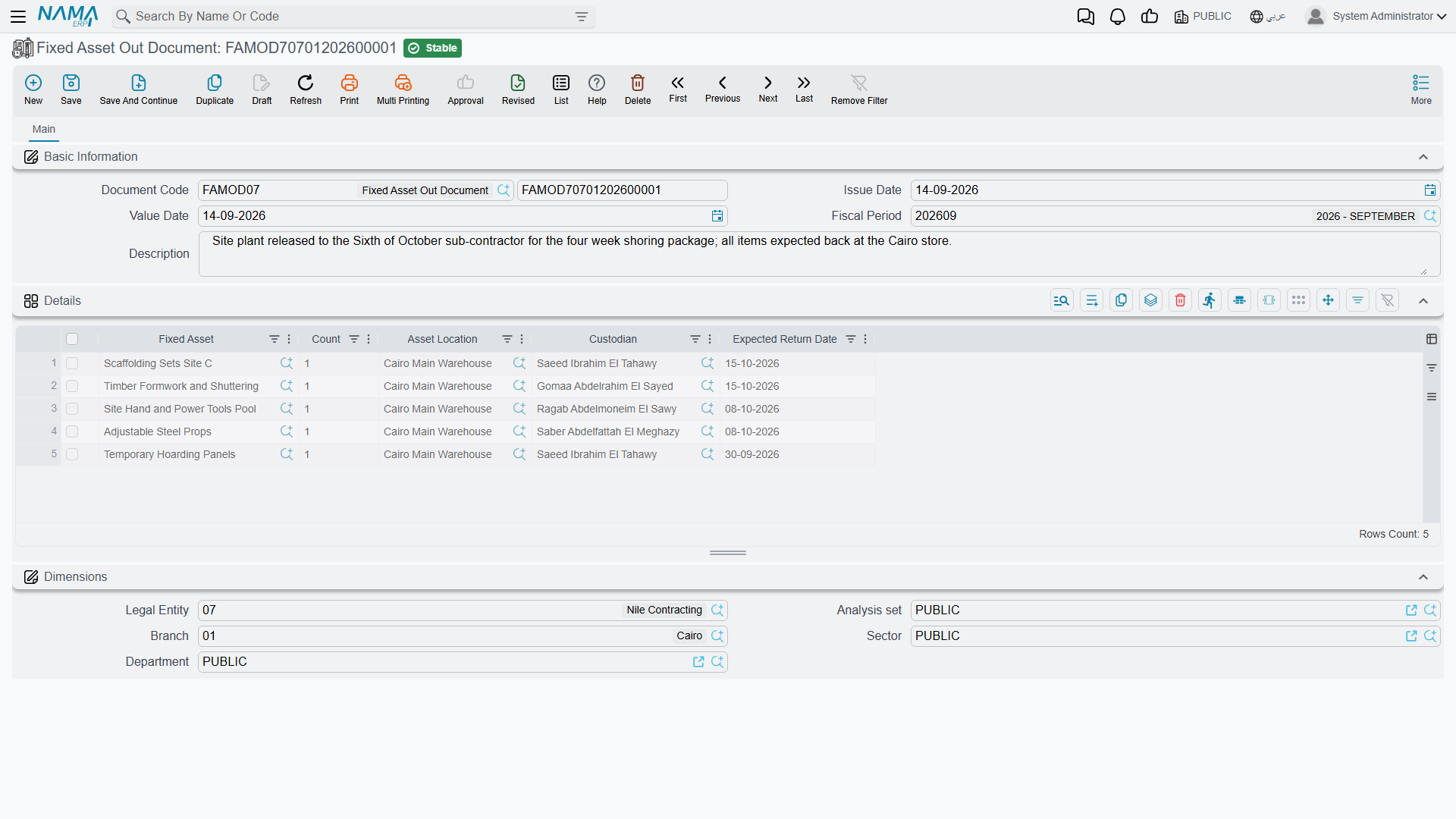
The header is book and code, issue date, value date, fiscal period and a description, plus the document's own dimensions. Everything else is in the التفاصيل / Details grid:
| Column | What to put in it |
|---|---|
| الأصل الثابت / Fixed Asset | The countable asset. Required |
| العدد / Count | How many units are going out. Required |
| موقع أصول / Asset Location | Where they are going, recorded on the line |
| مسئول العهدة / Custodian | Who is taking them, recorded on the line |
| تاريخ الإعادة المتوقع / Expected Return Date | When you expect them back, recorded on the line as a note |
For the trade fair, one line: FRN-0021, count 3, expected back on 10 March.
Commit it and the asset's Out Count — visible on the asset's الإحصائيات / Statistics page — becomes 3. The Current Count stays at 10, because the company still owns ten desks; three of them just happen to be in Dammam.
The return document
سند رجوع أصول / Fixed Asset Return Document is the same screen with the same grid, and it is the only way the out count comes down.
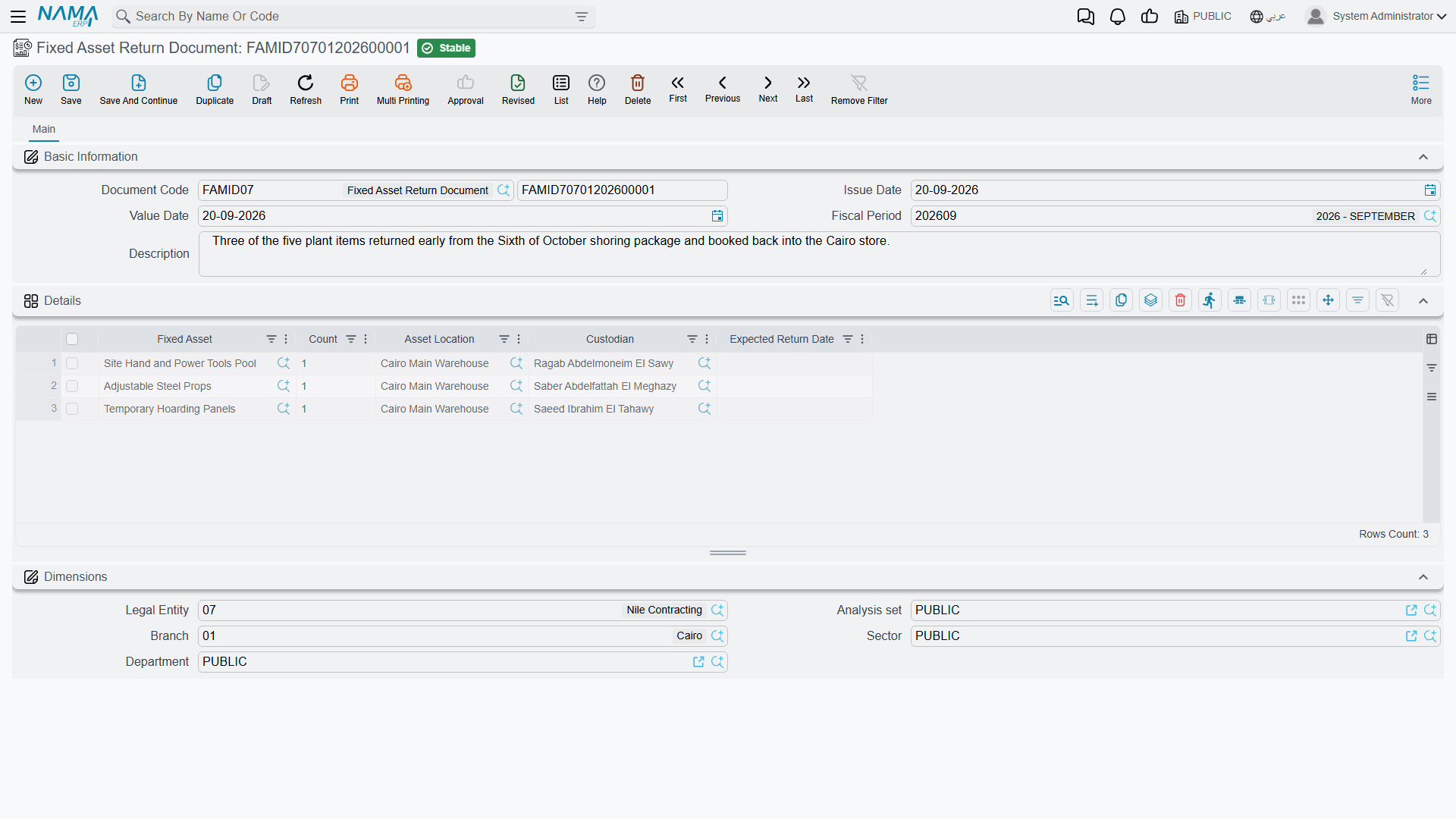
On 10 March you enter one line — FRN-0021, count 3 — and commit. Out Count returns to 0 and the asset is fully accounted for on site again.
Partial returns are perfectly normal: send thirty chairs out, bring twenty back on Tuesday and ten on Friday, with a return document for each.
The counting is checked across the whole timeline
The two documents are validated together rather than one at a time, and the check is stricter than it first appears. Every out and return document that touches an asset is replayed in value-date order, and the document you are committing is rejected if the running total ever goes wrong:
- you cannot have more units outside than the asset has. A second out document for eight of the ten desks while three are already away is refused, naming the totals — "Total count is 10, and total count outside is 11";
- you cannot bring back more than went out. A return for four desks when three are away is refused the same way;
- the same asset may not appear twice in one grid, and the grid may not be empty.
Because it is the whole timeline that is replayed, a back-dated document can be refused because of something that happens later. Insert an out document dated 5 March for the remaining seven desks and the check fails at 10 March, where the return of three would push the running total past what the asset holds. When a rejection makes no sense against today's position, look forward as well as back.
Cancelling or deleting a document removes its units from the running total and recomputes the counters from what is left, so corrections are safe — you are never patching a stored total by hand.
Actions on these screens
Neither the out document nor the return document carries a button of its own. You name the asset and the quantity going out or coming back, save and commit; the counters described above move on commit and move back when you cancel or delete the document.
Reading the counters
The four counters live on the asset's الإحصائيات / Statistics page, and the two you will actually use are:
- العدد بالخارج / Out Count — units outside the premises right now, maintained by these two documents;
- العدد الحالي / Current Count — units the register says you hold, which purchases and openings raise and partial disposals lower.
Subtract one from the other and you have what should be findable on site — which is exactly the figure a stocktake is trying to confirm.
Close out the loans before you count
An asset showing units out is an asset whose count sheet will not balance. Chase the outstanding return documents before a stocktake rather than explaining the difference afterwards, and treat anything still out well past the date it was expected back as a question for the custodian named on the line rather than a shortage.