
Stocktaking Fixed Assets
Once a year somebody walks the plant with a scanner and finds out what is actually there. The register says Al-Waha Industries holds forty assets and twelve custody items at the Riyadh plant. The count finds thirty-eight assets, one of them a desk that belongs to Dammam, and a printer that is signed out to another department altogether.
The مستند جرد أصول / FixedAssets Taking Document is where that comparison happens. It is worth being blunt about what it is, because the name says "document" and people expect documents in this module to do something:
The taking document is a reconciliation report that you save. It compares what the register expects against what you counted, and produces four lists: assets missing, assets found unexpectedly, custody items missing, custody items found unexpectedly. It writes nothing back. No asset is written off, no asset is created, no custodian is corrected, no journal entry and no business request is produced. Committing it changes nothing at all.
That is not a shortcoming — it is the right division of labour. Deciding that a missing forklift should be scrapped is an accounting decision with a gain or loss attached, and it belongs on a disposal document with a term behind it, not on a count sheet. What the taking document owes you is an accurate, dated list of the differences, and it delivers that.
You will find it at الأصول > عهد الأصول > مستند جرد أصول (Assets > Custody Of Assets > FixedAssets Taking Document), under the fixedassets licence. It uses no document term.
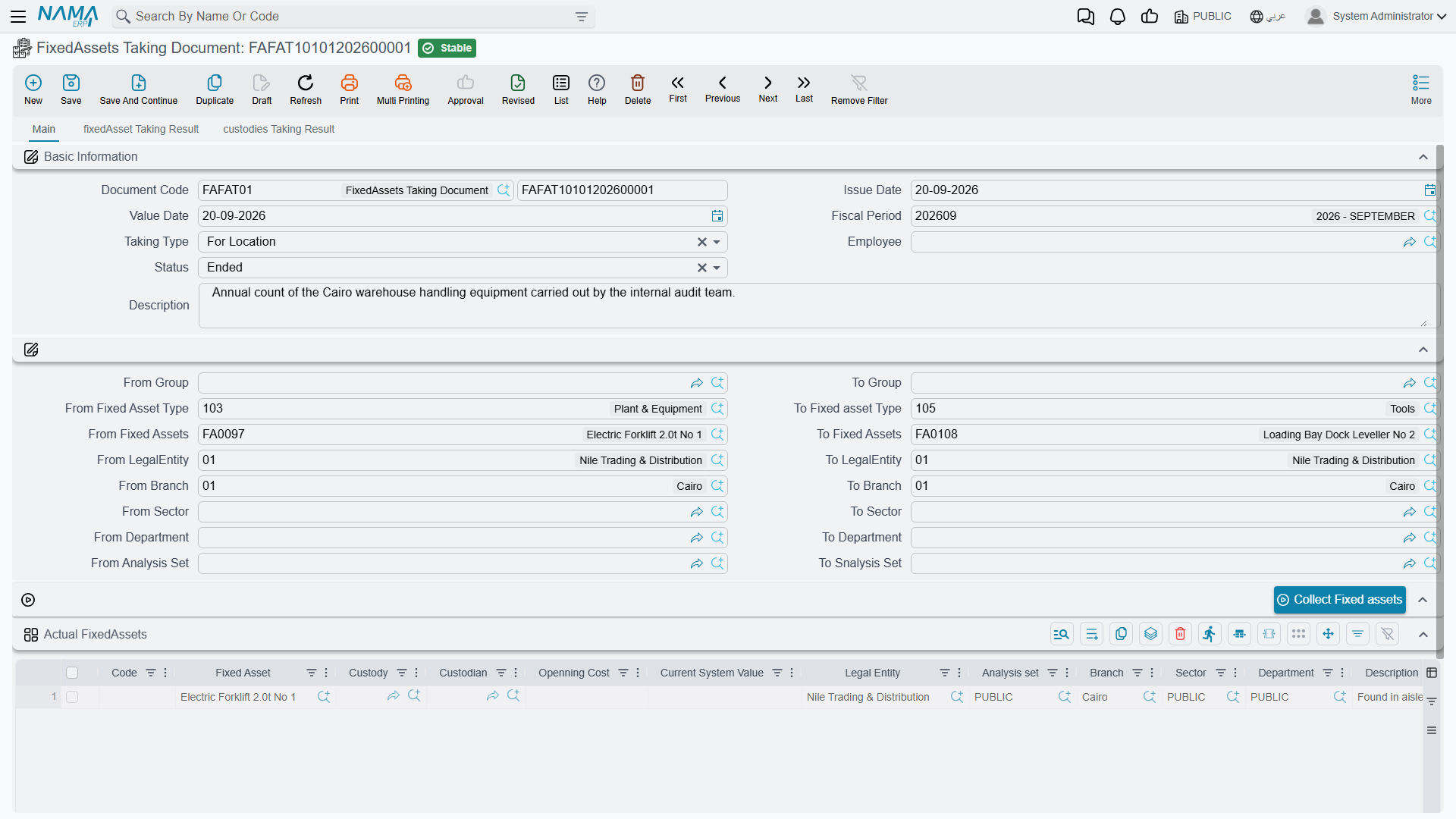
Two ways to scope a count
The header carries نوع الجرد / Taking Type, and it decides what the register is expected to produce:
| Taking Type | The expected list is |
|---|---|
| للموقع / For Location | Every asset and custody item filed under the document's own المحددات / Dimensions — company, sector, branch, department, analysis set — that has not been disposed of |
| للموظف / For Employee | Every asset and custody item held by the Employee named in the header |
For Location is the annual count of a site or a branch. Note what drives it: the document's own dimensions, set in the Dimensions group at the bottom of the page. Set the Dimensions group to Riyadh Plant and you are counting everything the register files under Riyadh Plant. Leave a dimension blank and it simply is not used to narrow the list.
For Employee is the other common case — a laptop-and-phone check on somebody who is leaving, or a periodic confirmation of what an engineer is signed for. It pulls both the assets and the custody items that person holds, and the employee is required.
The header also carries الحالة / Status, with two values: بدأ / Started and منهي / Ended. A new document starts as Started, and that matters — see the comparison section below.
Building the count sheet
The الاصول الحالية / Actual FixedAssets grid is the count itself: one row per thing the team physically found. There are three ways to fill it, and a real count usually uses all three.
1. Press Collect Fixed assets (تجميع الأصول الثابته). The button pre-fills the grid with assets from the register so the team has something to walk with. It rebuilds the grid from scratch each time, so press it before you start editing rows, not after. Above it sit sixteen From/To range fields — group, asset type, asset code, company, branch, sector, department, analysis set — which narrow what the button pulls in. Each range is a code comparison, and a blank field means no bound on that side, so From Fixed Asset FA-1000 and To Fixed Asset FA-1999 pulls that block of codes and nothing else. Assets that have been disposed of are never collected.
The ranges are a convenience for filling the sheet, and only that. They narrow what the button pulls in; they do not narrow what the count is compared against. That comparison always uses the taking type and the header dimensions.
2. Scan into the الكود / Code column. This is the real workflow. Point a barcode scanner at an asset tag or a custody label and the code goes into the Code column, which looks the value up — first among custody items, then among fixed assets — and fills in the reference, the custodian, the acquisition cost and the current book value. With barcode mode on, the grid advances to the next row by itself, so a two-person team can work a hall without touching the keyboard.
3. Pick a line by hand. Choose the الأصل الثابت / Fixed Asset or the عهدة / Custody on the row and the same details are filled in.
Two rules apply to the grid: every row needs either an asset or a custody item, and the same code cannot be counted twice — a repeated scan is rejected with "Can not stocktaking this item twice", which is exactly what you want when two people are scanning the same hall.
There is no "not found" tick — absence is the shortage
This is the one mechanic everybody has to be told. The count sheet lists what you found. If the team collected the register's expectation into the grid and then could not find two of the machines, they delete those two rows. What is left in the grid is the count; anything the register expected that is no longer in the grid becomes a shortage. Nothing is marked as missing — it is simply absent.
How the differences are worked out
The comparison runs when the document's Status is set to منهي / Ended, and it re-runs on every save from then on. While the status is Started the four result grids stay as they are, which is what lets a count run over several days without half-finished results confusing anybody.
When it runs, the system builds the expected list from the taking type and the header dimensions, projects the count sheet into its own list, and compares them:
- expected but not counted → shortage;
- counted but not expected → extra.
Assets and custody items are compared separately, which is why there are four result grids on two pages rather than two on one.
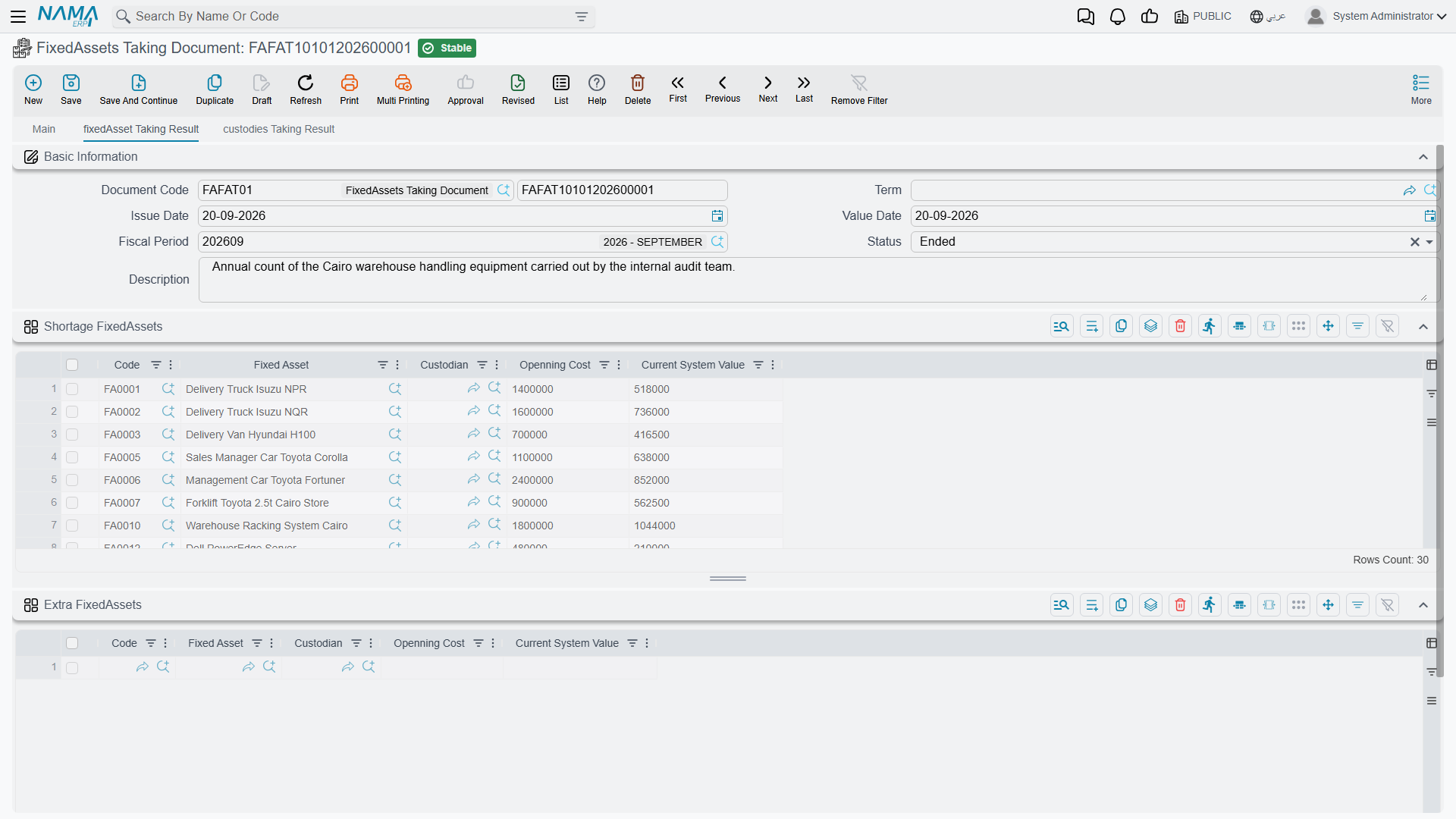
Page 2, نتائج جرد الاصول / fixedAsset Taking Result, holds الناقص من الاصول / Shortage FixedAssets and الزائد من الاصول / Extra FixedAssets. Each line shows the asset, its custodian, its قيمة الإقتناء / Openning Cost and its القيمة الدفترية الحالية / Current System Value — so the shortage list doubles as the value of the problem. Those value columns settle when the document is saved, so read them from a saved document rather than mid-entry.
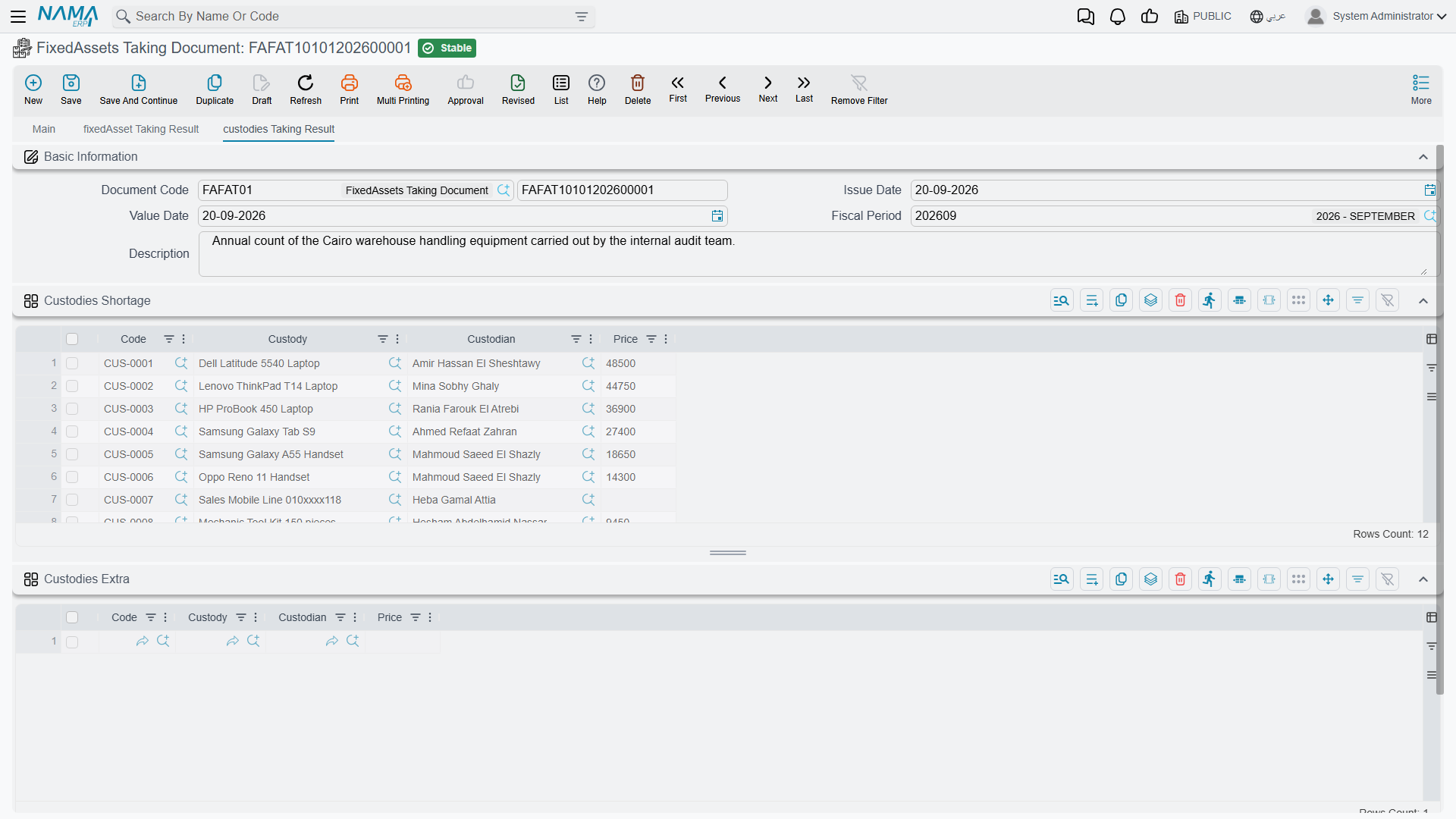
Page 3, نتائج جرد العهد / custodies Taking Result, does the same for custody items in الناقص من العهد / Custodies Shortage and الزائد من العهد / Custodies Extra, showing the item, its holder and its price.
Only two kinds of difference exist
Missing and unexpected. An asset found in the wrong place is not reported as "wrong location" — it appears as an extra on the count where it was found, and as a shortage on the count of the place it should have been. This is worth knowing before you plan a site-by-site count: run all the sites before drawing conclusions, and match the extras of one against the shortages of another.
A count at the Riyadh plant
Al-Waha counts the Riyadh plant on 30 June 2026.
- A new taking document, value date 30 June, Taking Type = For Location, Dimensions group set to the Riyadh Plant branch, status Started. The register holds forty assets and twelve custody items there.
- The team sets the asset-code range to the plant's block and presses Collect Fixed assets; thirty-eight rows arrive in the count sheet.
- Over two days they scan. Everything on the sheet is confirmed except the forklift
MCH-0012, which nobody can find, and one cabinet — those two rows are deleted. They also scan a deskFRN-0058that carries a Dammam tag, and a printer that turns out to be custody itemCDY-0041held by another department. Both are added as new rows. - Status is set to Ended and the document saved. The results come out as:
- Shortage FixedAssets —
MCH-0012(book value 22,000), the cabinet, and the two plant assets that fell outside the collected code range and were never scanned; - Extra FixedAssets —
FRN-0058; - Custodies Extra —
CDY-0041.
- Shortage FixedAssets —
- The document is committed. Every asset record is exactly as it was.
Acting on the findings
The count is the beginning of the work, not the end of it. Each kind of difference has a document that resolves it:
| Finding | What resolves it |
|---|---|
| An asset genuinely gone | A disposal document — for MCH-0012, a scrap at a disposal value of 0, taking the 22,000 book value as a loss |
| Some units of a countable asset gone | A partial disposal |
| An asset found somewhere else | A transfer document — FRN-0058 back to Dammam, or its dimensions corrected to where it really is |
| Something real that was never registered | A purchase if it was bought and not recorded, or an opening document if it predates the register |
| A custody item with the wrong holder, or gone | A custody delivery or transfer, or a custody disposal |
Two things make that follow-up smoother. First, settle the out and return documents before you count — units that are legitimately off site will otherwise read as shortages. Second, run the fixed assets reports for the same dimensions before the count, so the team walks in with the register's expectation on paper as well as on the scanner.
Keep the committed taking document. It is the dated evidence of what was found, and every disposal and transfer raised afterwards refers back to it.