
Moving an Asset: The Transfer Document
Al-Waha Industries wheels the CNC cutting machine MCH-0007 from Hall 2 to Hall 3 of the Riyadh plant. Twenty metres, half an hour, two technicians. Later that year the same machine is shipped to the Dammam workshop, which is a different branch of the same company. Later still, the group decides the machine belongs to its Jeddah company instead.
All three moves are recorded with the same document — سند نقل الأصل / Transfer document — and all three produce completely different accounting. The first books nothing at all. The second books one journal entry. The third books two. Nobody chooses that on the screen: what a transfer books is decided entirely by what the transfer changes.
That single rule explains almost everything on this page, so start with it:
| What changed between the old position and the new one | What is processed |
|---|---|
| The physical location only | Nothing. The asset record and its history are updated, the ledger is untouched |
| An accounting-relevant dimension (branch, sector, department, analysis set) or one of the asset's accounts, inside the same company | One entry, moving gross cost and accumulated depreciation from the old dimension/account to the new one |
| The company (legal entity) | Two linked entries, one in each company, joined by mediator accounts. Allowed only between companies that keep their books in the same currency |
Which of the four dimensions count as accounting-relevant is a decision you make once, in module configuration. If your installation does not treat sector as accounting-relevant, then a sector-only move behaves like a pure location move and books nothing.
Where the document lives
You will find it under الأصول > عهد الأصول > سند نقل الأصل (Assets > Custody Of Assets > Transfer document). It needs the fixedassets licence — the plain module licence, not the custody one, even though the menu folder is called Custody Of Assets.
A document term is optional here. Without a term the transfer behaves normally and books whatever its changes call for; the one thing a term can do is switch the accounting off entirely, which the section on suppressing the entry below covers.
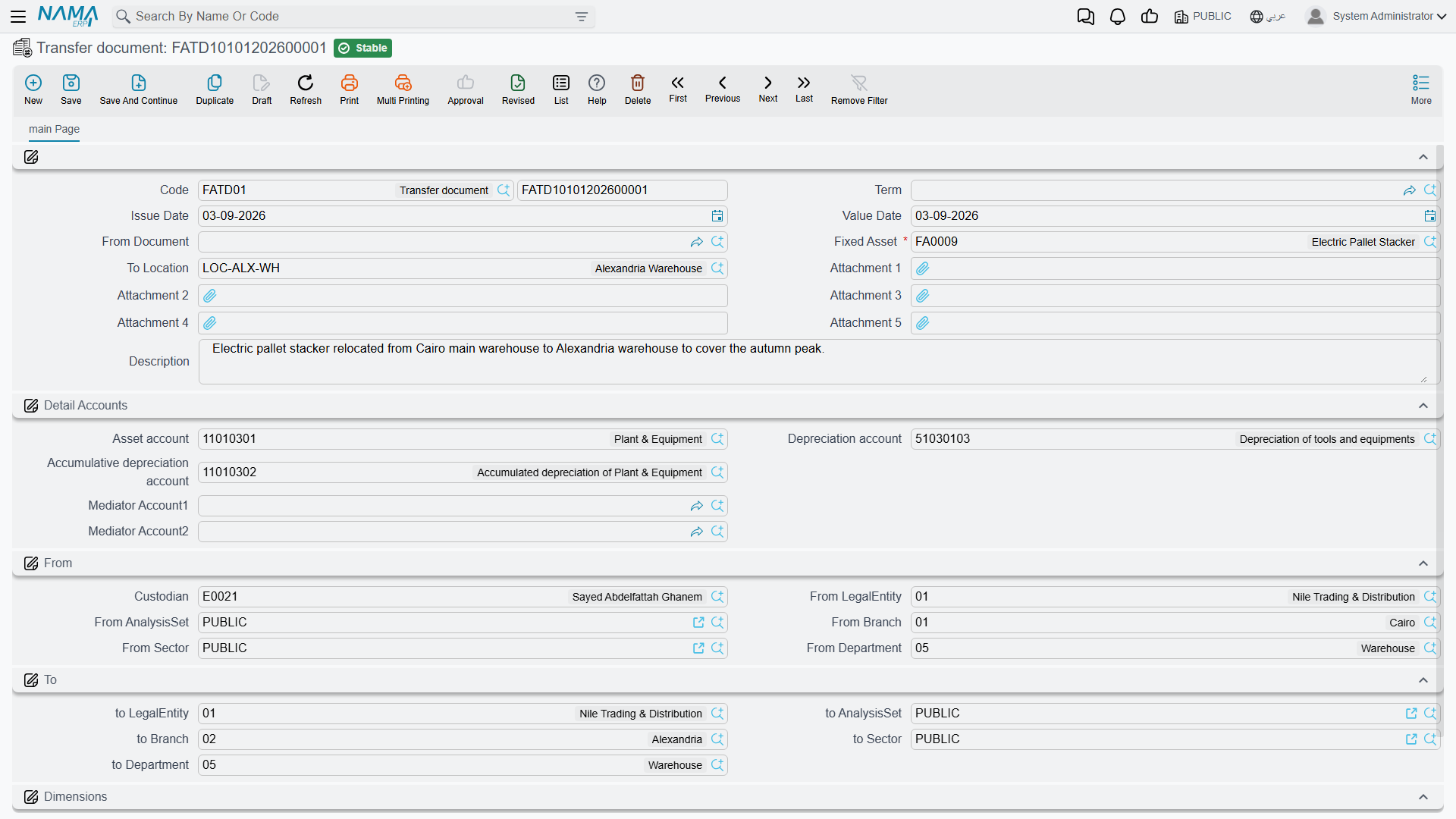
Reading the screen
The document is one page, and it is built around a from and a to.
The top group carries the usual document identity — book and code, issue date, value date — plus two fields that do the real work:
- From Document (بناءا على) — an existing transfer request, if the move was asked for on paper first. Picking one copies the asset, the locations, both dimension sets and the accounts onto this document so nothing is typed twice.
- Fixed Asset (الأصل الثابت) — the machine being moved. Choosing it fills in almost everything else: the From dimensions, the accounts, and the asset's current location.
- To Location (إلي موقع) — where it is going.
There is no From Location box to fill. The system knows where the asset is, because it knows the last transfer that touched it, and it writes that in for you.
The destination location drives the destination dimensions
When you pick To Location, the system reads that location's own master record and copies its company, branch, sector, department and analysis set into the whole To group. This is the intended way to work: set up each asset location with the dimensions that belong to it, and afterwards a transfer is a single choice. You can still override any of the five by hand — the To group is fully editable — but if you find yourself overriding them often, the location master file is what needs fixing.

Below that sit four groups:
| Group | What it holds |
|---|---|
| الحسابات / Detail Accounts | The three accounts the asset should sit on from now on — Asset account (حساب الأصل), Depreciation account (حساب الإهلاك) and Accumulative depreciation account (حساب الإهلاك التراكمي) — plus Mediator Account 1 and Mediator Account 2, which only come into play when the company changes |
| من / From | Where the asset is now: its custodian and its five current dimensions. Filled from the asset |
| إلى / To | Where it is going: the five destination dimensions, and To Fixed Asset Classification 1 to 5 (إلى تصنيف أصل ثابت) when the move also reclassifies the asset |
| المحددات / Dimensions | The document's own dimensions — the ones the document is filed under. These matter more than they look; see below |
The accounts are pre-filled from the asset, so leaving them alone means "keep the asset where it is in the chart of accounts". Changing one of them is a real event: the entry the transfer produces moves the balances off the old account and onto the new one.
The document's own legal entity decides which ledger is read
The Dimensions group at the bottom is not decoration. When the transfer works out how much cost and accumulated depreciation to move, it reads the asset's ledger balances in the company named in that group. Set it to the company the asset is leaving. If it names some other company — the destination, or whatever your user defaults to — the lookup finds nothing, every line comes out at zero, and the document commits without an entry.
The three outcomes, worked
The machine in these examples is MCH-0007, and we join it at the end of December 2027, after its control-unit upgrade and two years of depreciation:
| Cost | 270,000 |
| Accumulated depreciation | 93,900 |
| Book value | 176,100 |
| Location | LOC-R2 — Riyadh Plant, Hall 2 |
| Branch | Riyadh Plant |
Hall 2 to Hall 3 — nothing is booked
You raise a transfer, pick MCH-0007, set To Location to LOC-R3 (Riyadh Plant, Hall 3). That location carries the same company, branch, sector and department as Hall 2, so the To group comes back identical to the From group. The accounts are untouched.
On commit the asset's location changes to Hall 3, a row is added to the asset's location history, and that is all. No entry, no business request, nothing for the accountant to review. This is the common case and it is meant to be cheap: a plant that shuffles equipment between halls every week can record all of it without generating a single journal entry.
Riyadh to the Dammam workshop — one entry
Now the machine is shipped to the Dammam workshop, a different branch of Al-Waha Industries. You pick LOC-D1 as the destination and the To group comes back with branch Dammam Workshop.
Because branch is accounting-relevant in this installation, the transfer moves the machine's two balances across:
| Account | Dimensions | Debit | Credit | |
|---|---|---|---|---|
| 1 | Asset cost | Dammam Workshop | 270,000 | |
| 2 | Asset cost | Riyadh Plant | 270,000 | |
| 3 | Accumulated depreciation | Riyadh Plant | 93,900 | |
| 4 | Accumulated depreciation | Dammam Workshop | 93,900 |
The entry nets to zero — nothing is gained or lost, the machine simply now belongs to a different branch in the ledger as well as on the shop floor. Gross cost and accumulated depreciation both travel, which is why the branch trial balance still shows the machine at 176,100 net.
If the machine had never been depreciated, the accumulated-depreciation lines would come out at zero and be dropped, leaving a two-line entry.
To the Jeddah company — two entries
The third case is different enough to have its own page. The short version: the asset arrives in the receiving company at net book value — 176,100 — with its accumulated depreciation starting again from nothing, and the two companies are joined through a pair of mediator accounts. See transfers between companies for the entries and the setup they need.
Where Thread 1 actually goes
On the disposal page, MCH-0007 is sold on 31 December 2027 rather than moved to Jeddah. The inter-company move is the other fork in the same story, at the same numbers — one machine, one book value of 176,100, two possible endings.
What the transfer writes back
Committing the document does three things to the asset record: it sets the location, it sets the five dimensions, and it sets the three accounts — all from the To side of the document. It also writes a row into the asset's location history, which is what you read on the asset's Statistics page when someone asks where a machine has been.
The same commit can reclassify the asset. Each To Fixed Asset Classification that is filled replaces the matching Fixed Asset Classification (1 to 5) on the asset; the ones left empty leave the asset's classification as it is. So a machine moving from the workshop into the production line can change its classification from "Maintenance equipment" to "Production equipment" in the same document.
There is one condition on the write-back. The asset takes its header values from its latest movement. Enter a back-dated transfer behind one that is already recorded, and the history gains a row in the right chronological place while the asset's own location and dimensions stay as the later document left them. That is correct behaviour — the most recent move is the one that describes where the thing is now — but it does surprise people who expect the last document entered to win.
Who holds the asset is a separate question, handled by the delivery and receipt of custodies document. The Custodian field in the From group records who was holding the machine when the move was raised, and it is part of the paper trail rather than a way to reassign it.
Committing a transfer clears the asset's custodian
Watch for this one. Every committed transfer wipes the Custodian on the asset record and leaves it empty — and there is no field on the transfer screen that sets a new one. The machine arrives in its new department with nobody shown as holding it.
After each transfer, put the custodian back: either raise a delivery and receipt of custodies document for the new holder — the proper route, because it also books the value and writes the custody history — or set the field by hand on the asset. If your company transfers assets often, ask your administrator about adding the new-custodian field to the transfer screen with a screen modifier.
Actions on this screen
The transfer document has no buttons of its own. Everything it does happens when it is committed — the location, custodian and dimensions are written onto the asset, and the accounting entry is raised. The screen's conveniences are not buttons either. Picking the asset fills the from location, the custodian, the asset's accounts and both sets of dimensions from the asset's own record, so an unchanged dimension needs no typing at all. Picking the destination location then overwrites the to dimensions with that location's, which is why you should choose the location before correcting a destination dimension by hand.
What stops a transfer from committing
The transfer sits in the middle of an asset's timeline, so most of its rules are about not tearing a hole in that timeline. All failures are reported together, so you see the full list at once.
- A transfer can never be an asset's first document. The system needs a previous position to move the asset from. If you get "The first transaction for the asset can not be transfer", the asset was never brought into service — it still needs a purchase or an opening document.
- The asset must be in service. An asset still in its initial state cannot be transferred, and a disposed asset cannot be transferred at all. The asset status page lists what each status blocks.
- Nothing may exist after this date. A later transfer, or a later document that changed the asset's value — depreciation, an addition or deduction, a revaluation, a properties change — will block the commit, naming the document that is in the way. Cancel or delete that later document, insert the transfer, re-commit.
- Depreciation must be current. The asset has to be depreciable in the transfer's period, unless it is already fully depreciated and the last depreciation is genuinely behind the transfer date. In practice: run the depreciation up to the month of the move first, then transfer.
- Both companies need a mediator account, and the same currency, when the legal entity changes — see the inter-company page.
The interlock works in both directions. Once a transfer exists, a depreciation dated before it is refused as well, with a message naming the transfer. The order of documents on an asset's timeline is never allowed to become ambiguous.
Turning the accounting off
The transfer document's term has exactly one setting: بدون تاثير محاسبي / Without Accounting Effect. Tick it and the document does all of its register work — location, dimensions, accounts, history — and sends nothing to the ledger.
That is the right choice for organisations whose asset dimensions are purely analytical and whose accountants do not want branch-to-branch entries cluttering the ledger. It is a per-term decision, so you can keep a normal transfer book alongside a "no accounting" one and choose per document.
Because a term is optional on this document, a transfer entered without one behaves as though the box were unticked: it books.
Cancelling or deleting
Cancelling or deleting a transfer removes its ledger requests, restores the asset's location, dimensions and accounts from the previous movement, and deletes the history row. The asset ends up exactly where it was before, which is what you want when a move was recorded in error.
The one refusal you may meet is "asset location changed by …". That means a newer movement already exists, and rolling this one back would leave the newer one dangling. Cancel or delete the newer document first.
There is also a Regenerate Accounting Effects action on the More menu for when a term or an account was corrected after the fact: it rebuilds the entries from the document as it now stands. The same menu shows the ledger transactions the document produced, which is the fastest way to see what a particular transfer actually did.
Entries are processed in the background
Like everything else in the module, the ledger side of a transfer is a business request. The document saves immediately and the entry is produced by the request processor a moment later. If it fails — a closed period, a missing account — the document stays committed and the request is retried from the Business Requests list view with More → Reprocess. It is also worth remembering that the balances are read as at the transfer's value date from ledger entries that have already been processed, so a transfer entered while an earlier document is still queued can read a stale figure. Let the queue drain before transferring an asset that was only just bought.
Moving many assets at once
When a whole department relocates, entering one transfer per asset is not realistic. The سند نقل أصل مجمع / Aggregated Fixed Asset Transfer Document is one screen with a grid: one row per asset, each row carrying its own destination location, destination dimensions and accounts.
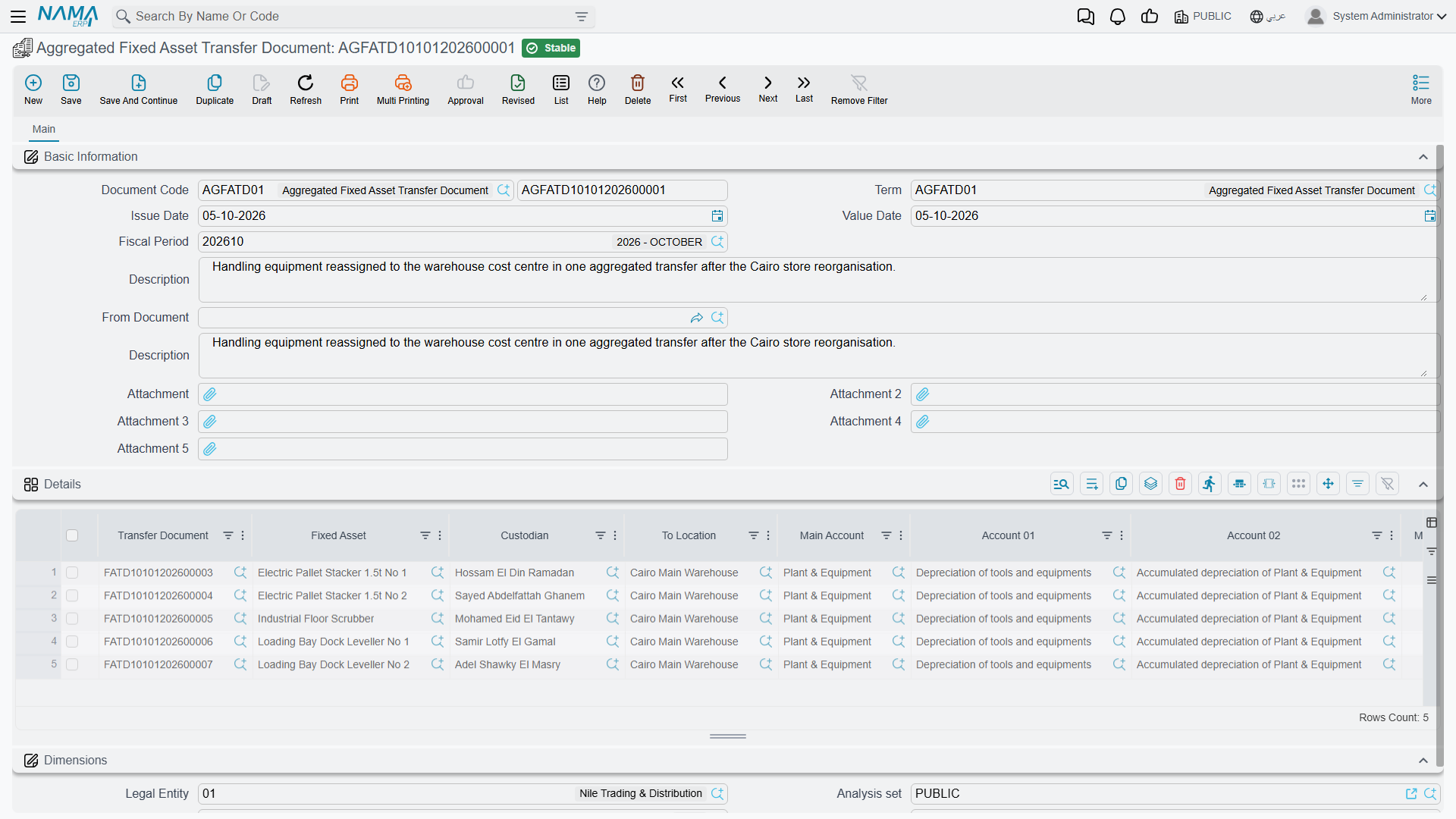
On commit it creates one real transfer document per row, and each of those does the full job described above — history row, asset update, ledger entry if the change calls for one. The aggregate itself books nothing; it is a factory.
Two consequences are worth knowing before you use it:
- The aggregate's own term names the book and term the generated transfers are created with. That is where Without Accounting Effect has to be set, if you want it — setting anything on the aggregate's term will not reach the children.
- Editing a committed aggregate re-commits its children, and cancelling it deletes them. The children are not independent documents you can maintain by hand afterwards.
Validation happens per row, and it is the same list as above with one addition: an asset may not appear twice in the grid. That check exists because two transfers of the same asset on the same date would produce exactly the ambiguity the timeline rules are designed to prevent.