
Production Costing: Following the Money
The Real Cost of Making Things
Here's a question that keeps manufacturing managers up at night: How much did it actually cost to make that product?
It sounds simple, but it's surprisingly tricky. Sure, you know what you spent on materials - you have the invoices. You know how much labor time went into it - you tracked the hours. But what about the factory rent? The electricity bill? The supervisor's salary? The equipment depreciation? How do you fairly allocate those costs across all the different products you make?
And even more important: Did production go according to plan? Did you spend what you expected, or were there surprises? If you're spending more than expected, where is the money going?
This is what production costing is all about. It's the financial truth-telling part of manufacturing - tracking every dollar (or riyal, or whatever currency you use) that went into making your products, and figuring out if you're making money or losing it.
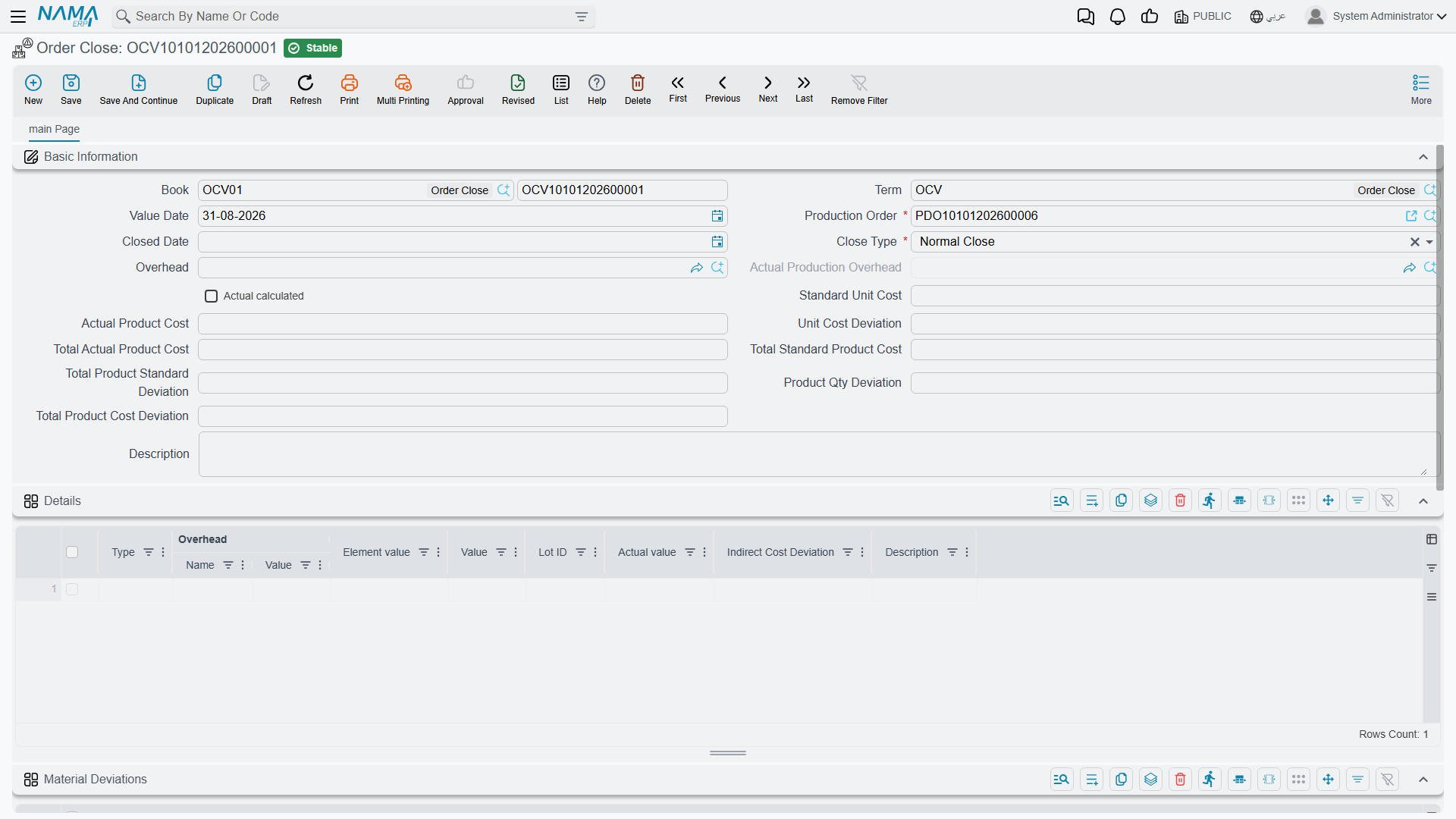
You'll find the main document under Manufacturing > Documents > Order Close (التصنيع > المستندات > إغلاق أمر إنتاج).
Required license
Order close, overhead types and the actual overhead calculator are part of the core manufacturing license. If the Manufacturing menu is missing altogether, that license is not enabled.
Understanding Manufacturing Costs: The Three Buckets
Think of manufacturing costs as falling into three buckets. Two are easy to track, one is... complicated.
Bucket 1: Direct Materials - The Easy One
These are the raw materials and components that physically go into your product. You can point at them and say "this steel sheet, these screws, that paint - they're all in the finished product."
Tracking this is straightforward: When you issue materials to a production order, the system records the cost. If you issued 100 kg of steel at $5/kg, that's $500 of material cost. Done.
The system values the materials with the company's inventory costing method - FIFO or moving average, chosen once in the Issue Cost Policy of Costing Configuration. If you're using lot-tracked materials, it knows exactly which lot you consumed and what that lot cost.
Bucket 2: Direct Labor and Machine Time - Still Pretty Clear
These are the people and machines directly making the product. The welder spending 4 hours on this order, the CNC machine running for 2 hours - you can tie these directly to the production order.
When you record production executions, the system creates Resource Vouchers tracking this time. If your welder costs $30/hour and worked 4 hours, that's $120 of labor cost. If your CNC machine costs $75/hour and ran for 2 hours, that's $150 of machine cost.
Again, pretty straightforward. You have the time, you have the rates, you multiply. The costs get accumulated on the production order.
Bucket 3: Manufacturing Overhead - The Complicated One
This is where it gets interesting. These are all the other costs of running a factory that you can't tie to a specific product:
The factory itself: You pay rent whether you make 100 units or 1000 units. How much of that rent should this particular production order bear?
Utilities: The electricity bill covers the whole factory. Sure, running machines uses power, but so does lighting, heating, ventilation. How do you split it up?
Indirect labor: Your production supervisor oversees multiple production lines. Quality inspectors check various products. Material handlers move stuff around. How much of their salary goes to each order?
Equipment depreciation: That expensive machine depreciates every month whether you use it heavily or barely at all. How do you charge that to products?
Supplies and consumables: Lubricants, cleaning materials, protective equipment, small tools - they support production but aren't in the final product.
Facility costs: Insurance, property taxes, maintenance, security - all necessary, none directly traceable to a specific product.
This overhead is real money you're spending. It needs to be recovered through product pricing. But how do you allocate it fairly?
Overhead Allocation: Making the Invisible Visible
This is where Overhead Types (التكاليف الغير مباشرة) come in. An overhead type is your formula for spreading indirect costs across products.
Think of it as a recipe for overhead allocation. Each line of the overhead type is one overhead element (like "Factory Rent", "Utilities", "Supervision"): it has a Name, a Type that says what the charge is measured against, a Value (the rate or the percentage), and its own Accounting Effects | Debit side and Accounting Effects | Credit side, so every element can land in its own accounts.
When the order is closed, the system works out a base figure for each line (the Element value on the close voucher) and turns it into the line's overhead amount. The types to choose from:
| Type | The base figure | Overhead amount |
|---|---|---|
| Material Percentage — «نسبة من تكلفة المواد الخام» | Cost of raw materials issued to the order, less materials returned | Base × Value ÷ 100 |
| Resource Percentage — «نسبة من تكلفة الموارد» | Cost of the order's resources (labour and machines) | Base × Value ÷ 100 |
| Resource And Material Percentage — «نسبة من التكاليف الأولية ( مواد خام+ موارد)» | Material cost plus resource cost | Base × Value ÷ 100 |
| Final Product Amount — «قيمة لكل وحدة منتجة» | Quantity of finished product delivered on the order's product deliveries | Base × Value |
| Value Per Material Amont — «قيمة لكل وحدة ماده خام» | Quantity of raw material issued less returned, in the base unit — only the item in the line's Raw material column, or every material when that column is empty | Base × Value |
| Resource Time Amount — «قيمة لكل ساعة مورد» | Hours on the order's resource vouchers, human and machine together | Base × Value |
| Human Resource Time Amount — «قيمة لكل ساعة مورد بشري» | Hours on the order's resource vouchers, human resources only | Base × Value |
| Machine Amount — «قيمة لكل ساعة آلة» | Hours on the order's resource vouchers, machines only | Base × Value |
| Execution Time Amount — «قيمة لكل ساعة عمل ( من سند التنفيذ)» | Hours between the from and to date/time on the order's production execution lines | Base × Value |
| Custom — «مخصص» | — | The result of the query written in the line's Script Statement column, run for the order being closed |
Two examples. A line of type Material Percentage with a value of 12 charges an order that consumed $10,000 of materials $1,200. A line of type Final Product Amount with a value of 3 charges an order that delivered 500 units $1,500.
A line does not have to apply to every order. Fill its Finished Product column, or any of Product Class 1 to Product Class 10, and the line is used only for orders whose finished product matches; leave them empty and it applies to all.
There is no fixed amount per order
None of the types charges a flat sum per order. If you need one, use Custom with a query that returns that amount.
The Actual Overhead Calculator - Getting Real
All the types above use predetermined rates - you're estimating what overhead should be. But what if you want to use actual overhead costs?
That's where the Actual Overhead Calculator (طريقة حساب فعلي للمصاريف الغير مباشرة) comes in.
Instead of guessing, you tell the system: "Go look at the actual general ledger accounts for factory overhead. Take the real numbers from accounting."
Overhead Element: "Actual Factory Utilities"
Source: GL Account 5400 (Utilities Expense)
Period: This month
At month-end, the system queries account 5400, finds you spent $15,200 on utilities this month, and allocates that actual cost across all production orders closed this month.
The beauty: You're using real numbers, not estimates.
The trade-off: You can only finalize costs at period-end when you have actual numbers. If you need real-time costing, you have to use predetermined rates.
How allocation works: Usually proportional to something - maybe production hours, maybe direct labor cost, maybe units produced. The system divides the total actual overhead across orders based on their share of that allocation base.
Example:
January actual utilities: $15,200
Total production hours in January: 1,900 hours

Order A: 200 hours → gets charged $15,200 × (200/1900) = $1,600
Order B: 500 hours → gets charged $15,200 × (500/1900) = $4,000
Order C: 300 hours → gets charged $15,200 × (300/1900) = $2,400
Running it: the Actual Production Overhead document
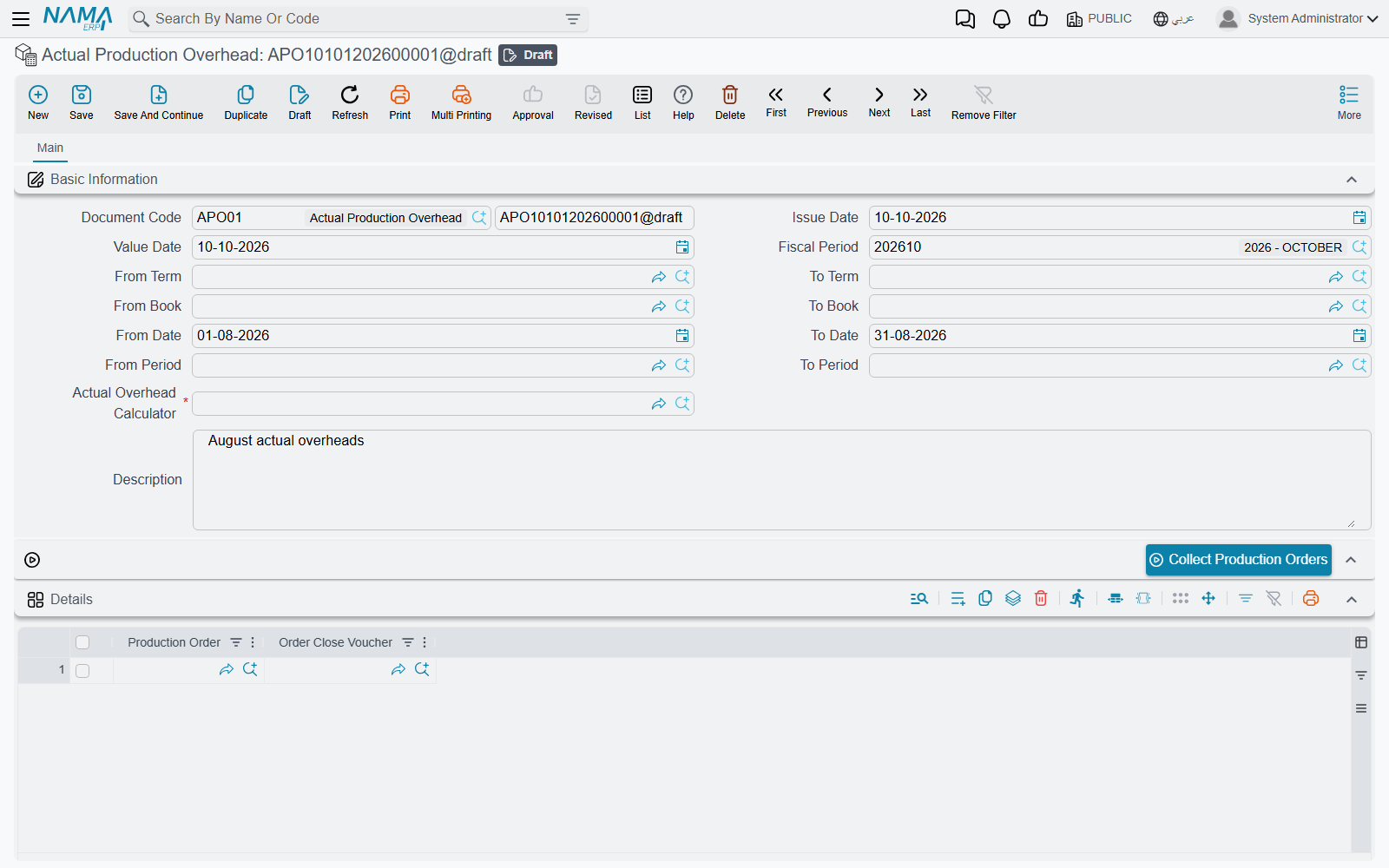
The calculator is only the recipe. The run itself is an Actual Production Overhead document, under Manufacturing → Master Files → Actual Production Overhead (التصنيع ← الملفات ← تكاليف الإنتاج الغير مباشرة الفعلية), and it is driven by three buttons used in order:
- Fill in the ranges — From Term / To Term, From Book / To Book, From Date / To Date, From Period / To Period — and press Collect Production Orders (تجميع أوامر الإنتاج). The Details grid fills with the order close vouchers in those ranges, each with its production order.
- Pick the Actual Overhead Calculator, save, and press Calculate Overhead Values (حساب قيمة التكاليف الغير مباشرة). The Actual Overheads grid is cleared and rebuilt with one line per calculator line, carrying the actual amount found, and the document is saved.
- Press Distribute Actual Overhead values (توزيع القيمة الفعلية للتكليف الغير مباشرة). The actual amounts are spread over the collected order close vouchers and each voucher is saved again, so its overhead and its accounting effect carry the actual figures.
Both of the last two buttons simply refresh the screen when they finish. Check the Actual Overheads grid after the second, and open one of the close vouchers after the third, to confirm the figures landed.
Closing Production Orders: The Final Reckoning
Eventually, production is done. Materials are consumed, work is executed, finished goods are in inventory. Time to close the books on this production order.
This is where the Order Close Voucher (إغلاق أمر إنتاج) comes in. It's the final accounting step that says "here's what we actually spent, here's what it means financially."
When to Close an Order
You close an order when:
- ✅ All production executions are complete
- ✅ All finished goods have been delivered to inventory
- ✅ All material issues are accounted for
- ✅ No more work will happen on this order
- ✅ You're ready to lock the costs and move on
Important: The system won't let you normally close an order while part of its quantity has not been started yet. If 20 of 100 units were never moved into the operations, move them in (or terminate the order) before closing.
What Happens When You Close
When you create and commit an Order Close Voucher, several things happen:
1. Cost Collection
The system gathers every cost related to this production order:
- All material issues (صرف مواد خام)
- All resource vouchers (سند موارد) tracking labor and machine time
- All mold/tooling usage (سند قوالب)
- Any returned materials (negative cost)
- Any scrapped units (cost of waste)
- Finished goods delivered
It adds them all up. This is your total actual cost before overhead.
2. Overhead Application
If you specified an overhead type (either in the close voucher or it came from the production order's default), the system generates overhead lines.
For each element in your overhead type, it calculates the overhead amount based on the method you defined. If you use actual overhead calculator, it pulls real numbers from GL accounts.
These overhead amounts get added to your total cost.
3. Inventory Revaluation
Here's the clever part: The system goes back to all the Product Delivery documents for this order and updates them with the actual unit cost.
Maybe when you delivered 100 units, they went into stock at a provisional $50/unit. Now, after closing, the actual cost is $52/unit. The system adjusts the inventory value accordingly.
This ensures your finished goods inventory reflects actual production costs, not estimates.
4. Accounting Entries
The voucher's own accounting entry carries:
- One pair of lines per overhead line, to the debit and credit sides set on that line of the overhead type
- The finished product's standard cost deviation, when the Order Close term names Standard Deviation Debit and Standard Deviation Credit and deviations are calculated (see Costing Document Terms)
The product deliveries that were revalued are saved again, so their own entries follow the new cost.
The general ledger gets updated to reflect the reality of what this production cost.
5. Status Change
The production order status changes from "In Progress" to "Closed". From then on, documents that work on the order are refused with Production order {0} is closed or terminated.
To reopen it, cancel or delete its Order Close voucher: the order returns to "In Progress" and its actual completion date is cleared. Pointing the voucher at a different order does the same for the order it used to close.
If the order came from a Production Order Request, that request's status updates to "Finished" too.
The Two Ways to Close
Normal Close: Mission Accomplished
This is the standard way - production completed successfully, all units are accounted for. When you select "Normal Close" type, the system checks that the whole order quantity has been started, that is, moved out of the order's starting point into its operations. If part of it has not, the voucher is refused with This production order has pending quantities.
If the check passes, closure proceeds and costs are finalized.
Terminate: Calling It Quits
Sometimes you need to cancel an order before completion:
- Customer cancelled the order
- Design flaw discovered
- Material quality issues can't be resolved
- Business priorities changed
When you select "Terminate" type, the system:
- Skips the pending-quantities check, so the order can be closed part-way
- Marks the order status as "Terminated" instead of "Closed"
Everything else is the same as a normal close. The costing runs in full, the cost lands on the product deliveries the order has, and the accounting entries are exactly those of a normal close. Terminate does not write work-in-process off to a loss account or move anything to variance accounts.
Variance Analysis: Playing Detective
Inventory in Nama is always valued at actual cost - FIFO or moving average, chosen once for the whole company (see Inventory Costing). There is no "standard costing" valuation method. What the Order Close voucher can do is hold the actual result of an order up against a yardstick, and show you where the two part ways.
Two things switch it on:
- Calculate Deviations With Save ticked on the production order's term.
- Expected prices recorded in a Manufacturing Standard Price document (سعر قياسي للتصنيع), under Manufacturing → Documents → Manufacturing Standard Price: a price per item and unit, each with an optional from and to date. Where two documents cover the same item and date, their Priority decides which one is used.
Each time the voucher is saved it then fills three things.
The finished product, in the header. Actual Product Cost is the actual unit cost of what was delivered; Standard Unit Cost is the product's standard price on the voucher date; Unit Cost Deviation is the difference, and the totals beside them multiply it by the delivered quantity. Product Qty Deviation is the order quantity minus what was actually delivered.
Material Deviations. One line per component. Standard Quantity is what the production order planned for the component; Actual Quantity is what was issued less what came back. A material issued to the order that is not on its component list still gets a line, with a standard quantity of zero.
- Quantity Deviation = (Actual Quantity − Standard Quantity) × Standard Unit Price. Did you use the right amount?
- Cost Deviation = Total Actual Cost − Standard Quantity × Standard Unit Price. The whole gap, amount and price together.
The part of the Cost Deviation that the Quantity Deviation does not explain is the price effect - you paid more, or less, per unit than the standard.
Standard: 100 kg at a standard price of $10/kg = $1,000
Actual:   110 kg costing $1,210 ($11/kg)

Quantity Deviation: (110 - 100) × $10       = $100 unfavourable
Cost Deviation:     $1,210 - (100 × $10)    = $210 unfavourable
Price effect:       $210 - $100             = $110 unfavourable
What it tells you: a quantity deviation points at the shop floor - waste, scrap, or a BOM that no longer matches reality. A price effect points at purchasing - a supplier raised prices, or a shortage forced you to an expensive source.
Reading the Clues
Variances tell stories. Here are some common patterns:
High quantity deviation, small price effect: You're wasting material or having quality issues. Check scrap rates, look for process problems.
Small quantity deviation, large price effect: Purchasing is paying more than expected. Check supplier contracts, freight costs, market conditions.
Large variances on some orders but not others: Process inconsistency. Some orders go well, others have problems. Look for what's different.
Consistently favorable variances: Your standard prices might be too pessimistic. Or you've genuinely improved the process - time to update the standard prices and take credit!
Cost Per Batch: When One Size Doesn't Fit All
Sometimes you need to track costs separately for each batch or lot produced. This is common in:
Pharmaceuticals: Regulatory requirements demand batch-level costing. Batch 2024-001 might have different costs than Batch 2024-002.
Food production: Different production runs can have different ingredient costs, yields, and quality results.
Chemicals: Batch yields vary. One batch might produce 95% good product, another 98%. Costs should reflect that.
When you enable "Cost Per Batch" in the production order term configuration, the system:
Tracks costs separately per lot: Each lot number in your product deliveries gets its own cost calculation.
Allocates overhead by lot: Overhead is split proportionally based on what each lot produced.
Creates separate inventory values: Lot A finished goods might cost $50/unit while Lot B cost $52/unit because they had different yields.
Example:
Production Order: Make 200 units total
  - Lot 2024-001: 100 units delivered
  - Lot 2024-002: 100 units delivered

Total Costs:
  - Materials: $8,000
  - Labor: $3,000
  - Overhead: $1,000
  - Total: $12,000

But Lot 2024-001 used more material (lower yield):
  - Lot 2024-001: $5,000 materials + $1,500 labor + $500 overhead = $7,000 (100 units = $70/unit)
  - Lot 2024-002: $3,000 materials + $1,500 labor + $500 overhead = $5,000 (100 units = $50/unit)
Now your inventory correctly shows that Lot 2024-001 units cost more than Lot 2024-002 units. When you sell or consume them later, COGS reflects the actual cost of that specific lot.
Practical Scenarios
Scenario 1: Simple Order with Standard Overhead
You made 100 widgets:
- Material cost: $5,000 (from material issues)
- Labor cost: $2,000 (from resource vouchers)
- Machine cost: $1,500 (from resource vouchers)
- Subtotal: $8,500
Your overhead type has one line of type Resource And Material Percentage with a value of 20:
- Overhead: $8,500 × 20% = $1,700
Total cost: $8,500 + $1,700 = $10,200 Unit cost: $10,200 / 100 = $102/unit
When you close the order:
- System tallies the $8,500 in direct costs
- Calculates $1,700 in overhead
- Updates the 100 units in inventory to $102/unit each
- Generates accounting entries
- Locks the order as Closed
Simple, clean, done.
Scenario 2: Variance Analysis Reveals Problems
The order planned 100 kg of copper, and the Manufacturing Standard Price document prices copper at $10/kg. The order actually consumed 115 kg, which cost $1,265 ($11/kg).
The Material Deviations line on the Order Close voucher shows:
- Standard Quantity 100, Actual Quantity 115, Standard Unit Price $10, Total Actual Cost $1,265
- Quantity Deviation: (115 - 100) × $10 = $150 unfavorable
- Cost Deviation: $1,265 - (100 × $10) = $265 unfavorable
The $115 that the quantity does not explain is the price effect.
The story: You used 15% more material than planned (waste or scrap issue) AND paid 10% more for it (purchasing issue). Two separate problems revealed.
Now you can investigate:
- Why the material waste? Check scrap records
- Why the higher price? Talk to purchasing
Without variance analysis, you'd just know "this order cost more than expected" but not why. With it, you have specific clues to follow.
Scenario 3: Using Actual Overhead
You're closing orders at month-end using actual overhead calculator.
Your actual overhead calculator queries GL accounts:
- Account 5100 (Factory Rent): $12,000
- Account 5200 (Utilities): $8,500
- Account 5300 (Supervision): $15,000
- Account 5400 (Maintenance): $4,500
- Total actual overhead for month: $40,000
Three production orders closed this month:
- Order A: 150 production hours
- Order B: 250 production hours
- Order C: 100 production hours
- Total: 500 production hours
Overhead allocated proportionally:
- Order A: $40,000 × (150/500) = $12,000
- Order B: $40,000 × (250/500) = $20,000
- Order C: $40,000 × (100/500) = $8,000
Each order gets charged based on its share of total production hours. Order B, which consumed half the production time, gets charged half the overhead.
This reflects reality - you spent $40,000 in overhead this month, and you've recovered all of it through product costs.
Configuration That Controls Everything
Several settings control how costing works:
Production Order Term
Cost Per Batch: Enable lot-specific costing. Each lot gets its own cost calculation.
Calculate Deviations With Save: Enable variance analysis. The Order Close voucher then compares the actual cost with the standard prices - see Variance Analysis.
Overhead: Default overhead type for all orders using this term.
Order Close Term
Overhead: If specified, overrides the production order's overhead type. Useful if you have a special overhead allocation for certain situations.
Do Not Update Accounting Effects With Actual Values: The overhead lines always record their planned overhead value, even after an Actual Production Overhead document has distributed actual figures onto the voucher. Use it when the actual overheads are distributed for analysis but the books must keep the planned figure.
Overhead Type Configuration
Elements: Define each overhead component (rent, utilities, supervision, etc.)
Type: What each element is charged against — a percentage of material or resource cost, an amount per unit delivered, per unit of material, per resource or execution hour, or a custom query. See the table under Overhead Allocation. Actual figures from GL accounts come from the Actual Overhead Calculator instead.
Accounting Effects: The debit and credit side for each overhead element.
Getting Good Results From Costing
Close orders on a regular rhythm rather than letting them accumulate. A week or two after production finishes, the data is fresh and so are the memories of anyone who has to answer a question about it. Months later, both have faded.
Then actually read the variances. This is the step most often skipped, and skipping it wastes the entire exercise — the variance is the output, not the paperwork around it. A large one is a signal about something real, and the useful response is to work out which of the plausible explanations it is: supplier quality, process waste, or a BOM that no longer describes what the product is made of. A 15% unfavourable material variance is data; knowing which of those three caused it is information.
Consistently favourable variances deserve the same suspicion. Twenty percent favourable, month after month, does not mean the factory is beating expectations — it almost always means the standards are out of date and should be reset to current reality.
Choose overhead methods that match how your costs actually behave rather than copying another company's approach. If overhead is genuinely driven by production hours, a rate per hour is honest; if it is driven by material handling, a percentage of material cost is. And whichever predetermined method you use for day-to-day speed, run an actual overhead calculation at period end to true the figures up.
Closing locks the order
Once an order is closed, nothing more can be recorded against it until its Order Close voucher is cancelled or deleted. Make sure production is genuinely complete first.
Regulated industries may not have a choice
In pharmaceuticals, food or medical devices, batch-level costing is often a traceability and compliance requirement rather than a management preference. Check what your regulator expects before deciding it is optional.
Messages you may see
| Message | Why | What to do |
|---|---|---|
| The overhead type in line {0} must not be empty — «التكلفة الغير مباشرة فى السطر {0} لا يجب انت تكون فارغة» | The Actual Overhead Calculator is set to determine the overhead type on each line, and one line leaves it empty. | Name the overhead type on that line, or switch the header option off and let the header decide it. |
| The overhead name {0} does not exist in the overhead type {1} — «الاسم {0} غير موجود في التكلفة الغير مباشرة {1}» | The name typed on the line is not one of the names defined inside the overhead type it points at. | Use a name the overhead type defines, or add it there first. |
| You must choose account or accounts chart not both — «يجب اختيار حساب او شجرة حسابات وليس الاثنان معا» | A line names both a single account and an accounts chart. The calculator reads the actual cost from one or the other. | Clear one of the two — the chart when you want one account, the account when you want a whole branch of the tree. |
| To calculate the Overhead Value for {0} only query or criteria allowed not both — «أو الاستعلام لحساب قيمه التكاليف الغير مباشره ل {0} يمكن استخدام المعايير» | The line carries a Query and also narrows the figure by account, subsidiary, entity dimension or dimensions. Those are the two alternative ways of finding the value, and only one may be used. | Either keep the query and clear the selection fields, or drop the query and let the account and dimensions do the filtering. |
| This production order has pending quantities — «هذا الأمر له كميات معلقة لا يمكن إغلاقة إغلاق عادي» | The voucher's close type is Normal Close and part of the order quantity has not been started yet (or the order has no operation quantities recorded yet). | Move the remaining quantity into the operations, or use the Terminate close type if the order is being stopped part-way. |
| Production order {0} is already closed by order close voucher {1} — «أمر الإنتاج {0} تم إغلاقه بالفعل بسند إغلاق الأمر {1}» | Another saved Order Close voucher already closes this order. An order has only one. | Open the voucher named in the message and change it, or cancel or delete it before saving this one. |
| Production order {0} is closed or terminated — «أمر الإنتاج {0} انتهي أو تم إغلاقه» | A document is being saved against an order whose status is Closed or Terminated. | Reopen the order by cancelling or deleting its Order Close voucher, record the document, then close the order again. |