
Agricultural Investment Contracts
Start with what this is not, because the menu actively misleads.
The Investment menu holds two products side by side. One is the pooled investment fund, where several investors put money into a shared pot, the pot buys property, and their return comes from revaluing that property upward. The other is the agricultural investment contract, and it has nothing to do with any of that.
Here a single investor signs a contract with the company: he pays a lump sum, and in exchange the company promises him a schedule of profit installments over a fixed period, normally against a specific plot of agricultural land. No pot, no other investors, no revaluation, no share of anything. It is closer to a fixed-return instrument than to a fund.
Two more things separate them:
- A different licence. Everything on this page needs
realestate-agri-investmnent— quoted exactly as it ships, typo included. The fund needs plainrealestate. Without the agricultural licence these screens do not appear at all. - A different meaning of "Agr". The screens and entity names are prefixed Agr for Agricultural, not "aggregated". It is a contract about farmland.
The worked example
An investor puts 500,000 into a five-year agricultural investment contract. The agreed return is 10% of the contract value per year, paid quarterly — 20 profit installments of 25,000 each, starting 01/01/2026.
Later, the same investor buys a villa from the company, and rather than paying him one quarter's profit in cash, both sides agree to net that 25,000 off what he owes on the villa.
The contract category
Before any contract can be written you need at least one Agricultural Investment Contract Category (Real Estate and Property > Investment > Agricultural Investment Contract Category).
It is a very small master file — a code, a name, and one business decision: Work With Estates.
That tick is not decoration. It is checked on every contract commit:
- ticked → the contract's Estate field becomes required;
- unticked → the contract's Estate field must be empty, and the save is refused with an error naming the category if anything is in it.
So the category is how you separate "contracts tied to a named plot" from "contracts against the business generally". Create one of each if you sell both, and the system will keep them honest.
The contract
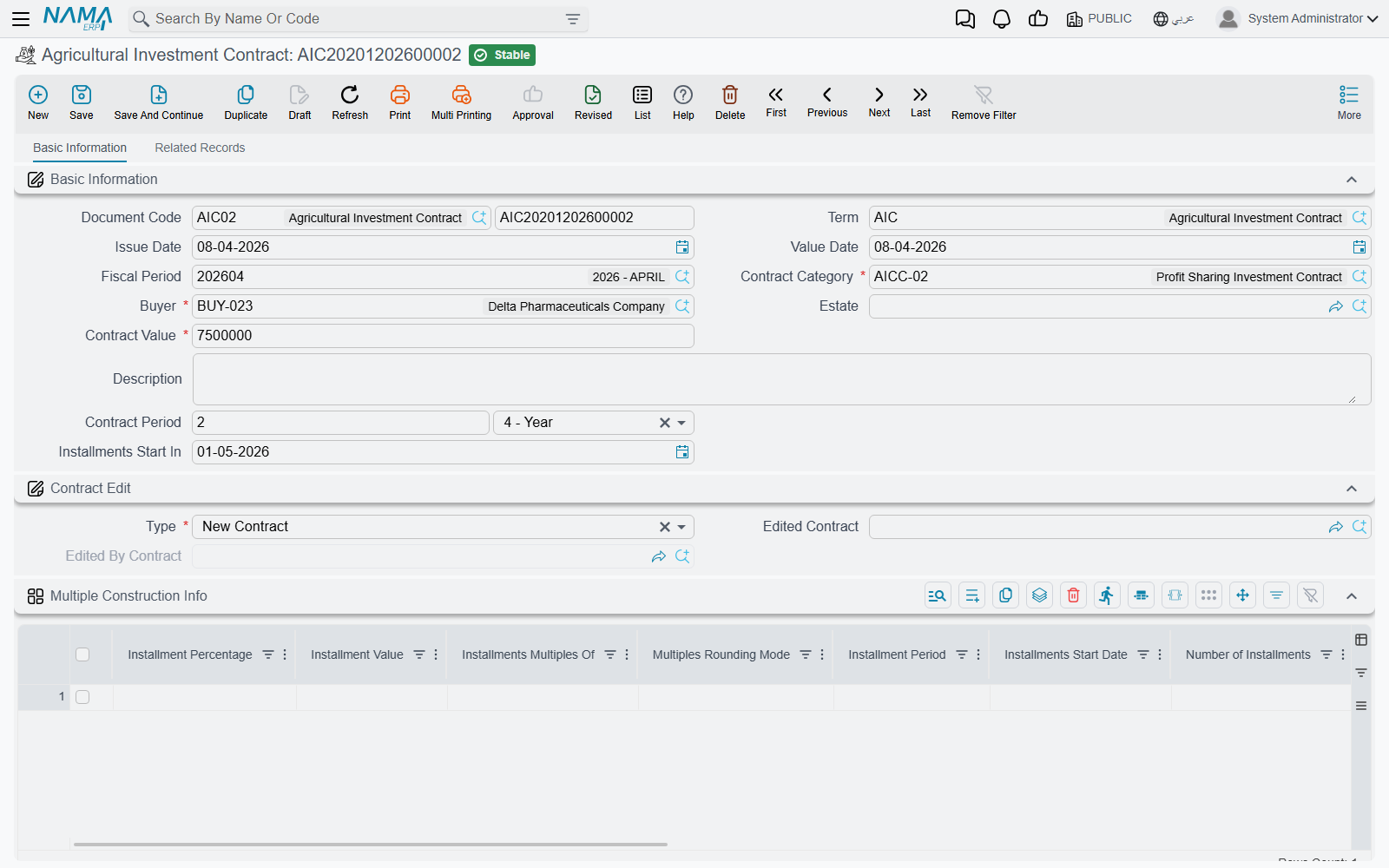
Real Estate and Property > Investment > Agricultural Investment Contract is the deal itself. The header is short:
| Field | For our example |
|---|---|
| Contract Category | "Land-backed, 5 year" |
| Buyer | the investor |
| Estate | the plot — required or forbidden by the category |
| Contract Value | 500,000 |
| Contract Period | 5 years |
| Installments Start In | 01/01/2026 |
Only land plots
The Estate field accepts land plots only — not buildings, not floors, not rental units. That is consistent with what the product is, and it is enforced by the picker itself.
Generating the profit schedule
Below the header sit two grids that are easy to confuse, so it is worth naming them clearly.
The first, Multiple Construction Info, is not the schedule. It is the recipe for building the schedule — one row per block of installments, saying how many there are, how far apart, what each is worth, and where the block starts. Its columns are the same ones used on sales contracts, described in Building the Installment Plan: a percentage or a value, a period, a number of installments, a rounding rule, a switch saying whether the value you typed is the total rather than the per-installment amount, and an offset that pushes this block's start date forward before it begins.
For our contract, one row does it: 10% of the value, quarterly, 20 installments, with the value treated as a total.
The second grid, titled Profits, is the actual schedule — the individual profit installments with their codes, amounts, due dates and payment columns. It is filled by the Create installments button between the two grids.
Pressing it walks the recipe rows in order, working out where each block starts from the contract's Installments Start In date and each row's offset and period, then hands off to the same installment engine the sales contracts use, with the contract value as the base. Our single row produces 20 lines of 25,000 each, dated quarterly from 01/01/2026.
Create installments replaces the whole Profits grid
The button rebuilds the schedule from scratch, so anything already in the Profits grid is replaced. Run it once, at the beginning, before any profit has been claimed against the contract.
The validations that catch most mistakes are worth knowing in advance: the Profits grid may not be left empty, installment codes must be unique and valid, a recipe row may not carry both a value and a percentage, you may not change the code of an installment that already exists, and you may not touch a line that already has payments against it.
Amending a contract
Contracts change. The system does not let you edit a live one in place; instead it uses a supersession mechanism that leaves a clean audit trail.
To amend, create a new contract and set its type to Edit For Existing Contract, then point its Edited Contract field at the old one. Doing so:
- copies the buyer, category, contract value, estate and period across;
- copies over only the unpaid installment lines, with their matching recipe rows — so the new contract starts life carrying exactly the old one's outstanding schedule;
- on commit, marks the old contract as edited, closes out its entire remaining schedule by marking those installments paid, and locks it permanently.
A superseded contract is locked forever
Once a contract has been edited by another, it can no longer be edited or deleted, and neither can any profit claim raised against it. If you need to undo an amendment, cancel the editing contract first — that reverses the supersession and unlocks the original.
The rules around this are strict by design: a contract can be edited only once, the contract being edited must be older than the one editing it, a New Contract may not name an edited contract at all, and the picker for Edited Contract only offers contracts belonging to the same buyer and the same category that have not already been superseded.
One more restriction: you may not move the contract's value date backwards past a committed profit claim. If a claim already exists at or before your new date, the save is refused and names the claim.
The contract books nothing
The agricultural investment contract has no accounting effect of its own. It creates the profit schedule and nothing else. The money is recognised by the profit claims raised against it.
Claiming the profit
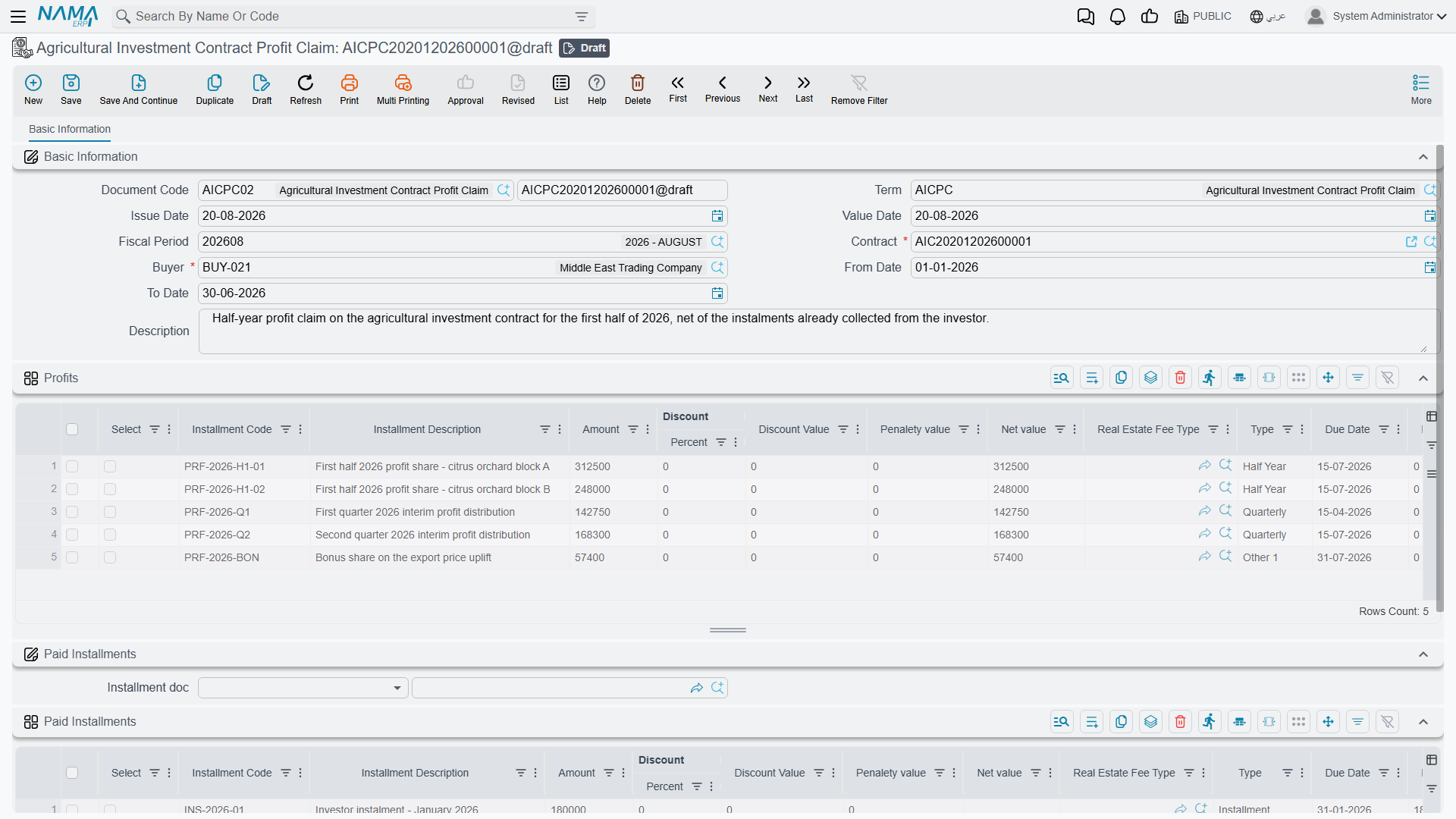
Every quarter, the company raises an Agricultural Investment Contract Profit Claim (Real Estate and Property > Investment > Agricultural Investment Contract Profit Claim) to recognise the profit that has fallen due.
Fill in the buyer, the contract, and a From Date and To Date — 01/01/2026 to 31/03/2026 for our first quarter. Choosing the contract loads the Profits grid with the contract's installments that are not yet paid and whose due date falls inside that range. One line, 25,000. Each loaded line is claimed at its full outstanding value, so there is no partial-claim arithmetic to do.
Netting it against what the investor owes
This is the part that makes the document more than an accrual. The investor who is owed 25,000 of profit may also owe the company money on a property he is buying. Rather than moving cash both ways, the claim can settle one against the other.
In the Paid Installments group, pick an Installment doc — a sales contract or an opening sales document; nothing else is accepted. The system then takes the total of the claim's profits and walks that document's not-fully-paid installments in order, allocating to each until the money runs out, and builds the Paid Installments grid from the result.
Our 25,000 lands on the oldest unpaid installments of the investor's villa contract.
You may claim more profit than you offset, never less
The document enforces that the profits total is greater than or equal to the paid-installments total. Claiming 25,000 and offsetting 25,000 is fine. Claiming 25,000 and offsetting 30,000 is refused, and the message tells you both figures.
Committing the claim marks the money as system-collected on both sides — the contract's profit installments and the sales document's installments both have their system-collected value raised and their remaining value reduced, through payment entries the system writes and removes with the document. Cancelling the claim removes them again.
What it records
The claim carries two completely independent ledger blocks, and each one fires only if both of its account sides are configured on the term:
| Block | One debit and one credit line per… | Valued at |
|---|---|---|
| Profits | each line of the Profits grid | that line's amount |
| Paid Installments | each line of the Paid Installments grid | that line's amount |
The usual arrangement books the profits block as a cost against the investor's payable, and the paid-installments block as that payable being settled against the sales receivable — which is exactly the netting the document describes. But you can configure the profits block alone, which turns the document into a pure profit accrual with no offset.
Amounts are recorded in the legal entity's ledger main currency, and processing happens as a background business request — retry a failure from the Business Requests list view with More menu → Reprocess / Recommit. The term itself is documented in Collection, Maintenance, Investment and Cost Document Terms.
The claim moves no cash
It creates an accrual, an offset, or both. If the investor is actually to be paid his 25,000, that is a separate payment document. The claim only says the profit is due and, optionally, that some of it has been consumed against a debt.
Every claim raised against a contract is listed back on the contract's Related Records tab, so the contract itself is the place to see how much of its schedule has been claimed.
Actions on these screens
The agricultural investment screens carry a single button between them: Create installments on the agricultural investment contract, which builds the Profits grid from the recipe rows as described in Generating the profit schedule above, replacing whatever was there. The contract category and the profit claim have no buttons — the claim fills its grids from the fields you pick, not from a button.
The example end to end
- A category "Land-backed, 5 year" is created with Work With Estates ticked.
- A contract is written for the investor: 500,000, five years, starting 01/01/2026, against a named plot. One recipe row — 10%, quarterly, 20 installments, value is total — and Create installments produces 20 lines of 25,000.
- On 31/03/2026 a profit claim for 01/01–31/03 loads one 25,000 installment.
- The investor's villa contract is picked as the installment document, so the 25,000 is allocated against his oldest unpaid villa installments.
- Committing marks both sets of installments as system-collected, and the term records the profit and the settlement as two separate blocks.
- Nineteen quarters later the schedule is exhausted; if the terms had changed on the way, an Edit For Existing Contract would have carried the unpaid remainder into a fresh contract and locked this one.
Messages you may see
| Message | Why | What to do |
|---|---|---|
| Current contract is edited by {0} ,so it can not be edited or deleted — «لا يمكن تعديل او حذف العقد الحالى لأنه مُعدل بواسطة العقد {0}» | This contract has already been superseded by an edit contract, and the message names it. A superseded contract is frozen. | Work on the edit contract instead. To touch the original again you have to cancel the edit contract first. |
| Estate must be empty because the category {0} dose not work with estates — «يجب أن يكون العقار فارغا لأن التصنيف {0} لا يعمل مع العقارات» | The contract category does not work with estates, but the Estate field is filled. | Clear the estate, or move the contract to a category that works with estates. |
| Can not change value date because profit claim document {0} was created before {1} — «لا يمكن تغيير التاريخ الفعلى للعقد لأن مستند استحقاق الأرباح {0} تم انشاؤه قبل {1}» | You changed the contract's value date, and a profit claim document already exists that was created before the new date. | Leave the value date alone, or cancel the claim documents that sit before it first. |
| Contract {0} is edit by {1} .Contract can be edited only once — «العقد {0} تم تعديله مسبقا بالعقد {1} .العقد يمكن تعديله مرة واحدة فقط» | The contract you are trying to edit has already been edited once by another edit contract. | Edit the latest contract in the chain. A contract only takes one edit. |
| Contract {0} must be older than the current edit contract — «يجب ان يكون العقد المطلوب تعديلة {0} أقدم من العقد الحالى» | The contract named in Edited Contract carries a value date after this edit contract's own. | Date the edit contract after the contract it edits. |
| Profits can not be empty — «لا يمكن ترك الأرباح فارغة» | The Profits grid on a profit claim is empty, so there is nothing to claim. | Fill the profit lines, or use the button that loads the contract’s due profits. |
| Total profits amount {0} must be greater than or equal paid installments amount {1} — «{1} إجمالي قيمة الفوائد {0} يجب ان يكون أكبر من او يساوى قيمة الأقساط المدفوعة» | The paid-installments lines add up to more than the profit lines on the same claim. | Reduce the paid installments, or raise the profits so the claim at least covers what is being settled. |
| Can not use contract {0} because contract value date is after current document value date — «لا يمكن استخدام العقد {0} لأن تاريخه الفعلي بعد تاريخ الستند الحالي» | The contract's value date is later than the claim document's own value date, so the contract did not yet exist on that day. | Date the claim on or after the contract, or pick an earlier contract. |
| Contract {0} is edited by {1} so the claim doc can not be saved ,edited or deleted — «لا يمكن حفظ أو تعديل أو حذف مستند استحقاق الأرباح لأن العقد {0} تم تعديله بواسطة {1}» | The contract on the claim was superseded by an edit contract, so claims against it are frozen. | Raise the claim against the edit contract instead. |