
Maintenance Contracts
The maintenance contract is the centre of gravity of the whole suite. It answers four questions at once: which machines are covered, how often each one is visited, what has been pre-paid and how the customer pays. Every preventive work plan, every drawn-down spare part and every contract-priced invoice line comes back to it.
We will follow one contract all the way through: MC-0021, signed with Marina Plaza Hotels on 18 February 2026 and running from 1 March 2026 to 1 March 2027.
Menu: CRM → Maintenance Documents → Maintenance Contract.
Required licence
crm-maintenance. A document term (توجيه) is required, and it carries two things the contract cannot work without: the work-plan book and term that the generate button writes into, and — if you want the contract to reach the ledger — both a debit and a credit accounting side. See Maintenance Document Terms.
The Dates Are Not Called What You Expect
Start here, because nobody guesses it.
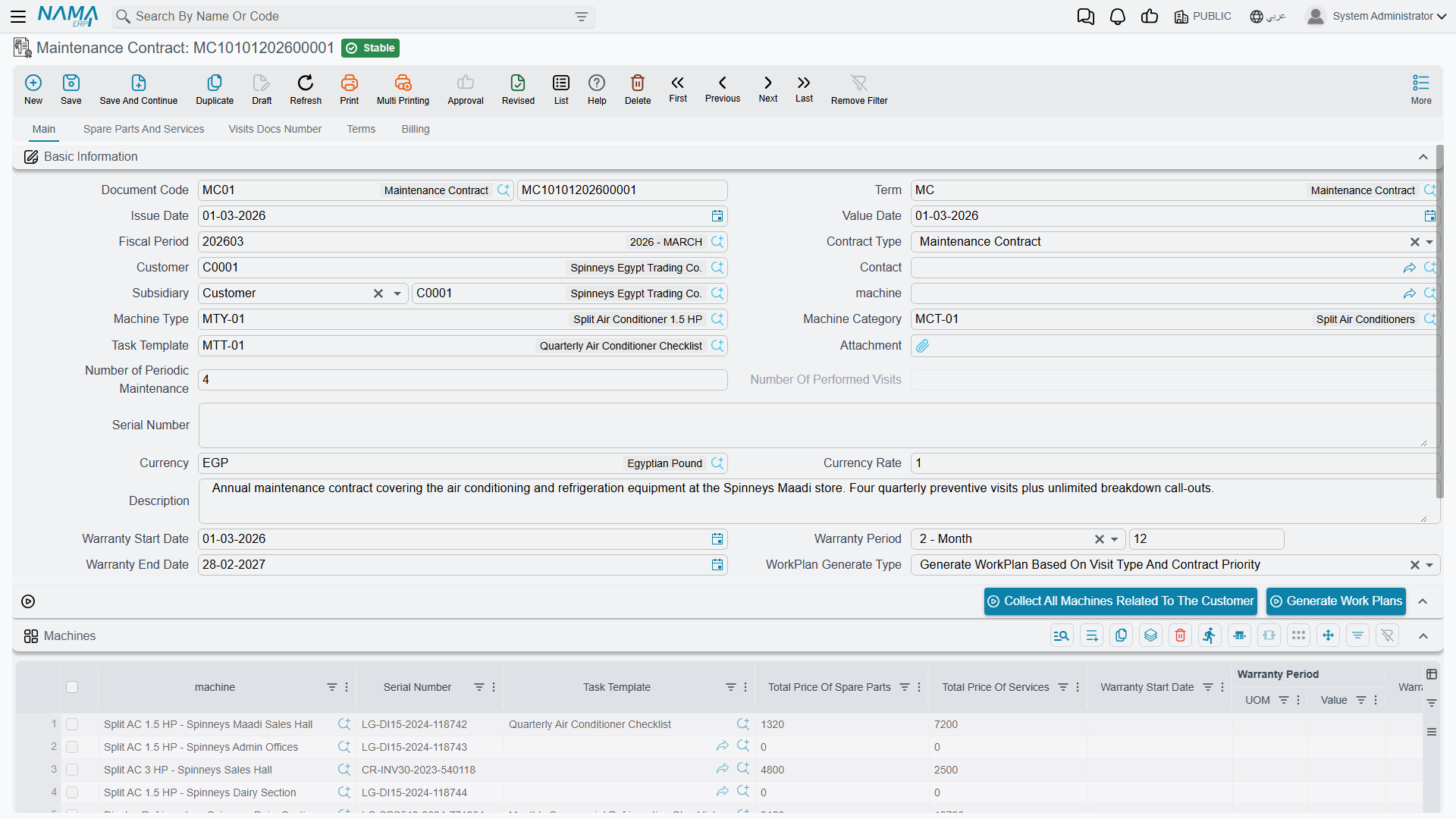
The contract's start and end dates live in fields labelled Warranty Start Date and Warranty End Date
There is no field called "contract start". The contract period is the Warranty Start Date and Warranty End Date pair in the header, with the Warranty Period between them. On MC-0021 those read 2026-03-01, 12 Month and 2027-03-01.
Both must be filled before you press Generate Work Plans, or the generation refuses to run — the whole visit series is stepped out between those two dates.
The rest of the header is unsurprising: contract type (Maintenance Contract here, as opposed to a Warranty Contract — see below), customer C-01188, contact CNT-0904, subsidiary (الذمة) the customer, responsible employee EMP-3001 Nahed El Gindy, machine, machine type and category, task template, serial number, currency and rate, number of periodic maintenances, a read-only number of performed visits, and the work-plan generation type.
The Machines Grid — Where the Schedule Really Lives
This is the important grid, and the seven Visit Type columns are the important part of it. Each machine line can carry up to seven frequencies, and each frequency has its own task template next to it, so the same machine can have a light monthly checklist and a heavier quarterly one.
MC-0021 covers three machines:
| Machine | Visit Type 1 | Template | Visit Type 2 | Template | Technician | Building |
|---|---|---|---|---|---|---|
MCH-00311 Chiller No. 1 | Monthly | TT-CHL-M | Quarterly | TT-CHL-Q | EMP-2011 | BLD-MP01 |
MCH-00312 Chiller No. 2 | Monthly | TT-CHL-M | Quarterly | TT-CHL-Q | EMP-2011 | BLD-MP01 |
MCH-00318 AHU – Basement | Monthly | TT-AHU-M | — | — | EMP-2011 | BLD-MP01 |
The same grid also carries the serial number, the machine's own warranty dates, building, floor and room, the maintenance period and number of visits, a planned visit date, the maintenance group, the technician, five classification columns and per-machine totals that are recalculated from the detail grids on every save.
Collect All Machines Related To The Customer is a shortcut worth knowing: it replaces the grid with every machine belonging to that customer that is not a sub-machine of another. On a customer with forty split units that saves an afternoon — but it replaces, so use it before you start hand-editing lines, not after.
The Visit schedule grid does nothing
Further down the main page there is a grid headed Visit schedule, holding a machine and a visit date. It looks exactly like the place you would enter "chiller 1, 1 April; chiller 1, 1 May; …" — and nothing reads it. The only code that touches it is a validation checking that the machine you picked also appears in the Machines grid.
No work plan, no order and no visit is ever produced from it. The visit series comes from the Visit Type columns above and the contract's start and end dates. Leave the visit-schedule grid empty.
The Terms page is in the same category: a grid of trouble level, trouble description, response time and remarks. It is an SLA table, it prints nicely if your implementer builds a form for it, and no code in the module reads it. Nothing measures a response time against it.
Pre-Paid Entitlement
The Spare parts and services page is where coverage actually lives, and coverage here means one thing only: a quantity, at a price.
Spare parts:
| Item | Quantity | Unit price | Net value |
|---|---|---|---|
SP-FLT-14 Air filter 14 in | 24 | 300.00 | 7,200.00 |
SP-OIL-05 Compressor oil 5 L | 4 | 600.00 | 2,400.00 |
| Total spare parts | 9,600.00 |
Services:
| Service | Quantity | Unit price | Net value |
|---|---|---|---|
MSV-01 Chiller periodic maintenance visit | 44 | 1,200.00 | 52,800.00 |
| Total services | 52,800.00 |
Those 44 visits are not a coincidence — they are exactly the 44 visits the work-plan generator will produce from the machine lines above. Pricing the contract and scheduling it are two sides of the same arithmetic, and it is worth doing them together.
Each line carries quantity, sold quantity and remaining quantity. As orders, invoices and returns are committed against this contract, the sold quantity rises and the remaining quantity falls, and a document that asks for more than is left is refused with a message naming the item and the contract. After the April order MO-0513, MC-0021 shows SP-FLT-14 sold 6 / remaining 18, SP-OIL-05 sold 1 / remaining 3, and MSV-01 sold 3 / remaining 41.
The contract price wins
MSV-01 is priced at 1,500.00 on the service catalogue and 1,200.00 on this contract; SP-FLT-14 is 350.00 on the sales price list and 300.00 here. When a document is raised against the contract, the contract price is what lands on the line. That is the mechanism sites use to give contract customers a better rate — and, if you price a line at zero, it is also the only sense in which covered work is "free".
What contract coverage does not do
Nothing compares the date of the work to the contract period or to any warranty. An order raised on a machine whose contract ended last year is priced and billed exactly like one on a live contract, with no warning. There is no free-versus-billed flag anywhere: the decision to charge the customer or absorb the cost is made by a person, every time.
Money and Payments
The contract carries a full money block, and on MC-0021 it reads:
| Total (52,800.00 services + 9,600.00 spare parts) | 62,400.00 |
| Sales tax 14 % | 8,736.00 |
| Net value | 71,136.00 |
The Billing page holds the payment schedule. Marina Plaza pays quarterly:
| # | Date | Amount |
|---|---|---|
| 1 | 2026-03-01 | 17,784.00 |
| 2 | 2026-06-01 | 17,784.00 |
| 3 | 2026-09-01 | 17,784.00 |
| 4 | 2026-12-01 | 17,784.00 |
| Total | 71,136.00 |
The schedule must add up
The contract is refused if the payment-schedule lines do not sum to exactly the money net value. That is a genuine, useful validation — if the contract will not save, add the schedule up first.
The buttons on that page — Generate Payments, Generate Receipt Voucher For Selected Payments, Generate Receipt Voucher and Collect Receipt Vouchers — are the standard payment-schedule helpers. Generating a receipt voucher opens a pre-filled voucher that you review and save; nothing is created behind your back.
What Committing the Contract Does
Accounting: yes, when the term is configured for it. Saving MC-0021 creates a full invoice-style entry over the spare-part and service lines — in our example debit receivable 71,136.00, credit spare-parts revenue 9,600.00, service revenue 52,800.00 and sales tax 8,736.00.
Both sides or nothing
The contract books only when its document term carries both a debit and a credit accounting side. With only one side filled it books nothing at all, silently and with no error message. If a signed contract shows no entry, that is the first thing to check — see How CRM Document Terms Work.
Stock: none. A maintenance contract never moves inventory.
The entry is created as a business request and processed in the background, which is why the save is instant. If processing fails, retry it from the Business Requests list view: filter for failed requests, select the rows, then More menu → Reprocess / Recommit.
Generating the Work Plans
This is press one of the two that make preventive maintenance happen. On 1 March 2026 Nahed opens MC-0021 and presses Generate Work Plans.
The generator walks every machine line, reads its Visit Type columns, and steps a date forward from the contract start date until it passes the contract end date. Then it groups the resulting rows into work-plan documents according to the header's work-plan generation type:
| Generation type | One work plan per… |
|---|---|
| Generate WorkPlan Based On Contract Priority (the default when the field is left empty) | calendar month of the expected order date |
| Generate WorkPlan Based On Visit Type | visit type |
| Generate WorkPlan Based On Visit Type And Contract Priority | visit type, per month |
MC-0021 uses the first, and produces 44 expected-visit rows spread over 12 work-plan documents, WP-0087 through WP-0098. The arithmetic — why 44, why 12, and what each work plan contains — is on Maintenance Work Plans, which is also where you press the second button.
Two things must be in place before the button will work: the contract's start and end dates, and a work-plan book and term on the contract's document term. If either is missing the generation stops with a message and produces nothing.
Pressing Generate Work Plans again deletes work plans
This is not a safe refresh. When you press the button a second time, the generator keeps the work plans whose grouping key still matches — and deletes every other work plan this contract produced, together with the links from their machine lines to any orders already generated from them.
Add one machine to the contract, or change a visit type, or shift the contract end date, and work plans that used to exist can vanish. Before regenerating on a live contract, note which work plans have already produced orders. The orders themselves are not deleted, but the trail back from the work plan to them is.
Warranty Contracts
Contract type has a second value, Warranty Contract, and it is mostly not typed by hand: committing a maintenance order whose Order Type is Installation creates one automatically, copying the warranty period, the machine, the serial number, the customer, the contact and the spare-part, machine and service grids.
A generated warranty contract carries the full money block
Because the generated contract is a copy, it arrives with the same totals as the order it came from. If the warranty-contract term has accounting sides configured, the same amount is booked twice — once by the order or invoice, once by the generated contract. Leave the warranty-contract term without accounting sides. The mechanism is described on Maintenance Orders.
The Visits Number Page
The last page of the contract is a read-only list of the Maintenance Visit documents that point back at it. It fills up as visits are typed, and each one raises the header's number of performed visits — MC-0021 goes from 0 to 1 when MVIS-0055 is saved on 1 April 2026.
It is a genuinely useful "has anyone actually been there?" view, with one honest caveat: nothing generates those visit documents, so the counter only reflects the trips somebody bothered to type in. See Maintenance Visits.
Reporting
Reporting: none. This module ships no system reports, and this screen has no print form. To review contracts across customers, use the list view with saved criteria (المعايير) and export to Excel, or build a BI dashboard over the contract data.
Messages you may see
| Message | Why | What to do |
|---|---|---|
| Total of payment values {0} not equal the total price {1} — «إجمالي مبلغ الدفعات {0} لايساوي السعر الإجمالي {1}» | The contract has payment-schedule lines on the Billing page and they do not add up to the money net value. | Make the schedule sum to the net value (71,136.00 on MC-0021), not to the figure the message prints — the message shows the total before tax while the check uses the net value. |
| Can not use the machine {0} because it was not found in the machines grid — «لا يمكن استخدام الاّلة {0} لأنها غير موجودة في جدول الالاّت» | A row in the Visit schedule grid names a machine that is not listed in the Machines grid. | Add the machine to the Machines grid, or clear the visit-schedule row — that grid drives nothing and is best left empty. |
| The Item {0} in line {1} is repeated — «البند {0} في السطر {1} مكرر» | The same spare part, or the same service, is listed twice on the Spare parts and services page. | Merge the two rows into one carrying the combined quantity; entitlement is tracked per row. |
| Main Quantity can not be less than the Sold Quantity — «الكمية الأساسية لا يمكن ان تقل عن الكمية المباعة» | A spare-part or service row has a Quantity below the Sold Quantity already drawn against it. | Raise the Quantity to at least what has been consumed; reducing entitlement below what documents have already taken is refused. |