
Maintenance Visits
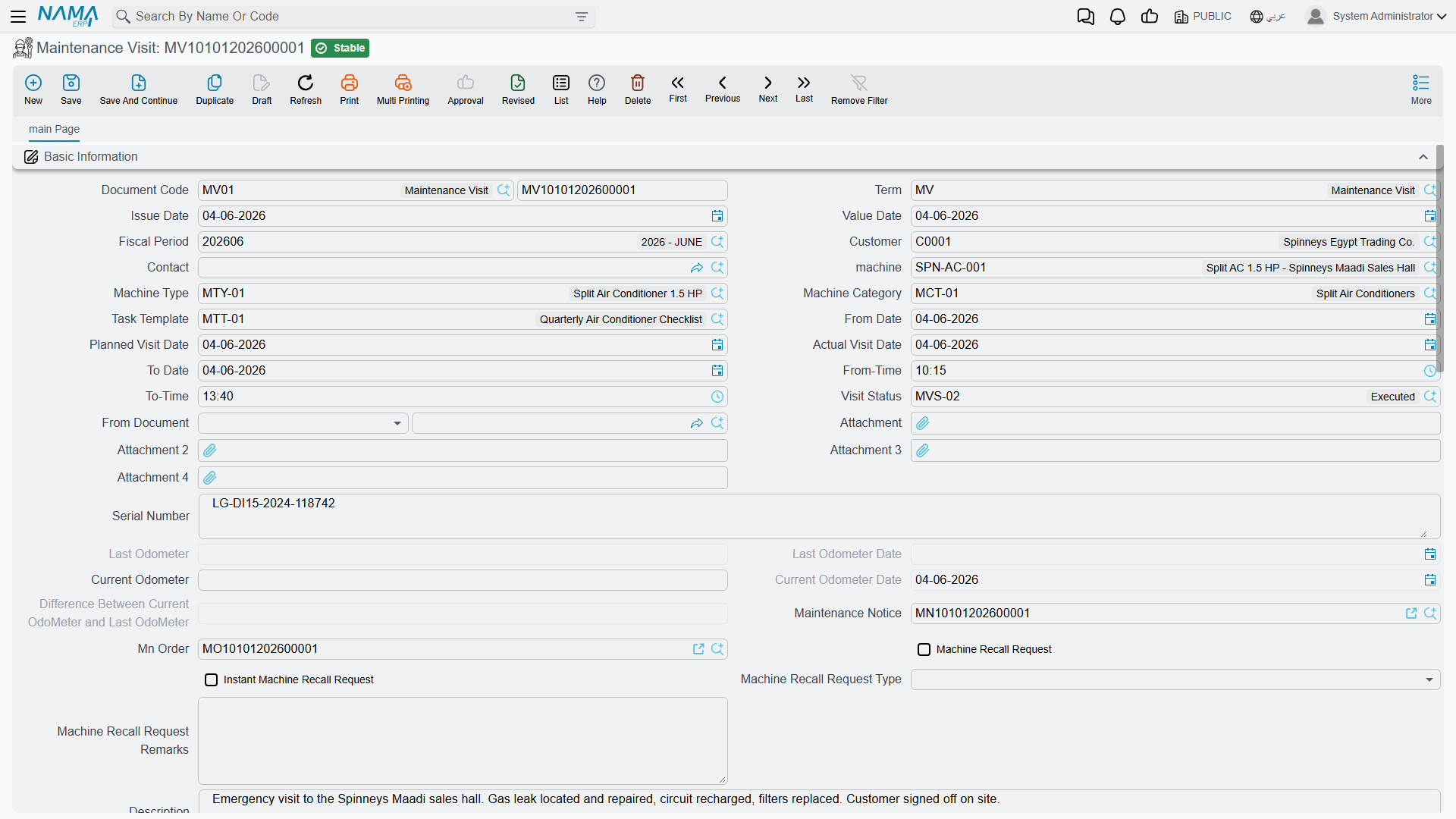
A Maintenance Visit is a log entry. Somebody went to the site, the visit happened, and afterwards a document is typed to say so. That is the whole of it — and saying it plainly at the start saves a great deal of confusion, because everything about the name suggests the opposite.
A maintenance visit is never generated by anything
Not by the contract, not by the work plan, not by the order, not by a scheduler — there is no scheduler anywhere in this module. The preventive series you set up on a maintenance contract expands into work plans and then into maintenance orders. It never produces a single Maintenance Visit document. If you want visits recorded, somebody types them.
Required licence
crm-maintenance
Why you would type one
Because it is the only document that moves the contract's performed-visit counter, and the only one that updates the machine's odometer.
On 1 April 2026, after the three chiller and AHU jobs are executed, the Alexandria office types MVIS-0055: From document = the maintenance contract MC-0021, machine MCH-00311, visit status MVS-DONE (Visit Completed), actual visit date 2026-04-01, current odometer (running hours) 1,240.
Saving it does three things and nothing else:
| Effect | Result |
|---|---|
| On the contract | Number Of Performed Visits on MC-0021 is recounted — from 0 to 1. |
| On the machine | The machine's odometer pair is brought up to date from the visit's readings. |
| On the order | Any lines in the visit's Additional spare parts grid are pushed into the linked order's own Additional spare parts grid. |
Ledger: none. Stock: none. A visit is not a billable document and never becomes one; to charge for a visit you invoice the service line on the order.
The screen
It is a single page. Customer, contact, machine, machine type and category, task template; a from date and to date with from time and to time; a planned visit date and an actual visit date; the visit status; From document; four attachments; the serial number; the odometer block (last odometer and its date, current odometer and its date, and a calculated difference); the linked notice and the linked order; and a machine recall request block — a flag, an "instant" flag, a recall type and free-text remarks.
Below that: an Additional spare parts grid (item and quantity), a Maintenance groups grid, a Discussion lines checklist, and an Orders grid with a Copy all lines from orders button that appends the listed orders' detail lines.
Three fields on this screen do less than they look
- Visit Status drives nothing whatsoever. It is a label for your own reporting; no rule, no status change and no validation reads it. See Order and Visit Statuses.
- The machine recall request block is stored and displayed only. Nothing acts on it, nothing lists it, nothing chases it.
- Current Odometer Date is silently overwritten with the document's value date every time you save, so whatever you type there will not survive.
The two rules the document does enforce
The visit is refused when the current odometer date is the same as the last odometer date, and when the current odometer reading is lower than the reading already on the machine for a visit dated on or after the machine's own odometer date. Both exist to keep the odometer history monotonic. They are the only checks on this document.
Not the same thing as a CRM Visit
The maintenance suite's Maintenance Visit and the sales side's CRM Visit share a word and nothing else. The CRM Visit is a sales activity against a lead or a potential, with mobile check-in and check-out — and it is the one document in the whole CRM module that has a shipped print form. This document has none.
Reporting: none. This module ships no system reports, and this screen has no print form. The maintenance contract screen carries an embedded read-only list of the visits raised against it, and the order and invoice screens carry the same list scoped to themselves; beyond those, use the list view and its Excel export.