
Daily Dispatch
A call-centre takes fault reports all day. Somebody then has to decide who goes where tomorrow, and in which order. That is what the CRM Maintenance Plan and the Maintenance Itinerary are for: a route sheet for a single day, and the named routes it draws on.
This is not preventive-maintenance scheduling
The words plan and itinerary invite the assumption that this is where periodic visits are scheduled. It is not, and the two features never meet. Preventive maintenance is planned on the maintenance contract, expanded into maintenance work plans and then into maintenance orders — all by pressing buttons, since there is no scheduler in this module.
The daily plan described on this page deals only with maintenance notices that already exist. It creates nothing, it schedules nothing in the future, and it never produces an order or a visit.
Required licence
crm-maintenance
The itinerary — a named route
The Maintenance Itinerary is a master file, filed under Maintenance Files rather than with the documents. It holds a route name, a noticing capacity — how many call-outs the route is thought to absorb in a day — five free description boxes, and a grid of the address regions the route covers.
That is all it holds, and the capacity figure is the one to be careful about: nothing enforces it, and it is not even carried onto the plan for you. See the warning below.
The plan — one document per day
The plan itself is a short document:
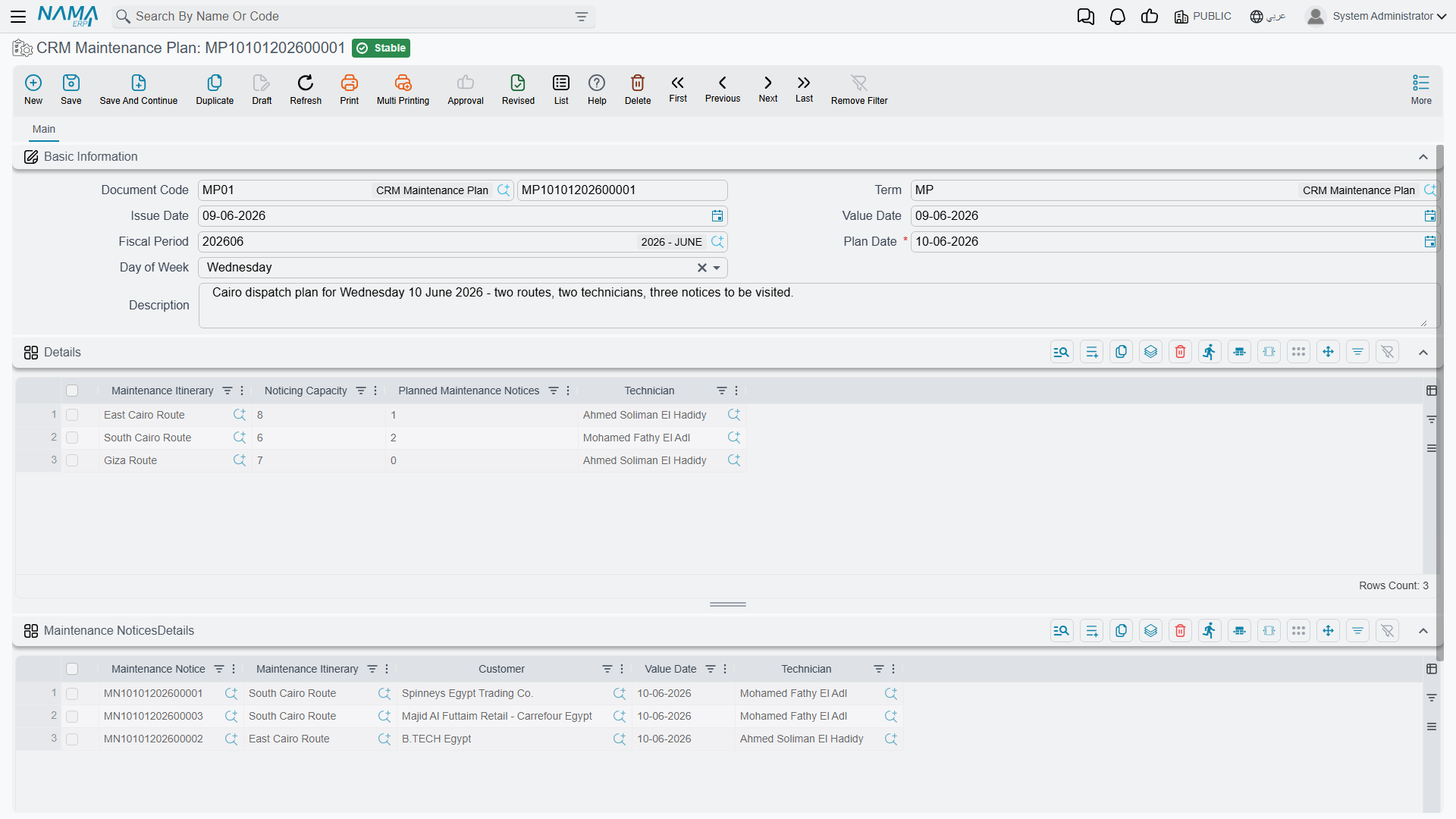
Header. A plan date, which is mandatory, and a day of week that the system calculates from it.
Routes grid. One line per route working that day: the itinerary, its noticing capacity, the planned number of notices, and the technician assigned to it.
Notices grid. The actual call-outs to be served: the maintenance notice, the itinerary it has been put on, and the notice's customer, value date and technician. Pick an itinerary on a line and the technician is filled in for you from the matching route line, so the assignment stays consistent.
Three rules are enforced, and no others: there must be at least one route line, the same itinerary may not appear twice, and the same notice may not appear twice.
What committing the plan does
One thing, to each notice listed on it:
| Written onto the notice | From |
|---|---|
| Responsible employee (the technician) | The route line's technician |
| Maintenance itinerary | The route the notice was put on |
| Planned visit date | The plan's date |
That is the plan's entire effect. Ledger: none. Stock: none. Its document term has no settings at all — there is nothing to configure on it.
Take the refrigerant leak reported at Marina Plaza on 20 May 2026, notice MNOT-0140. The dispatcher types the day's plan, adds a route line with technician EMP-2014 (Sayed Abdullah Morsy), lists MNOT-0140 against that route, and saves. Open the notice afterwards and its responsible employee, itinerary and planned visit date are filled in. Nothing else about it has changed — it is still a fault log, and the work still becomes real only when somebody raises a maintenance order with the notice in From document.
Capacity is a note, not a limit
The route's noticing capacity and planned number of notices are typed by hand and never compared with the number of notice lines. A route with a capacity of 5 accepts 30 notices and saves happily. The capacity is not even copied from the itinerary master onto the plan line — you retype it, and nobody checks that you retyped it correctly.
Nothing tells the technician
Saving the plan writes onto the notices and stops. No notification, no message, no mobile push, no e-mail — there is no notification mechanism anywhere in this module. The route sheet is something a supervisor reads on screen or exports; getting it to the crew is a manual step.
Where the notices come from
Only from the call-centre. A notice is typed when a customer calls; nothing generates one. See Notices and Requests for what a notice holds, and for the important fact that a notice's money totals and payment schedule reach nothing at all.
Notices also double as the mobile technician's attendance document — check-in and check-out are recorded against the notice, not against the plan.
Reporting: none. This module ships no system reports, and this screen has no print form. A day's route sheet is read from the plan document itself or from the notices list view filtered by planned visit date, technician or itinerary; the list view's Excel export is the practical way to hand it out.