
Project Types, Classes and Disciplines
Required licence
ecpa — one code for the whole module. There are no sub-licences.
Before an engineering office can open its first project in Project Management (ECPA), it has to teach Nama its own vocabulary: what kinds of work it sells, how it likes to slice its portfolio for reporting, and which professional disciplines its people belong to. Four small master files carry that vocabulary, and all four live under Project Management → Projects (ادارة المشاريع ← مشاريع).
They are not equally important, and it saves a lot of wasted effort to know that up front. Project Type is the one that actually changes how the system behaves. The other three are classification: Nama stores them, shows them on lists, and lets you filter and report by them — and that is all they do.
Throughout this page we will set up a small architectural and engineering office, Nakheel Engineering, which does two kinds of work and employs four kinds of engineer.
Project Type — the load-bearing one
A Project Type is the top level of the firm's service catalogue: the kind of engagement it sells. Nakheel Engineering sells two:
| Code | Name |
|---|---|
RES | Residential |
COM | Commercial |
Every project is stamped with one. The record itself is deliberately plain — a code, a coding group, an Arabic and an English name, and the usual dimensions (legal entity, analysis set, branch, sector, department). There are no rates on it, no accounts and no defaults.
What makes it load-bearing is what happens elsewhere once a project carries one:
- It keeps tasks honest. Task types are themselves tied to a project type. When you save a task, Nama checks that the task type you chose belongs to the same project type as the task's project, and refuses the save if it does not. A
Residentialproject can only be given task types that were set up forResidentialwork. This is described in full on Project Tasks. - It narrows the lookups. On a project and on a project sales quotation, picking the Project Type restricts the Project Sub Type list to that type's sub-types. On a task, it restricts the task-type list the same way.
- It travels with the work. The type and sub-type are copied from the project onto every task and onto timesheet lines, so time analysis can be sliced by type without joining back to the project. They are also carried over when a project is generated from a quotation.
The Project Type screen has a second page listing every project of this type — a read-only view showing each project's code, customer, manager, vice manager and responsible. It is the quickest way to answer "what have we got running under Residential?" without opening the project list and filtering.
Set project types up first
Everything else in the module either hangs off a project type or is filtered by it. Creating task types before project types means going back to edit every one of them, and opening a task type lookup on a project that has no project type at all is best avoided.
Project Sub Type — a narrower variant of the type
A Project Sub Type splits a type into the variants the office actually recognises. It looks exactly like the Project Type screen with one extra field: Project Type, which is required. That parent is what makes the cascade work — choose Residential on a project and only Residential sub-types are offered.
Nakheel Engineering sets up four:
| Code | Name | Project Type |
|---|---|---|
RES-VIL | Villa | Residential |
RES-APT | Apartment building | Residential |
COM-RET | Retail | Commercial |
COM-OFF | Office building | Commercial |
Like the type, the sub-type is copied onto tasks and onto timesheet lines, and it is one of the filters on the project list view. It carries no rates and no accounts either — it exists so that "how much time did we spend on villas last year?" is a question the lists can answer.
Project Class — a reporting tag, and eight of them
A Project Class is the office's own way of tagging a project for reporting: public sector versus private, by region, by funding source, by size band. The record is nothing but a code, a group and the two names.
Nakheel Engineering uses two:
| Code | Name |
|---|---|
PUB | Public sector |
PRV | Private sector |
What is unusual is that a project offers eight independent slots for this same file, so a firm can run up to eight parallel tag axes at once — sector in the first, region in the second, funding source in the third, and so on. On the project screen the first slot sits in the Project Details group beside Project Type and Project Sub Type; slots two to eight are gathered in their own group further down, titled Project Classes. People often look for the first one there and do not find it.
Be clear with your users about what a class is for: it is stored, displayed and filterable, and no rule, calculation or accounting entry in the module depends on it. That is not a shortcoming — it is exactly what a reporting tag should be — but a consultant who promises that a class will drive pricing or approvals will have to take the promise back.
Discipline — who does which part of the work
A Discipline is a professional specialism: architectural, structural, electrical, mechanical, HVAC, quantity surveying. In an engineering office the work of a project is split two ways at once — by phase (which milestone) and by discipline (which profession) — and the discipline is that second axis.
Nakheel Engineering has four:
| Code | Name |
|---|---|
ARC | Architectural |
STR | Structural |
ELE | Electrical |
MEC | Mechanical |
The record itself is a code, a coding group and the two names. Its value is entirely in the places it gets used:
- on a project's Disciplines page, where each discipline gets its share of the project and its estimated hours and costs;
- on the project's Details matrix, where each (milestone, discipline) pair becomes one work package — see Milestones and the Phase–Discipline Matrix;
- in a reusable Phases Discipline Group, the template that pre-combines phases with disciplines;
- on expense request and expense document lines, so a cost can be charged to a discipline;
- on timesheet lines, where the discipline defaults from the document header, so worked hours can be analysed by profession.
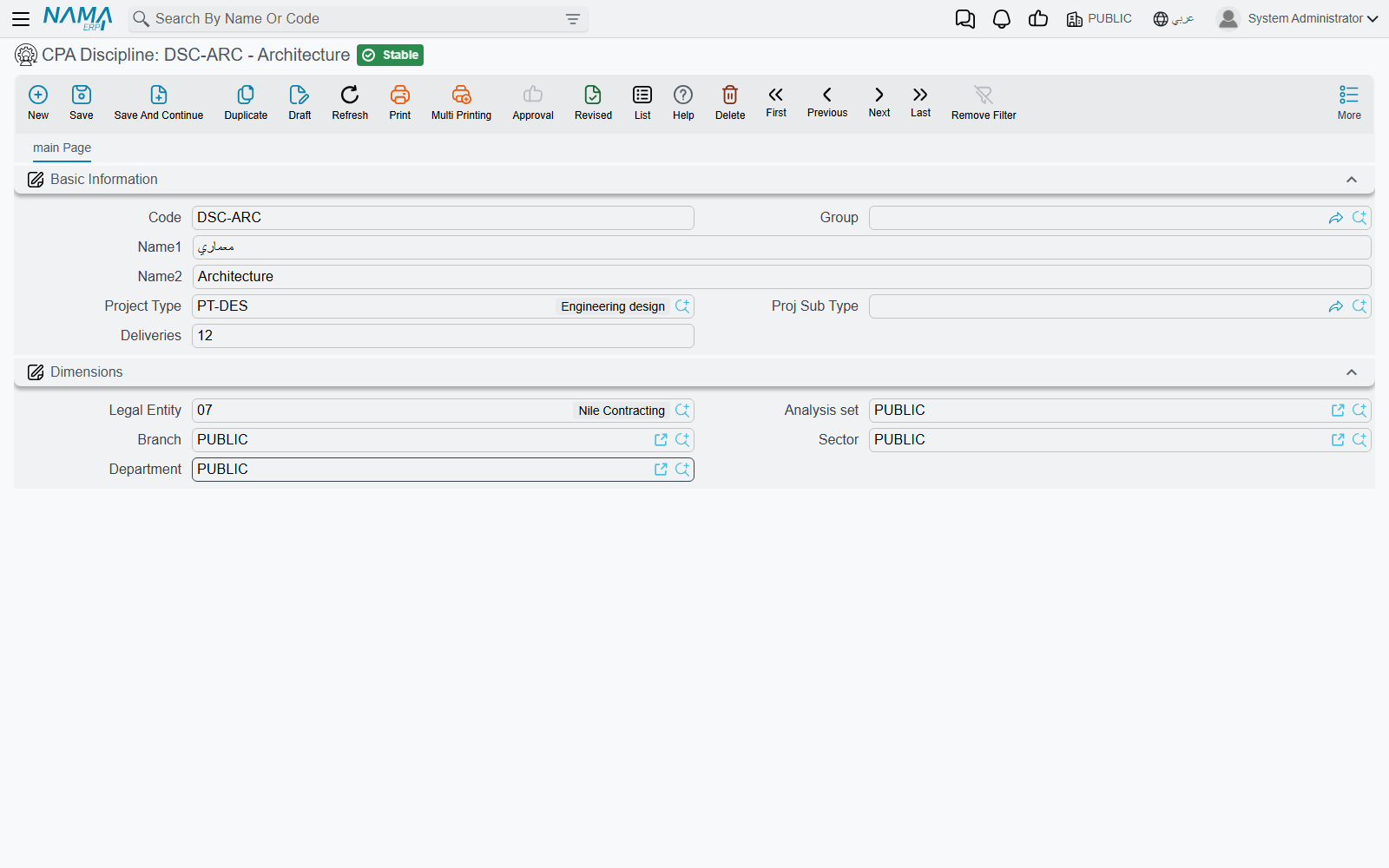
Rates do not live on the discipline
The estimated hours, average hourly cost and indirect costs that a firm associates with, say, its structural team are entered per project, on that project's Disciplines page — not on the discipline master file. Two projects can value the same discipline completely differently, which is usually what a firm wants.
Setting the vocabulary up, in order
- Project Types —
RESResidential,COMCommercial. - Project Sub Types under them —
RES-VIL,RES-APT,COM-RET,COM-OFF. - Project Classes —
PUB,PRV, and any second axis you want in slot two. - Disciplines —
ARC,STR,ELE,MEC. - Task types for each project type, so that tasks can be saved at all — on Project Tasks.
- Milestones and a phases-and-disciplines template, which is where the vocabulary above starts producing an actual work breakdown — on Milestones and the Phase–Discipline Matrix.
With those in place, a new project is mostly a matter of choosing from lists — The Managed Project walks through the screen itself.