
Project Templates
Most firms do the same handful of jobs over and over. An interior fit-out always needs a survey, a concept, detailed drawings, a tender package and site supervision; it always runs about six months; it always ends up on the same accounts. A Template Project in Project Management (ECPA) captures that repetition so it does not have to be retyped for every new client.
You will find it at Project Management > Projects > Template Project, under licence ecpa.
A template is a small, quiet master file — no book, no document term, nothing to process. Its value is entirely in what it saves someone else from typing.
Read this before you design one
A template does not create projects. There is no "create project from template" button anywhere in the module, and the Managed Project screen has no template field.
The template is consumed by the project sales quotation. The chain is:
template → quotation → accepted quotation → project and tasks
Design your templates for the estimator writing the quotation, not for the project manager. That one sentence explains every decision on the rest of this page.
What the screen holds
Basic Information — Code, Group, Name1 and Name2, plus the template's Subsidiary Accounts bag.
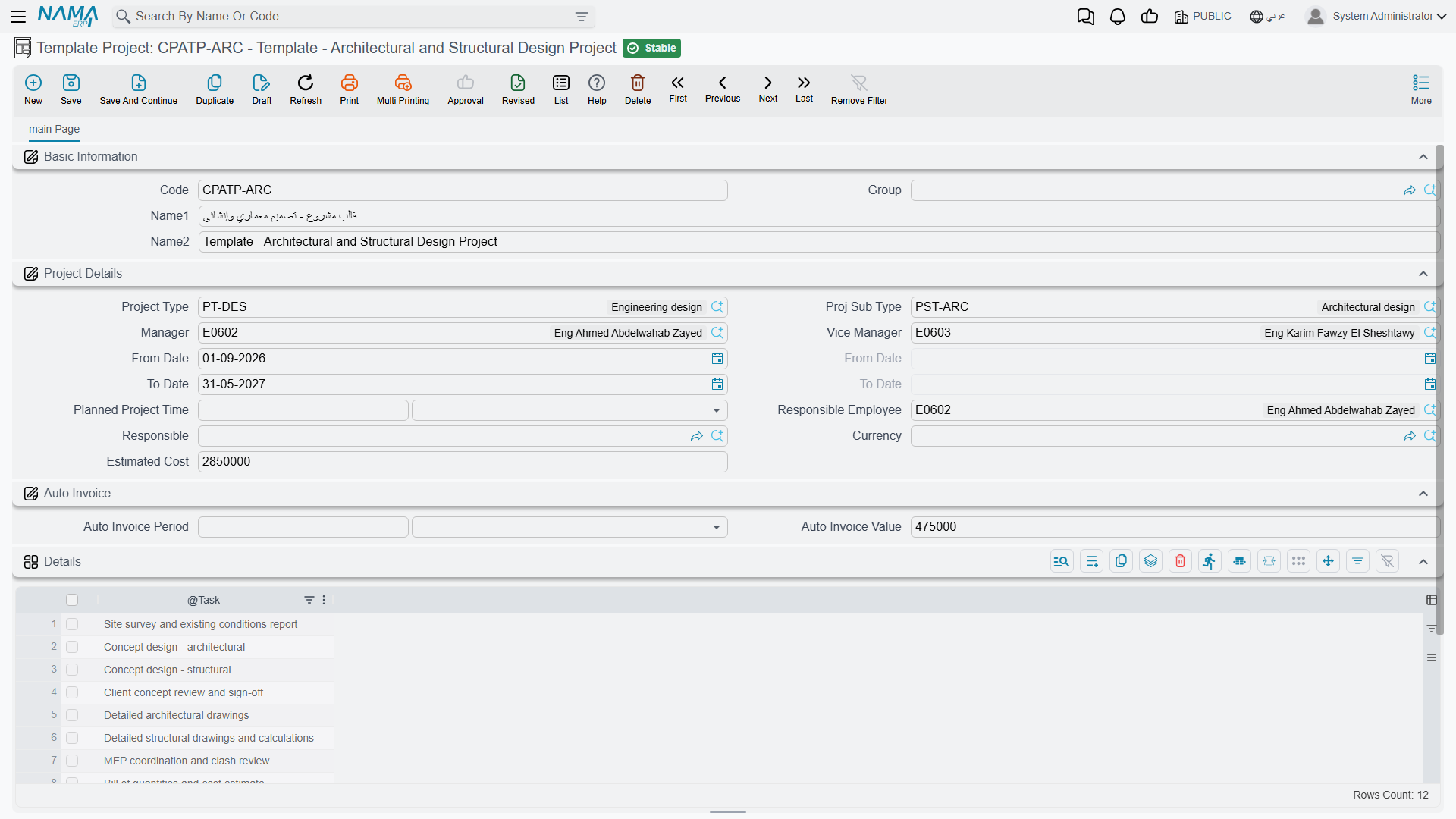
Project Details — the defaults for a job of this kind: Project Type and Proj Sub Type, Manager and Vice Manager, the planned From Date and To Date, the Planned Project Time with its unit, the Responsible Employee, the Responsible third party, an Estimated Cost and the Currency.
Details — a one-column grid listing the Tasks a job of this kind normally involves. Each row points at an existing task record, which is how a house methodology gets written down: the standard steps, in order, named the same way every time.
Detail Accounts and Dimensions — the main account plus five numbered accounts, and the usual legal entity, sector, branch, department and analysis set.
For Nama Architects, one template covers most of the practice's work: code TPL-FITOUT, name Interior fit-out, project type Interior, planned project time 6 Month, and five task rows — Site survey, Concept design, Detailed drawings, Tender package, Site supervision.
What travels, and where
Two hand-offs matter, and they carry different things.
When the estimator picks the template on a quotation, the quotation receives the planned From Date, the planned To Date, the Planned Project Time and its unit, and every row of the task list. That is the moment the template earns its keep: the estimator opens a blank quotation, names the template, and the five standard tasks and the six-month window are already there to price.
Everything else on the template — the project type and sub-type, the managers, the responsible employee, the estimated cost, the currency, the dimensions — is not carried at this step. The estimator fills those in on the quotation, from which they do reach the project.
When the accepted quotation runs Create Project And Tasks, a Managed Project and its tasks are built. Almost everything on the new project comes from the quotation. The one thing taken from the template at this point is its Subsidiary Accounts, and only as a fallback — when the quotation carries no subsidiary accounts of its own, the template's are used.
Where to put the accounts
Because the Subsidiary Accounts are the only thing that reaches a project directly from a template, it is worth filling in properly on every template you create. It is the module's tidiest way to say "all interior fit-outs book to these accounts unless the deal says otherwise".
What a new project still needs
A project built through this chain arrives with its header, its dates and its task list, and with nothing else. Specifically, its Milestones, Disciplines and Details matrix are all empty, and so is its Team Work roster.
That is not a gap in your template — a template has no milestones or disciplines to give. Build them on the project the usual way: either type them on the Milestones and Disciplines pages, or pick a Phases Discipline Group, which fills all three grids in one step. The milestones and matrix page covers that.
So the practical division of labour is: the template standardises the work list and the calendar; the phases-discipline group standardises the phase-and-speciality breakdown. Firms that set both up get a new project almost fully formed in two picks.