
Hospital Management System Settings
The hospital module has one settings record, and it is small: seventeen options on a single tab. Four of them change how a stay is counted into billable days, and the rest decide which discount, tax and price-classifier fields the hospital screens show at all. Nothing here posts anything or blocks a save — but the first block decides how many nights every inpatient is charged for, so it is worth setting deliberately before the first admission.
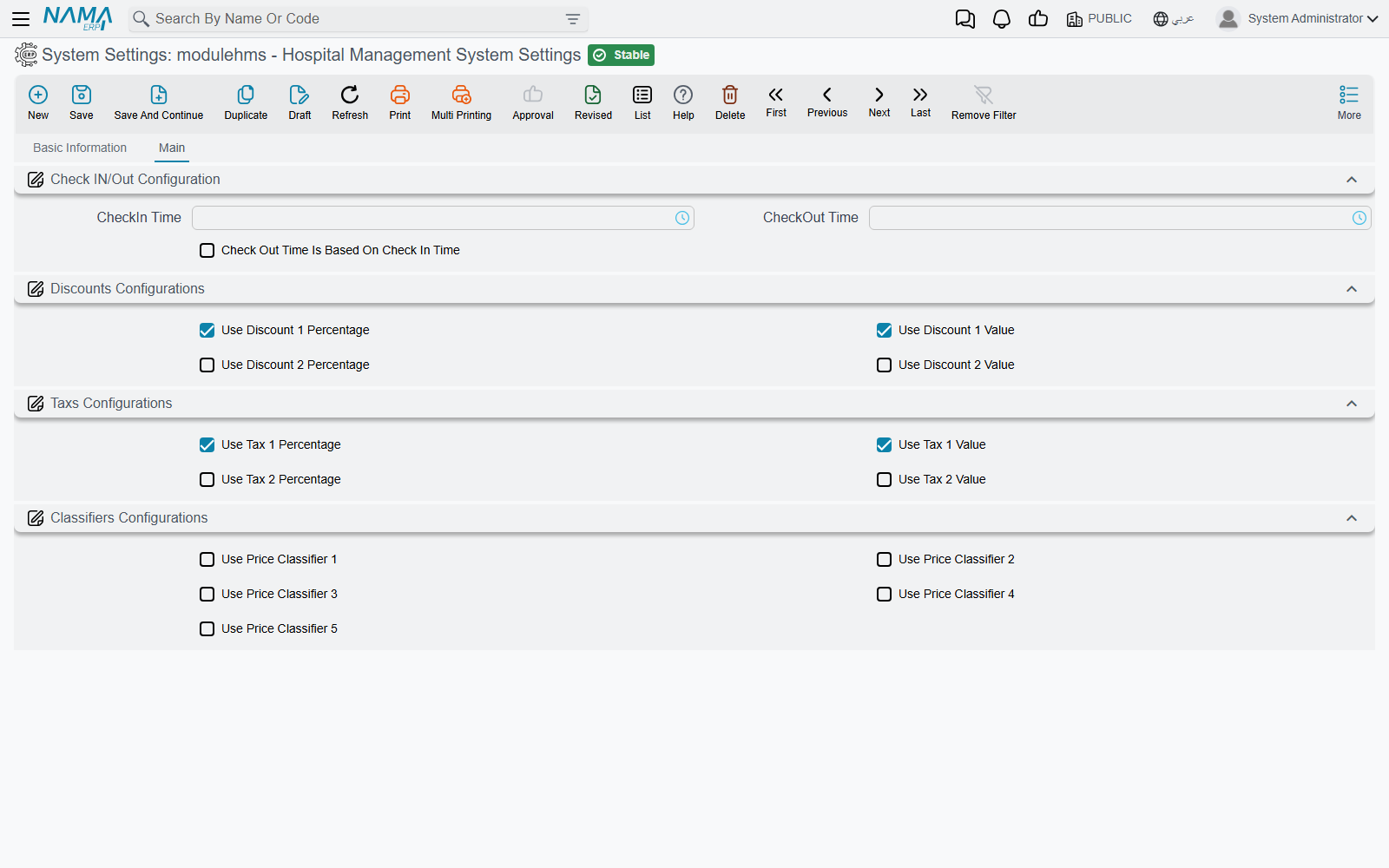
You open it from Hospital Management System → Settings → Hospital Management System Settings. The record carries the usual header (code, name, configuration group and the dimensions it applies to) and one tab, Main («الرئيسية»), with four groups.
Check IN/Out Configuration — how a stay becomes billable days
A hospital charges accommodation by the day, but patients do not arrive at midnight. The three options in this group set the hotel-style "day" that accommodation invoices count in.
| Option | What it does |
|---|---|
| CheckIn Time | The hour the billing day starts. A patient who arrives before this hour is charged from the previous day. Default 00:00. |
| CheckOut Time | The hour the billing day ends. A patient who leaves after this hour is charged one more day. Default 00:00. |
| Check Out Time Is Based On Check In Time | Ignores both hours above. Each patient's day starts at the time of their first accommodation and ends one minute before that time the next day, so the stay is billed in 24-hour cycles from arrival. |
Both hour fields show their English labels on Arabic screens too (CheckIn Time, CheckOut Time); the shipped product has no Arabic label for them. The third option reads «احتساب وقت الدخول والخروج حسب أول وقت دخول في الإقامة».
A worked example
A patient arrives on 1 January at 10:00 and is discharged on 3 January at 13:00.
- With both hours left at 00:00 (the default), every calendar day the patient touched counts: 1, 2 and 3 January — 3 days.
- With CheckIn Time and CheckOut Time both at 12:00, arriving at 10:00 is before check-in, so the stay starts on 31 December at 12:00; leaving at 13:00 is after check-out, so it runs to 4 January at 12:00 — 4 days.
- With Check Out Time Is Based On Check In Time ticked, the day runs from 10:00 to 09:59. Leaving at 13:00 on 3 January crosses the second 09:59 boundary — 3 days. Leaving at 09:00 the same day would have been 2 days.
The same hours set the invoicing date of each accommodation-invoice line (a line whose day began before the check-in hour is dated the previous day), and they are the "today at check-out time" that a still-running stay is billed up to when temporary accommodation invoices are rebuilt — see Accommodation & Feeding.
Discounts Configurations and Taxs Configurations — which columns you see
Every priced hospital document carries the same price block: price, two discounts, the patient and insurer split, two taxes, the totals. Most hospitals use one discount and one tax, so these eight options hide the parts you do not use.
| Option | Shows | Default |
|---|---|---|
| Use Discount 1 Percentage | Discount 1 percent, value and maximum value on service lines and price blocks | On |
| Use Discount 1 Value | Discount 1 value in the document totals | On |
| Use Discount 2 Percentage | Discount 2 percent, value and maximum value on service lines and price blocks | Off |
| Use Discount 2 Value | Discount 2 value in the document totals | Off |
| Use Tax 1 Percentage | Tax 1 percent (and, on lines, its value) | On |
| Use Tax 1 Value | Tax 1 value in price blocks and totals | On |
| Use Tax 2 Percentage | Tax 2 percent (and, on lines, its value) | Off |
| Use Tax 2 Value | Tax 2 value in price blocks and totals | Off |
These options only show or hide fields. A discount or tax that comes from a price list, a medical discount or a tax plan is still calculated and still posted when its field is hidden, so turn on the fields for every discount and tax you actually use.
Classifiers Configurations — the five price classifiers
Use Price Classifier 1 to Use Price Classifier 5 add the Price Classifier fields to the hospital invoices and price-list grids. A price classifier is an extra matching key of your own — for example "night shift" or "VIP wing" — taken from the shared Sales Price Classifier files. A price-list line that names a classifier only matches an invoice carrying the same classifier; a line that leaves it empty matches any invoice. All five are off by default.
When a change shows on screen
The hospital screens are built from these options when the screens are generated, so a change here does not appear on an open screen. After saving the settings, run Regenerate UI from Utilities (or Regenerate Screens from any Screen Modifier) and have users reload the browser page. The check-in and check-out hours are different: they are read every time an accommodation invoice is built, so they apply from the next save.
Changing the hours does not re-bill old stays
Existing accommodation invoices keep the days they were built with. Only invoices that are rebuilt — by saving an accommodation document again or pressing Re-create Accommodation Invoice — use the new hours.
Options that exist but are not on the screen
The settings record also holds Show Costs, which adds cost percent and cost value to the price blocks. It is not on the settings screen, so it stays off unless it is set by import.