
Rewards & Penalties
Not every adjustment to an employee's pay comes from the salary structure or attendance — some of it is ad hoc: a one-off bonus for good work, or a deduction for a specific incident. That is what a Reward / Penalty (نوع مكافأة / جزاء) type and its (Reward / Penalty) Document (سند مكافأة/جزاء) exist for: a small, reusable catalog of named bonuses and deductions, and a document that applies one of them to a specific employee on a specific day.
Not the same as a government penalty
This page is about payroll-level rewards and penalties — internal bonuses and disciplinary deductions a company defines for itself. Saudi/Gulf labor-authority (HO) violations are a completely different catalog with their own escalation rules and their own ledger posting — see Government Penalties. The two never share a type or a document.
Where to find them
- Reward / Penalty (the catalog) — Payroll > Reward / Penalty > Reward / Penalty (الرواتب > نوع مكافأة / جزاء > نوع مكافأة / جزاء).
- (Reward / Penalty) Document — Payroll > Reward / Penalty > (Reward / Penalty) Document (الرواتب > نوع مكافأة / جزاء > سند مكافأة/جزاء).
The Reward / Penalty catalog
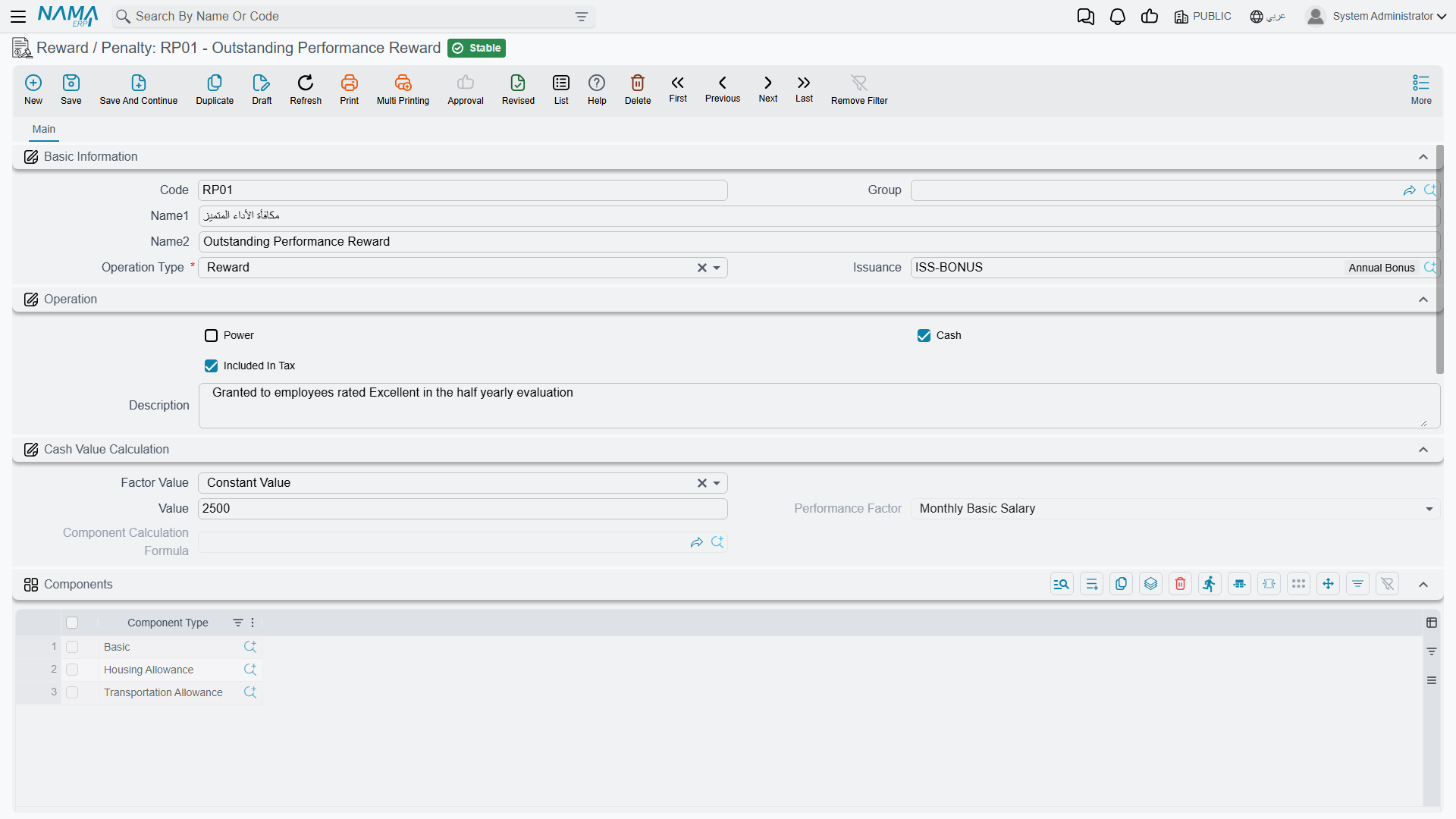
Each catalog entry is a small master record that says what kind of bonus or deduction this is, and — if it posts to the ledger on its own — where it posts.
| Field (English) | Arabic | Notes |
|---|---|---|
| Group | المجموعة | An optional master group, for organizing a long catalog. |
| Operation Type | نوع الإجراء | Reward (مكافأة) or Penalty (جزاء) — the two things this catalog can define. |
| Issuance | الصرفية | Ties the type to one Salary Issuance, when a company runs more than one payroll stream. |
| Power | عينية | Marks the type as an in-kind reward/penalty (a benefit or deduction in goods or services) rather than a cash figure. |
| Cash | النقدي | Marks the type as a cash amount. |
| Included In Tax | يضاف إلى وعاء الضريبة | Whether the value feeds into the employee's tax basis. |
| Factor Value | حساب المعامل | The value method: Constant Value (قيمة ثابتة) — a fixed figure — or Variable Value (متغير) — computed at document time, the same idea used for salary components. |
| Value | القيمة | The fixed amount, when the value method is Constant. |
| Performance Factor / Component Calculation Formula | معدل الأداء / معادلة حساب المفرد | Inputs used to compute the amount when the value method is Variable — the same calculation formula machinery salary components use. |
| Components (grid) | المكونات | One or more salary Component Types the variable calculation draws its base figure from (for example, "one day of Basic Salary"). |
Below that, a Reward/Penalty type carries its own Debit Accounts and Credit Accounts blocks — the same account-line pattern used on salary components: a distribution type (Fixed, Variable, or Fixed With Criteria) plus one or more account lines. These accounts are what a document posts through, either directly or via the next salary run — see "How it's processed" below.
The (Reward / Penalty) Document
This is where a specific occurrence gets recorded against one employee.
| Field (English) | Arabic | Notes |
|---|---|---|
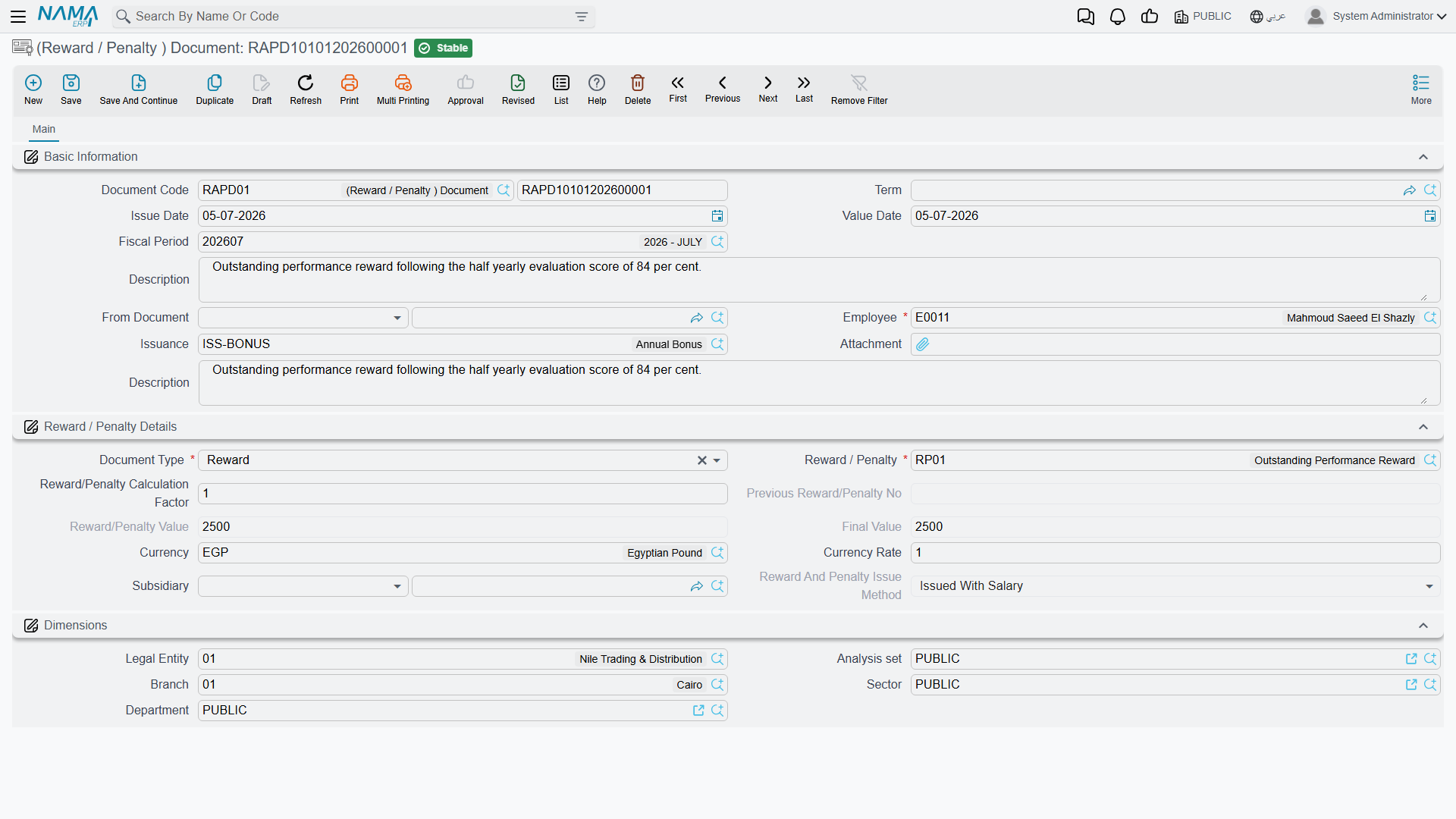
| Term | توجيه المستند | The document term — decides numbering, whether this document posts on its own, and where its debit/credit accounts come from. |
| Employee | الموظف | Who receives the reward or penalty. |
| Issuance | الصرفية | Auto-filled from the chosen type when it carries one. |
| Document Type | نوع المستند | Reward or Penalty, mirrored from the chosen type. |
| Reward / Penalty | نوع مكافأة / جزاء | Which catalog entry this document applies. |
| Reward/Penalty Calculation Factor | معامل حساب المكافأة/الجزاء (عدد مرات التطبيق) | How many times the type's value applies — required whenever the type is a Cash reward/penalty. |
| Previous Reward/Penalty No | عدد المكافأة/الجزاء السابق | An automatic running count of how many times this same type was already committed for this employee — handy for escalating penalties. |
| Reward/Penalty Value | القيمة المعرفة بنوع المكافأة/الجزاء | The per-unit value pulled from the type (fixed, or computed for a Variable type). |
| Final Value | القيمة النهائية | Calculation Factor × Reward/Penalty Value — the bottom line. |
| Subsidiary | الذمة | The settlement party/account this document is booked against. |
| Reward And Penalty Issue Method | طريقة صرف المكافأة / الجزاء | Issued Immediately (تصرف الآن) or Issued With Salary (تصرف مع الراتب) — see below. |
For example, a "Late Arrival" penalty type worth 50 (one day's basic pay) applied three times in a month produces a Reward/Penalty Calculation Factor of 3, a Reward/Penalty Value of 50, and a Final Value of 150.
Immediate posting needs a fixed value
If the document's term is set to Issued Immediately, Nama requires the chosen Reward/Penalty type to use a Constant value method and a Fixed distribution on both its debit and credit accounts — a criteria-based or salary-computed value can only flow through a salary run, not post on its own the moment the document is committed.
One per employee per day (optional)
An HR configuration setting can block recording the same Reward/Penalty type for the same employee twice on the same day, to guard against accidental duplicates.
How it's processed / what it posts
Whether a (Reward / Penalty) Document generates a ledger effect at all is a choice made on its term — a document term can turn accounting effects off entirely, in which case the document is a pure record with no posting.
When the term does have an accounting effect switched on, committing (or later updating/cancelling) the document creates a background business request with a processing status, retryable from the Business Requests view if it fails — building one debit line and one credit line for the Final Value. The accounts for those two lines come from one of two places, depending on the term's setup: either the Reward/Penalty type's own Debit/Credit Account Lines (the same accounts described above), or, if the type doesn't supply them, accounts configured directly on the term itself.
In practice the Issue Method decides which pattern is used:
- Issued Immediately — the document is normally set up to post on its own, right away, independent of any salary run.
- Issued With Salary — the far more common case — the document typically does not post on its own; instead its Final Value carries forward and is folded into the employee's next Salary Document, which is what actually posts the entry, through the same accounts configured on the Reward/Penalty type. The salary document's own Rewards / Penalties grid, and its Current Month Penalties / Postponed From Previous Month / Postponed To Next Month figures, are exactly this: the running tally of reward/penalty documents feeding into that period's pay.
Actions on this screen
The Reward / Penalty catalog and the single (Reward / Penalty) Document have no buttons of their own.
On the Aggregated Reward And Penaltie Document (سند مكافأه - جزاء مجمع), which records one reward or penalty run for many employees at once:
- Collect Employees — adds a line for every employee who matches the employee range and is working on the document's value date. Employees already on the grid are kept and not added twice.
- Recalculate Reward Values — recomputes every line from its reward/penalty type: the type's value for that employee on the line's date, multiplied by the line's calculation factor, then the remaining amount and the document totals. Press it after changing types, factors or dates; it works on the document as it is on screen, without saving.
Messages you may see
| Message | Why | What to do |
|---|---|---|
| You Must Choose (Reward/Penaltie) Type — «يجب إختيار نوع المكافأة / الجزاء» | The catalog entry has neither Power (in-kind) nor Cash ticked, so nothing says what kind of value it carries. | Tick Cash for a monetary reward or penalty, Power for an in-kind one. |
| Debit accounts distribution type must be fixed value in reward and penalty {0} — «طريقة توزيع الحسابات المدينة يجب أن تكون ثابت في نوع المكافأة / الجزاء {0}» | The document's term is set to Issued Immediately — the document posts on its own rather than waiting for the salary run — and in that mode the catalog entry's Debit Accounts distribution type has to be Fixed. | Set the type's debit distribution to Fixed, or change the term's issue method so the value is carried into the next salary document instead. |
| Credit accounts distribution type must be fixed value in reward and penalty {0} — «طريقة توزيع الحسابات الدائنة يجب أن تكون ثابت في نوع المكافأة / الجزاء {0}» | The same rule on the Credit Accounts side. | As above, for the credit distribution type. |
Related pages
- Salary Documents — where an "Issued With Salary" reward/penalty actually posts, alongside every other component of the pay run.
- Salary Components and Salary Calculation Formulas — the same value-method and account-line patterns reused here.
- Government Penalties — the separate, legally-driven disciplinary catalog for labor-authority (HO) violations.
- HR Suspension — a related but distinct disciplinary document: suspending an employee from work rather than adjusting a single pay figure.