
Material and Payment Document Terms
The terms on this page cover two families that look unrelated and turn out to be closely connected: the documents that move material onto a site, and the documents that move money in advance of an extract. They belong together because in Contracting, material issued to a subcontractor becomes a deduction on his next extract, exactly as an advance payment does. Two different documents, one mechanism.
The single most important thing these terms encode is the difference between the two material streams. Material issued to your own project carries no money — it is a stock movement that pushes inventory cost onto a contract's term codes, and its term has no accounting-effect groups at all because there are no accounts for the reader to choose. Material issued to a subcontractor is a sale — a full invoice with a receivable, taxes and discounts, and a term that carries the whole set of invoice accounting groups. Get those two the wrong way round in your head and nothing about the two term screens makes sense.
All the material and purchasing documents borrow supply chain's term screen wholesale, so most of what you see on them is documented under Supply Chain Document Terms and is not repeated here. What follows is the contracting-specific part: the additions, the options that change contracting behaviour, and the payment terms, which are entirely the module's own.
Which term serves which document
| Document | Term screen | Read the shared options in |
|---|---|---|
| Contracting Material Issue, Contracting Material Issue Req | Supply chain inventory term, no accounting groups | supply chain |
| Contracting Material Return | Supply chain inventory term, no accounting groups | supply chain |
| Contractor Material Issue, Contractor Material Issue Request, Contractor Material Return | Supply chain invoice term, with accounting groups | supply chain accounting effects |
| Project Advance Payment, Contractor Advance Payment, Contractor Other Payment | One contracting term screen, shared by all three | this page |
| Project Contract Fine, Contractor Contract Fine | One contracting term screen each, nearly identical | this page |
Material to your own project
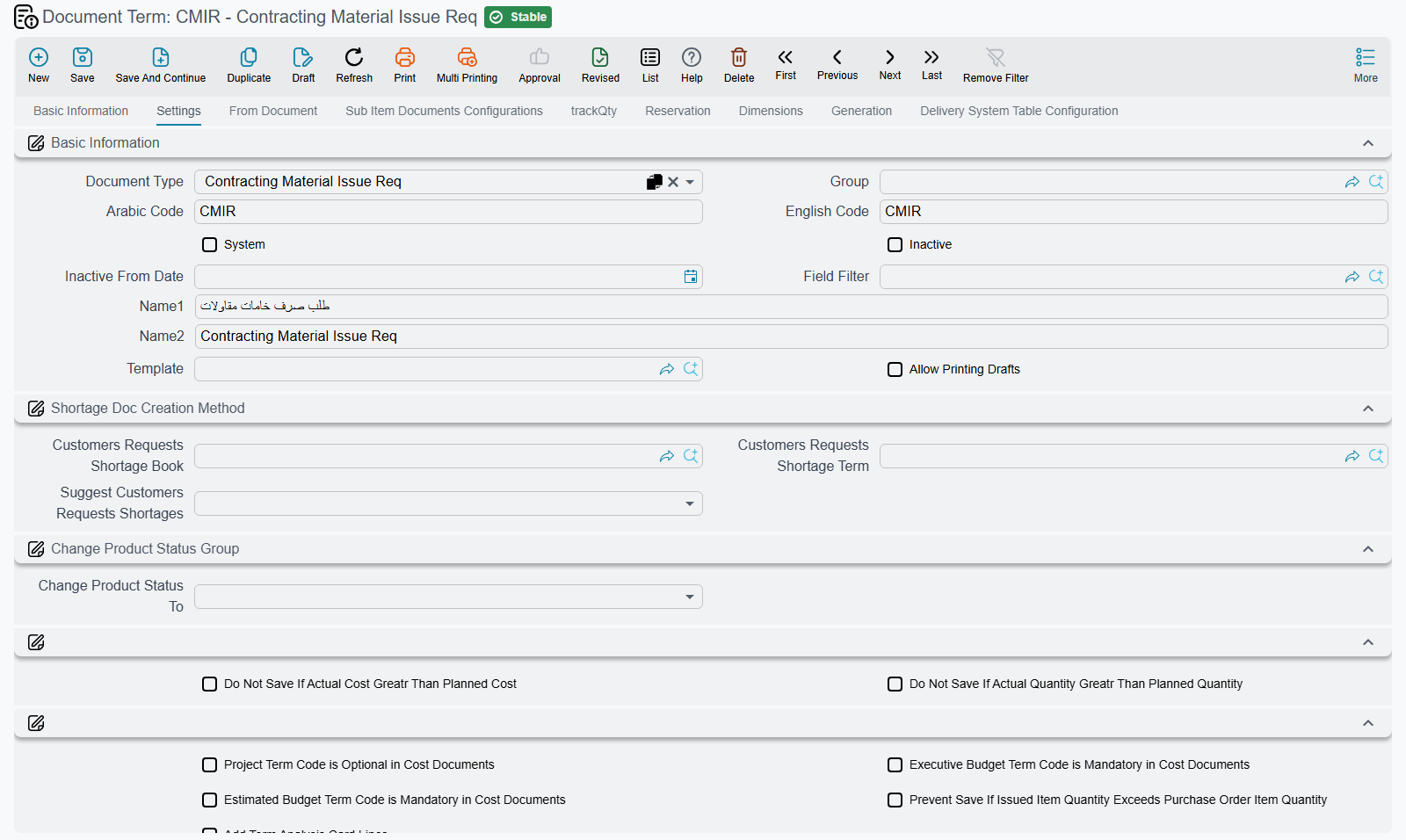
These terms have no accounts to set, which regularly worries implementers. It should not: the material issue does not book money — it generates a stock issue, and the value that reaches the project comes from inventory costing once the stock movement is priced. The contracting-specific options are about generation and about which codes are compulsory.
| Option | What it does |
|---|---|
Generation book and generation term termConfig.generationConfigurations.generationBook / termConfig.generationConfigurations.generationTerm | The book and term of the stock issue (or, on a return, the stock receipt) that the document generates. Both are required for anything to be generated — with either missing, the document commits and no stock moves |
Project Term Code is Optional in Cost Documents termConfig.optionalProjectTermCodeInCostDocuments | Makes the contract's term code optional on the lines instead of compulsory |
Executive Budget Term Code is Mandatory in Cost Documents termConfig.mandatoryExecutiveBudgetTermCodeInCostDocuments | Forces every line to name an executive budget term code |
Estimated Budget Term Code is Mandatory in Cost Documents termConfig.mandatoryEstimatedBudgetTermCodeInCostDocuments | The same for the estimated budget's term code |
Prevent Save If Issued Item Quantity Exceeds Purchase Order Item Quantity termConfig.preventSaveIfIssuedItemQtyExceedsPurchaseOrderItemQty | Blocks issuing more of an item than the purchase order behind it ordered |
Add Term Analysis Card Lines termConfig.addTermAnalysisCardLines | When a line names an analysis card, its material lines are pulled in automatically |
Do Not Copy Contract Terms When Selected termConfig.doNotCopyContractTermsWhenSelected | Picking a contract on the document does not copy its terms onto the lines — for teams who select the few terms they need by hand |
Two further options, Do Not Save If Actual Quantity Greater Than Planned Quantity termConfig.doNotSaveIfActualQtyGreatrThanTotalQty and Do Not Save If Actual Cost Greater Than Planned Cost termConfig.doNotSaveIfActualCostGreatrThanTotalCost, act as spending ceilings. They bite when the line's target is an analysis card line: issue more material, or more value, than the card planned and the save is refused. Where a line targets a budget or a contract term line instead, the ceiling does not apply — so do not rely on these two as a budget control. The only budget-derived ceiling in the module is the one on the budget item request.
The generation configuration is not optional in practice
A contracting material issue with no generation book and term is a document that looks complete, commits without complaint, and moves no stock. Because the project's cost only arrives via the generated stock issue, the term code also ends up with no cost against it. Set the book and the term on every material term before it is used in anger.
On the material return the two extra options are:
| Option | What it does |
|---|---|
Allow Returned Quantity To Be Greater Than Issued Quantity For Contract termConfig.allowReturnedQtyBeGreaterThanIssuedQty | Permits returning more than was issued against the contract — for sites that receive material through more than one route |
Consider Executive Budget Term Code While Validating Return Item Quantity termConfig.considerExecutiveTermCodeWhileValidateReturnItemQty | Narrows the issued-quantity check so it compares within one executive-budget term code rather than across the whole contract |
The three term-code options above are also honoured on the return, even though the return's own screen does not offer them. If a return refuses to save because a line has no executive-budget term code, the setting responsible is on the term of the document family, not on the return's own screen — the practical answer is to fill the code.
Material to a subcontractor
This is a sale, and its term is the supply chain invoice term. The full option set is documented under supply chain; what matters on the contracting side is which parts of it you must actually fill in.
| What to set | Why it matters here |
|---|---|
The main accounting sides termConfig.config.debit / termConfig.config.credit | The debit is the subcontractor's receivable, the credit is inventory going out. Leave them empty and the sale creates no journal entry, while the stock still moves |
The tax sides termConfig.tax, termConfig.tax2, termConfig.htax, termConfig.htax2 | VAT on material sold to the subcontractor |
The invoice-discount and line-discount sides termConfig.invoiceDiscount, termConfig.lineDiscount, termConfig.firstDiscountAcc … termConfig.seventhDiscountAcc | Where discounts given on the sale land |
Generation book and generation term termConfig.generationConfigurations.generationBook / termConfig.generationConfigurations.generationTerm | As above — without both, no stock issue or receipt is generated |
Project Term Code is Optional in Cost Documents termConfig.optionalProjectTermCodeInCostDocuments | Makes the line's term code optional |
The payment-details defaults — Condition termConfig.contractingCondition, Payment Method termConfig.paymentMethod, Payment Percentage termConfig.paymentPercent, Payment Value termConfig.paymentValue | These are what make the charge-back automatic. See below |
The payment-details block is the mechanism the whole charge-back rests on. When you set a default condition on the term — a "material deduction" condition on the subcontract — every material issue raised under that term arrives with that condition already filled in, and the subcontractor's next extract collects the outstanding value as a deduction on its conditions grid. A material return arrives the same way and lands as an addition. Get the default right and the site storekeeper never has to know that a deduction exists.
Those four fields are read on the material issue request as well, but its own term screen does not present them. If you use requests, set the defaults on the issue's term and let the request inherit the condition when it is converted, rather than expecting to configure the request separately.
Advance payments and other payments
One term screen serves all three payment documents — the advance received from a project owner, the advance paid to a subcontractor and the subcontractor's other-payment document. It is a single page with nine options and no accounting groups beyond one debit and one credit, which tells you how simple the document is: money moves once, and a condition governs how it is recovered later.
| Option | What it does |
|---|---|
Debit termConfig.debit | The debit side of the payment's entry — the advance receivable on the subcontractor side, or cash/bank on the owner side |
Credit termConfig.credit | The credit side of the same entry |
Condition termConfig.contractingCondition | The default condition the payment is charged against. This is the field that decides how the advance comes back, because the condition is what a later extract collects |
Payment Method termConfig.paymentMethod | Whether recovery is by percentage or by fixed value. The English caption on this one field is not resolved on screen; it is the payment method |
Payment Percentage termConfig.paymentPercent | The default percentage when the method is percentage-based |
Payment Value termConfig.paymentValue | The default fixed amount when it is not |
Tax Debit and Tax Credit termConfig.taxDebit / termConfig.taxCredit | The two sides for the payment's own tax |
Allow Negative Remaining termConfig.allowNegativeRemaining | Permits the payment's remaining balance to go below zero, i.e. to be over-recovered |
The condition on the term is the whole design
An advance payment on its own is only a transfer of money. What turns it into something that comes back is the condition: the extract's conditions grid collects the outstanding value of every payment document that points at a condition on the contract. Set a sensible default condition per term — "owner advance recovery", "subcontractor mobilisation recovery" — and users never have to remember to fill it in.
Fines
The two fine documents — a penalty on the owner contract and a deduction against a subcontractor — share the same term shape as the payment documents, plus three options of their own. Both are a single page.
The shared six are Debit, Credit, Condition, Payment Method, Payment Percentage and Payment Value (termConfig.debit, termConfig.credit, termConfig.contractingCondition, termConfig.paymentMethod, termConfig.paymentPercent, termConfig.paymentValue), and they mean exactly what they mean on a payment document: the fine's own entry, and the condition through which the fine reaches the next extract. The three additions:
| Option | What it does |
|---|---|
Calculate Accounting Effects From Contracting Condition termConfig.calcAccEffectsFromContrCondition | The debit and credit are taken from the linked condition record instead of from the term. Use it where different fine reasons must hit different accounts — the reason drives the condition, and the condition drives the accounts |
Project Term Code is Optional in Cost Documents termConfig.optionalProjectTermCodeInCostDocuments | Despite its wording, what this actually relaxes is the requirement for a term code on the fine's lines. The project term code is required either way |
Link With Invoice Lines In Accounting Document termConfig.linkWithInvoiceLinesInAccountingDocument | Receipt and payment vouchers carry the fine's lines in their invoice grid |
The subcontractor fine's term adds one more, Show Finished Contracts termConfig.showFinishedContracts, which lets the contract lookup on the fine also list subcontracts already marked finished. It exists on this one term only — on extracts, advances and the project fine, finished contracts are simply not offered.
The fine's subsidiary is the one on the document header, so fill it there; the term's sides handle the accounts, not the party.
Worked example — one month on Tower A
Material to the project. Term CMI-STD for Contracting Material Issue: generation book SI-CNTR and generation term SI-CNTR-STD, project term code compulsory, executive-budget term code compulsory. The site engineer issues 200 blocks against term 3.01. No money is booked by the issue. The generated stock issue moves 200 blocks out of the site warehouse; inventory costing prices them at 4.00 each, so term 3.01 of the contract picks up 800 of actual material cost. Five blocks come back on a material return under term CMR-STD and the term's cost drops by 20.
Material to the subcontractor. Term CTI-STD for Contractor Material Issue: the main sides debit the subcontractor's receivable and credit inventory going out, the tax sides carry VAT, generation book and term are set, and the default condition is MATDED — "material deducted from extract". Eighty bags of cement worth 2,400 are issued to the blockwork subcontractor. This one does book: a receivable on the subcontractor, inventory out, VAT. Because the term carried MATDED, the subcontractor's next extract collects a condition line of MATDED with a deduction of 2,400, and his net payable falls by exactly that. Nobody typed the deduction.
The advance. Term PAP-STD for Project Advance Payment: debit bank, credit advances received from customers, default condition ADV-REC, payment method percentage with every extract, payment percentage 25. The owner pays 46,000. Every subsequent extract collects 25% of it — 11,500 a time — as a deduction, and the advance draws down 46,000 → 34,500 → 23,000 without anyone tracking it by hand. The extract term option that collects payment documents on save is what makes those condition lines appear on their own.
The fine. Term PCF-STD for Project Contract Fine, with Calculate Accounting Effects From Contracting Condition ticked so that each fine reason is recorded on its own account through its condition. Fine PCF-001, a 5,000 delay penalty, is raised. It creates its own entry immediately, and appears as a 5,000 deduction on the next extract's conditions grid — both, which is the behaviour worth knowing before the first month closes.