
Invoice Document Terms
A hospital invoice posts nothing on its own. Every account it touches — the patient's receivable, the insurer's receivable, the revenue, the discounts, the taxes, the doctor's share — is named on its document term, and an invoice saved under a term with empty sides is saved, priced and printed without a single ledger line. When support is asked "why did this lab invoice not reach the patient's account?", the answer is almost always on this page.
Sixteen invoice and return types share one Effect tab. This page explains that tab once, then what each family of invoice adds to it. Terms are edited in Basic → Settings → Document Term: open the term whose Document Type is the invoice you are configuring. The documents that make up a stay — admission, accommodation, exit, closing invoice, feeding, surgery package — have their own, much shorter terms, on Stay and Operations Document Terms.
How an HMS invoice turns into an entry
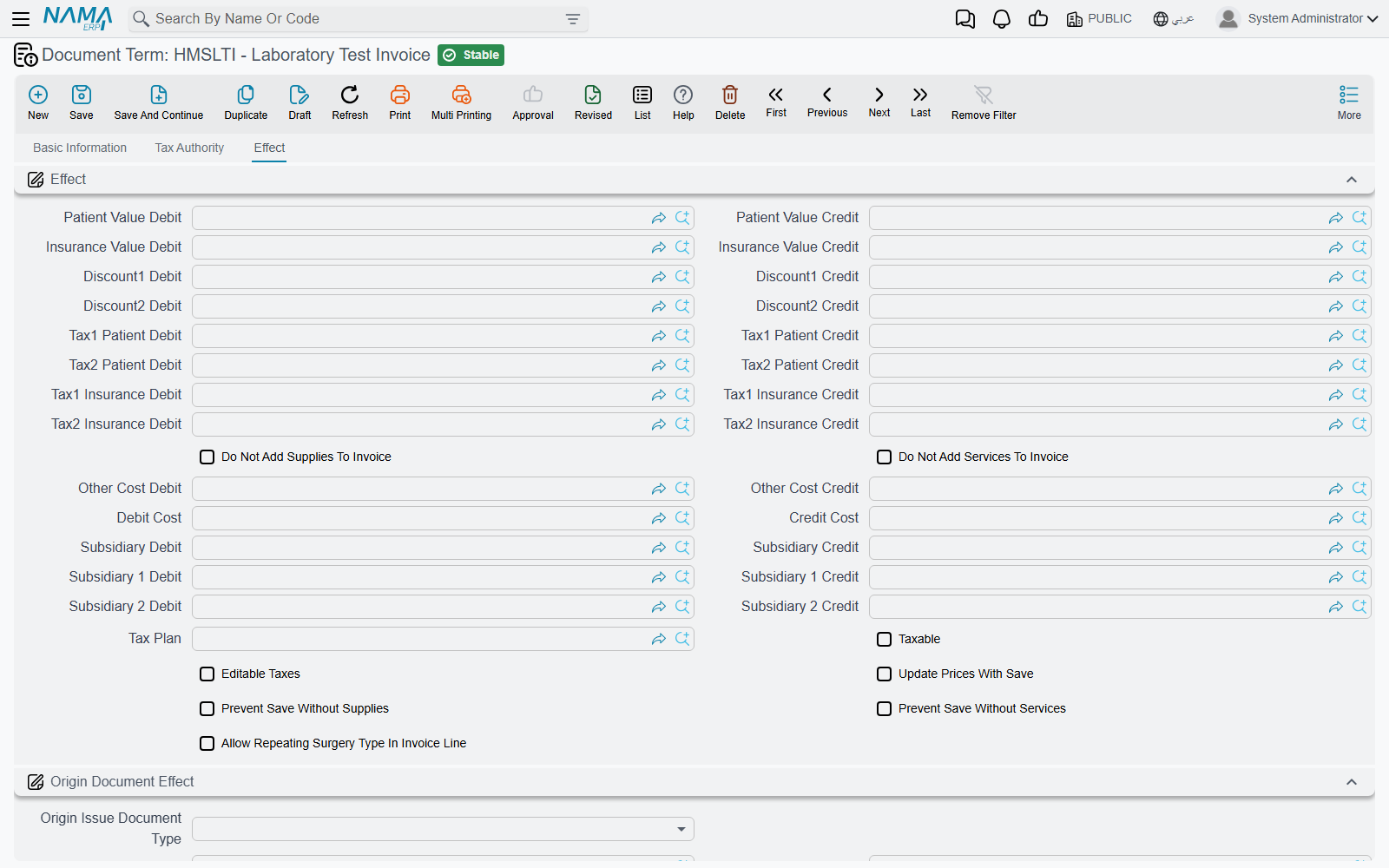
Every priced line on a hospital invoice carries a price block: the price, two discounts, the patient's share and the insurer's share, Tax 1 and Tax 2 each split between the two, the cost and up to three subsidiary shares (see Invoicing & Billing). When the invoice is saved, each line is posted pair by pair from the Effect group:
- A pair posts only when both sides are filled. Patient Value Debit without Patient Value Credit posts nothing for the patient's share — there is no warning, the value simply never reaches the ledger.
- Every main line, every supplies line and every services line is posted, unless the term's Do Not Add Supplies To Invoice or Do Not Add Services To Invoice keeps that grid out.
- Each side is an ordinary account side — a fixed account or one taken from a source on the document — described on Accounting Effects Configuration. HMS adds its own sources: Patient, Doctor, Medical Insurance Company and Medical Specialty from the invoice header, and the line's own Laboratory Test Type, Radiology Type, Surgery Type, Physical Therapy Type, Medical Service, Pharmacy or Blood Bank. A side sourced from one of these posts to that record's account, which is how a lab test type or a pharmacy gets its own revenue account.
Patient or doctor?
When the invoice's Medical Document Category has Use Doctor Instead Of Patient In Accounting Effects ticked, every side whose source is Patient posts to the doctor's account instead. This is the switch behind doctor revenue-sharing arrangements — see Medical Master Files.
The Effect group — the sides
| Pair | Field ids | What it posts, per line |
|---|---|---|
| Patient Value Debit / Credit | termConfig.patientValueDebit / termConfig.patientValueCredit | The patient's share of the price. |
| Insurance Value Debit / Credit | termConfig.insuranceValueDebit / termConfig.insuranceValueCredit | The insurer's share. |
| Discount1 Debit / Credit | termConfig.discount1Debit / termConfig.discount1Credit | The Discount 1 value. |
| Discount2 Debit / Credit | termConfig.discount2Debit / termConfig.discount2Credit | The Discount 2 value. |
| Tax1 Patient Debit / Credit | termConfig.tax1PatientDebit / termConfig.tax1PatientCredit | The patient's part of Tax 1. |
| Tax2 Patient Debit / Credit | termConfig.tax2PatientDebit / termConfig.tax2PatientCredit | The patient's part of Tax 2. |
| Tax1 Insurance Debit / Credit | termConfig.tax1InsuranceDebit / termConfig.tax1InsuranceCredit | The insurer's part of Tax 1. |
| Tax2 Insurance Debit / Credit | termConfig.tax2InsuranceDebit / termConfig.tax2InsuranceCredit | The insurer's part of Tax 2. |
| Debit Cost / Credit Cost | termConfig.costDebit / termConfig.costCredit | The line's cost value, from the medical cost list. |
| Subsidiary Debit / Credit | termConfig.subsidiaryDebit / termConfig.subsidiaryCredit | The first subsidiary share — typically the doctor's or an outside lab's share of the revenue. |
| Subsidiary 1 Debit / Credit, Subsidiary 2 Debit / Credit | termConfig.subsidiary1Debit … termConfig.subsidiary2Credit | The second and third subsidiary shares. |
Other Cost Debit / Credit also sits in this group, but only the surgery invoice uses it — it is the "other" fee component of an operation (see below). On every other invoice it posts nothing.
A typical cash-and-insurance setup: Patient Value debits the patient (source Patient) and credits a revenue account; Insurance Value debits the insurer (source Medical Insurance Company) and credits the same revenue; the two tax pairs debit the patient or insurer and credit the output-tax account.
Overhead lines post through their own item
The estimated or actual overhead carried on an invoice's overhead grid is not posted by the term. Each Overhead Item names its own estimated-value and actual-value sides, and the invoice uses the actual ones once an Actual Overhead Calculation has given it an actual value.
The Effect group — the options
| Option | Field id | What it does |
|---|---|---|
| Do Not Add Supplies To Invoice | termConfig.doNotAddSuppliesToInvoice | The supplies grid is left out of the invoice total and out of the entry. The supplies are still issued from stock. |
| Do Not Add Services To Invoice | termConfig.doNotAddServicesToInvoice | The same for the services grid. |
| Tax Plan | termConfig.taxPlan | The tax plan used for a line whose service, type or room names no tax plan of its own. |
| Taxable | termConfig.taxable | Whether the plan's taxes apply to this invoice type at all. |
| Editable Taxes | termConfig.editableTaxes | Taxes are no longer recalculated from the tax plan on save, so a tax typed on a line is kept. |
| Update Prices With Save | termConfig.updatePricesWithSave | Every save looks every line's price up again from the insurance approval and the price lists. Prices typed by hand are overwritten — unless the invoice's Allow Changing Main Prices, Allow Changing Services Prices or Allow Changing Supplies Prices is ticked for that grid. |
| Prevent Save Without Supplies | termConfig.preventSaveWithoutSupplies | Refuses to save an invoice whose supplies grid is empty. |
| Prevent Save Without Services | termConfig.preventSaveWithoutServices | Refuses to save an invoice whose services grid is empty. |
| Allow Repeating Surgery Type In Invoice Line | termConfig.allowRepeatingSurgeryTypeInInvoiceLine | Surgery invoice only: two operation lines may name the same surgery type. |
The three Allow Changing … Prices switches are on each invoice, not on the term. On a saved invoice they are ticked from the More menu (Allow Changing Main Prices, Allow Changing Services Prices, Allow Changing Supplies Prices), which is how a price agreed at the desk survives Update Prices With Save.
Origin Document Effect — issuing the supplies of a service invoice
Service invoices carry a supplies grid filled from the Medical Supplies tab of the service or type being billed. The Origin Document Effect group («تأثيرات المستند المنشأ») turns that grid into a stock document:
| Field | Field id | What it does |
|---|---|---|
| Origin Issue Document Type | termConfig.issueDocType | Stock Issue issues the supplies on save; Stock Issue Request raises a request for the store instead. Empty: nothing is generated. |
| Stock Issue Book / Stock Issue Term | termConfig.issueForHMSInvoiceBook / termConfig.issueForHMSInvoiceTerm | The book and term of the generated document. Both are needed. |
The pharmacy-family invoices below do not use this group — they move stock through their Generation tab. The full story is on Pharmacy, Supplies & Blood Bank.
What each invoice family adds
Check, attendant, lab, radiology, physical therapy, services and supervision invoices
These seven terms are the Effect tab plus one more tab, Tax Authority («مصلحة الضرائب»), with a single field, Tax Authority Item termConfig.taxAuthorityItem. On the Check Invoice, Attendant Invoice and Supervision Invoice it is the item every line is reported under when the invoice is sent to the tax authority. Lab, radiology, physical therapy and services invoices report each line under the tax-authority item of its own test type, radiology type, therapy type or medical service, so the field on their terms can stay empty.
Accommodation invoice
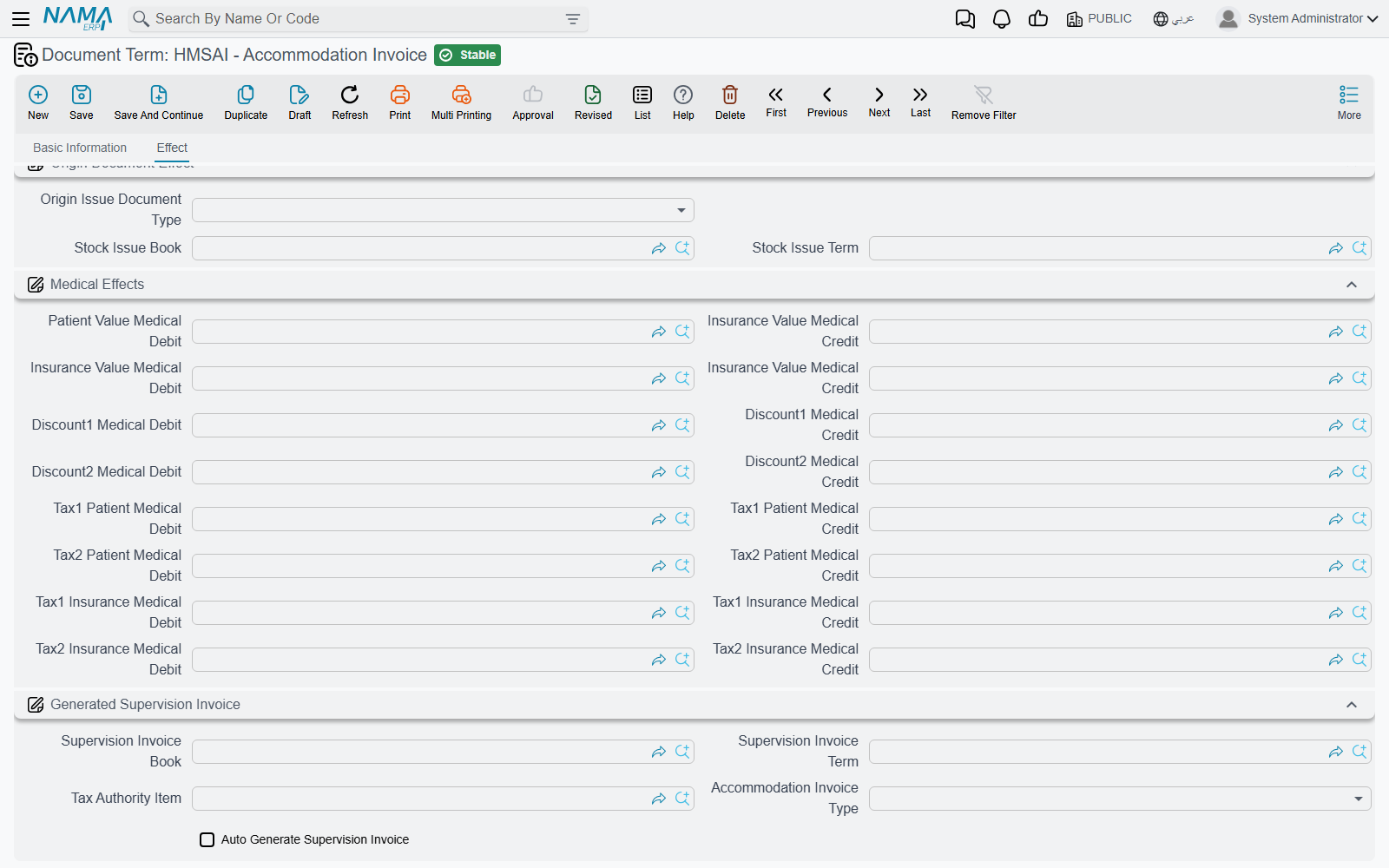
The accommodation invoice posts the accommodation price of each of its day lines through the Effect group. The medical-supervision part of the same lines is billed separately, by a Supervision Invoice the accommodation invoice can create for you. The group Generated Supervision Invoice («فاتورة الإشراف الطبى المنشأة») sets that up:
| Field | Field id | What it does |
|---|---|---|
| Auto Generate Supervision Invoice | termConfig.autoGenSupervisionInvoice | On save, create (or rebuild) one Supervision Invoice holding a line per day of each accommodation line. Rooms ticked Do Not Create Room Supervision Invoice are skipped. |
| Supervision Invoice Book / Supervision Invoice Term | termConfig.supervisionInvoiceBook / termConfig.supervisionInvoiceTerm | The book and term of the generated Supervision Invoice — whose own term then posts it. |
| Tax Authority Item | termConfig.taxAuthorityItem | The item the accommodation invoice's lines are reported under to the tax authority. |
| Accommodation Invoice Type | termConfig.accommodationInvoiceType | Shown here, but what splits the stay into invoices is the same field on the Accommodation term — see the stay terms page. |
The accommodation invoice's term also carries a Medical Effects group; leave it empty, since the supervision charge is posted by the generated Supervision Invoice.
Surgery invoice
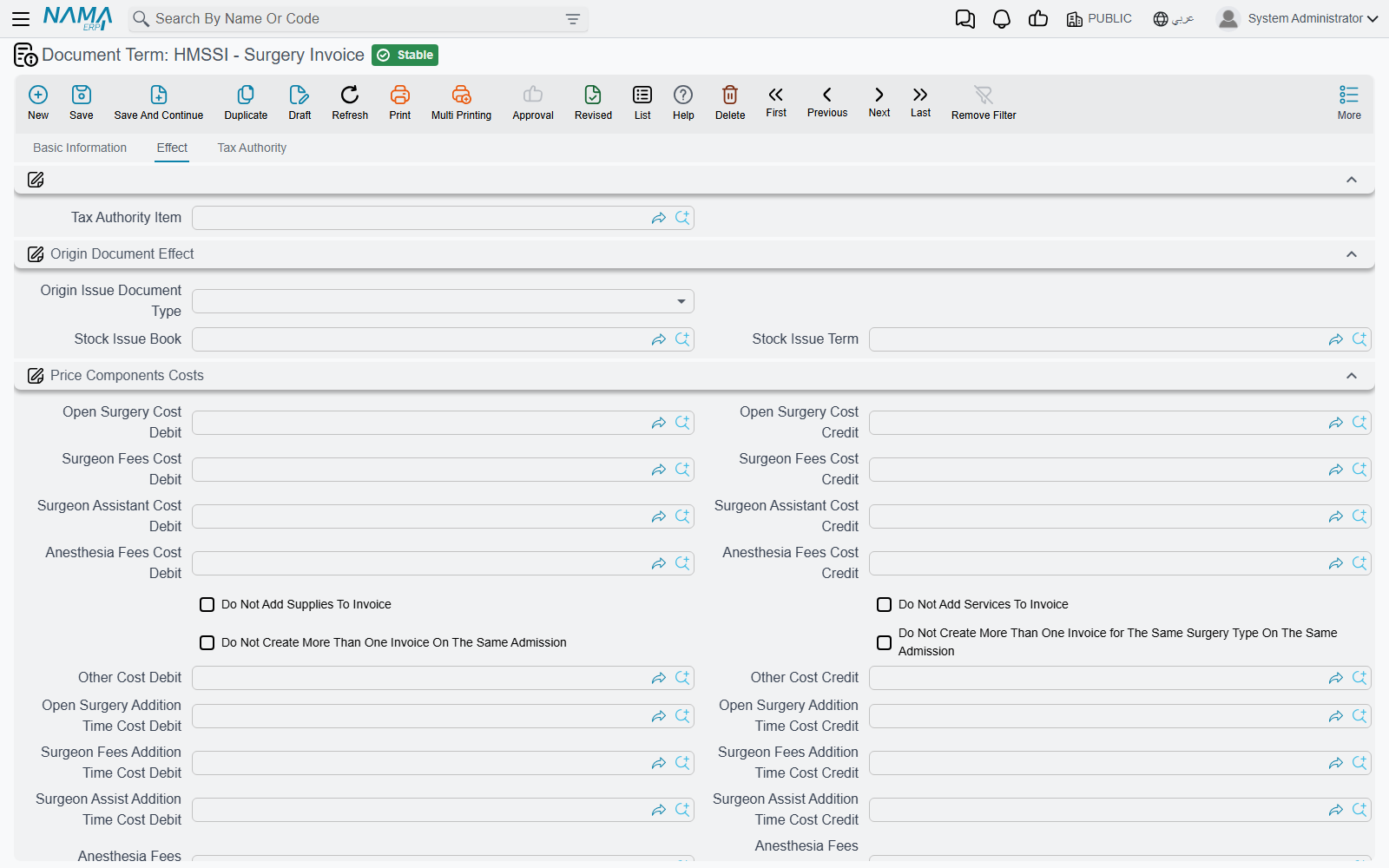
The surgery term puts its own group, Price Components Costs («تكاليف أسعار العمليات»), under the Effect group. An operation's price is made of components — open surgery, surgeon fees, surgeon assistant, anaesthesia and other — each with a cost for the standard hours and an extra cost for additional time, and each component has its own pair:
| Pair | What it posts |
|---|---|
| Open Surgery Cost, Surgeon Fees Cost, Surgeon Assistant Cost, Anesthesia Fees Cost, Other Cost (Debit / Credit) | The cost of that component for the standard hours. |
| Open Surgery Addition Time Cost, Surgeon Fees Addition Time Cost, Surgeon Assist Addition Time Cost, Anesthesia Fees Addition Time Cost, Other Addition Time Cost (Debit / Credit) | The extra cost of that component for hours beyond the standard. |
| Subsidiary Addition Time (Debit / Credit) | Shown on the screen; the surgery entry does not post it. |
The same group holds the two rules that limit surgery invoices per admission: Do Not Create More Than One Invoice On The Same Admission and Do Not Create More Than One Invoice for The Same Surgery Type On The Same Admission. Some options appear twice on this screen (the supplies/services switches, Other Cost, and the Origin Document Effect group); both copies are the same field. The term ends with a Tax Authority tab. How the components are priced is on The Surgery Lifecycle.
Pharmacy, supplies, service-and-supply and blood bank invoices, and the three returns
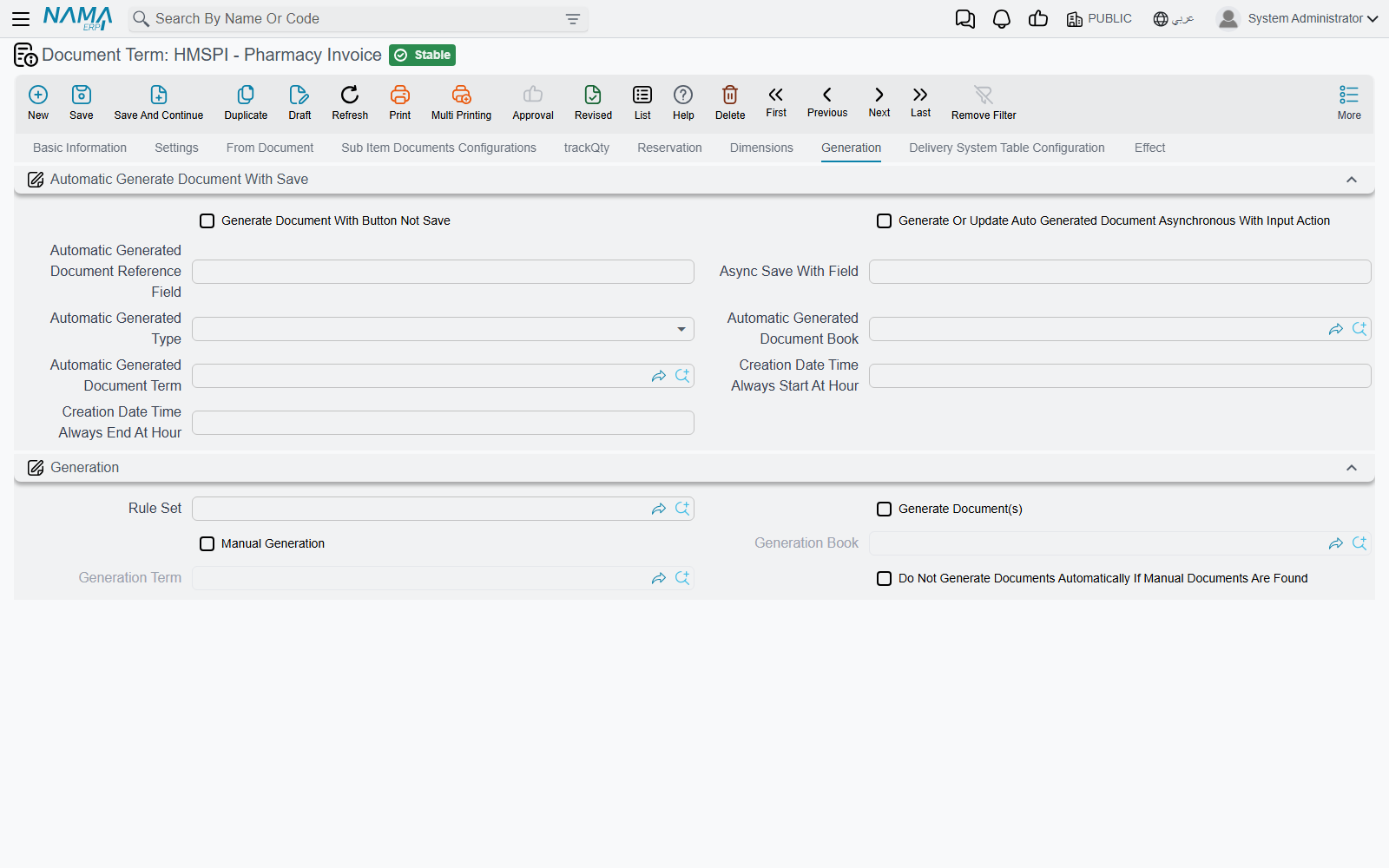
Pharmacy Invoice, Pharmacy Return, Medical Supplies Invoice, Supply Return, Service And Supply Invoice, Blood Bank Invoice and Blood Bank Return are inventory documents, so their terms open with the standard supply-chain term tabs — Settings, From Document, quantity tracking, reservation, Dimensions, Generation and the rest, all described under supply chain document terms — and end with the HMS Effect tab above.
Two things differ from the service invoices:
- The stock document comes from the Generation tab. A Generation Book and Generation Term make the invoice issue its items (and the return receive them back). The Origin Document Effect group on these terms is not used.
- A return does not reverse the sides for you. It posts the same pairs as the invoice, in the direction its own term gives them, so a return term needs each pair set the other way round from the invoice term — patient value on the credit side where the invoice debits it, and so on.
Of the Effect group, these terms post the patient and insurance values, both discounts, the four tax pairs, the cost and the first subsidiary share.
Documents without HMS term options
Lab and radiology requests and results, the surgery request and approval, the patient diagnosis and health status, the outpatient reservation, Change Patient Price Plan and Actual Overhead Calculation have no HMS-specific term tab. Their terms carry only the general settings every document has.