
Journal Entries & Adjustments
Most entries in Nama are generated automatically from other documents (an invoice, a stock issue, a payroll run...), but there's always a need to record manual entries: an adjustment, a petty expense, an opening balance, clearing a suspense account. That's the job of the Journal Entry. Alongside it are specialized entry documents that handle particular cases: the Currency Diff Journal, the Exchange Rate Update, and the Inter-Company Transfer.
Required license
The journal entry, currency-difference journal, and inter-company transfer are part of the core accounting license. The Exchange Rate Update, however, is a feature within the banks license accounting-banks.
The Journal Entry
The journal entry (Accounting > Documents > Journal Entry) is the balanced document where you enter the debit and credit lines yourself — with the condition that total debit equals total credit before the system will accept it.
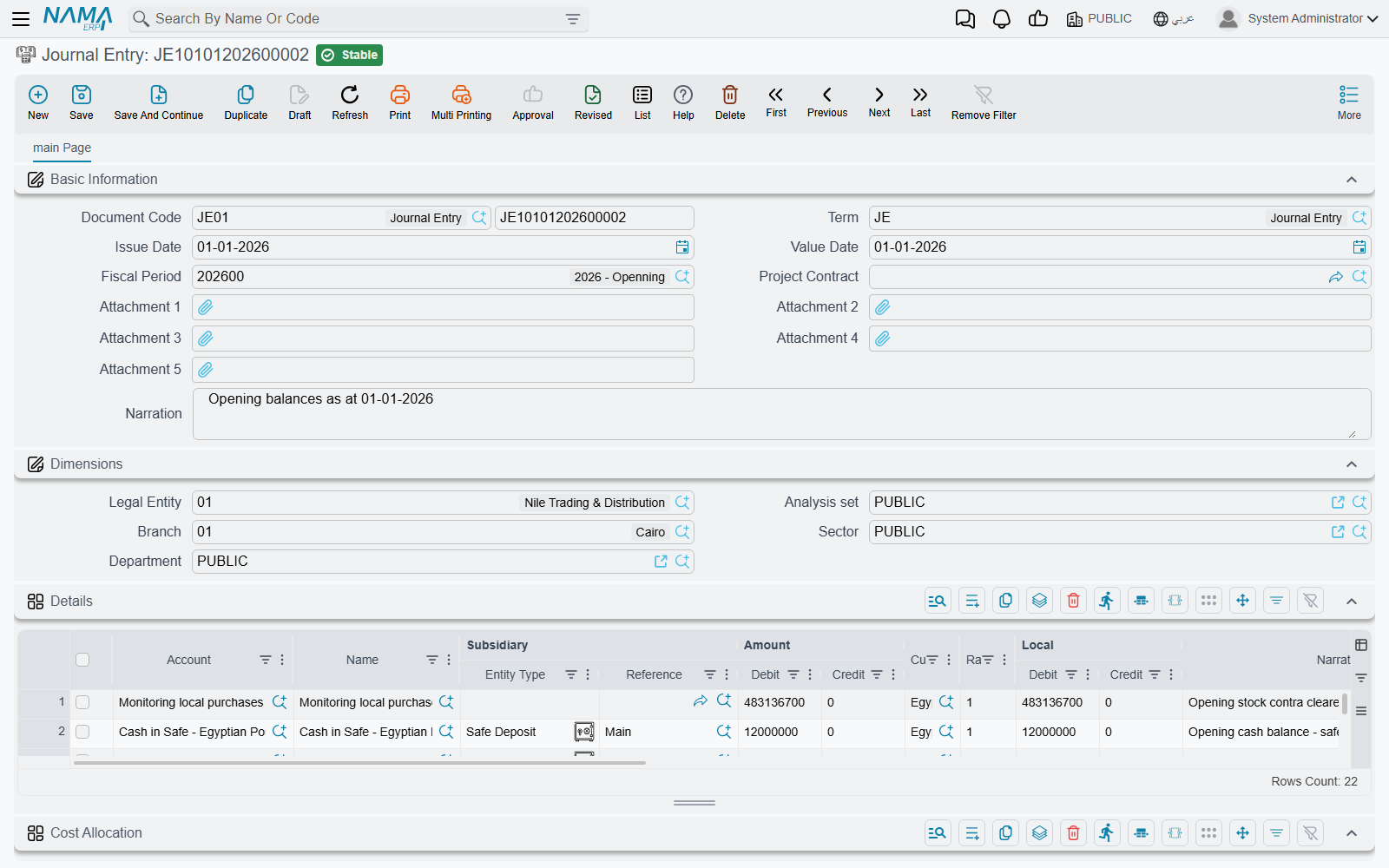
Document header
In the header you set:
- Document Term — the term (
توجيه) that governs the entry's behavior and where its special accounts (such as the difference account) come from. Term details are in the Document terms reference. - Document Number and Creation Date — the serial number and the document's creation date.
- Value Date — the accounting date the effect is recorded under (which determines the period), and may differ from the creation date.
- Period — the accounting period the value date falls in; the system sets it automatically, and if it's closed the save is rejected.
- Narration and dimensions (legal entity, branch, sector, department, analysis set) at the document level.
Detail lines
In the Details grid each line carries:
- Account and Subsidiary (the party, if the account is of subsidiary type).
- Debit Amount or Credit Amount — the line's value on its side, in the line's currency, with the corresponding local value shown after translation at the exchange rate.
- Reference, Narration, and line dimensions (sector/branch/department) for whoever needs finer detail than the document header.
- Tax fields (tax 1 and 2 percentage and value) appear when the tax features are enabled, linking the manual entry to its tax effect.
Balancing and the difference account
At the bottom of the screen the Totals show: Total Debit, Total Credit, and Total Difference. As long as the total difference is non-zero, the entry is unbalanced and won't save. The term lets you specify a difference account that absorbs small rounding differences automatically so the entry balances — so you don't have to chase fractions by hand.
Cost allocation
The Cost Allocation grid lets you distribute the entry's value across cost centers/dimensions independently of the debit and credit lines, for managerial analysis.
Currency Diff Journal
The Currency Diff Journal (Accounting > Documents > Currency Diff Journal) is a specialized entry for recording the differences arising from exchange-rate fluctuations on foreign-currency balances. It's most often generated automatically as a result of an Exchange Rate Update (see below), but it remains a standalone document you can review and print.
Exchange Rate Update
When currency rates change, your foreign-currency balances need revaluation at the new rate. The Exchange Rate Update (Accounting > Documents > Exchange Rate Update) does this in one batch: you specify the account (or a range of accounts), the currency, the new exchange rate, and the mediator account where revaluation differences are recorded; the system computes the difference for each balance and generates the corresponding currency-difference entries.
This document revalues balances you already hold. The day-to-day rates that new documents pick up are entered on a different screen, Exchange Rate — see Currencies and exchange rates.
WARNING
Accounts with Do Not Auto-Include In Exchange Rate Update enabled (see Accounts) are excluded from revaluation. This is a feature within the banks license accounting-banks.
Inter-Company Transfer
When transferring value between two companies in the same group, the Inter-Company Transfer (Accounting > Documents > Inter Company Transfer) records both sides in one step: it generates a journal entry in the first company and a matching one in the second, so the "inter-company current" accounts stay in sync without double manual entry.
Each line names the legal entity it belongs to. Each company's journal is balanced on the other company's Mediator account, taken from that company's Legal Entity record. The head office's journal therefore carries Egypt's mediator account, and Egypt's carries the head office's. Flag the mediator accounts Intercompany so the consolidated statements eliminate them.
Between companies with different currencies
The transfer also works between companies whose ledgers keep different currencies, for example a head office in US dollars and a subsidiary in Egyptian pounds. Three things differ from a same-currency transfer:
- One currency on every line. All lines must use the same transaction currency. Otherwise the save is refused with An inter-company transfer between companies with different currencies must use one currency on all lines — «التحويل بين شركات بعملات مختلفة يجب أن يستخدم عملة واحدة في جميع السطور».
- Each company's own rate. A line of another company is always converted at that company's own exchange rate on the document's value date, so its local amount is in that company's currency; a rate typed on such a line is replaced when the document is saved. If that company has no rate for the currency on that date, the document cannot be committed: Legal entity {0} has no exchange rate for {1} on {2} — «لا يوجد سعر صرف للعملة {1} في الشركة {0} بتاريخ {2}».
- The same amount on both mediator accounts. The balancing line on the mediator account is in that account's own currency when it has one, otherwise in the transfer's currency. Both companies' mediator accounts then hold the same amount.
So when Egypt sends USD 10,000 to the head office, Egypt books USD 10,000 at its own dollar rate, in pounds. The head office books USD 10,000 at rate 1. Both mediator accounts hold USD 10,000, and the consolidated reports eliminate them exactly.
Actions on this screen
Three buttons carry most of the day-to-day work on these documents.
On the journal entry:
- Reverse Document — the answer to "this entry was wrong and the period is already closed to editing". It opens a new, unsaved entry that copies the original line for line with debit and credit swapped, so saving it cancels the original's effect instead of erasing history. The original must be saved first, and the reversal is an ordinary entry: you choose its own value date, period and book before saving.
- Delete Empty Lines — sweeps out every detail line whose debit and credit are both zero or blank. Handy after pasting or importing lines, where blank rows come along for the ride and the entry then refuses to balance cleanly.
On the Exchange Rate Update:
- Preview Results — computes the revaluation and fills the document's lines with what would be recorded for each balance at the new rate, so you can inspect the differences before committing. Run it after setting the account (or account range), currency, new rate and mediator account; the document must be saved first.
Reports and forms
- Entry and daily-movement statements (
SYSR-ACCjournal statements) are covered on the Account statements & trial balance page. - The printed form for the journal entry is
SYSF-ACC001, for the currency-difference journalSYSF-ACC008, and for the inter-company transferSYSF-ACC007.
For Support
- "The entry won't save — unbalanced" — check the Total Difference; it must be zero. If it's a tiny fraction, enable/review the difference account in the term.
- "Save rejected because of the period" — the value date falls in a closed period or no period covers it; see Year-end & period control.
- "Tax fields don't appear on the entry" — the tax features aren't enabled in the Accounting configuration catalog.
- "Where does the difference account / the term's accounts come from?" — from the document term; details in the Document terms reference.
- How a document turns into an accounting effect and how to reprocess a stuck entry are in How documents are processed into accounting effects.