
Moving Stock Between Warehouses
Sometimes items don't come in or go out - they just move from one place to another. This guide focuses on stock transfers: moving inventory between warehouses and locations while its ownership stays within the organization.
Other movements have their own guides
Transforming stock by assembling it is covered in Assembly & Packaging; reserving items without moving them in the Reservation System Guide; loading and delivering them to customers in Delivery & Loading; and reconciling differences through counting in Stock Taking. This guide stays focused on inter-warehouse transfers.
Stock Transfers: The Basics
A stock transfer is any movement of items from one location to another without changing their owner. Total inventory stays the same - only the location changes.
Think of it like moving money between your checking and savings accounts. Your total wealth doesn't change, but where the money sits does, and you need to track that.
The Simple Transfer: One Document, Complete Movement
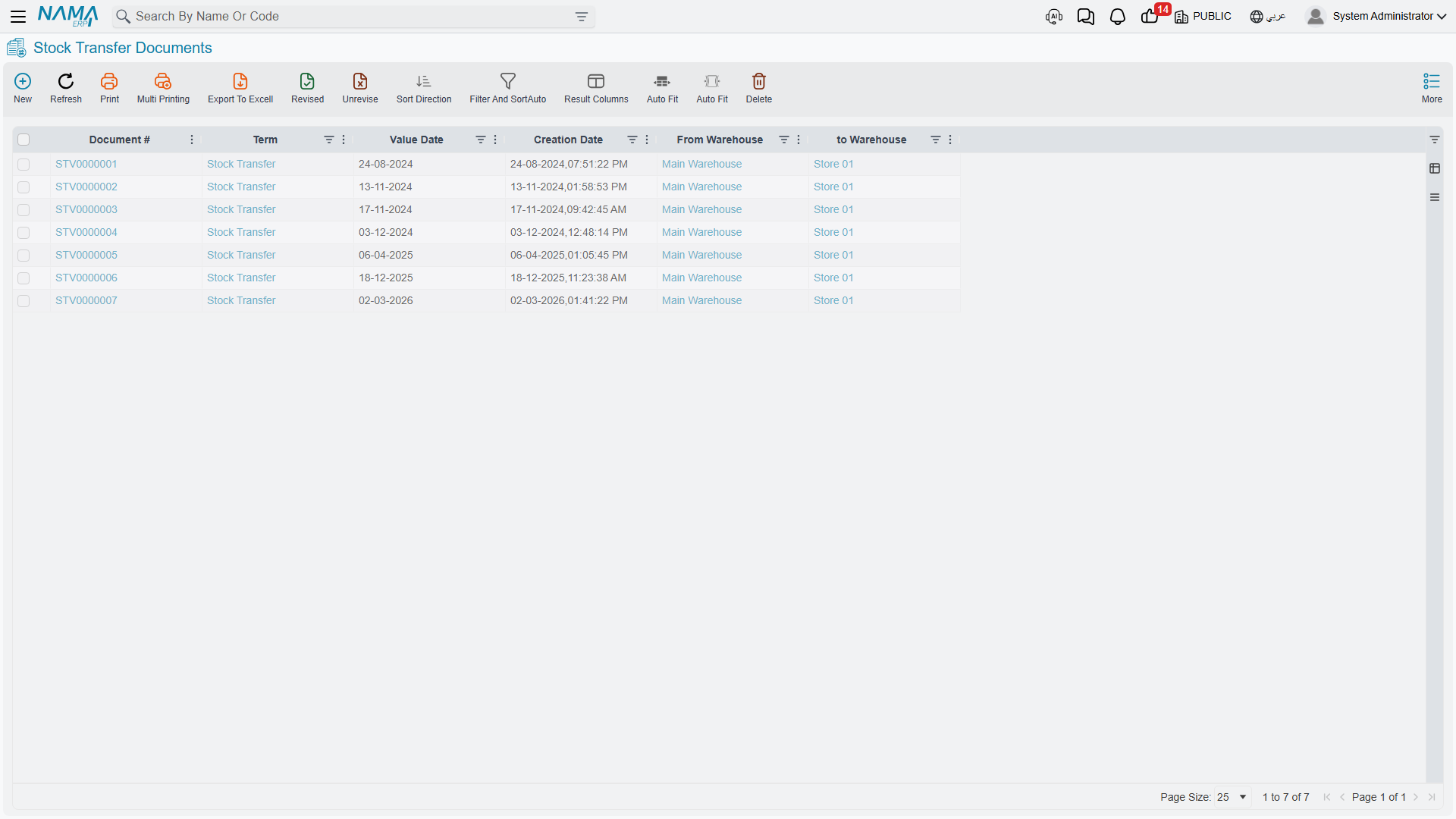
The Stock Transfer (StockTransfer) document handles direct transfers in a single step.
Common Transfer Scenarios
Between warehouses You have three warehouses: main, north branch, and south branch. A customer at the north branch wants an item that's only in the main warehouse. Create a transfer from the main warehouse to the north branch for the required quantity. The system reduces stock at the source and increases it at the destination, with the total staying constant, and tracks the item's movement history.
Within a single warehouse Even inside one building you may need to move items: from the receiving dock to a storage location, from storage to a staging area, or from shelf to shelf during reorganization. Create transfers to update the system's location records to match physical reality.
How Transfers Work
A transfer simultaneously:
- Issues from the source location (reducing the quantity there)
- Receives at the destination location (increasing the quantity there)
It's essentially an issue and a receipt together, bundled into one document. If the transfer fails or is cancelled, both sides are reversed together - you won't find items lost in the middle.
Cost note: Items are usually moved at their current cost - no revaluation. An item carries the same cost wherever it is.
The Two-Step Transfer: More Control and Tracking
Some organizations want tighter control over transfers, especially when items move between distant locations, transit time is significant, custody changes hands, or security and compliance require tracking inventory in transit. This is where the two-step transfer process comes in.
Issue Stock Transfer (IssueStockTransfer)
The Issue Stock Transfer documents the sending side: items leave the source warehouse, so stock decreases there and the items become "in transit," and the document records what was sent, when, and by whom.
Receipt Stock Transfer (ReceiptStockTransfer)
The Receipt Stock Transfer documents the arrival side: items reach the destination warehouse, so stock increases there and they become "available" in the new location, and the document records what was received, when, and by whom.
Why Two Steps?
- Tracking inventory in transit: If items are on a truck for two days between warehouses, you know they're unavailable at the source (shipped), unavailable at the destination (not arrived), and in transit. A "goods in transit" warehouse is often used for this (see warehouse types).
- Managing discrepancies: The source sent 100 items but the destination received 98; the system highlights the 2-unit difference for investigation (damage? miscount?).
- Custody transfer: The source employee signs off on the issue, and the destination employee signs off on the receipt, so accountability is clear at each stage.
- Approval points: You may require an approval for the issue and a separate approval for the receipt.
Stock Transfer Request (StockTransferReq)
The Stock Transfer Request adds a layer above: requesting the transfer before executing it.
Workflow: the north branch requests 50 units of item X from the main warehouse → the main warehouse reviews and approves → it ships 50 units → the items transit → the north branch receives 50 units (or fewer, with an explanation). This ensures planned transfers, coordination between locations, and visibility of upcoming movements.
When transfer requests recur from several branches or for several items, the Aggregated Stock Transfer Request (AggrStockTransferReq) consolidates them into a single document that makes planning and execution easier in one batch.
Each of its lines names an item, a from warehouse and a to warehouse. Saving it generates the actual Stock Transfer Requests in the Stock transfer Request Book and Stock transfer Request Term set on its own term; with either left empty the save is refused with You must fill stock transfer request book and term in term {0} (no Arabic text; it shows in English on Arabic screens). The same term decides how the lines are shared out:
- Group by From Warehouse / Group by To Warehouse — one generated request per source warehouse, per destination warehouse, or per pair when both are ticked.
- Max Lines for Generated Stock Transfer Req — caps the lines of each generated request; a bigger group is split into several requests of at most that many lines, so each one stays a manageable picking list. Empty or zero means no cap.
Saving the aggregated request again updates the requests it generated, and cancelling or deleting it removes them.
Transfers between companies
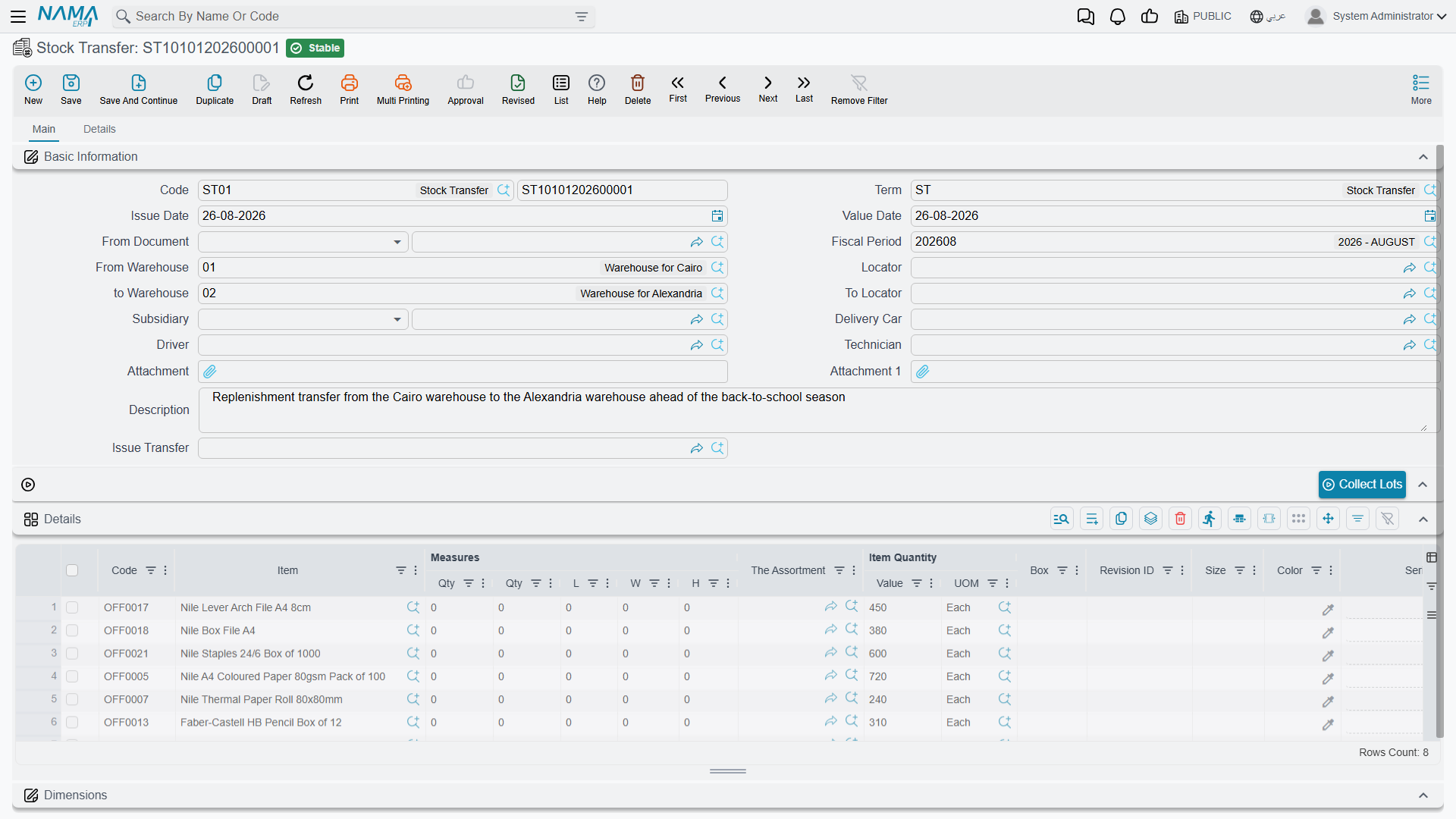
A stock transfer can also move stock from one company of the group to another. What makes it an inter-company transfer is its document term: set the term's Transfer Type to Global (Normal). On the transfer, the From group of the Details tab names the sending company and the To group names the receiving one.
Processing then creates an entry in each company. The sender takes the stock off its books against the receiving company's Mediator account. The receiver puts it on its books against the sender's mediator account. Each company's mediator account comes from its Legal Entity record. The stock moves at its cost.
This route is for companies that keep their books in the same currency. A Saudi company cannot take Egyptian stock at its pound cost as if pounds were riyals, so a transfer between companies whose ledgers use different currencies is refused. Between such companies, sell from one with a sales invoice and buy into the other with a purchase invoice, on intercompany accounts. Each side is then recorded in its own currency, and the consolidated statements eliminate the sale and the margin on stock still held.
Actions on these screens
On the Stock Transfer, and on both halves of the two-step transfer (the issue side and the receipt side): Collect Lots — fills the batch on every detail line from what the header warehouse and locator hold, following the document's term. It asks first whether to clear the batches already entered.
On the Stock Transfer Request:
- Add Stock Transfer Req — asks you to pick another transfer request and appends its unsatisfied lines to this one, skipping anything already fulfilled. It needs the from-warehouse, the to-warehouse and the term to be filled in first, and it does nothing if any of them is missing.
- Collect Requests — the bulk version of the same idea, gathering the open requests rather than adding them one at a time.
Tips for Accurate Transfer Tracking
Best Practices
Transfer only for real movements: Create transfers only when items physically move, not "virtual" transfers for reporting purposes.
Consolidate transfers wisely: If you move 100 items in one batch, one document for quantity 100 is cleaner than 100 documents. But if they move at different times, create separate transfers.
Track transit time: In two-step transfers, minimize the time between issue and receipt. Long transit periods signal lost items or a process that needs improvement.
Handle discrepancies immediately: When you receive less than was shipped, document the difference and investigate rather than ignoring it.
Frequently Asked Questions
Q: Can we transfer items between different companies?
A: Yes, between companies that use the same currency, with a stock transfer whose term's Transfer Type is Global (Normal) (see Transfers between companies). Between companies with different currencies, use an intercompany sales invoice and purchase invoice.
Q: What happens to reservations when transferring reserved items?
A: Reservations usually travel with the items - if you transfer reserved stock to another warehouse, it stays reserved for the same purpose at the new location.
Q: Do we use the two-step or one-step transfer?
A: Use one-step for transfers within a single location or between nearby locations with negligible transit time. Use two-step when transit time is significant, different people handle shipping vs. receiving, or you need to track inventory in transit.
Messages you may see
These messages have no Arabic text in the product except the last one, so the others appear in English on Arabic screens too.
| Message | Why | What to do |
|---|---|---|
| From legal entity {0} can not be same as to legal entity because this is inter-company transfer | The term makes this an inter-company transfer, but the From and To groups name the same company. | Set the receiving company in the To group, or use a term for transfers within one company. |
| Mediator account in legal entity {0} is empty | One of the two companies has no mediator account on its Legal Entity record. | Fill the company's Mediator account. |
| Stock can move between legal entities {0} and {1} only when they use the same currency. Use an intercompany sales invoice and purchase invoice instead — «لا يمكن نقل المخزون بين الشركتين {0} و{1} إلا إذا كانتا تستخدمان نفس العملة. استخدم فاتورة مبيعات وفاتورة مشتريات بين الشركتين بدلا من ذلك» | The two companies' ledgers keep different main currencies. | Sell from one company and buy into the other. |
Next Steps
- Stock Taking - verifying that book and physical balances match
- Inventory Costing & Revaluation - adjusting values without moving quantities
- The Sales Journey - how sold items leave the organization