
Issuing Stock
What goes in must come out! While receiving stock is about bringing items into your warehouse, issuing is about releasing them for use. Let's explore when, why, and how items leave your inventory.
The Stock Issue: Your Inventory's Exit Point
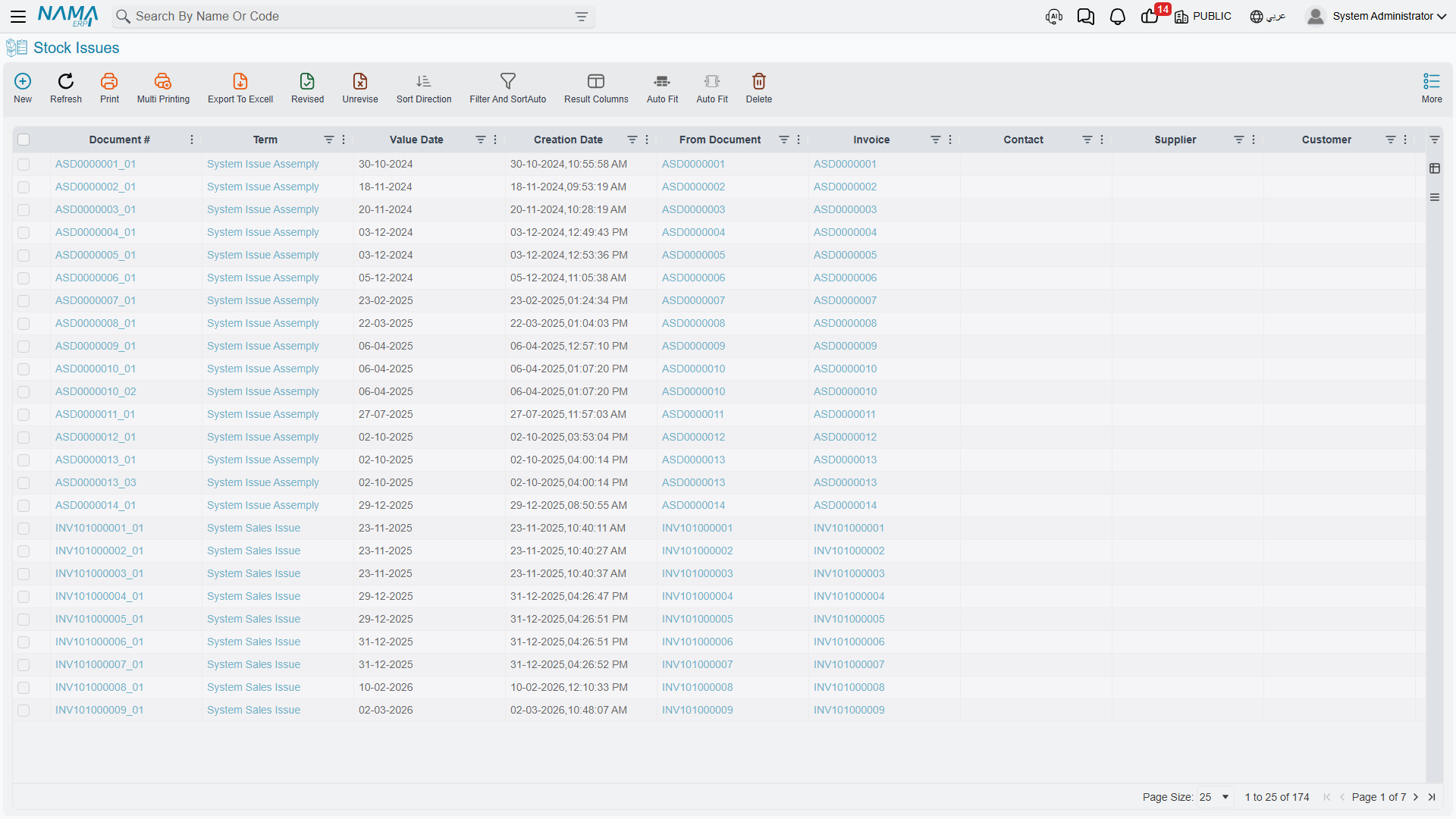
The Stock Issue (StockIssue) is the official record proving that items left the warehouse at a specific time for a specific purpose. Just like receipt documents, different scenarios call for different handling.
The General Stock Issue: Your Primary Tool
The stock issue document is your multipurpose tool for taking items out of inventory for any reason other than a direct sale (which has its own path in The Sales Journey).
Common Scenarios
Internal department use The IT department needs 10 laptops for a new project. Create a stock issue to move them from "available" into the department's custody, reduce available stock (so you don't accidentally sell them), and know their location later.
Samples and demos The sales team needs samples for a trade show. Issue them with notes about the purpose, to track what's been distributed vs. available for sale, and book their cost as a marketing expense.
Shortages, losses, and damage During stock taking you discovered a shortage of 5 pieces, or some goods were damaged in storage. The system has no standalone "damage voucher"; the correct way to record any incidental loss or damage is a stock issue directed to an appropriate loss account. This formally removes the items from tracked inventory and records the loss in accounting, with the reason documented.
Natural loss and periodic differences
If the shortage results from natural loss or periodic differences discovered during counting (not a specific damage event), it's better settled through Stock Taking, not a manual issue.
Donations You donate old equipment to a charity. Issue the items with proper documentation for tax purposes, recording the fair value and the recipient's information.
How It Works
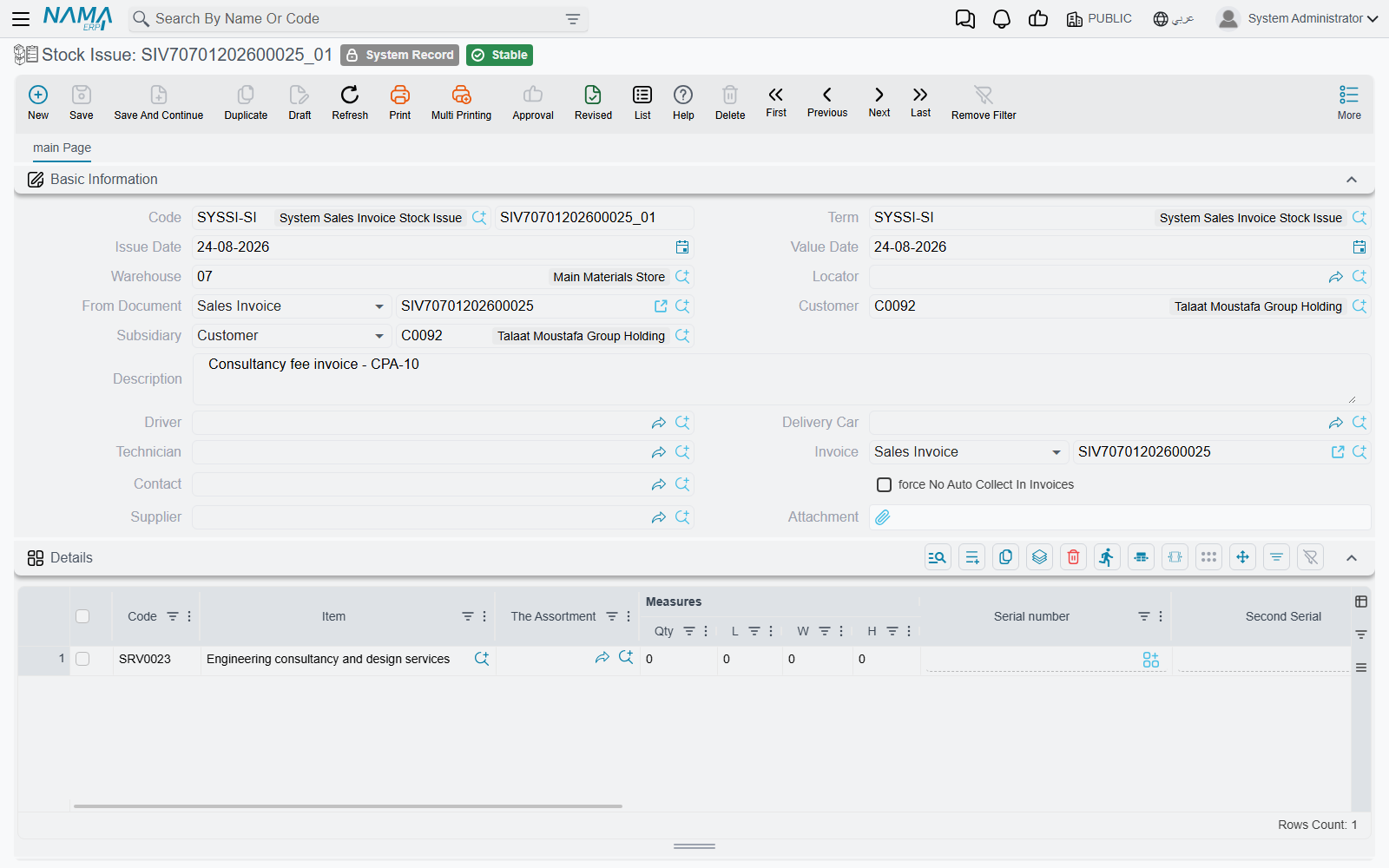
Every issue document needs:
- Source location: Where are the items taken from? Which warehouse and specific locator?
- Items and quantities: What's leaving and how much? With the unit of measure specified.
- Purpose / destination: Where is it going? A department? A project? A loss account?
- Costing method: Usually automatic, based on the adopted costing method.
The system then reduces the inventory quantity at the source location, decreases inventory asset value, creates accounting entries (crediting inventory, debiting the expense or target account), records the specific serials or batches issued, and updates available quantities.
The Request-First Approach: Stock Issue Request (StockIssueReq)
In many organizations, items aren't issued at random - someone requests them first. The Stock Issue Request is a request for items that must be reviewed and approved before the actual issue.
Workflow:
- Request: The department creates an issue request: "we need 100 kg of material, 50 pieces for work order #12345."
- Review: The warehouse supervisor checks availability, the request's validity, and the reasonableness of quantities.
- Approval: After approval, the request is authorized.
- Execution: The warehouse creates the actual issue document linked to the request.
Why the extra step? Because it gives you control (no one takes items without a request and approval), planning (preparing items in advance), visibility (management sees consumption before it happens), and a clear audit trail. This is critical for high-value items, controlled materials, and budget-restricted items.
Issuing to production and specialized departments
Issuing raw materials to production orders has its documents in the Manufacturing and Manufacturing Components (MC) modules; issuing supplies to patient wards is in Hospital Management; and issuing site materials is in Contracting. Each of these tracks its cost its own way, so see each module's documentation for those paths. The general stock issue here remains your tool for non-specialized purposes.
Cutting Two-Dimensional Materials (ItemCuttingDoc)
The Item Cutting Document handles a special case for two-dimensional items (such as steel, glass, and wood sheets): when you don't just issue the material, but transform it into smaller pieces of specific dimensions.
Example: You have a steel sheet measuring 2×3 meters. You cut it into several pieces of various dimensions per the manufacturing need. This document issues the full sheet, receives the resulting pieces with their dimensions, and tracks the waste (the difference between the sheet's area and the sum of the pieces' areas). It's an issue and a receipt at once - a transformation document for two-dimensional items.
Not for weight loss
The cutting document is for the geometric transformation of two-dimensional items, not for handling weight loss or natural shrinkage (such as meat losing weight); that's handled through Stock Taking.
Batch Selection: Which Items Are Issued?
When you have several batches of the same item, which one is issued? When the user enters an item on an issue line, the system lists the lots and other properties that have stock, each with its available quantity, and the user picks one. The order of that list is the stock-rotation policy. It is set once, on the Qty Suggestion tab of supply chain configuration, by three keys: First, Second and Third Suggestion Order. Each key is set to Expiry Date, First Receipt Date or Search Property, and each can be ascending or descending.
- The default order is Expiry Date, then First Receipt Date, then Search Property, all ascending. This is FEFO (First Expiry First Out): the lot nearest to expiry is offered first.
- To get FIFO (First In First Out), put First Receipt Date first.
- To offer the newest stock first, set First Receipt Date to descending.
- To sort one property differently, such as lots, give it its own line in the per-property table on the same tab.
The fields, defaults and the per-property table are documented in Quantity Suggestion Configuration.
Serial Number Management
For serialized items, issuing requires specifying exactly which serials are leaving. The system displays available serials at the source location, the user selects (or scans) which to issue, the system verifies availability, and on save those serials move from "available" to "issued." Future tracing stays possible: "where is serial #12345?" shows it was issued on such a date to such a destination. This is essential for warranty tracking, recall management, and asset management.
The Accounting Effect of Issuing
Every issue has accounting consequences that depend on the purpose:
- Issue to a department (internal use): credit inventory / debit department expense
- Issue for samples (marketing): credit inventory / debit marketing expense
- Issue for losses/damage: credit inventory / debit loss account
- Issue for repair (returned later): credit inventory / debit inventory-under-repair (still an asset!)
The system creates these entries automatically based on the accounting setup you configured for the item and the issue's purpose.
Correcting Issue Errors
What if you issued too much? Too little? The wrong item?
- Return via receipt: if items are returned, create a receipt to bring them back into available stock.
- Adjustment issue: if you issued too little, create an additional issue for the remaining quantity.
- Cancel and re-issue: clearer audit trail but the most effort.
Choose based on your organization's controls, the time elapsed, and whether downstream operations (like production costing) have already used the issue data.
Actions on this screen
The Stock Issue carries one screen action of its own: Collect Lots. It fills the batch on every detail line from what the header warehouse and locator actually hold, following the document's term, instead of picking a batch line by line. It asks first whether to clear the batches already entered — answer no and it only fills the blanks.
Tips for Accurate Issuing
Best Practices
Verify before saving: Review quantities and items before saving (not as a draft). Once saved, the document affects the system immediately.
Use locators precisely: Issue from the actual location where the items reside, not from the warehouse in general.
Link to source documents: Always link the issue to its purpose. This traceability is essential when investigating discrepancies.
Don't delay recording issues: Record them as soon as they happen. Real-time inventory accuracy requires real-time recording.
Handle partial issues: If only part of the request is available, issue what you have and record the shortage rather than waiting.
Frequently Asked Questions
Q: Can we issue items not in stock (go negative)?
A: It depends on the item's overdraft policy; some critical items prevent negative stock, while others warn but allow. See Understanding Inventory Items.
Q: What's the difference between an issue and a transfer?
A: An issue reduces total inventory (items left the organization's control). A transfer moves items between locations while the total stays the same. Moving from one warehouse to another is a transfer, covered in Moving Stock.
Q: How do we record damaged goods without a "damage voucher"?
A: Use a stock issue directed to a loss account. This is the system's adopted way to record incidental damage, with the reason documented in the notes.
Messages you may see
| Message | Why | What to do |
|---|---|---|
| Can not save stock document {0} because the document cost effects are frozen by the record {1} — «لا يمكن تعديل السند {0} بسبب السجل {1}» | A Freeze Of Cost Effects On Accounts record covers the document's company and a date range that contains its value date, and that record is set to prevent saving frozen documents. Moving a document into the frozen range or out of it both count. | Use a value date outside the frozen range, or ask whoever owns the freeze to narrow it or to allow saving. |
| The document {0} supplier is {1}, while the invoice supplier is {2} — «المورد بالمستند {0} هو {1} بينما المورد بالفاتورة هو {2}» | The issue names a supplier, and the purchase return it was generated from names a different one. | Make the two agree, or clear the supplier on the issue. |
| The document {0} customer is {1}, while the invoice customer is {2} — «العميل بالمستند {0} هو {1} بينما العميل بالفاتورة هو {2}» | The issue names a customer, and the sales invoice it was generated from names a different one. | Make the two agree, or clear the customer on the issue. |
| The system document {0} is not linked to its invoice {1} — «المستند الآلي {0} غير مرتبط بفاتورته {1}» | A stock issue (or stock receipt) that an invoice generated as its system document has lost its link back to that invoice, so its stock effect would no longer belong to any invoice. It is refused when it is processed. | Save the invoice named in the message again so it brings its stock document back in line; if the message repeats, have support check the pair. |
| Item {0} measures type must be single dimension or two dimensions — «الصنف {0} يجب أن يكون أحادي أو ثنائي الأبعاد» | A cutting document line names an item whose measures type is neither single dimension nor two dimensions — cutting only makes sense for material measured by length, or by length and width. | Remove the line, or fix the item's measures type on its file. |
| Required length and required width must be bigger than zero — «الطول و العرض المطلوبين يجب أن يكون أكبر من صفر» | The line's item is two-dimensional and one of the required length or required width is empty or zero. | Enter both required measures on the line. |
| Required length must be bigger than zero — «الطول المطلوب يجب أن يكون أكبر من صفر» | The line's item is measured by length only, and the required length is empty or zero. | Enter the length you want cut. |
| Required length {0} is greater than issue length for item {1} — «الطول المطلوب {0} أكبر من الطول المصروف للصنف {1}» | You are asking for a cut piece longer than the piece being issued. The message gives the length you asked for. | Reduce the required length, or issue a longer piece. |
| Required width {0} is greater than issue width for item {1} — «العرض المطلوب {0} أكبر من العرض المصروف للصنف {1}» | The same check on the width, for a two-dimensional item. | Reduce the required width, or issue a wider piece. |
| The Length must be greater than zero — «الطول يجب أن يكون أكبر من الصفر» | The item is measured by length only and the line's length is still empty or zero — the same gap as above, reported by the second of the two checks the screen runs. | Fill the length on the line. |
Next Steps
Now that you understand receiving and issuing together, learn about:
- Moving Stock Between Warehouses - transfers and consolidations
- Stock Taking - reconciling differences and natural loss
- The Sales Journey - how sold items leave (leading to issues)