
Numbering POS Documents
Registers work offline, so they cannot ask the server for the next invoice number the way a screen in the ERP does. Each register numbers its own documents, and the numbers are built so that two registers can never produce the same code. This page explains how a code is put together and which settings change it — the prefix, the number of digits, a date part, and where a sequence starts.
How a code is built
Every code a register produces is made of up to five parts, in this order:
| Part | Where it comes from | Example |
|---|---|---|
| 1. Prefix | The Prefix column of the register's coding grid (see below), if filled | BR1- |
| 2. Document-type prefix | Fixed per document type — 1 for a sales invoice, 2 for a return, and so on (table below) | 1 |
| 3. Register code | The register's own Code | R01 |
| 4. Date part | A date pattern such as yyMMdd, if one is set | 261010 |
| 5. Serial | A running number, left-padded with zeros to a fixed length (8 digits unless you change it) | 00000001 |
With no settings at all, register R01's first sales invoice is 1R0100000001 and its first return is 2R0100000001. Add the date part yyMMdd and the invoice issued on 10 October 2026 becomes 1R0126101000000001.
The serial counts per document type and per prefix. Because the date part is part of the prefix, a register that uses one starts again from 00000001 every day — the date keeps the codes unique.
The document-type prefixes are:
| Document | Prefix |
|---|---|
| POS Sales Invoice | 1 |
| POS Sales Return | 2 |
| POS Sales Replacement | 3 |
| POS Credit Note | 4 |
| POS Internal Message | 5 |
| POS Stock Transfer Request | 6 |
| POS Payment | 7 |
| POS Receipt | 8 |
| Point of Sale StockTaking Details Document | 9 |
| POS Order Reservation | r |
| POS Cancel Reservation | c |
| POS Stock Receipt | rcpt |
| Scrap Document | sc |
| Shortfalls Document | sf |
Shift codes and cash-count codes have no document-type prefix and never take a date part — they are the register code followed by the serial. A shift's closing carries the same Shift Code as its opening.
Where the settings live
Three places control numbering, from the broadest to the most specific.
POS Settings (Point of sale → Settings → POS Settings) holds the company-wide defaults:
- Pos Code Suffix Length (طول لاحقة كود مستندات نقاط البيع) — how many digits the serial has. Empty means 8.
- POS Code Date Part Format (نمط جزء التاريخ الخاص بكود نقطة البيع) — the date pattern for every register that does not set its own.
The register (Point of sale → Register → Register) can set its own POS Code Date Part Format in its header; when filled, it replaces the one in POS Settings for that register.
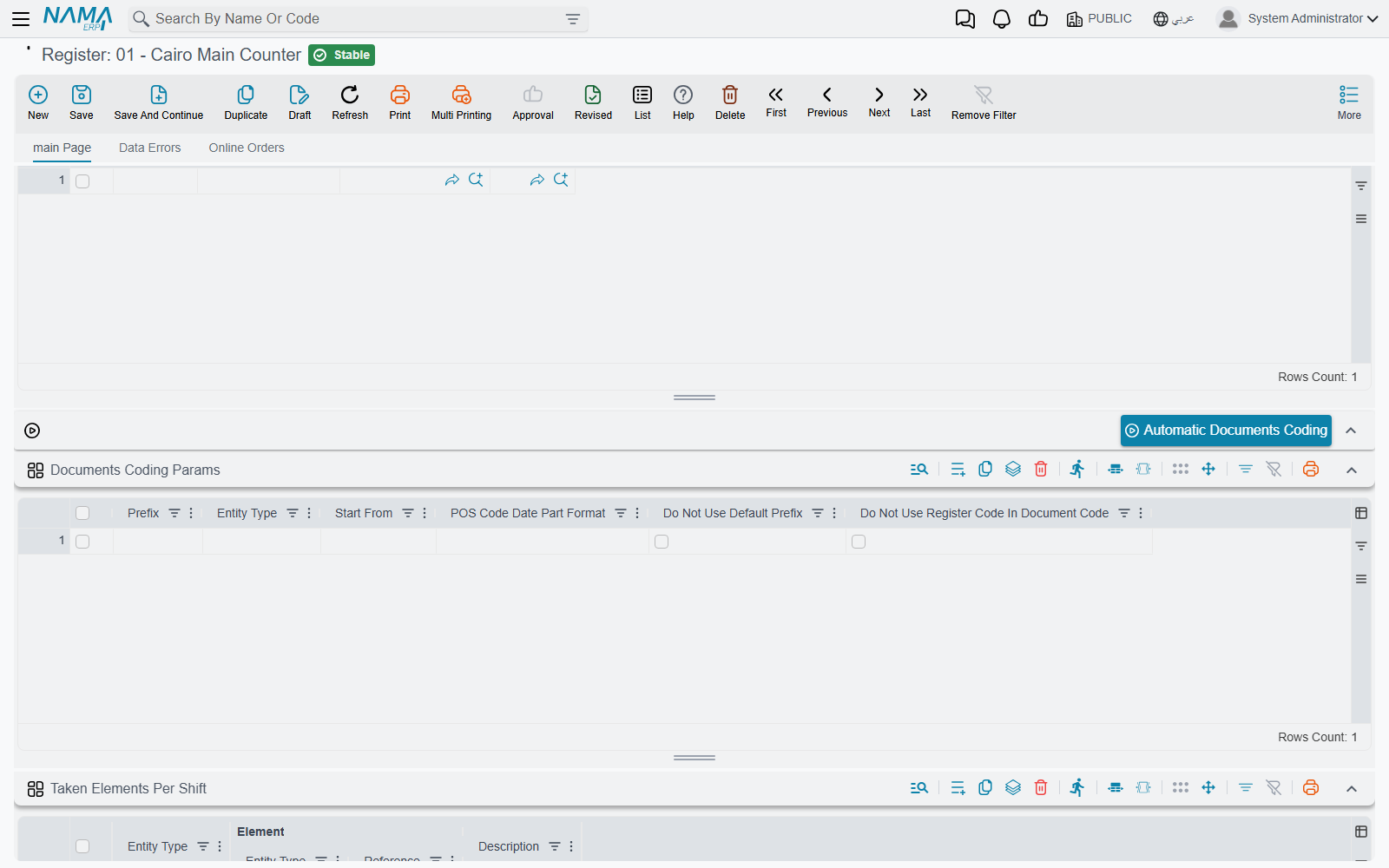
The register's coding grid, Documents Coding Params (تكويد مستندات نقاط البيع), fine-tunes one document type at a time. Each line has:
| Column | Arabic on screen | What it does |
|---|---|---|
| Entity Type | النوع | The document the line applies to. Each type can appear only once. |
| Prefix | بادئة التكويد | Text added at the very start of the code. |
| Start From | يبدأ | The lowest serial the next document may take (see below). |
| POS Code Date Part Format | نمط جزء التاريخ الخاص بكود نقطة البيع | A date pattern for this type only; it beats the register's and the settings' pattern. |
| Do Not Use Default Prefix | عدم استخدام بادئة التكويد الافتراضية | Drops the document-type prefix (1, 2, …). |
| Do Not Use Register Code In Document Code | عدم استخدام كود الماكينة في التكويد | Drops the register code. |
The date-part fields offer two ready patterns, yyyyMMdd and yyMMdd; any standard date pattern works.
The grid accepts these document types: sales invoice, return, replacement, credit note, internal message, stock transfer request, payment, receipt, stock-taking details, shift opening, cash drawer, order reservation, cancel reservation and stock receipt. Scrap and shortfalls documents always use the default scheme.
Drop a part only when the rest keeps codes unique
The register code is what keeps two registers' codes apart. Ticking Do Not Use Register Code In Document Code on two registers that share the same prefix lets both of them issue 1…00000001. Remove the register code only when the Prefix you give each register already tells them apart.
Where a sequence starts
When a register needs a new code it takes the highest of three numbers and adds one:
- the highest serial it already has locally for that type and prefix;
- Start From minus one, from the coding grid;
- the highest serial the server already holds for that register, type and prefix — fetched in the background each time the register starts.
So Start From is a floor, not a reset: it can push numbering forward (for example, to begin at 5001 after migrating from an older system) but it can never take numbering back below a code that already exists. The server check is what keeps a freshly reinstalled register — whose local database is empty — from reissuing codes it already sent.
Changing the prefix, the date part or the number of digits starts a new sequence, because the register only continues codes that have exactly the same prefix and length.
Filling the grid automatically
The Automatic Documents Coding button (تكويد مستندات نقاط البيع آليا) above the grid asks for a prefix, looks up the last code the server holds for each document type of this register, and adds one grid line per type with Start From set to the next serial. Lines that already had the same prefix are replaced. Use it after reinstalling a register, or before giving it a new prefix, then save the register so the machine receives the new lines with its next sync.
A worked example
A chain wants each branch's invoices to read BR1-…, BR2-… and so on, with the date, and wants branch 1 to continue from invoice 5,000 of its old system.
- On POS Settings, set Pos Code Suffix Length to
6. - On branch 1's register (code
R01), add a grid line: Entity Type = POS Sales Invoice, Prefix =BR1-, POS Code Date Part Format =yyMMdd, Start From =5001. - Save the register. Once the machine has synced, its next invoice is
BR1-1R01261010005001.
Because the date part makes every day a new sequence, and Start From is the floor of every sequence, the next day's first invoice is BR1-1R01261011005001: each day starts again at 5001. If the chain wants one unbroken running number instead, it should leave the date part empty — then the invoice after BR1-1R01005001 is BR1-1R01005002, day after day.
Messages you may see
| Message | Why | What to do |
|---|---|---|
| Repeated entity type — «نوع مكرر» | The register's Documents Coding Params grid has two lines for the same document type. | Keep one line per type. |