
POS Security Profiles
What a cashier may do at the register — change a price, give a discount, return without an invoice, close someone else's shift — is not controlled by the ERP's ordinary roles and capabilities. It is controlled by a POS Security Profile (صلاحيات نقاط البيع): one record per kind of user ("Cashier", "Shift Supervisor", "Branch Manager"), each a long list of yes/no permissions. The register reads the profile of whoever signs in and enables or refuses each action accordingly.
Giving a user a profile
A profile does nothing until users are attached to it:
- Create the profile under Point of sale → Settings → POS Security Profile and tick what that kind of user may do.
- Open each User and set its POS Security Profile field.
- The profile's Users tab lists every user that currently points at it — the quickest way to check who a change will affect.
Profiles and users reach the register through the normal data sync, like any other master data (see How POS Data Syncs with the Server). A user with no profile can sign in but is refused every action that needs a permission.
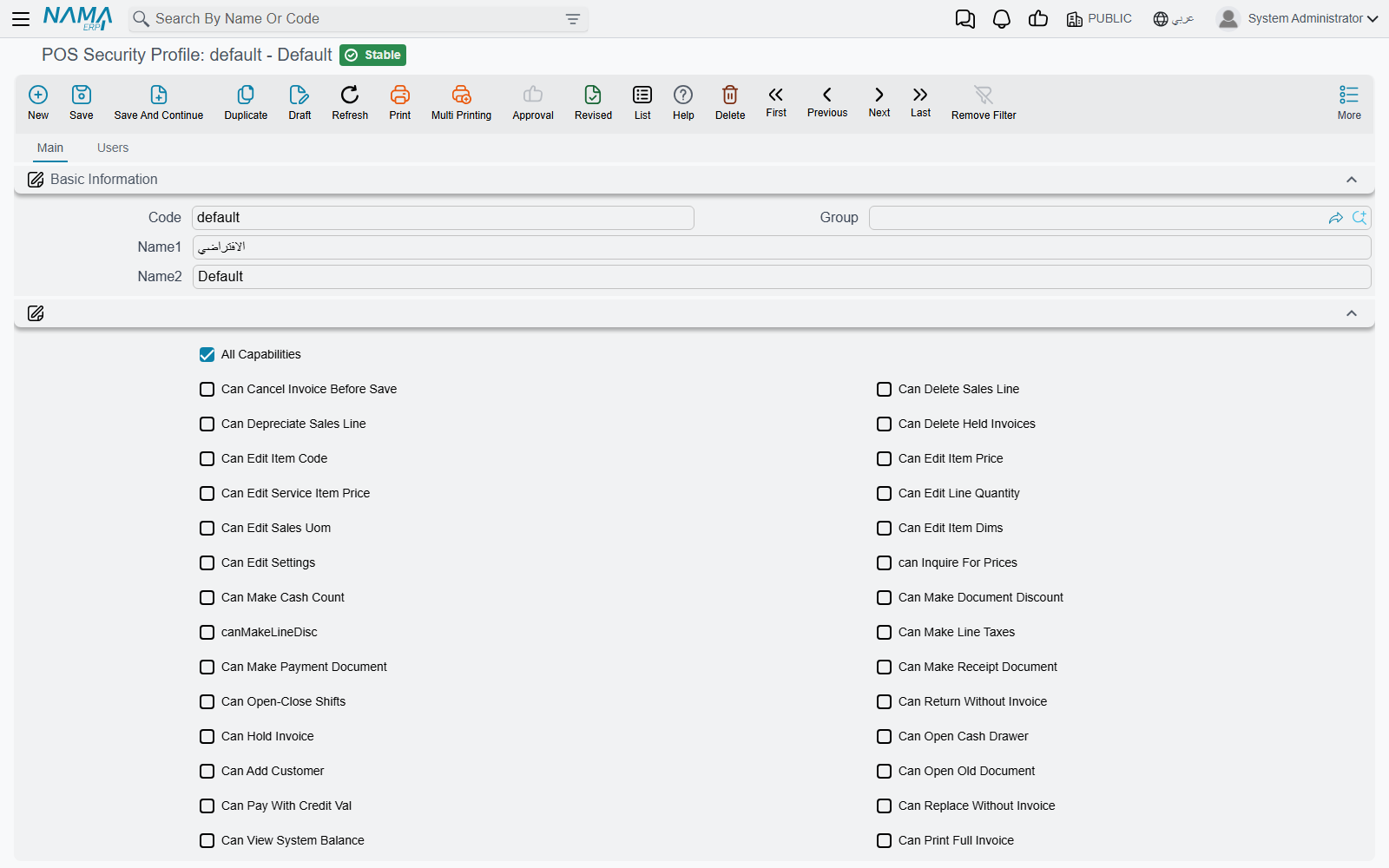
Two ways to grant a permission
The main tab has two places that grant permissions, and the register accepts either:
- The checkboxes in the header — one per common permission.
- The Capabilities grid (الصلاحيات) — each line picks one permission from a list. The list contains every checkbox permission and about twenty more that have no checkbox (they are marked "grid only" below). A permission is granted if its checkbox is ticked or it has a line in the grid.
All Capabilities (كل الصلاحيات) at the top grants everything at once. It is meant for managers and support users.
Restrictions and "All Capabilities"
Some options restrict rather than grant — Prevent View Notifications, Deactivate Shortcuts, Show Current Shift Invoices Only and similar. Ticking All Capabilities on the same profile cancels those header restrictions. The grid-only restrictions (Prevent Payment, Prevent Opening Old Invoices, Prevent Opening Old Returns, Read Item Code Using Scanner Only, Read Sales Invoice Code In Returns Using Scanner Only) are the exception: they apply even to a profile with All Capabilities.
Asking a supervisor instead of refusing
By default, a cashier who tries something their profile does not allow is simply refused with This user has not this capability — «ليست لديك هذة الصلاحية», followed by the name of the missing permission.
On POS Settings (Point of sale → Settings → POS Settings), the grid Request Authorization From Another User When User Does Not Have Capability (طلب تفويض من مستخدم آخر عند عدم وجود الصلاحيات التالية) turns chosen refusals into a supervisor override. For every permission listed there, the register opens a sign-in box instead of refusing; a supervisor whose own profile has the permission types their user name and password, and the action goes ahead. The register records which supervisor authorised which action on which document.
A typical setup gives cashiers no discount permission, and lists Can Make Document Discount in that grid, so every invoice discount needs a supervisor's password at the counter.
The permissions
The tables group the permissions by what they control. The Arabic column is the label exactly as it appears on the Arabic screen.
Selling and the sales lines
| Permission | Arabic on screen | What it allows |
|---|---|---|
| Can Edit Item Code | إمكانية تعديل كود الصنف | Changing the item on a line already entered. |
| Can Delete Sales Line | إمكانية حذف سطر المبيعات | Removing a line from the invoice. |
| Can Depreciate Sales Line | إمكانية تحويل سطر إلى هالك | Marking a line as depreciated (damaged goods). |
| Can Edit Item Price | إمكانية تعديل سعر الصنف | Typing a different unit price. |
| Can Edit Service Item Price | إمكانية تعديل سعر صنف الخدمة | Changing the price of a service item, such as the service charge. |
| Can Edit Delivery Cost (grid only) | إمكانية تعديل تكلفة خدمة التوصيل | Changing the delivery charge. |
| Can Edit Line Quantity | إمكانية تعديل الكمية على سطر المبيعات | Changing a line's quantity. |
| Can Edit Sales Uom | إمكانية تعديل وحدة المبيعات | Selling in a different unit of measure. |
| Can Edit Item Dims | إمكانية تعديل محددات الصنف | Changing the item's size, colour and similar properties on the line. |
| Make Line Discount 1 … 8 (grid; discount 1 also has a checkbox) | إمكانية إعطاء تخفيض 1 على السطر … 8 | Entering line discount 1 to 8. Each discount column is controlled separately. |
| Can Make Document Discount | إمكانية إعطاء تخفيض كلي على الفاتورة | Entering an invoice-level discount. |
| Can Make Line Taxes | إمكانية إعطاء ضريبة على السطر | Editing the taxes on a line. |
| Can Cancel Taxes | إمكانية إلغاء الضرائب | Removing taxes from the invoice. |
| Can Give Free Items | إمكانية أعطاء أصناف مجانية | Adding items free of charge. |
| Can Edit Invoice Classification | إمكانية تعديل تصنيف الفاتورة | Changing the invoice classification (dine-in, take-away, delivery…). |
| Can Edit Sales Man | إمكانية تعديل مندوب المبيعات | Choosing the salesman on a new invoice. |
| Allow Salesman Update | السماح بتعديل المندوب في الفاتورة التي تم صدورها بالفعل | Changing the salesman on an invoice that was already saved. |
| Allow Hide Offers Dialog | السماح بإخفاء Dialog العروض | Closing the offers window without choosing. |
| Can Make Negative Duplicate (grid only) | إمكانية تكرار أخر سطر بكمية سالبة | Pressing the minus key to repeat the last line with a negative quantity. |
| Read Item Code Using Scanner Only (grid only, restriction) | قراءة كود الصنف من خلال قارئ الباركود فقط | The cashier can add items only by scanning, not by typing a code. |
The invoice as a whole
| Permission | Arabic on screen | What it allows |
|---|---|---|
| Can Cancel Invoice Before Save | إمكانية إلغاء فاتورة قبل الحفظ | Abandoning an invoice in progress. |
| Can Hold Invoice | إمكانية تعليق فاتورة | Holding (parking) an invoice to recall later. |
| Can Delete Held Invoices | إمكانية حذف الفواتير المعلقة | Deleting a held invoice. |
| Can Print Held Invoice | إمكانية طباعة فاتورة معلقة | Printing an invoice that is still held. |
| Can Open Old Document | إمكانية فتح مستند قديم | Opening an already-saved document. |
| Prevent Opening Old Invoices (grid only, restriction) | منع عرض فواتير نقاط البيع القديمة | Blocks opening saved invoices. |
| Prevent Opening Old Returns (grid only, restriction) | منع عرض مردودات نقاط البيع القديمة | Blocks opening saved returns. |
| Show Current Shift Invoices Only (restriction) | عرض فواتير الوردية الحالية فقط | Searches for old invoices list only the current shift's. |
| Can Print Full Invoice | إمكانية طباعة الفاتورة الكامله | Printing the full (A4) invoice form. |
| Can RePrint Documents | إمكانية إعادة طباعة المستندات | Reprinting a saved document. |
| Can Prevent Printing Invoices (grid only) | إمكانية منع طباعة الفواتير | Ticking "do not print" in the payment window. |
Payment and the cash drawer
| Permission | Arabic on screen | What it allows |
|---|---|---|
| Can Pay With Credit Val | إمكانية الدفع آجل | Leaving part of the invoice on the customer's account. |
| Can Delay Invoice Payment | إمكانية تأجيل دفع الفاتوره | Saving an invoice now and taking payment later. |
| Can Show Payments Details | إمكانية الإطلاع على تفاصيل الدفع في المبيعات | Seeing the payment breakdown of a sale. |
| Prevent Using Critical Methods (restriction) | منع استعمال طرق الدفع الحرجه بنقاط البيع | Payment methods marked Critical Pos Payment Method on the Payment Method screen cannot be chosen. |
| Prevent Fraction Discount (restriction) | منع خصم الكسر | Blocks the small "round-off" discount (capped by Max Fraction Discount Value on the register or POS Settings). |
| Can Not Modify Credit Note Value In Payment (grid only, restriction) | منع تعديل قيمة إشعار الدائن في الدفع | Locks the amount of a credit note used as payment. A supervisor can unlock it from the button next to the field (Alt+F2). Note that All Capabilities also switches this lock on. |
| Prevent Payment (grid only, restriction) | منع إمكانية الدفع | The user cannot take payment at all — useful for an order-taking user who passes invoices to a cashier. |
| Can Open Cash Drawer | إمكانية فتح - غلق الدرج | The open-drawer button on the register's toolbar. |
Customers
| Permission | Arabic on screen | What it allows |
|---|---|---|
| Can Add Customer | إمكانية إضافة عميل | Creating a new customer at the register. |
| Can Edit Customer | إمكانية تعديل العميل | Editing an existing customer. |
| Can Search On Customers | إمكانية البحث عن عميل | Searching the customer list. Ticked by default on a new profile. |
Returns and replacements
| Permission | Arabic on screen | What it allows |
|---|---|---|
| Can Make Return | إمكانية عمل مردود مبيعات | Making a sales return. |
| Can Make Replacement | إمكانية عمل إستبدال مبيعات | Making a replacement (exchange). |
| Can Return Without Invoice | إمكانية عمل مردود بدون فاتورة | A return that does not refer to an original invoice. |
| Can Replace Without Invoice | يمكن الإستبدال بدون أصل الفاتورة | A replacement that does not refer to an original invoice. |
| Can Search On Invoice In Return And Replacement | إمكانية البحث في كود الفاتورة في المردود والاستبدال | Searching for the original invoice from a return or replacement. |
| Can Search By Invoice Code Part in return and replacement | إمكانية البحث بجزء من كود الفاتورة في المردود و الاستبدال | Finding the original invoice by typing only part of its code. |
| Can Select Sales Invoice In Returns (grid only) | إمكانية اختيار فاتورة المبيعات في المردود | Picking the original invoice in a return. |
| Read Sales Invoice Code In Returns Using Scanner Only (grid only, restriction) | قراءة كود فاتورة المبيعات في المردود من خلال قارئ الباركود فقط | The original invoice must be scanned from its receipt, not typed. |
| Can Display Lines When Selecting Invoice In Sales Return (grid only) | إمكانية عرض السطور عند اختيار الفاتورة في مردود المبيعات | Seeing the invoice's lines when choosing it in a return. |
| Allow Return After Allowed Period (grid only) | إمكانية عمل مردود بعد تجاوز مدة المردود المسموح بها | Returning an invoice older than the register's Return Invoices With In (In days). |
| Can Edit Return Unit Price | يمكن تعديل سعر الوحده في المردود | Changing the refunded unit price. |
| Can Edit Return Discount or Tax | يمكن تعديل التخفيض أو الضريبة في المردود | Changing discounts or taxes on a return. |
| Can Remove Sales Return Free Items | إمكانية حذف أصناف مجانية من مردود المبيعات موجودة في الفاتورة الأصلية | Leaving out free items of the original invoice when returning. |
| Can Return In Other User Shift | إمكانية عمل مردود بوردية مستخدم اخر | Saving a return in a shift another user opened. |
| Can Replace In Other User Shift | إمكانية عمل استبدال بوردية مستخدم اخر | Saving a replacement in a shift another user opened. |
Shifts and cash documents
| Permission | Arabic on screen | What it allows |
|---|---|---|
| Can Open-Close Shifts | إمكانية فتح - غلق وردية | Opening and closing shifts. |
| Can Open Shift (grid only) | إمكانية فتح وردية | Opening a shift only — for a user who should not close. |
| Can Close Shift (grid only) | إمكانية غلق وردية | Closing a shift only. |
| Can Close Another User Shift | إمكانية غلق وردية مستخدم آخر | Closing a shift someone else opened. |
| Can Use Another User Shift | إمكانية استخدام وردية مستخدم أخر | Selling in a shift someone else opened (see shift settings). |
| Can View System Balance | يمكن مراجعه الرصيد الدفتري | Seeing what the system expects in the drawer while counting. Leave it off for a blind count. |
| Can Print Shift Closing Document (grid only) | إمكانية طباعة مستند غلق وردية | Printing the shift-closing slip. |
| Can Make Cash Count | إمكانية عمل جرد | A cash count in the middle of a shift. |
| Can Make Payment Document | إمكانية عمل سند مدفوعات | Paying money out of the drawer. |
| Can Make Receipt Document | إمكانية عمل سند مقبوضات | Receiving money into the drawer. |
| Show Current Shift Payments Only (restriction) | عرض مصروفات الوردية الحالية فقط | Searches for payments list only the current shift's. |
| Show Current Shift Receipts Only (restriction) | عرض مقبوضات الوردية الحالية فقط | Searches for receipts list only the current shift's. |
Stock at the register
| Permission | Arabic on screen | What it allows |
|---|---|---|
| Can Make Stock Transfer Request | إمكانية عمل طلب تحويل مخزني | Requesting stock from another warehouse. |
| Can Receipt From Stock Transfer | إمكانية عمل توريد مخزني من التحويل المخزني | Receiving stock against a transfer. |
| Can Receipt From Purchase Invoice | إمكانية عمل توريد مخزني من فاتورة المشتريات | Receiving stock against a purchase invoice. |
| Can Make Shortfalls Document | إمكانية عمل سند نواقص | Recording shortfalls. |
| Can Make Scrap Document | إمكانية عمل سند هوالك | Recording scrap. |
| can Inquire For Prices | إمكانية إستعلام عن سعر | Using the price checker. |
| Can Search On Item Code | إمكانية البحث في كود الصنف | Searching items by code. |
Screen and tools
| Permission | Arabic on screen | What it allows |
|---|---|---|
| Can Edit Settings | إمكانية تعديل الإعدادات | Opening the register's settings from the toolbar or the slide menu. |
| Can Show Data Transfer Errors | إمكانية الإطلاع على أخطاء نقل البيانات | Seeing documents that failed to sync. |
| Can Show Field Ids | إمكانية الأطلاع على معرف الحقول | Seeing the technical field names (used when designing screens). |
| Can Use Calculator | إمكانية استعمال الآلة الحاسبة | The on-screen calculator. |
| Can Use KeyBoard | إمكانية استعمال لوحة المفاتيح | The on-screen keyboard. |
| Can Enroll Fingerprints (grid only) | إمكانية تسجيل بصمة إصبع الموظفين | Enrolling users' fingerprints (see Fingerprint Login). |
| Prevent View Notifications (restriction) | عدم إمكانية الاطلاع على التنبيهات | Hides notifications. |
| Deactivate Shortcuts (restriction) | تعطيل الاختصارات | Keyboard shortcuts do nothing for this user. |
| Prevent Reorder Columns (restriction, Advanced group) | منع تغيير ترتيب اعمدة الجداول | The user cannot drag grid columns into a new order. |
| Prevent Resize Columns (restriction, Advanced group) | منع تغيير حجم اعمده الجداول | The user cannot resize grid columns. |
Force Minimum Price With Discounts
The Advanced group also holds Force Minimum Price With Discounts (الإلتزام بأدني سعر مع التخفيضات). It is not a permission but a check: for this user, a line's price after all its discounts may not fall below the minimum price of the price-list line it was priced from. It applies even to a profile with All Capabilities.
Messages you may see
| Message | Why | What to do |
|---|---|---|
| This user has not this capability — «ليست لديك هذة الصلاحية» | The signed-in user's profile lacks the permission named after the message. | Grant it on the profile, or list it under Request Authorization From Another User… so a supervisor can approve it. |
| User prevented from this action, please review security profile — «المتسخدم ممنوع من اتخاذ هذا الإجراء. يرجى مراجعة الصلاحيات» | The profile carries a grid-only restriction such as Prevent Opening Old Invoices. | Remove the restriction line if the user should be allowed. |
| You do not have permission to make payments — «ليس لديك صلاحية الدفع» | The profile has Prevent Payment. | Hand the invoice to a user who can take payment. |
| line {0} price after discounts {1} less than minimum price {2} — «السطر {0} السعر بعد التخفيضات {1} اقل من ادني سعر {2}» | Force Minimum Price With Discounts is on and the discounts take the line below the price list's minimum price. | Reduce the discount. |