
Stock Receipts for the Unsatisfied Part of a Purchase Order
Development Request: SRDRQ06178
The Problem
Picture a purchasing department that works against open purchase orders. An order goes out for 1,000 units, the supplier delivers 600, and the remaining 400 are still on their way. The buyer keeps invoicing and receiving against that order over days or weeks, and at any moment they want to know — and to have in stock — exactly what is still outstanding on each order.
Doing this by hand is tedious and error-prone. Someone has to look at each order, work out how much has already been received or invoiced, subtract it from what was ordered, and key a stock receipt for the difference. Then they have to redo that arithmetic every time another invoice lands, deleting and re-entering receipts so the warehouse always reflects the true remaining quantity.
This request automates that whole dance, and tidies up a few related rough edges in the purchase-order → receipt → invoice flow along the way. It is really a small family of options that work together:
- a purchase order can keep a stock receipt for its own unsatisfied quantity automatically in sync;
- when you build a document from an order, the order picker can hide orders that are already fully executed;
- a purchase invoice that generates receipts can date each receipt from the order it came from, and
- it can produce a separate receipt per originating order instead of lumping everything into one.
Keeping a Receipt in Step with the Order's Remaining Quantity
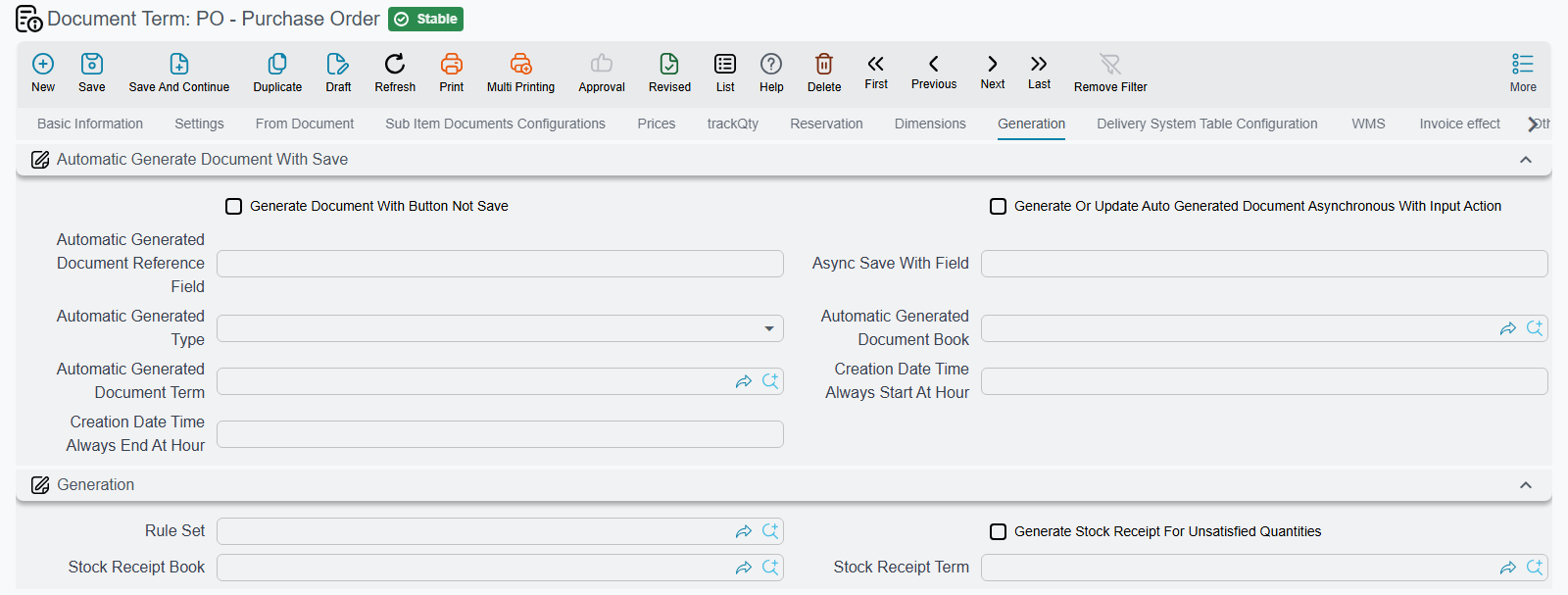
The centrepiece lives on the Purchase Order term. Turn on Generate Stock Receipt For Unsatisfied Quantities and the order takes responsibility for a stock receipt that always represents whatever it still has not received.
Here is how it behaves. The moment the order is applied, the system looks at each line's unsatisfied quantity — the part of the ordered amount that hasn't yet been satisfied by downstream receipts or invoices — and builds a single Stock Receipt covering exactly those remaining quantities. Each receipt line is copied from its order line and priced at the order's own unit price, so the receipt value matches the order.
From then on the receipt is treated as a living document, not a one-off:
- Every time the order changes (re-applied or updated), the receipt is rebuilt from the current unsatisfied quantities.
- Every time a purchase invoice against the order is committed or deleted, the order is asked to refresh its receipt — so as invoices chip away at the outstanding amount, the generated receipt shrinks to match.
- When nothing is left unsatisfied, the generated receipt is deleted automatically; there is no empty receipt lying around.
- When the order is cancelled, its generated receipt is removed.
In other words, you configure it once and the receipt looks after itself: it appears when there is an outstanding quantity, tracks that quantity down as the order gets fulfilled, and disappears when the order is done.
You Must Tell It Which Book and Term to Use
A generated document needs a home. Alongside the switch you'll find two companion fields — Stock Receipt Book and Stock Receipt Term — that decide the book and term of the receipt the order creates.
Book and term are required
If Generate Stock Receipt For Unsatisfied Quantities is on but the Stock Receipt Book or Stock Receipt Term is missing, the order cannot create the receipt and the operation fails with a clear message asking you to configure them. Set both before enabling the feature on a live order book.
All three of these fields live together on the Generation tab of the Purchase Order's Document Term.
Hiding Orders That Are Already Fully Executed
The second piece helps at data-entry time rather than at generation time. When you create a downstream document and reach for an order in the from document (بناءً على) or the line's origin document field, the default lookup shows every matching order — including ones that have already been fully received and have nothing left to give.
Switch on Show Only Orders With Unsatisfied Quantities In FromDoc on the document's term and that lookup tightens up: only orders that still carry an unsatisfied quantity are listed. Better still, when you trigger the lookup from a specific line, the system also narrows the results to orders that have an outstanding quantity for the item on that line, so the buyer sees only the orders that can actually fulfil what they're entering.
This is a general from-document control — it isn't tied to purchase orders alone — but it shines in the purchasing flow, where a long history of partly-executed orders would otherwise clutter the picker.
Dating and Splitting the Receipts a Purchase Invoice Generates
The last two options refine the stock receipts that a Purchase Invoice generates from its lines, and both sit on the invoice term's Generation tab.
Use From Document Value Date For Receipt changes which date the generated receipt carries. Normally a generated receipt simply inherits the invoice's own value date. With this on, the receipt instead takes the value date of the order the invoice was built from — useful when the goods were physically received on the order's date and you want the inventory movement to land on that day rather than on the invoice date.
Generate Receipt Document For Each Lines Origin Document changes how many receipts you get. By default, when an invoice generates stock receipts it groups its lines by warehouse — one receipt per warehouse. Turn this on and the grouping also considers each line's origin document (the order the line was copied from), so every originating order ends up with its own generated receipt. The result is a clean one-receipt-per-order trail: each generated receipt maps back to exactly one purchase order, which makes reconciliation and tracing far easier when a single invoice draws on several orders.
Why It's Safe for Everyone Else
Like all term-driven behaviour, none of this is active until you switch it on. Every one of these options is off by default, so existing purchase orders and invoices behave exactly as they always did. The auto-receipt only comes to life on orders whose term enables it (and only once a book and term are set); the from-document filter only narrows lookups where its switch is on; and the date and per-order-receipt options only take effect on invoice terms that ask for them. Leave them alone and nothing changes.
In Short
| Option | Where | What it does |
|---|---|---|
| Generate Stock Receipt For Unsatisfied Quantities | Purchase Order term → Generation | Keeps a stock receipt in sync with the order's outstanding quantity; rebuilds it as invoices satisfy the order and deletes it when nothing remains |
| Stock Receipt Book / Term | Purchase Order term → Generation | The book and term used for that generated receipt — both required when the switch is on |
| Show Only Orders With Unsatisfied Quantities In FromDoc | Any document term → From Document | Restricts the from-document / origin-document lookup to orders that still have an unsatisfied quantity (and matches the current line's item) |
| Use From Document Value Date For Receipt | Purchase Invoice term → Generation | Dates the generated receipt from the originating order instead of the invoice |
| Generate Receipt Document For Each Lines Origin Document | Purchase Invoice term → Generation | Generates a separate receipt per originating order rather than one receipt per warehouse |
Together these turn the messy reality of partially-fulfilled purchase orders into something the system keeps tidy on its own: the outstanding quantity is always visible and always in stock, the order picker stays focused on what's still open, and every generated receipt traces cleanly back to the order — and the day — it belongs to.